Recommended resources
The freely available resources this lesson will direct you to.
Welcome to the second module. In our previous discussions, we designed the high-level "org chart" for our agentic system, establishing how a hierarchy of supervisors and workers can decompose and solve complex problems. Now, we shift from architectural design to hands-on implementation, starting with the foundational building blocks of our worker agents: their tools.
For our system to be scalable and maintainable—especially with our goal of creating a central tool store—we cannot define tools in an ad-hoc manner. We need a robust, standardized, and predictable way to describe what a tool does, what inputs it expects, and what outputs it produces.
This lesson will focus on exactly that. We will define a standardized tool schema using Zod, a TypeScript-first schema validation library, tailored for the Vercel AI SDK. This will not only ensure type safety in our code but also provide the language model with the precise information it needs to use our tools effectively.
1. The Anatomy of a Tool in the Vercel AI SDK
Before we write any code, it's crucial to understand what constitutes a "tool" from the AI SDK's perspective. A tool is not just a function; it's a descriptive object that tells the language model how and when to use that function.
The Vercel AI SDK provides a tool helper function for this purpose. A tool object defined with this helper has three primary components: a description, an input schema, and an execution function.
To understand the role of each component, please watch the following explanation from a Vercel workshop on building agents.
Vercel Ship 2025 workshop: Building agents with the AI SDK (Nico Albanese)
This video from Vercel provides a clear breakdown of how to define a tool using the AI SDK.
Watch the segment from the tool definition. As you watch, focus on the speaker's explanation of these three key properties: description: Pay close attention to why a clear, descriptive string is "critically important" for helping the model choose the right tool. inputSchema: Note how this defines the necessary parameters for the tool to run. execute: Understand that this is the actual TypeScript function that runs when the model decides to use the tool.
As the video emphasizes, the description and inputSchema are not merely for code validation; they are compiled into the prompt sent to the language model. They are the primary mechanism by which the model understands your tool's capabilities.
The AI SDK documentation provides a concise summary of these core elements. It's a good reference to keep in mind.
This section of the official documentation provides a textual reference for the structure of a tool.
Please read the introductory section, starting from the overview. This will reinforce the concepts of description, inputSchema, and execute.
2. Defining a Typed inputSchema with Zod
With the structure of a tool understood, let's focus on the inputSchema. This is where we define the "contract" for our tool's inputs. Using Zod allows us to create a schema that is both machine-readable for validation and human-readable for the LLM.
A Zod schema for a tool's input is typically a z.object({}), where each key represents a parameter the tool expects. Critically, we can use Zod's .describe() method on each field to provide natural language explanations. This is essential for the LLM.
The following video demonstrates how to construct a schema and use .describe() to provide the necessary context for the model.
A Complete Guide To Vercel’s AI SDK // The ESSENTIAL Tool For Shipping AI Apps
This guide by Matt Pocock, a TypeScript expert, shows the practical application of Zod schemas in the context of AI tool definition.
Please watch the clip from defining the tool. Notice how he defines a logToConsole tool and uses z.object for the parameters, adding a .describe() call to clarify the purpose of the message parameter for the LLM.
Let's look at a complete, practical example of a weather tool. The code below defines a tool that requires a single string input: location.
import { z } from 'zod';
import { tool } from 'ai';

export const weatherTool = tool({
  description: 'Get the weather in a location',
  inputSchema: z.object({
    location: z.string().describe('The location to get the weather for'),
  }),
  execute: async ({ location }) => {
    // Tool execution logic goes here...
    // e.g., call a weather API with the 'location'
    return { location, temperature: 75 };
  },
});
Here, inputSchema: z.object({ location: ... }) tells the AI SDK that the tool expects an object with a location key. The .describe() method gives the LLM a vital hint: "The location to get the weather for." Without this, the model might struggle to understand what kind of string to provide for the location parameter.
Schemas can also define more complex, nested structures. For example, if a tool expected a recipe, the schema might involve nested objects and arrays.
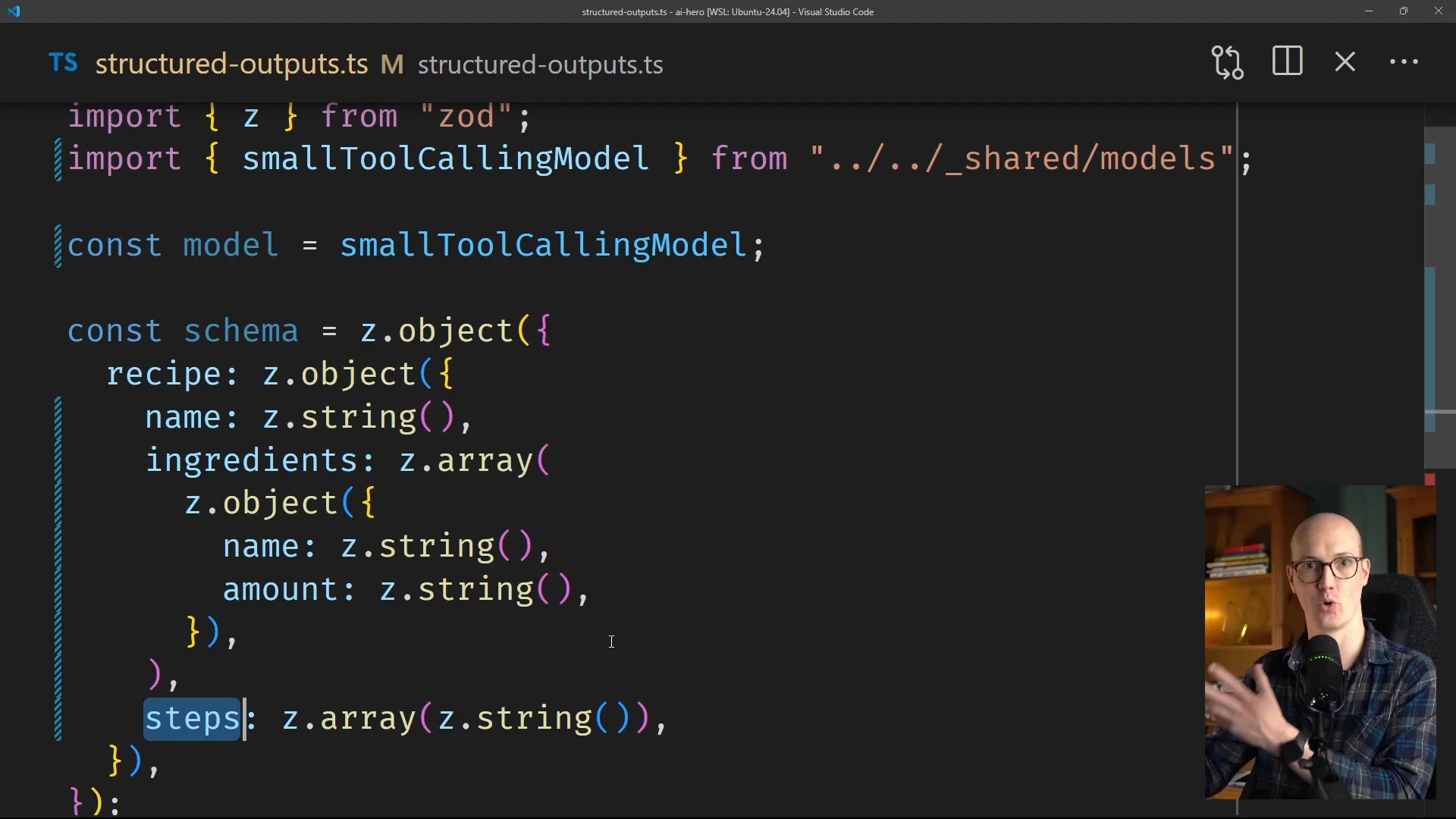
This ability to define complex, typed structures is what makes Zod so powerful for ensuring reliable tool calls.
3. Completing the Contract: The outputSchema
While inputSchema validates what goes into a tool, best practice dictates we should also validate what comes out. The Vercel AI SDK v5 introduced the outputSchema property for this purpose. It allows you to define a Zod schema for the return value of your execute function.
This enforces end-to-end type safety, guaranteeing that a tool's output conforms to an expected shape before it's passed back to the model or used elsewhere in your application.
The official Vercel blog post on AI SDK 5 explains this change clearly.
This blog post highlights the key improvements to tool definitions in AI SDK 5.
Please read the section on renaming and new schemas. Pay special attention to the code comparison showing a tool definition "Before (v4)" and "After (v5)". This clearly illustrates the introduction of outputSchema.
Here is our weatherTool example, updated to include an outputSchema:
import { z } from 'zod';
import { tool } from 'ai';

export const weatherTool = tool({
  description: 'Get the weather in a location',
  inputSchema: z.object({
    location: z.string().describe('The location to get the weather for'),
  }),
  outputSchema: z.object({
    location: z.string(),
    temperature: z.number(),
  }),
  execute: async ({ location }) => {
    // In a real implementation, you would call a weather API.
    // This is just a mock for demonstration.
    const temperature = 72 + Math.floor(Math.random() * 21) - 10;
    return { location, temperature };
  },
});
By adding outputSchema, we guarantee that any successful execution of this tool will return an object containing a string location and a number temperature. This prevents bugs from propagating through the system if, for example, an external API changes its response format unexpectedly.
4. Creating a Standardized, Reusable Tool Module
Now, let's connect this back to our goal of creating a tool store. The most effective way to prepare for that is to define each tool in its own self-contained, exportable module. This makes our tools reusable, testable, and, importantly, discoverable.
The code example from the AI SDK documentation demonstrates this best practice perfectly.
This section of the documentation shows the recommended pattern for modularizing tools.
Please read the section on extracting tools. The example shows the weatherTool being defined and exported from its own file.
This pattern of export const myTool = tool({...}); is precisely the standard we will adopt. Each tool becomes a well-defined, typed, and documented module. Later, when we build our tool store, we can create a system that dynamically loads these modules, reads their descriptions, and makes them available to the appropriate agents.
Conclusion
In this lesson, you have learned the fundamental pattern for creating robust, type-safe tools for an agentic system using the Vercel AI SDK. This is the first practical step in moving from high-level architecture to a functional implementation.
Key Takeaways:
- A tool in the AI SDK is an object with a
description, aninputSchema, an optionaloutputSchema, and anexecutefunction. - The
descriptionand the.describe()calls within your Zod schema are crucial parts of the prompt that guide the LLM. Clear descriptions lead to more reliable tool usage. - Zod provides a powerful way to define typed
inputSchemaandoutputSchema, ensuring end-to-end type safety from the LLM's call to your function's return value. - Defining each tool in a separate, exportable module creates a standardized, reusable component, which is the foundational step for building our future tool store.
Now that we have the blueprint for defining a tool, our next lesson will focus on the implementation details. We will build a complete custom tool, including robust input validation, proper error handling, and formatting the structured result.