Recommended resources
The freely available resources this lesson will direct you to.
- The Complete Guide To Master Serum|#4 LFOwww.youtube.com
- How to Create Sequences and Arps in Xfer Serum - ADSR Soundswww.adsrsounds.com
- 7 Serum LFO Tricks That Will Change Your Liferocketpoweredsound.com
- Complete Guide To Master Serum 2 – EP6: LFO Movement Tricks For Better Sound Designwww.youtube.com
- NEED to know Serum tip 🟢 LFO Point Modulation Tutorialwww.youtube.com
- Using Wavetables as LFO Curves in Serum 2: Modulation from Soundwww.mind-flux.com
In our last lesson, we established the fundamental difference between envelopes and LFOs—envelopes for defining a sound's one-shot character and LFOs for creating a cyclic, rhythmic groove. We concluded by noting that you can use an LFO in ENV mode to combine the one-shot behavior of an envelope with the shape-design power of Serum's LFO editor.
Today, we dive deep into that editor. The goal of this lesson is to move beyond standard sine, saw, and square waves and learn to design custom LFO shapes in Serum's editor to create non-standard, complex modulation patterns. Mastering this is a gateway to crafting the signature rhythmic and timbral movements that define modern DnB leads, from the intricate growls of Neurofunk to the syncopated stabs of Dancefloor DnB.
The LFO Editor: Your Canvas for Movement
At first glance, the LFO editor is a simple grid. In reality, it's a powerful vector editor that allows you to design modulation with surgical precision. The key to unlocking its potential lies in understanding a few core mechanics and workflow shortcuts.
First, let's get a comprehensive overview of the LFO editor's capabilities.
Complete Guide To Master Serum 2 – EP6: LFO Movement Tricks For Better Sound Design
The video "Complete Guide To Master Serum 2 – EP6" by Zen World offers an excellent, fast-paced tour of the LFO editor's functions. We'll focus on the drawing mechanics and refinement tools.
Start with the section on drawing custom shapes. Pay close attention to how the grid size is controlled and how holding the Option/Alt key while clicking forces the points to snap to the grid. This is the fundamental technique for creating precise, rhythmic patterns. Next, watch the segment explaining the Smooth knob. Notice how it can transform a jagged, stepped shape into a fluid, flowing curve. This is invaluable for turning a rough idea into a polished, organic modulation. He also demonstrates how to use the "Random Flat" preset as a starting point, which is a great creative technique.
To reinforce these essential workflow shortcuts, which you'll use constantly, here are two specific tricks from the "7 Serum LFO Tricks" article.
7 Serum LFO Tricks That Will Change Your Life
This article from Rocket Powered Sound isolates two critical workflow hacks for using the Alt key.
Read Trick #5: "The Accuracy Hack #2: Making Consistent Grid Snaps" and Trick #7: "Another 'Alt' Hack: Bulk Edit LFO Shape Curves". Mastering these two uses of the Alt key—snapping points to the grid and adjusting all slope curves simultaneously—is non-negotiable for efficient and intentional LFO design.
Technique 1: Complex Rhythmic Patterns
With the drawing tools mastered, you can now create your own rhythmic signatures. Instead of using a standard saw wave for a simple gate or sidechain effect, you can draw highly specific, syncopated patterns. This is perfect for making a lead "talk" to the drum groove in a unique way.
For example, you could create a 1-bar LFO pattern that modulates a filter cutoff with a dotted 1/8th -> 1/16th -> 1/8th rhythm. This creates a level of rhythmic detail that instantly makes a simple sustained note more interesting and dynamic.
Here is a practical demonstration of a custom LFO shape being used to create a rhythmic bass sound. The principle is identical for a lead.
The Complete Guide To Master Serum|#4 LFO
In this older but still relevant guide, Zen World applies a custom LFO shape to modulate both wavetable position and filter cutoff.
Watch the segment from 10:17 to 11:47. Notice how the hand-drawn, rounded LFO shape creates a rhythmic pulse that is more nuanced than a simple square or saw wave would be. This is the core of custom rhythmic modulation.
Technique 2: Advanced LFO Control with Loopbacks
One of the most powerful—and underutilized—features of the LFO editor is the ability to set custom loopback points. This lets you design a shape that has two distinct parts: an "attack" phase that plays once, followed by a "sustain" phase that loops.
This is extremely useful for DnB leads. Imagine a lead that starts with a sharp, fast filter pluck and then settles into a sustained, vibrating tone.
- Part 1 (Attack): A steep, fast ramp-down shape.
- Part 2 (Sustain): A small, repeating triangle or sine shape for the vibrato.
You would draw this entire shape, then set the loopback point to the beginning of the vibrato section.
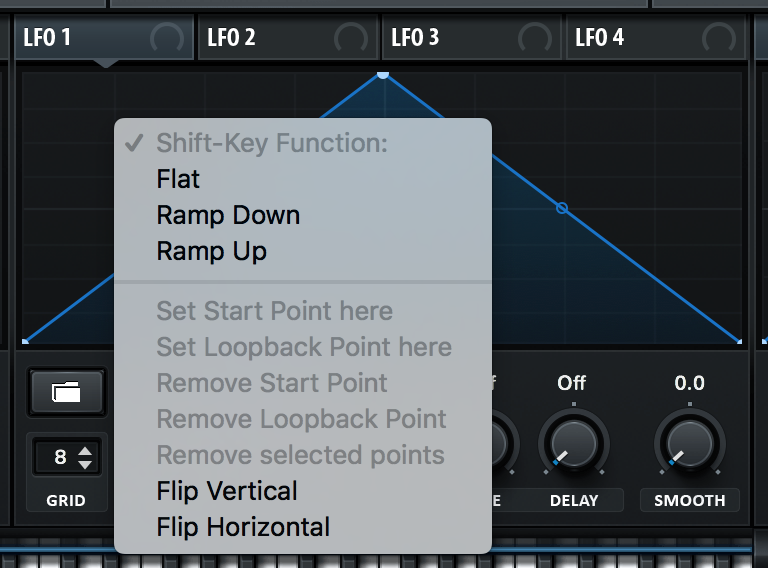
The following video demonstrates exactly how to set this up.
Complete Guide To Master Serum 2 – EP6: LFO Movement Tricks For Better Sound Design
Let's return to the "LFO Movement Tricks" video to see this technique in action.
Watch the section from 06:51 to 07:24. The presenter explains how to set a loopback point, creating a pattern that does one thing on the first pass and then loops a smaller section. He notes its utility for sounds that need a specific initial hit on "the one" before falling into a repeating pattern.
Application Showcase: Custom Arpeggios & Sequences
Perhaps the most powerful application of the LFO editor is to create custom arpeggiators and melodic sequences directly within Serum. This goes far beyond simple timbral modulation and turns the LFO into a compositional tool. The process involves using a stepped LFO shape to precisely control the oscillator's pitch.
The key is setting the LFO grid correctly and assigning it to the right destination.
How to Create Sequences and Arps in Xfer Serum
This tutorial from ADSR Sounds provides a step-by-step guide to building a sequencer using two LFOs. We'll focus on the first LFO, which defines the melody.
Read the sections "Step 1 – Understanding the Two-LFO System", "Step 2 – Building the Step Sequence", and "Step 3 – Fine-Tuning Pitch and Grid Values". The crucial insights are: Set the Grid: Double-click the grid value box and enter 8,12 (or 16,12, etc.). This gives you 8 horizontal steps and 12 vertical steps—one for each semitone in an octave. Assign the LFO: Drag LFO 1 to the SEMI value of your oscillator's pitch. Set Modulation Depth: In the Matrix, set the LFO 1 -> Master Tune amount to 12 st. This ensures each vertical grid line corresponds exactly to one semitone. Draw Your Melody: Now you can "paint" a melodic sequence by drawing a stepped pattern in the LFO editor.
This technique is a perfect example of designing a "non-standard, complex modulation pattern" and is fundamental to creating the intricate riffs and lead lines found in many styles of electronic music.
Bonus Technique: Wavetables as LFO Shapes
For ultimate complexity, you can even import wavetables directly into the LFO editor. This allows you to use the intricate single-cycle shapes from your wavetable library as modulation sources.

This is an advanced trick for generating highly complex and often unpredictable modulation shapes, perfect for the experimental textures of Neurofunk.
Conclusion
You are now equipped with the tools and techniques to design modulation that is truly your own. By moving beyond the preset shapes, you can create the unique rhythmic and melodic signatures that elevate a good sound to a great one.
Key Takeaways:
- Precision is Key: Use the grid and the
Alt/Optionkey to create precise, intentional rhythmic or melodic patterns. - Refine Your Shapes: Use the
Smoothknob to transform jagged, hand-drawn shapes into fluid, organic curves. - Design Dynamic Modulations: Use custom loopback points to create two-part modulations with a distinct attack and a looping sustain phase.
- LFOs as Compositional Tools: By quantizing the LFO grid and targeting pitch, you can design intricate arpeggios and sequences directly within your patch.
In our next lesson, we will build upon this foundation. Now that you can design one complex LFO shape, we will explore how to coordinate multiple modulation sources on a single parameter to create even deeper, more evolving textures.