Hello! Welcome to our new module, Binary Trees and Traversals.
In the previous module, we mastered heaps and priority queues, which are powerful tools for problems involving ordering and selection. Heaps are actually a specialized type of binary tree, where nodes are arranged to always keep the minimum (or maximum) element at the top. Now, we will take a step back to study binary trees in their more general form. Trees are one of the most fundamental non-linear data structures in computer science, used in everything from file systems to databases and AI.
This lesson is our starting point. The goal is to learn how to represent binary trees using node classes in Python. By the end of this session, you'll understand the structure of a binary tree and be able to construct one in code.
1. What is a Binary Tree?
Unlike linear data structures like arrays or linked lists which have a clear start and end, trees are hierarchical. Think of a family tree or an organizational chart.
A tree is a collection of entities called nodes, linked together by edges.
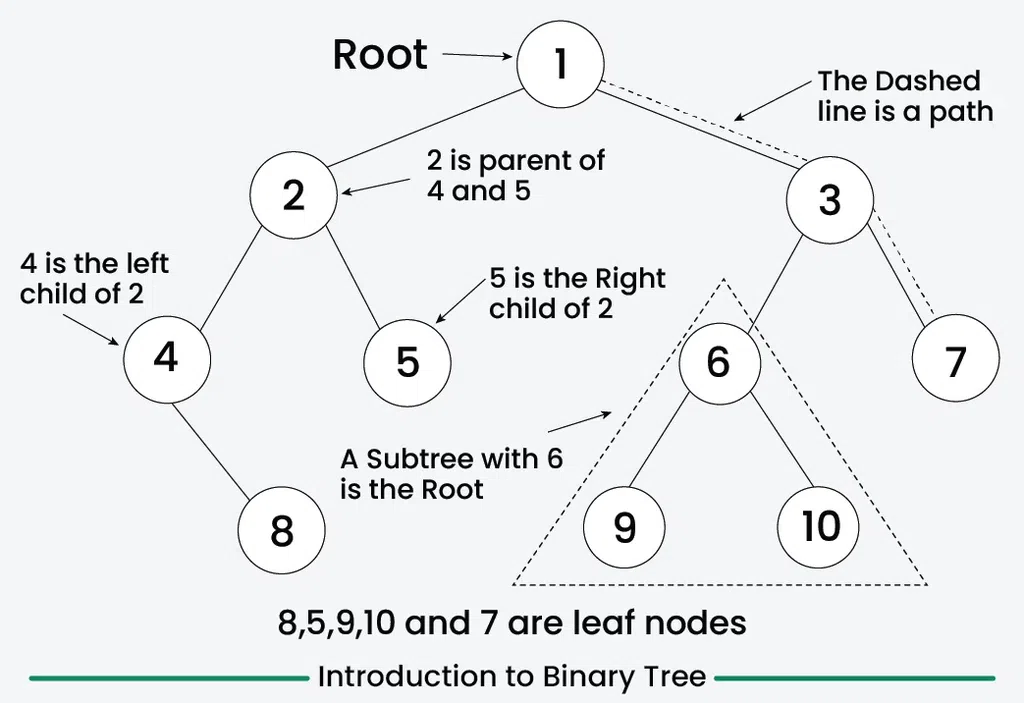
In this course, we will focus on a very common type of tree: the Binary Tree. The defining rule of a binary tree is simple: each node can have at most two children. These are referred to as the left child and the right child.
2. The Structure of a Node
To build a tree, we first need to define its fundamental building block: a single node. A node in a binary tree must hold three pieces of information:
- The data it stores (e.g., a number, a string).
- A reference (or "pointer") to its left child.
- A reference (or "pointer") to its right child.
If a node does not have a left or right child, its corresponding reference will point to None.
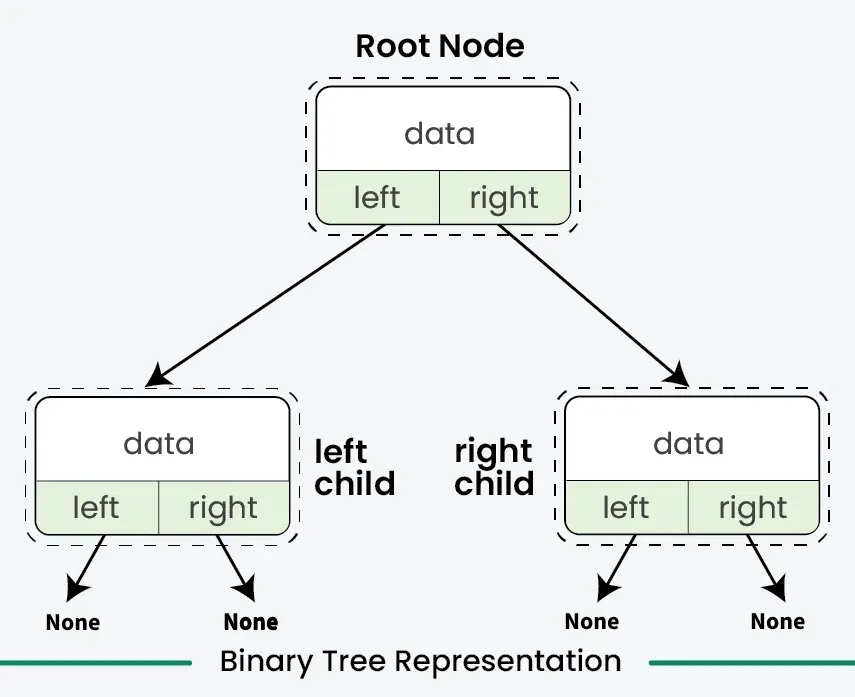
This recursive definition—where a tree is made of nodes, and each node's pointers can point to other nodes that are themselves roots of smaller subtrees—is a core concept.
3. Creating a Node Class in Python
In Python, the most natural way to represent a custom object like a node is by using a class. We can create a Node class that encapsulates the three properties we just discussed.
The following video provides a concise explanation of what a binary tree is and how to define the Node class that forms its foundation.
Part 1 - Defining a Binary Tree Class in Python
Watch this video from Kindson The Genius to see how the conceptual idea of a binary tree node is translated into a Python class.
Please watch from 01:13 to 05:29. The first part (until 02:47) explains the binary tree concept. The second part (from 02:47 onwards) demonstrates how to define the Node class in Python. Focus on the structure of the __init__ method.
As the video demonstrates, the implementation is straightforward. We define a class, often named Node or TreeNode, with a constructor (__init__) that sets up its attributes.
Here is the code for a basic Node class:
class Node:
    """
    A class to represent a single node in a binary tree.
    """
    def __init__(self, data):
        self.data = data   # The value stored in the node
        self.left = None   # A reference to the left child node
        self.right = None  # A reference to the right child node
When we create a new Node object, we must provide its data. The left and right children are initialized to None by default, signifying that the new node is initially a leaf node.
4. Building a Tree from Nodes
Now that we have our Node blueprint, we can create instances of it and link them together to form a tree. The entire tree structure can be accessed through a single variable that holds a reference to the root node.
Let's see how this is done in practice. The following resource provides a simple, concrete example.
This article from GeeksForGeeks demonstrates how to instantiate Node objects and connect them to form a simple binary tree.
Please read the section titled 'Example for Creating a Binary Tree in Python'. Observe how four separate Node objects are created and then linked together by assigning them to the left and right attributes of their respective parent nodes.
Let's walk through building a simple tree ourselves. Suppose we want to create this tree:
    1
   / \
  2   3
Here's the Python code to do it:
# First, create the individual nodes
root = Node(1)
node2 = Node(2)
node3 = Node(3)

# Now, link them together
root.left = node2
root.right = node3
That's it! The variable root now holds a reference to the Node object with data 1. Through this root object, we can access the entire tree:
root.datais1.root.leftpoints to theNodeobject with data2.root.rightpoints to theNodeobject with data3.root.left.datais2.root.left.leftisNone.
Test your understanding!
Using the Node class we defined, write the Python code to create the following binary tree and store its root in a variable named my_tree_root.
      50
     /  \
    25   75
   /
  10
Show answer
# Define the Node class first
class Node:
    def __init__(self, data):
        self.data = data
        self.left = None
        self.right = None

# Create the individual nodes
my_tree_root = Node(50)
node25 = Node(25)
node75 = Node(75)
node10 = Node(10)

# Link the nodes to form the tree
my_tree_root.left = node25
my_tree_root.right = node75
node25.left = node10
Conclusion
In this lesson, you've taken the first and most crucial step in working with trees: understanding how to represent them in code. This is the foundation upon which all other tree algorithms are built.
Key Takeaways:
- A binary tree is a hierarchical data structure where each node has at most two children (
leftandright). - The fundamental unit of a tree is the node. We represent it in Python using a
class. - A
Nodeclass typically contains three attributes:data,left(a reference to the left child), andright(a reference to the right child).leftandrightareNoneif a child does not exist. - We build a tree by creating instances of the
Nodeclass and linking them via theirleftandrightattributes. The entire tree is accessed through a reference to the root node.
Up Next:
Now that we know how to build a tree, how do we visit every node within it? This process is known as tree traversal. In our next lesson, we will implement the three fundamental recursive traversal algorithms: preorder, inorder, and postorder. These are essential for solving a vast range of tree-based problems.