Hello! Welcome to the first lesson of our new module on Graph Traversal Algorithms.
In the previous module, we concluded our study of Binary Search Trees with in-order traversal. Trees are a fundamental data structure, but they are actually a special, simplified type of a more general structure: a graph. You can think of a tree as a graph with no cycles and a specific hierarchical structure.
Today, we take a major step forward by learning how to represent any kind of graph in code. This is the absolute foundation for all the powerful graph algorithms you'll be learning for competitive programming, like finding the shortest path or detecting cycles. Our goal is to master the two most common methods: the adjacency matrix and the adjacency list.
What is a Graph?
Before we can represent a graph, let's establish some common language. A graph consists of a set of vertices (or nodes) and a set of edges that connect pairs of vertices.
To get a quick and clear introduction to the essential terminology, please watch the beginning of the following video.
Graphs: Edge List, Adjacency Matrix, Adjacency List, DFS, BFS - DSA Course in Python Lecture 11
This video from Greg Hogg's DSA course provides an excellent, concise introduction to graph terminology.
Watch from the beginning until 03:58. Pay close attention to the definitions of vertices, edges, directed vs. undirected graphs, and cycles.
To summarize the key terms you'll encounter constantly:
- Vertex (or Node): An entity in a graph. In competitive programming problems, these are often represented by integers (from 0 to N-1) or sometimes strings.
- Edge: A connection between two vertices.
- Undirected Graph: Edges are two-way. If you can go from A to B, you can also go from B to A.
- Directed Graph (Digraph): Edges are one-way, represented with arrows. Going from A to B does not imply you can go from B to A.
- Neighbors: Two vertices are neighbors if they are connected by an edge.
How to Store a Graph in Code?
In competitive programming, you're usually given the graph structure as an edge list—a simple list of pairs representing the connections. For example: edges = [[0, 1], [1, 2], [2, 0]].
While this format is easy to read, it's not efficient for algorithms. To find all neighbors of node 1, you'd have to scan the entire list. Therefore, our first step is always to convert this edge list into a more useful structure. The two primary choices are the adjacency matrix and the adjacency list.
1. Adjacency Matrix
An adjacency matrix is a 2D array, typically of size where is the number of vertices. We represent an edge between vertex i and vertex j by setting the value at matrix[i][j] to 1 (or the edge weight in a weighted graph). If there is no edge, the value is 0.
- For an undirected graph, the matrix is symmetric across its diagonal (i.e.,
matrix[i][j] == matrix[j][i]). - For a directed graph,
matrix[i][j] = 1represents an edge fromitoj, but this does not imply thatmatrix[j][i]is also 1.

Implementation
Let's see how to build an adjacency matrix from an edge list.
This GeeksForGeeks article provides a clear textual explanation and Python code for creating an adjacency matrix.
Read the section 'Adjacency Matrix Representation' and review the Python code examples for both undirected and directed graphs. Notice how for an undirected graph, two matrix cells are updated for each edge.
Here is a Python function that demonstrates the process for a directed graph:
def build_adj_matrix(n, edges):
    """
    Builds an adjacency matrix for a graph.

    Args:
        n (int): The number of vertices (labeled 0 to n-1).
        edges (list of lists): The edge list, e.g., [[u1, v1], [u2, v2]].

    Returns:
        list of lists: A n x n adjacency matrix.
    """
    # Initialize an n x n matrix with zeros
    matrix = [[0 for _ in range(n)] for _ in range(n)]

    for u, v in edges:
        # For a directed edge from u to v
        matrix[u][v] = 1

        # For an undirected graph, you would also add the reverse edge:
        # matrix[v][u] = 1

    return matrix

# Example: 4 vertices, directed edges
num_vertices = 4
edge_list = [[0, 1], [0, 2], [1, 2], [2, 3]]
adj_matrix = build_adj_matrix(num_vertices, edge_list)

# Print the matrix
for row in adj_matrix:
    print(row)

# Expected Output:
# [0, 1, 1, 0]
# [0, 0, 1, 0]
# [0, 0, 0, 1]
# [0, 0, 0, 0]
Pros and Cons
- Pro: Checking for an edge between two vertices
uandvis extremely fast: it's anO(1)lookup (matrix[u][v]). - Con: It requires space, which is very inefficient for sparse graphs (graphs with many fewer edges than the maximum possible). Most graphs in competitive programming are sparse.
- Con: Finding all neighbors of a vertex requires iterating through an entire row, which takes
O(V)time.
2. Adjacency List
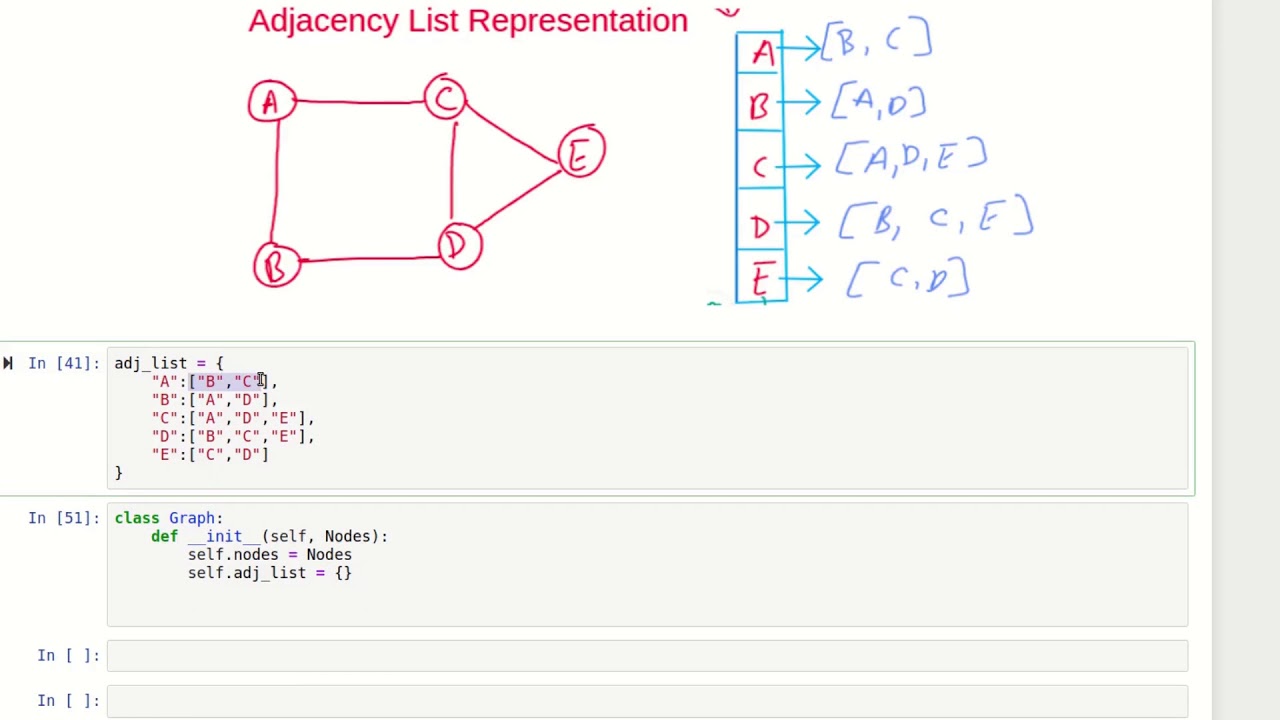
The adjacency list is the most common representation in competitive programming. It consists of an array or dictionary where the entry for each vertex u contains a list of its neighbors.
Implementation
In Python, this is most efficiently implemented using a dictionary or a list of lists. For competitive programming, collections.defaultdict(list) is particularly powerful, as it simplifies the code for adding edges. You may recall defaultdict from our first module on Python tools.
Watch the following clip to see a practical demonstration of building an adjacency list from an edge list using defaultdict.
Graphs: Edge List, Adjacency Matrix, Adjacency List, DFS, BFS - DSA Course in Python Lecture 11
This part of Greg Hogg's video shows the most common and efficient way to build an adjacency list in Python for competitive programming.
Watch from 24:48 to 26:38. Focus on how defaultdict from the collections module makes it easy to append neighbors to a list without checking if the key already exists.
Here’s a summary of the implementation for a directed graph:
from collections import defaultdict

def build_adj_list(n, edges):
    """
    Builds an adjacency list for a graph using a defaultdict.

    Args:
        n (int): The number of vertices (labeled 0 to n-1).
        edges (list of lists): The edge list.

    Returns:
        defaultdict: A dictionary where keys are vertices and values are lists of neighbors.
    """
    adj_list = defaultdict(list)

    for u, v in edges:
        # For a directed edge from u to v
        adj_list[u].append(v)

        # For an undirected graph, you would also add the reverse edge:
        # adj_list[v].append(u)

    return adj_list

# Example: 4 vertices, directed edges
num_vertices = 4
edge_list = [[0, 1], [0, 2], [1, 2], [2, 3]]
adj_list = build_adj_list(num_vertices, edge_list)

# Print the adjacency list
for i in range(num_vertices):
    print(f"{i}: {adj_list[i]}")

# Expected Output:
# 0: [1, 2]
# 1: [2]
# 2: [3]
# 3: []
Pros and Cons
- Pro: It is space-efficient for sparse graphs. The space complexity is , where
Eis the number of edges. - Pro: Iterating through all neighbors of a vertex is very efficient; it's proportional to the number of neighbors (the degree of the vertex).
- Con: Checking for a specific edge between
uandvis slower than with a matrix. It takesO(degree(u))time, as you have to scan the list ofu's neighbors.
Test your understanding!
Consider a simple undirected graph with 3 vertices (0, 1, 2) and edges connecting (0, 1) and (1, 2).
- What would its adjacency matrix look like?
- What would its adjacency list look like (using a dictionary or list of lists)?
Show answer
-
Adjacency Matrix:
[[0, 1, 0],
 [1, 0, 1],
 [0, 1, 0]]
Notice it is symmetric because the graph is undirected.
matrix[0][1] = 1andmatrix[1][0] = 1. -
Adjacency List:
{
  0: [1],
  1: [0, 2],
  2: [1]
}
Or as a list of lists:
[[1], [0, 2], [1]]
Which Representation to Choose?
| Feature | Adjacency Matrix | Adjacency List |
|---|---|---|
| Space Complexity | ||
| Check for Edge (u,v) | ||
| List All Neighbors of u | ||
| Best For... | Dense graphs (where is close to ) | Sparse graphs (most common case) |
For competitive programming, time and memory limits are strict. Since most problems feature sparse graphs, the adjacency list is the standard, default choice. Its efficiency in storing data and iterating through neighbors is crucial for the performance of algorithms like BFS and DFS, which we will cover next.
Conclusion
Congratulations on completing your first lesson on graphs! You've learned the fundamental prerequisite for almost every graph problem you'll encounter.
Key Takeaways:
- Graphs are represented by vertices and edges, and can be directed or undirected.
- The Adjacency Matrix uses a grid. It's fast for checking edges but uses a lot of memory (), making it suitable only for dense graphs.
- The Adjacency List uses a list or dictionary to map each vertex to its neighbors. It's memory-efficient for sparse graphs () and is the standard representation for competitive programming.
- In Python,
collections.defaultdict(list)is an excellent tool for building an adjacency list from an edge list.
Up Next:
Now that we know how to store a graph, we can start exploring it. In our next lesson, we will implement our first major graph traversal algorithm: Depth-First Search (DFS). You will see how the adjacency list representation makes implementing DFS both elegant and efficient.