Hello! Welcome back to your course on Python for Competitive Programming.
In our last two lessons, we got our hands dirty implementing classic sorting algorithms like Merge Sort and Quicksort. Understanding how they work from the ground up is a crucial skill. However, in the time-pressured environment of a coding competition, implementing these algorithms from scratch is often too slow and prone to bugs.
This is where Python's built-in sorting capabilities shine. They are highly optimized, reliable, and incredibly flexible. Today's lesson focuses on harnessing that power. Our goal is to use Python's built-in sorting with custom comparators via lambda functions. You'll learn how to sort almost any data structure based on any criteria you can imagine, a skill that is absolutely essential for competitive programming.
sorted() vs. .sort(): Two Tools for the Same Job
Python provides two ways to sort data: the sorted() built-in function and the list.sort() method. While they achieve the same result, they have one fundamental difference that's crucial to understand.
sorted(iterable): This function takes any iterable (like a list, tuple, or string) and returns a new, sorted list, leaving the original iterable unchanged.list.sort(): This is a method that can only be called on a list. It sorts the list in-place, modifying the original list and returningNone.
In competitive programming, you often need to preserve the original order of data for other purposes. Using sorted() is safer in those cases. However, if memory is tight and you don't need the original list, .sort() can be slightly more efficient as it avoids creating a new copy.
To see a detailed comparison with examples, let's turn to a helpful article.
How to Use sorted() and .sort() in Python
This article from Real Python clearly explains the difference between sorted() and .sort() and also introduces the optional key and reverse arguments, which we'll explore next.
Please read the sections 'Customizing sorted() With Keyword Arguments', 'Ordering Values With .sort()', and 'Deciding When to Use sorted() vs .sort()'. Pay close attention to the examples that show how .sort() modifies a list in-place and returns None, while sorted() creates a new list. The race-day scenario in the last section is a perfect illustration of why this distinction matters.
Customizing Sort Order with the key Argument
The real power of Python's sorting comes from the key argument. This parameter accepts a function that will be called on every element of the list before making comparisons. The return value of this function (the "key") is what's used to sort the elements.
For example, to sort a list of strings by their length instead of alphabetically, you can use Python's built-in len function as the key:
words = ["banana", "pie", "Washington", "book"]
sorted_by_length = sorted(words, key=len)
print(sorted_by_length)
# Output: ['pie', 'book', 'banana', 'Washington']
Another common use is for case-insensitive sorting of strings, using str.lower as the key:
names = ["Alice", "bob", "Zeke", "carol"]
sorted_case_insensitive = sorted(names, key=str.lower)
print(sorted_case_insensitive)
# Output: ['Alice', 'bob', 'carol', 'Zeke']
Notice that the original values from the list are returned, not the keys themselves.
Using lambda for Ultimate Flexibility
What if your sorting logic is simple and unique to this one situation? Defining a whole new function with def for a one-off sorting key can feel clunky. This is the perfect use case for lambda functions.
A lambda function is a small, anonymous function defined without a name. The syntax is lambda arguments: expression. It's ideal for the key argument because it allows you to define your custom logic right where you need it.
For example, if you have a list of tuples (name, score) and want to sort by score, you don't need to define a separate function.

To see this in action, let's watch a short video that demonstrates using a lambda to sort a list of tuples by the second element.
Python tutorials: Sorting (reverse, key, multiple attributes / value)
This video from PyMoondra provides a clear, concise demonstration of using a lambda function with the key argument to sort a list of tuples based on a specific index.
Watch from 00:51 to 02:02. The video shows how the lambda function lambda x: x[1] is used to extract the second element of each tuple, which then becomes the basis for the sort.
This technique is incredibly common. For instance, to sort a list of astronaut names by their last name:
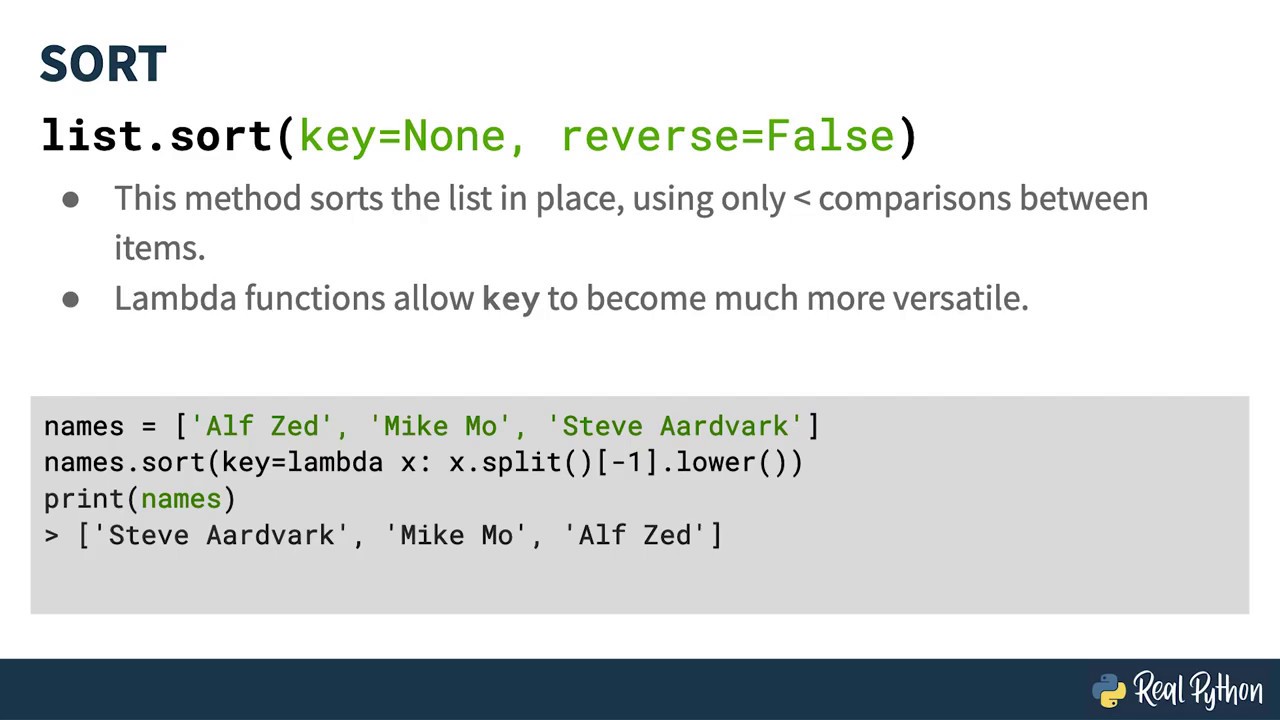
Test your understanding!
You are given a list of lists, where each inner list represents [student_id, score, age].
students = [[10, 88, 19], [12, 95, 20], [11, 95, 18]]
How would you sort this list in ascending order based on the score?
Show answer
You would use a lambda function to access the second element (index 1) of each inner list.
sorted_students = sorted(students, key=lambda s: s[1])
# sorted_students will be: [[10, 88, 19], [12, 95, 20], [11, 95, 18]]
# Note: The order of students with score 95 is not guaranteed. We'll fix this next!
Advanced Sorting: Tie-Breaking with Multiple Keys
In the exercise above, two students had the same score of 95. What if you wanted to break ties by sorting the students with the same score by their age in ascending order?
You can achieve this by having your lambda function return a tuple. Python automatically sorts by the first element of the tuple, and if they are equal, it uses the second element as a tie-breaker, and so on.
To sort by score (primary) and then age (secondary), the key would be lambda s: (s[1], s[2]).
Let's see a demonstration of this powerful technique.
Python tutorials: Sorting (reverse, key, multiple attributes / value)
This clip from the same PyMoondra video explains how to sort by multiple attributes. This is a must-know technique for competitive programming.
Watch from 03:31 to 05:22. Pay close attention to how returning a tuple (x[0], x[1]) from the lambda function allows for a secondary sort when the primary keys are the same.
Pro-Tip: Mixed Ascending and Descending Order
What if the problem requires you to sort by score in descending order, but break ties by age in ascending order?
The reverse=True argument applies to the entire sort, which isn't what we want. The trick is to negate the numerical value you want to sort in descending order within your key tuple.
For example, to sort by score (descending) and then age (ascending):
students = [[10, 88, 19], [12, 95, 20], [11, 95, 18]]

# Sort by score descending (-s[1]), then age ascending (s[2])
sorted_students = sorted(students, key=lambda s: (-s[1], s[2]))

print(sorted_students)
# Output: [[11, 95, 18], [12, 95, 20], [10, 88, 19]]
Notice how [11, 95, 18] now comes before [12, 95, 20] because 18 is less than 20. This works because sorting -95 and -88 in ascending order is equivalent to sorting 95 and 88 in descending order.
This technique is explained very well in the following article, which is written with competitive programming in mind.
Sorting in Python 3 for Competitive Programming
This article from dev.to provides several examples relevant to competitive programming, including how to handle secondary sorting and mixed-order sorting.
Please read the sections 'Secondary Sorting' and 'More Complex Examples'. The second section demonstrates the exact trick of negating a value in the key to reverse its sort order.
Note: This negation trick only works for numeric types. You cannot put a - in front of a string.
Test your understanding!
Using the same students list:students = [[10, 88, 19], [12, 95, 20], [11, 95, 18]]
Write a single line of code to sort the list first by score in descending order, and then for students with the same score, by student ID in ascending order.
Show answer
You need to return a tuple from the lambda function. The first element is the negated score, and the second is the student ID.
sorted_students = sorted(students, key=lambda s: (-s[1], s[0]))
# sorted_students will be: [[11, 95, 18], [12, 95, 20], [10, 88, 19]]
# Here, the student with ID 11 comes before the student with ID 12 because they have the same score, and we sort by ID ascending as the tie-breaker.
Conclusion
You've done an excellent job today! Mastering Python's built-in sorting is a massive leap forward. It's a tool you will use in countless problems, and knowing how to tailor it to your exact needs will save you immense time and effort.
Key Takeaways:
sorted()returns a new sorted list, whilelist.sort()modifies a list in-place.- The
keyargument accepts a function to specify custom sorting logic. lambdafunctions are perfect for creating concise, one-off key functions.- You can achieve multi-level sorting (tie-breaking) by returning a tuple from your
lambdafunction. - For mixed-order sorting, you can negate numerical values within the key tuple to sort them in descending order.
Up Next:
We've covered general-purpose comparison sorts (Merge Sort, Quicksort, and Python's built-in Timsort). However, some problems involve data with special properties that allow for even faster sorting. In the next lesson, we will explore Counting Sort, a non-comparison-based algorithm that is extremely efficient for sorting integers within a limited range.