Hello! Welcome to the first lesson of our module on Sorting and Searching Algorithms.
In the previous module, we built a strong foundation by exploring Python's core data structures like lists, tuples, sets, and dictionaries. You learned how to use them effectively and, crucially, you learned about their performance characteristics, like the O(1) speed of dictionary lookups. Now, we'll start using these tools to build and analyze fundamental algorithms, which is the heart of competitive programming.
This lesson will teach you how to implement and apply binary search on sorted arrays. Binary search is one of the most important and frequently used algorithms you will encounter. Its incredible efficiency makes it a go-to solution for a wide range of problems that involve searching.
The Problem with Linear Search
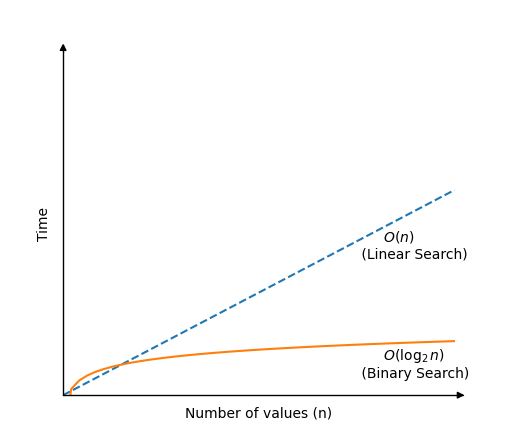
Imagine you're looking for a specific number in a large, unsorted list. The only way to guarantee you find it is to check every single element, one by one, from the beginning to the end. This is called a linear search. For a list with n elements, this could take up to n comparisons in the worst case. If your list has a billion items, that's a billion checks!
Binary Search: A "Divide and Conquer" Strategy
Now, what if the list was sorted? Think about looking up a word in a physical dictionary. You don't start from the first page. You open it somewhere in the middle. If the word you see comes after your target word, you know your word must be in the first half. If it comes before, you know your word is in the second half. You've just eliminated half the dictionary in a single step.
This is the core idea of binary search. It's a "divide and conquer" algorithm that works on sorted data. By repeatedly dividing the search space in half, it can find a target element with remarkable speed.
Let's watch a video that visualizes this process.
Binary Search - Leetcode 704 - Python
This video from NeetCode provides an excellent visual walkthrough of how binary search works. It introduces the key concept of using two pointers to manage the search space.
Watch from 01:00 to 03:38. Focus on how the left and right pointers define the current search space, and how checking the mid element allows us to discard one half of that space.
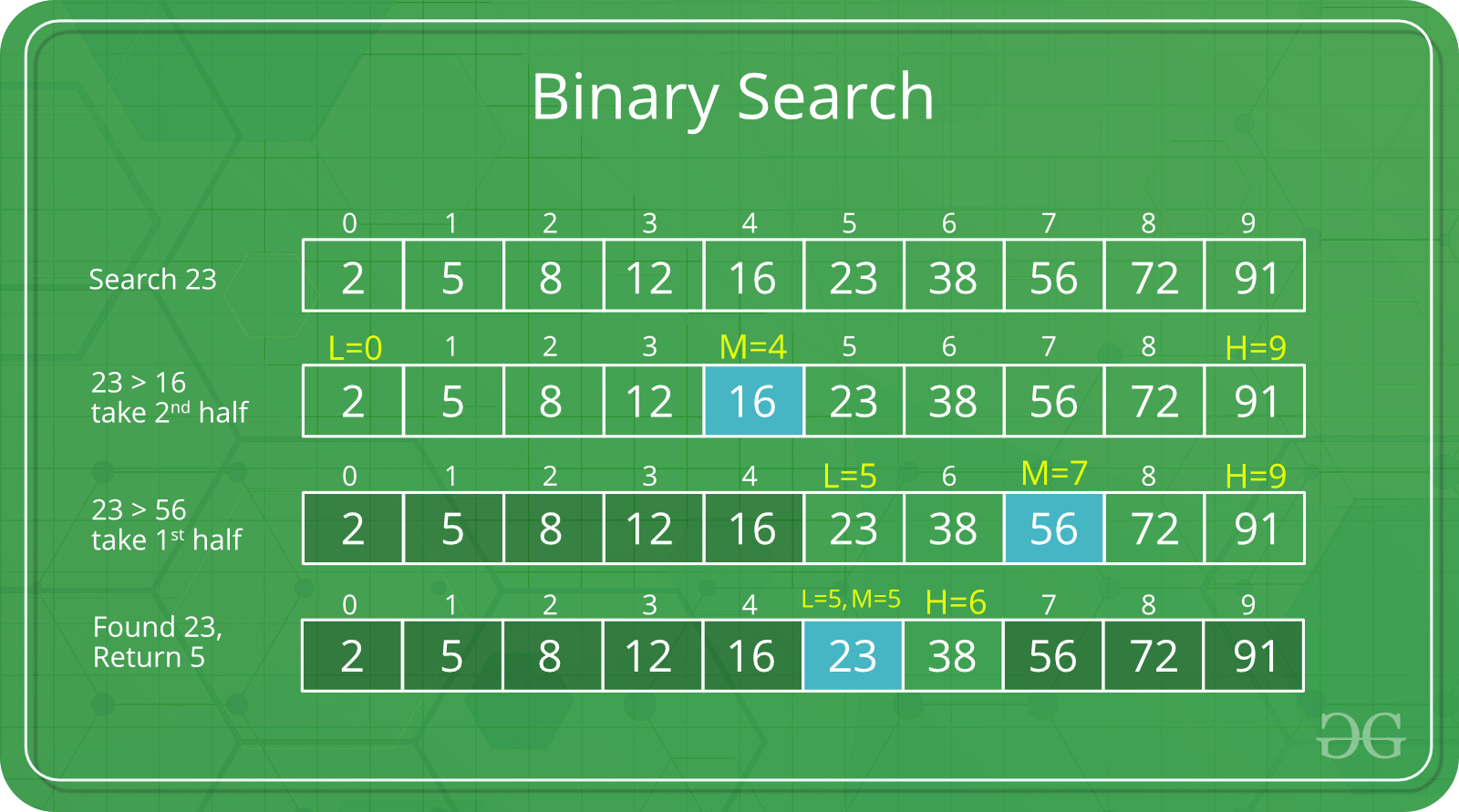
As you saw, the algorithm maintains a search space using two pointers, typically called left and right.
- Calculate the middle index,
mid. - Compare the element at
midwith your target. - If it's a match, you're done!
- If the middle element is less than the target, you know the target must be in the right half, so you move your
leftpointer tomid + 1. - If the middle element is greater than the target, the target must be in the left half, so you move your
rightpointer tomid - 1. - You repeat this until you find the element or the search space becomes empty (
leftcrossesright).
Here's a static image that breaks down the process step-by-step.
Implementing Binary Search in Python
Now that you understand the concept, let's translate it into code. The most common way to implement binary search is with an iterative approach using a while loop.
This next video segment walks through a complete Python implementation.
Binary Search - Leetcode 704 - Python
Let's continue with the NeetCode video, which now demonstrates how to write the Python code for binary search.
Watch from 05:16 to 07:37. Pay close attention to: The initial values of left and right. The loop condition: while left <= right. Think about why the 'equal to' part is necessary. The logic for updating left and right pointers.
Here's the code structure we just saw:
def binary_search(nums, target):
    left, right = 0, len(nums) - 1

    while left <= right:
        # Calculate the middle index
        mid = (left + right) // 2  # Using // for integer division

        if nums[mid] == target:
            return mid  # Target found
        elif nums[mid] < target:
            left = mid + 1  # Search in the right half
        else:
            right = mid - 1 # Search in the left half

    return -1 # Target not found
A Note on Calculating the Midpoint
The calculation mid = (left + right) // 2 is simple and works perfectly fine in Python, because Python's integers can grow to any size needed.
However, in other languages like C++ or Java, where integers have a fixed size (e.g., 32-bit or 64-bit), left + right could potentially exceed the maximum integer value, causing an integer overflow and leading to an incorrect mid value. This is a classic interview question.
A safer way to calculate the midpoint, which avoids overflow, is:mid = left + (right - left) // 2
Let's watch a brief explanation of this.
Binary Search - Leetcode 704 - Python
The NeetCode video concludes by addressing this exact integer overflow issue. This is an important detail for any computer science student to know.
Watch from 07:37 to 09:13. Understand why left + (right - left) // 2 is mathematically equivalent and safer in other languages.
While you don't have to use this safer formula in Python for LeetCode-style problems, being aware of it demonstrates a deeper understanding of potential programming pitfalls.
Test your understanding!
Consider the sorted array arr = [2, 5, 8, 12, 16, 23, 38, 56, 72, 91] and target = 16.
Trace the values of left, right, and mid for each iteration of the while loop until the target is found. What is the final index returned?
Show answer
- Initial:
left = 0,right = 9. - Iteration 1:
mid = (0 + 9) // 2 = 4.arr[4]is 16.arr[mid] == targetis true.
- Return: The function returns
mid, which is4.
Let's try one more where the target isn't found: target = 15.
- Initial:
left = 0,right = 9. - Iteration 1:
mid = (0 + 9) // 2 = 4.arr[4]is 16.arr[mid] > target, so we search the left half.rightbecomesmid - 1 = 3.- New state:
left = 0,right = 3.
- Iteration 2:
mid = (0 + 3) // 2 = 1.arr[1]is 5.arr[mid] < target, so we search the right half.leftbecomesmid + 1 = 2.- New state:
left = 2,right = 3.
- Iteration 3:
mid = (2 + 3) // 2 = 2.arr[2]is 8.arr[mid] < target, so we search the right half.leftbecomesmid + 1 = 3.- New state:
left = 3,right = 3.
- Iteration 4:
mid = (3 + 3) // 2 = 3.arr[3]is 12.arr[mid] < target, so we search the right half.leftbecomesmid + 1 = 4.- New state:
left = 4,right = 3.
- Loop terminates: The condition
left <= right(4 <= 3) is now false. - Return: The function returns
-1.
Complexity Analysis: The Power of Logarithms
Why is binary search so fast? Each time we make a comparison, we cut the search space in half.
- If we start with
nelements, after 1 step we haven/2elements left. - After 2 steps, we have
n/4. - After
ksteps, we haven / 2^kelements.
The algorithm stops when we have only one element left, i.e., when n / 2^k = 1. Solving for k gives us 2^k = n, which means k = log₂(n). This means the number of steps grows logarithmically with the size of the array, giving us a time complexity of O(log n).
The iterative implementation uses only a few variables (left, right, mid), so its space complexity is O(1) (constant space).
Consolidation and Further Reading
To solidify your understanding, please read the following article. It provides a great summary of what we've covered and also shows a recursive implementation, which is another way to think about the problem.
The article 'Binary Search' from GeeksforGeeks is a comprehensive resource. It recaps the algorithm and presents both iterative and recursive implementations in Python.
Please read the sections 'Binary Search Algorithm', 'Iterative Algorithm', 'Recursive Algorithm', and 'Complexity Analysis'. This will reinforce the concepts and show you an alternative recursive implementation, which is good to be aware of.
Conclusion
Congratulations on learning your first major search algorithm! It is a fundamental building block for more complex problems and data structures.
Key Takeaways:
- Binary search is a highly efficient algorithm for finding an element in a sorted array.
- It works by repeatedly dividing the search space in half, a strategy known as "divide and conquer".
- The standard iterative implementation uses
leftandrightpointers and awhileloop. - Its time complexity is O(log n), a massive improvement over the O(n) of linear search.
- The iterative version has a space complexity of O(1).
Up Next:
Finding an element in a sorted array is just the beginning. The true power of binary search comes from applying it to more abstract problems. In our next lesson, we will explore how to apply binary search to find solutions in a monotonic search space. This technique allows you to solve problems that might not look like searching problems at first glance.