Hello! Let's continue our deep dive into React's core mechanics.
In our previous lesson, we established the "what" and "why" of React's Fiber architecture. You learned that Fiber is a rewrite of React's core algorithm that breaks rendering work into small, interruptible chunks. We introduced the high-level concepts of the workInProgress tree and the two main phases of rendering: the render phase and the commit phase.
Today, we will zoom in and dissect those two phases. Our learning outcome is to distinguish between React's render phase and commit phase and list the operations allowed in each.
This is a critical piece of the puzzle for understanding how React achieves both performance and a predictable developer experience. By the end of this lesson, you'll have a clear mental model of:
- The specific jobs of the render and commit phases.
- Why one phase is interruptible and the other is not.
- Which operations are safe to perform in each phase, and why this is fundamental to writing correct React code.
Let's get started.
The Fundamental Separation
React's update process is split into two distinct stages. This separation is the key that unlocks all of Fiber's advanced capabilities. To get a clear, high-level definition of these two stages, please start by reading this short text.
A Deep Dive into React Fiber — The Engine Behind Modern React
The article 'A Deep Dive into React Fiber' provides concise and clear definitions for the render and commit phases. This will establish our initial framework.
Read the introductory paragraph under 'Render & Commit Phases', and then the short sections for 'Render Phase' and 'Commit Phase'. Focus on the one-sentence descriptions of what each phase does and its key characteristic (e.g., interruptible vs. synchronous).
As you just read, the entire process is divided into:
- Render Phase: Calculating the work.
- Commit Phase: Applying the work.
Let's explore each one in more detail.
Phase 1: The Render Phase (Calculating Changes)
The render phase is where React does all the computational work. Its sole job is to figure out what changes need to be made to the UI.
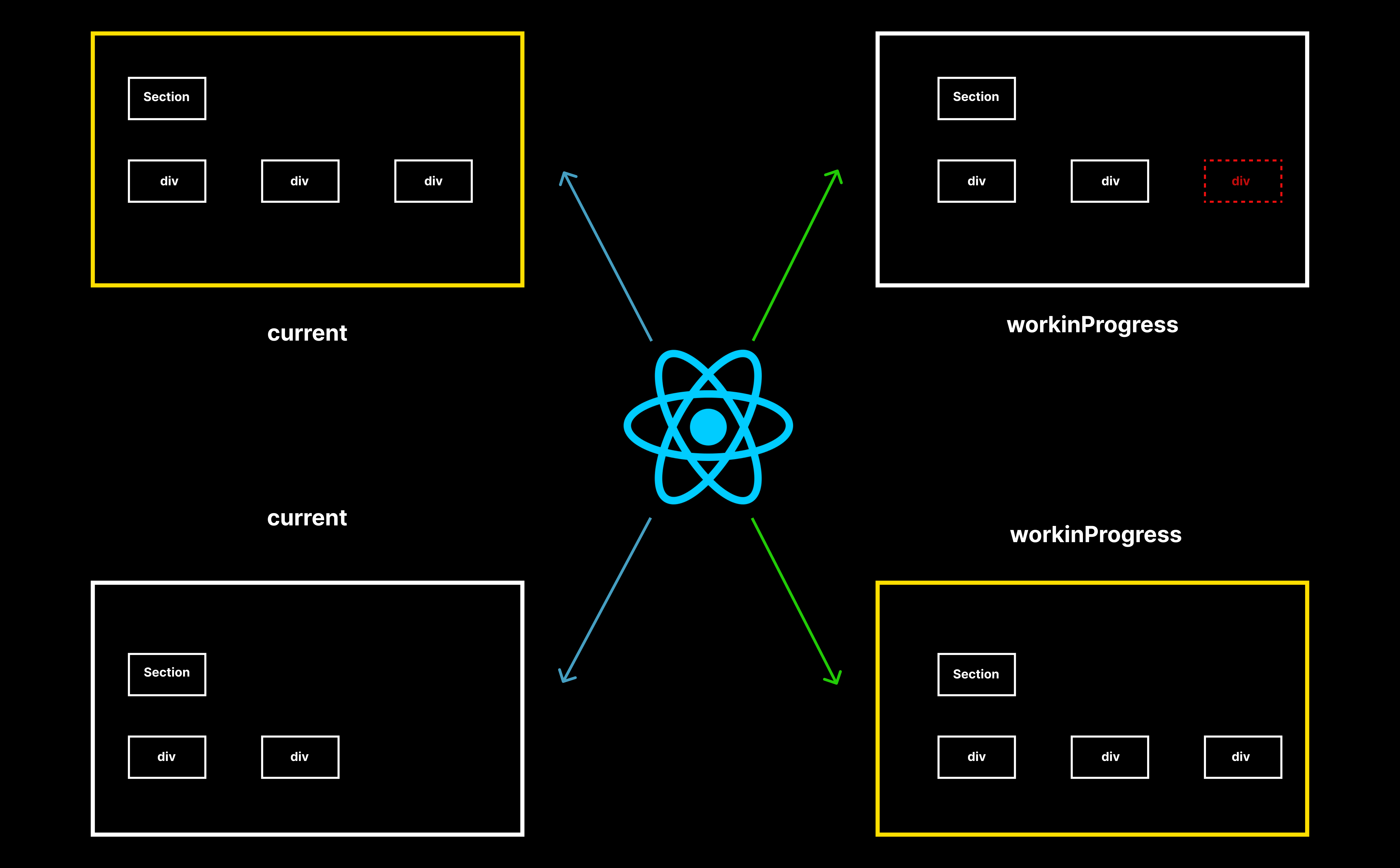
In the previous lesson, we saw that this is done by building a workInProgress tree. React traverses the component tree, calling your function components (or the render method of class components) to get the new JSX output. It then compares this output to the current Fiber tree to determine what has changed.
This process is a "pure" calculation. It happens entirely in memory and does not produce any user-visible side effects.
To see this process in action, the following video segment details the beginWork and completeWork functions that power the render phase's traversal of the Fiber tree.
React Fiber Reconciliation: How it Works (Part 1)
In 'React Fiber Reconciliation', Tejas Kumar provides a great walkthrough of the functions that constitute the render phase work loop.
Watch the segment from 07:33 to 11:42. Pay close attention to the distinction between Begin work (walking down the tree, flagging updates) and Complete work (walking up, building the new element tree in memory). Notice the analogy of creating DOM elements in memory without attaching them to the document—this is the essence of the render phase.
The key takeaway is that this phase produces a new workInProgress tree and a list of "effects" (e.g., "insert this DOM node," "update this attribute").
Rules of the Render Phase
Because the render phase might be paused, resumed, or even thrown away and restarted, there are strict rules about what you can do inside it. The work must be pure.
What is allowed in the render phase?
- Calling components to get their render output.
- Comparing props and state.
- Calculating values based on props and state.
What is NOT allowed in the render phase?
- DOM Mutations: You should never try to modify the DOM directly (e.g., using
document.getElementById()...) during the render phase. The DOM is not guaranteed to be in a consistent state, and any changes you make could be overwritten by the upcoming commit phase. - Side Effects: You should not initiate side effects like network requests, subscriptions, or timers directly in the body of a function component. Since a component might render multiple times before committing, this would lead to duplicate and unpredictable effects.
The following video explains precisely why certain work, like DOM mutations and some lifecycle methods, cannot be done during this asynchronous phase.
What Is React Fiber? React.js Deep Dive #2
Let's return to Philip Fabianek's 'What Is React Fiber?' video to understand the rationale behind the rules of the render phase.
Watch the segment from 10:57 to 13:32. Focus on the explanation of why it would be problematic to run DOM mutations or certain lifecycle methods during an asynchronous, discardable phase. This introduces the concept of an 'Effects list' which is the output of the render phase.
Phase 2: The Commit Phase (Applying Changes)
Once the render phase is complete and React has a finished workInProgress tree and a list of all effects, it moves to the commit phase.
This phase is synchronous and uninterruptible. React will execute all the collected changes in one single pass. This is crucial for UI consistency; you never want the user to see a half-updated screen.
Work of the Commit Phase
During this phase, React performs the following tasks:
- DOM Updates: It iterates through the effect list and applies all the necessary DOM insertions, updates, and deletions.
- Ref Updates: It updates
refobjects to point to the corresponding DOM nodes and component instances. - Lifecycle Methods and Effects: It runs specific lifecycle methods and hooks that need to execute after the DOM has been updated. This includes
componentDidMount,componentDidUpdate, and importantly,useLayoutEffect.
To tie all of this together, let's read the definitive guide on this topic.
Blogged Answers: A (Mostly) Complete Guide to React Rendering ...
The article 'Blogged Answers: A (Mostly) Complete Guide to React Rendering' provides an excellent, detailed breakdown of the two phases and the work done in each.
Read the section titled 'Render and Commit Phases'. It clearly lists the work done in each phase and also introduces a third, related step: the 'Passive Effects' phase, where useEffect hooks are run. Take note of the distinction between useLayoutEffect (runs synchronously in the commit phase) and useEffect (runs after a short timeout).
A Visual Summary
This diagram provides a clear visual map, showing where the traditional class component lifecycle methods fall within the render and commit phases. Even though we primarily use hooks now, this mapping is invaluable for understanding the underlying model.

Summary and Key Takeaways
Understanding the distinction between the render and commit phases is fundamental to mastering React. It explains why React is fast and how it remains predictable.
Here is a summary of the key differences:
| Feature | Render Phase | Commit Phase |
|---|---|---|
| Purpose | Calculate what changes are needed. | Apply those changes to the DOM. |
| Execution | Asynchronous, Interruptible | Synchronous, Uninterruptible |
| Output | A new workInProgress tree and an effect list. |
A visible update to the user interface. |
| Allowed Work | Reading props/state, calling components. | DOM mutations, updating refs, running layout effects. |
| Forbidden Work | DOM mutations, network requests, subscriptions. | (N/A - this is where side effects are flushed) |
| Analogy | Writing a draft of a document. | Publishing the final document. |
This strict separation is what allows React to implement concurrent features. It can "draft" updates in the render phase, pause for more urgent work (like user input), and only "publish" the final UI in the commit phase once everything is ready, ensuring the user experience remains smooth.
Preview of the Next Lesson:
Now that we understand the two-phase process React uses to apply updates, a new question arises: what triggers this process in the first place? And if we call setState multiple times in a row, does React run this whole process for each call?
In the next lesson, we will answer that by exploring our next learning outcome: Explain React's automatic batching behavior and why state updates are scheduled asynchronously. We'll see how React cleverly groups multiple state updates into a single render pass for optimal performance.