Hello! Welcome back to our journey into the core of React.
In our last few lessons, we've explored what React decides to do during an update. We saw how the diffing algorithm compares component trees and how key props provide stable identities to help this process. This was all about the logic of reconciliation.
Today, we go one level deeper to understand how React executes this work. Our learning outcome is to explain the basics of React's Fiber architecture and its role as the unit of work in rendering.
You've expressed a strong interest in React's "under the hood" mechanics, and this lesson is central to that. We will cover:
- The problem with React's old synchronous rendering model.
- What a "Fiber" is—not just a concept, but a specific data structure.
- How the Fiber architecture enables React to perform work in chunks, without freezing the user interface.
- The high-level process of how React works through a component tree using Fibers.
Understanding Fiber is the key to grasping modern React's performance characteristics and advanced features like Concurrent Mode.
The Problem: Synchronous, Uninterruptible Rendering
Before React 16, the reconciliation process was entirely synchronous. When a state update triggered a re-render, React would walk the entire component tree, calculate the changes, and update the DOM in a single, unbroken sequence. For large applications, this could take a noticeable amount of time (e.g., >16ms), blocking the browser's main thread.
While this work was happening, the UI would be completely unresponsive. It couldn't respond to user input, run animations, or do anything else. This led to a poor user experience, often described as "jank" or UI freezing.

To understand the limitations of this old "Stack Reconciler," let's watch a short segment that sets the stage for why a change was needed.
What Is React Fiber? React.js Deep Dive #2
The video 'What Is React Fiber?' from the Philip Fabianek channel clearly explains the issue with the old synchronous Stack reconciler.
Watch the first 2 minutes of the video (00:00 - 02:00). Pay close attention to the explanation of why the Stack reconciler being synchronous was a major limitation, especially with the example of typing into a text field during a background render.
The Solution: React Fiber
React Fiber, introduced in React 16, was a complete rewrite of the core reconciliation algorithm designed to solve this exact problem.
The fundamental idea is to break the single, monolithic rendering task into many small, discrete units of work. Each "unit of work" is called a Fiber. Because the work is now chunked, React can:
- Process a few units of work.
- Pause and yield control back to the browser's main thread.
- Allow the browser to handle higher-priority tasks (like responding to a keypress or running an animation).
- Resume its work from where it left off when the browser is idle again.
This ability to pause, resume, and prioritize work is the defining feature of the Fiber architecture.
To build an initial mental model, let's look at a conceptual implementation in plain JavaScript. The following article simulates this chunking behavior using the browser's requestIdleCallback API.
Understanding React Fiber: How It Changes UI Rendering
The article 'Understanding React Fiber' provides a great, simplified JavaScript example of a scheduler that breaks tasks into chunks, mimicking the core idea behind Fiber.
Read the sections 'Simulating a Busy JavaScript Thread in React', 'The Issue', 'Solution: Preventing UI Freezing', and 'Creating Fiber-like code'. Focus on the FiberScheduler class. Notice how it processes one task and then uses requestIdleCallback to schedule the next one, effectively yielding to the browser between each chunk of work. This is a powerful analogy for Fiber's interruptible nature.
This conceptual scheduler demonstrates that at its heart, Fiber introduces a cooperative scheduling model where React no longer monopolizes the main thread.
What Exactly Is a Fiber?
Now let's move from the concept to the implementation. A Fiber is a plain JavaScript object that holds information about a component, a DOM element, or any other piece of work React needs to do.
Every element in your component tree gets a corresponding Fiber node during the rendering process. Crucially, these Fiber nodes are connected in a linked list structure. A Fiber object has properties like:
tag: Identifies the type of the fiber (e.g.,FunctionComponent,ClassComponent,HostComponentfor a DOM tag likediv).stateNode: A reference to the actual instance of the component class, function, or DOM node.return: A pointer to the parent Fiber.child: A pointer to the first child Fiber.sibling: A pointer to the next sibling Fiber.
This return, child, and sibling structure allows React to traverse the entire component tree without relying on recursion, which was a key limitation of the old Stack reconciler. It can walk the tree, pause at any Fiber, and resume later.
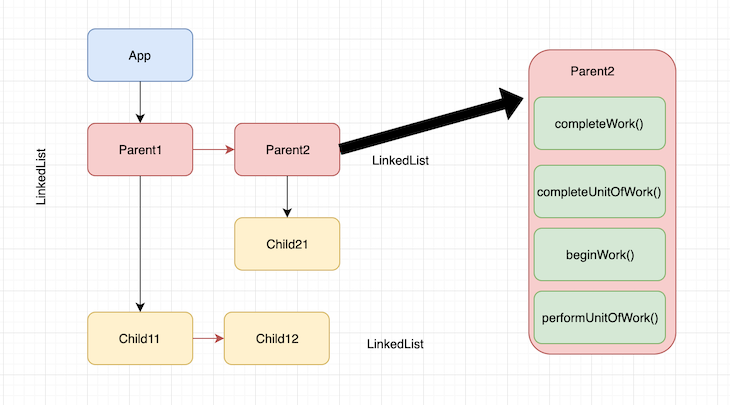
The following resource provides an excellent breakdown of the Fiber data structure by inspecting it directly in the browser.
Part 2: React Reconciliation, a Deep Dive: React Fibers
The article 'Part 2: React Reconciliation, a Deep Dive: React Fibers' offers a detailed look at the properties of a Fiber object.
Read the section 'React fiber data structure'. It uses the React Developer Tools to show you exactly what a Fiber object looks like. Focus on understanding the purpose of the key properties listed: tag, stateNode, alternate, child, sibling, and return.
The Fiber Work Loop: Two Trees and Two Phases
So how does React use these Fiber objects to update the UI? The process involves two parallel trees and happens in two main phases.
The Two Trees: current and workInProgress
At any given time, React maintains two Fiber trees:
- The
currenttree: This tree represents the UI that is currently visible on the screen. It's the source of truth for the existing state. - The
workInProgresstree: This is a "draft" tree where React builds the new UI off-screen. As React processes updates, it clones nodes from thecurrenttree into theworkInProgresstree and applies the changes there.
This technique is analogous to double buffering in graphics programming. By working on a draft copy, React can build the new UI incrementally without causing visual inconsistencies on the screen. If the render is interrupted, the user is still looking at the consistent current tree.
The Two Phases: Render and Commit
The entire reconciliation process is split into two distinct phases:
-
Phase 1: The Render Phase (Asynchronous, Interruptible)
- React traverses the Fiber tree, starting from the root. This is the "work loop."
- For each Fiber, it determines if any changes are needed (e.g., state changed, props changed).
- It builds up the
workInProgresstree in memory. - Crucially, this phase is pure and has no side effects. It doesn't touch the DOM. It just calculates the work to be done.
- Because it's pure, React can safely pause, abort, or resume work in this phase.
-
Phase 2: The Commit Phase (Synchronous, Uninterruptible)
- Once the
workInProgresstree is complete, the commit phase begins. - React now has a complete list of all the changes needed (e.g., add this DOM node, update this attribute, remove that node).
- It executes all these changes in one single, synchronous sequence.
- This phase must be uninterruptible to ensure the DOM is updated consistently and the user doesn't see a partially updated UI.
- After the commit is done, the
workInProgresstree becomes thecurrenttree, ready for the next update cycle.
- Once the
This video ties these concepts together beautifully, explaining the two phases and the work loop functions (beginWork and completeWork) that traverse the tree.
What Is React Fiber? React.js Deep Dive #2
Let's return to the 'What Is React Fiber?' video to see how these concepts fit together.
Please watch the following segments: The Two Phases (02:29 - 04:14): This introduces the Render and Commit phases. The Two Trees (09:53 - 10:57): This explains the current vs. workInProgress trees using the double buffering analogy. The Work Loop (13:32 - 16:09): This visualizes how React traverses the Fiber tree using beginWork (going down) and completeWork (coming up) in a non-recursive loop. Focus on how these pieces form a complete system for processing updates.
Conclusion
You've just taken your first major step into React's underlying architecture. This is a complex topic, but understanding the basics of Fiber is transformative for a developer's mental model of React.
Key Takeaways:
- Fiber is the solution to UI blocking: It replaced the old synchronous "Stack" reconciler.
- A Fiber is a unit of work: It's a JavaScript object with information about a component and its position in the tree structure (via
child,sibling,returnpointers). - Asynchronous Rendering: The Fiber architecture allows React to break rendering into chunks, pausing to let the browser handle high-priority tasks, and then resuming its work.
- Two Phases are Key:
- The Render Phase is async and interruptible, where React builds a
workInProgresstree in memory. - The Commit Phase is sync and uninterruptible, where React applies the calculated changes to the actual DOM.
- The Render Phase is async and interruptible, where React builds a
Preview of the Next Lesson:
We've introduced the render and commit phases today. In our next lesson, we will zoom in on them. The goal will be to distinguish between React's render phase and commit phase and list the operations allowed in each. We'll explore why this separation is so important and what it means for how you write your components, especially when using Hooks like useEffect.