Introduction
Welcome back! In our last lesson, we demystified JSX, learning that it's syntactic sugar for React.createElement() function calls. These calls produce simple JavaScript objects called "React Elements," which are essentially blueprints for what should appear on the screen.
Today, we'll build directly on that foundation. A single element is just one brick, but how does React construct the entire building? This lesson addresses that very question. Our learning outcome is to describe the structure and purpose of the React component tree and the concept of unidirectional data flow.
You'll see how React organizes components into a hierarchical structure and learn the strict rules that govern how data moves through that structure. Understanding this is fundamental to grasping React's "anatomy" and will clarify why React applications are structured the way they are.
The Component Tree: Your UI's Family Tree
In the last lesson, we saw that React components return element objects. When you nest components inside each other using JSX, you are implicitly defining a relationship between them. React uses these relationships to build a tree structure in memory that represents your entire UI.
This is very similar to how a browser constructs the Document Object Model (DOM) from an HTML document. Just as <html> is the parent of <body>, which might be the parent of a <div>, your App component is the parent of the components it renders.
To explore this concept in detail, let's turn to the official React documentation.
Understanding Your UI as a Tree
The article 'Understanding Your UI as a Tree' from the React team provides a clear explanation of this concept, which they call the 'Render Tree'.
Please read the entire article. As you read, focus on: The definition of the render tree and how it represents parent-child component relationships. Why the render tree is composed of React components and not HTML tags. How the tree can change between renders due to conditional rendering.
As the article explained, React creates a render tree made up of your components. The root component of your application (App in most cases) sits at the top. Any components rendered by App become its children, and so on, forming a hierarchy.
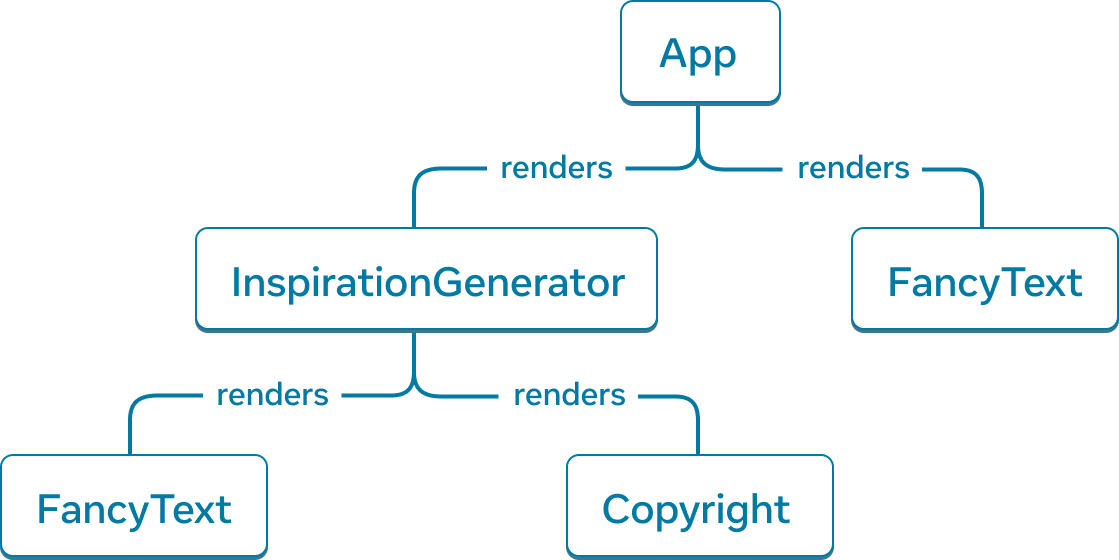
This tree structure is central to React. It isn't just a mental model; it's what React builds in memory. The "React Element" objects we discussed in the last lesson are the very things React uses to assemble this tree.
To reinforce this connection, let's watch a short video segment.
Understanding React's UI Rendering Process
The video 'Understanding React's UI Rendering Process' explains how React takes the element objects returned from your components and builds a tree from them. This tree of objects is what's commonly known as the 'Virtual DOM'.
Watch from 09:36 to 10:54. The key takeaway is how React assembles a whole tree of these lightweight element objects, which is a much cheaper and faster process than manipulating the real browser DOM directly.
So, to summarize:
- Your JSX is transpiled into
React.createElement()calls. - These functions return React Element objects (blueprints).
- React uses the nesting of these elements to build a component tree (the Render Tree, or Virtual DOM) in memory.
Now that we have this tree structure, the next logical question is: how does information flow through it?
Unidirectional Data Flow: The One-Way Street
In a React application, data has a very strict and predictable path. This is known as unidirectional data flow. Simply put, data flows down the component tree, from parent to child. It never flows directly up from child to parent, or sideways between siblings.
This is one of the most important principles in React, as it makes your application's logic easier to follow and debug.
Let's break this down by comparing it with Vanilla JS, as you requested.
Understanding Unidirectional and Bidirectional Data Flow
The article 'Understanding Unidirectional and Bidirectional Data Flow' provides excellent, simple examples that contrast these two patterns.
First, read the section on Unidirectional Data Flow, paying close attention to both the Vanilla JS and React examples. Notice the core pattern: state is held, the UI is rendered from that state, and an event triggers a function that updates the state, causing the cycle to repeat.
As the article demonstrates, the flow is:
- State holds the data.
- The UI is rendered based on the current state.
- A user Event (like a click) triggers a function.
- The function Updates the State.
- React detects the state change and re-renders the UI with the new data.
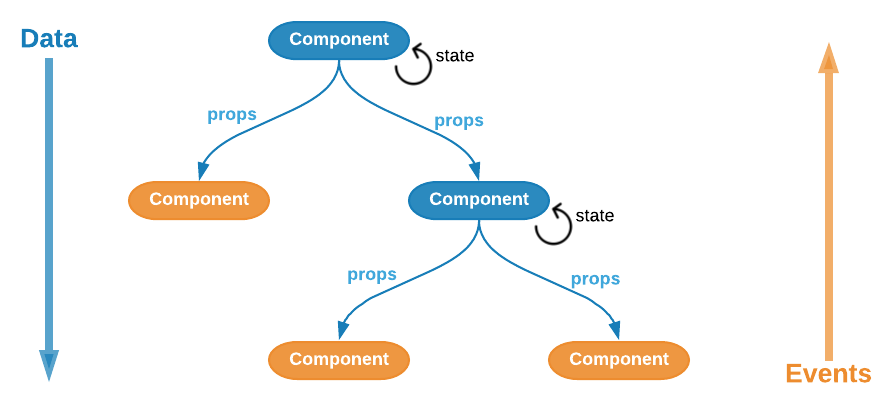
This flow is visualized perfectly in the following diagram. Data, in the form of props, is passed down from parent components to child components. If a child needs to communicate back up to the parent, it does so by calling a function that was passed down to it as a prop.
The Illusion of Two-Way Binding
Now, let's address a common point of confusion. In applications with forms, it often feels like data is flowing in two directions. You type into an input field, and the UI updates instantly. Let's see how React accomplishes this while still adhering to unidirectional flow.
Understanding Unidirectional and Bidirectional Data Flow
Now, let's look at how this compares to a bidirectional pattern.
Read the section on Bidirectional Data Flow, again focusing on the React example. Ask yourself: Is the input field directly changing the state? Or is it still following the 'event -> update state -> re-render' cycle?
The answer is the key to understanding React's state model. The input field does not directly modify the name state. Instead:
- The input's
valueis set by thenamestate (data down). - You type a character, triggering the
onChangeevent. - The
onChangehandler function is called (event up). - This function calls
setName()with the new value frome.target.value. - The state is updated, and the component re-renders.
- The input's
valueis now set to the newnamefrom the state.
This creates the effect of two-way binding but maintains the predictable, one-way flow of data. This pattern is called a controlled component, which we will explore in a future lesson.
Let's watch one final video clip that reinforces this core principle.
Senior-Level Understanding of React Portals
This clip from 'Senior-Level Understanding of React Portals' discusses exactly why React enforces this one-way data flow and contrasts it with frameworks that used two-way data binding.
Watch from 02:19 to 03:20. The video highlights that with unidirectional flow, information only travels in one direction. It also touches on a consequence of this model: if a deeply nested child needs to update a parent's state, you have to pass the state-updating function all the way down the tree.
This consequence, known as "prop drilling," is something we'll learn to manage later with tools like React Context. For now, the crucial insight is understanding this fundamental data architecture.
Conclusion
In this lesson, we established two of React's core architectural pillars.
Key Takeaways:
- Component Tree: React represents your UI as a tree of components, often called the render tree or Virtual DOM. This hierarchy is determined by how you nest components in your JSX.
- Unidirectional Data Flow: Data flows in only one direction: down from parent to child via
props. - Data Down, Events Up: To change data in a parent, a child component calls a function that was passed down to it as a prop. This maintains the predictable flow.
- Predictability: This model makes applications easier to reason about and debug because the flow of data is explicit and constrained.
You now have a solid mental model of a React application's structure and the rules governing how information moves within it.
Preview of the Next Lesson:
We've mentioned that this component tree (or "Virtual DOM") is cheap to create. But how does React use it to update the actual browser DOM efficiently? In our next lesson, we will explore how the Virtual DOM and React's reconciliation algorithm work to efficiently update the DOM. We'll dive into the "diffing" process that makes React so performant.