Introduction
Welcome back! In our last lesson, we established the fundamental difference between imperative and declarative programming. We saw that React embraces a declarative approach: you tell React what the UI should look like for a given state, and React handles the how of updating the DOM.
Today, we'll zoom in on the syntax that makes this declarative style so readable and powerful: JSX. This lesson directly addresses your goal of understanding React's underlying logic by peeling back the curtain on this familiar syntax. Our learning outcome is to explain how JSX compiles to React.createElement calls and describe the resulting object structure.
You'll see that JSX is not magic. It's a layer of abstraction—syntactic sugar—that is transformed into plain JavaScript that React can understand. By the end of this lesson, you'll know exactly what that JavaScript looks like and why it's the crucial first step in React's rendering process.
From JSX to JavaScript: The Transpilation Step
First, it's essential to understand that browsers do not natively understand JSX. If you were to include a file with JSX in a standard <script> tag, you'd get a syntax error. JSX is an extension to JavaScript that must be compiled into regular JavaScript before it's executed. This compilation process is often called "transpilation," and it's typically handled by a tool like Babel.
So, when you write something like this:
const element = <h1 className="greeting">Hello, world!</h1>;
You are not writing standard JavaScript. You're writing code that is destined to be transformed. Let's see exactly what it gets transformed into.
How Does React Actually Work? React.js Deep Dive #1
The video 'How Does React Actually Work?' from Philip Fabianek provides a concise demonstration of this transformation. It shows both the resulting function call and the object that this function produces.
Watch from 00:46 to 02:05. Pay close attention to the React.createElement function signature and the properties of the JavaScript object that is logged to the console.
As the video shows, every piece of JSX is converted into a call to React.createElement(). This is why, in older React projects (before version 17), you always had to have import React from 'react' at the top of any file that used JSX. The transpiled code literally called a function on the React object.
Dissecting React.createElement()
The React.createElement() function is the engine that turns your JSX declarations into something React can work with. Let's see this transformation in a more visual way using the Babel REPL (Read-Eval-Print Loop), which is a tool that lets you see the output of the Babel compiler in real-time.
How Does React Actually Work? React.js Deep Dive #1
This next clip from the same video uses the Babel REPL to make the JSX-to-JS transformation interactive and clear. It's a perfect 'under the hood' view.
Watch from 02:05 to 02:52. Notice how the JSX attributes become the props object and the nested elements become additional arguments.
The general signature of the function is:React.createElement(type, props, ...children)
Let's break down these arguments:
-
type: This defines what kind of element to create.- For a native HTML element, this is a string:
'div','h1','img'. - For a custom React component you've built (e.g.,
<Button />), this is a direct reference to the component function or class itself:Button.
- For a native HTML element, this is a string:
-
props: This is an object that contains all the properties you passed to the element. Attributes likeclassName,src, oronClickare collected into this single object. If there are no props, it will benullor an empty object. -
...children: Everything after thepropsargument represents the children of the element. These can be otherReact.createElementcalls (for nested JSX), strings of text, or numbers.
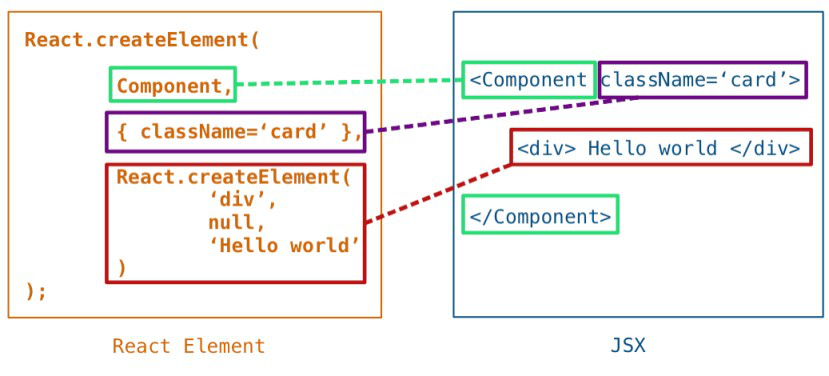
The Result: The "React Element" Object
So, what does React.createElement() actually return?
It does not return a DOM element. Instead, it returns a lightweight, plain JavaScript object. This object is called a React Element. It's simply a description, or a blueprint, of what should appear on the screen.
Here is what that object looks like when you inspect it in the browser's console.

Let's analyze the key properties of this object:
type: As discussed, this is the string tag name or component function.props: An object holding all props, including a specialchildrenprop that contains the element's nested content.key: A special string attribute you can use when rendering lists to help React identify which items have changed, are added, or are removed. We will cover this in depth later. For a single element, it's typicallynull.ref: Another special attribute used to get a direct reference to a DOM element. This is also a topic for a later lesson.$$typeof: Symbol(react.element): This is a special property that uniquely identifies the object as a React Element. It serves as a security measure to protect against XSS (Cross-Site Scripting) attacks. If you try to render a plain object from a JSON API that doesn't have this symbol, React will refuse to render it.
To see exactly how this object is constructed, we can even look at a simplified version of React's source code.
The article 'Reading Code - React' by Alex Kondov walks through the actual functions that create these element objects. This will give you the deep, theoretical understanding you're looking for.
First, find the code block for the createElement function. Skim through it to see how it initializes a props object and handles children. Don't worry about every line, just get the gist. Then, scroll down to the ReactElement function. This is the factory that actually builds and returns the object with the properties we just discussed ($$typeof, type, props, etc.).
These simple objects are cheap to create and hold in memory. React builds a whole tree of them (which we'll explore in the next lesson) and uses that tree to figure out the most efficient way to update the actual, much "heavier," browser DOM.
A Note on the Modern JSX Transform
You may have noticed that in modern React projects created with tools like Vite or Create React App, you no longer need to import React in every file that uses JSX. Why is that?
Since React 17, the JavaScript community introduced a "new JSX transform." Build tools like Babel can now be configured to automatically import special functions from a new JSX runtime, rather than transpiling JSX to React.createElement.
The same article, 'Reading Code - React', also explains this modern update. It's a great example of an 'alternative way' to achieve the same goal.
Read the section that begins with 'But since React 17, JSX doesn’t automatically get transpiled to React.createElement'. Notice that the new jsx function is very similar to createElement and still delegates to the same ReactElement factory. The core principle is unchanged.
The key takeaway is that even with this new transform, the fundamental principle remains the same: JSX is compiled into a function call that returns a React Element object. The main difference is that this function is now injected automatically by the build tool, making your code a little cleaner.
Conclusion
In this lesson, we demystified JSX and traced its path from a convenient syntax to a fundamental JavaScript object.
Key Takeaways:
- JSX is syntactic sugar: It's an HTML-like syntax extension for JavaScript that is not understood by browsers directly.
- Transpilation is required: A tool like Babel compiles JSX into function calls.
- The function is
React.createElement(orjsx): This function takestype,props, andchildrenas arguments. - The result is a React Element: This is a plain, lightweight JavaScript object that acts as a blueprint for a UI element. It is not a real DOM node.
- This object-based representation is the first step in how React builds its "Virtual DOM" to efficiently manage UI updates.
You now understand the very first step in React's rendering process: turning your declarative JSX into a data structure (the React Element object) that React can process.
Preview of the Next Lesson:
A single React Element is just one piece of the puzzle. How does React manage an entire UI made of hundreds of these elements? In the next lesson, we will explore how React assembles these element objects into a component tree. We'll discuss the structure of this tree and the critical concept of unidirectional data flow, which governs how information moves through your application.