Hello! Let's continue building your high-performance telemetry engine.
In our previous lesson, you implemented a StringInterner, a critical optimization that replaces bulky strings with lightweight integer IDs. This dramatically reduces the memory footprint and comparison cost for each event. Our PROFILE_EVENT macro now generates several distinct pieces of data for each event: a timestamp, source location information, and an interned message ID.
The challenge now is to package this information for transport. How do we take these disparate data types (uint64_t, uint32_t, etc.) and push them into our ring buffer, which is designed to be a simple, contiguous stream of bytes?
The answer is the focus of today's lesson: Serialize event data into a compact binary format before pushing to the ring buffer. This process involves converting our structured C++ data into a raw byte array, making it ready for high-speed, low-overhead transfer between threads.
1. What is Binary Serialization?
Binary serialization is the process of converting a data structure from its in-memory representation (like a C++ struct or class) into a flat sequence of bytes. The reverse process, reconstructing the data structure from the bytes, is called deserialization.
Unlike human-readable formats like JSON or XML, which use text characters and field names, a binary format is extremely dense. It stores the raw values directly, making it smaller and much faster to process. For a system capturing millions of events per second, this efficiency isn't just a "nice-to-have"—it's a requirement.
To get a sense of what a professional telemetry format looks like, consider this example of a telemetry packet structure.
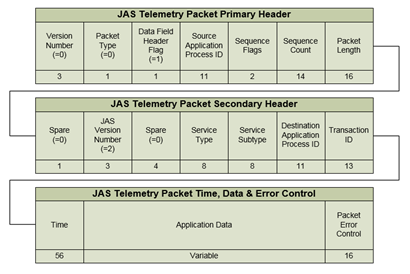
At its core, a C++ struct containing simple types is already laid out in memory as a sequence of bytes. Serialization is essentially the process of creating a well-defined and portable copy of that memory layout.
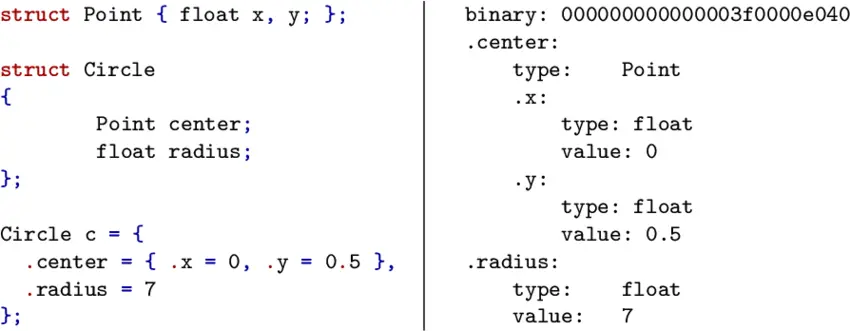
Let's watch a quick, clear definition of binary serialization and the concept of a "byte buffer" which we will be using.
Binary Serialization and Pixel Art in C and OpenGL | Game Engineering
The video 'Binary Serialization and Pixel Art' from the Game Engineering channel gives a concise introduction to the concept.
Watch the segment from the start until 01:31. Focus on the definition of binary serialization and the idea of systematically breaking down a structure to write its properties into a buffer.
2. The Core Technique: memcpy for Trivial Types
The data we need to serialize for our events—timestamps (uint64_t), interned IDs (uint32_t), and line numbers (uint32_t)—are all trivial types. These are simple data types (like integers and floats) whose in-memory representation is just their value. For these types, the fastest and most direct way to serialize them is to copy their raw bytes using std::memcpy.
This approach is simple, incredibly fast, and avoids any memory allocation overhead. It's the cornerstone of high-performance serialization.
Efficient Binary Serialization Of Mostly Basic Types
This Stack Overflow answer provides an excellent, practical starting point for a simple binary serializer in C++. It directly addresses the problem of serializing basic types efficiently and safely.
Read the accepted answer by user 'Sopel'. Pay close attention to: The initial comment stating memcpy is the fastest option for trivial types when endianness is consistent (which is true for our in-process profiler). The BinaryContainer code example. Note the use of static_assert(std::is_trivial_v) for compile-time safety and std::memcpy for the data transfer. The comments under the answer, which discuss how to handle variable-sized data like vectors (by serializing the size first).
As the resource highlights, memcpy is the workhorse here. The static_assert(std::is_trivial_v) check is a crucial safety mechanism that ensures we only use this direct-copy method on types where it's safe to do so. If you tried to memcpy a std::string, the assertion would fail at compile time, preventing a runtime bug where you'd only copy the internal pointer, not the string content.
3. Designing Our Event Packet Format
A robust telemetry system needs to handle different kinds of events (e.g., a profiling zone starting, a value being plotted, a log message). A flexible way to manage this is to create a small header for each event packet that tells the consumer thread two things:
- Size: How many bytes does this entire event packet occupy? This allows the consumer to read one full event at a time.
- Type: What kind of event is this? This tells the consumer how to interpret the payload that follows.
Our event packet will therefore have this structure:[uint16_t size] [uint8_t type] [payload]
Let's define the EventType and the struct for our first real event: marking the beginning of a scoped profiling zone.
#include <cstdint>

// Defines the type of event being serialized.
// The underlying type is uint8_t to keep it small.
enum class EventType : uint8_t {
    ZoneBegin,
    ZoneEnd,
    // We will add more types later
};

// The data payload for a ZoneBegin event.
// All members are trivial types, so this struct is also trivial.
struct ZoneBeginEvent {
    uint64_t timestamp;
    uint32_t source_loc_id; // Interned string for "file:line"
    uint32_t name_id;       // Interned string for the zone's name
};
4. Implementing the Serializer
Now, let's write the code to serialize a ZoneBeginEvent into a buffer. We'll create a simple Serializer class that manages a buffer pointer and provides methods to write data.
#include <cstdint>
#include <cstring> // For std::memcpy
#include <iostream>
#include <vector>

// (EventType and ZoneBeginEvent definitions from above)

class Serializer {
public:
    // We provide a pre-allocated buffer to write into.
    Serializer(char* buffer, size_t capacity)
        : m_buffer(buffer), m_capacity(capacity), m_write_pos(0) {}

    // Generic write function for any trivial type.
    template<typename T>
    bool write(const T& value) {
        // Ensure the type is safe to memcpy.
        static_assert(std::is_trivial_v<T>, "Can only write trivial types.");

        const size_t bytes_to_write = sizeof(T);
        if (m_write_pos + bytes_to_write > m_capacity) {
            // Not enough space in the buffer.
            return false;
        }

        std::memcpy(m_buffer + m_write_pos, &value, bytes_to_write);
        m_write_pos += bytes_to_write;
        return true;
    }

    // A specific function to serialize our ZoneBeginEvent.
    bool serialize_event(const ZoneBeginEvent& event) {
        const uint16_t payload_size = sizeof(ZoneBeginEvent);
        const uint16_t total_size = sizeof(EventType) + payload_size; // The size header itself is not included.

        // Create a temporary serializer to write the payload first
        // so we can calculate its size. In a real system, you might
        // reserve space for the size header and write it at the end.

        // 1. Write the type.
        if (!write(EventType::ZoneBegin)) return false;

        // 2. Write the payload.
        if (!write(event.timestamp)) return false;
        if (!write(event.source_loc_id)) return false;
        if (!write(event.name_id)) return false;

        // Now, let's add the size header at the beginning.
        // This is a simplified approach. A more optimized way is to reserve
        // space for the size header at the start and patch it later.

        // Let's re-organize the buffer to prepend the size.
        uint16_t final_packet_size = m_write_pos;

        // Make space for the size header by shifting existing data
        std::memmove(m_buffer + sizeof(uint16_t), m_buffer, final_packet_size);

        // Write the size header
        std::memcpy(m_buffer, &final_packet_size, sizeof(uint16_t));
        m_write_pos += sizeof(uint16_t);

        return true;
    }

    size_t get_size() const { return m_write_pos; }
    const char* get_data() const { return m_buffer; }

private:
    char* m_buffer;
    size_t m_capacity;
    size_t m_write_pos;
};


// --- Example Usage ---
int main() {
    // A buffer to hold our serialized data.
    // In the real project, this buffer will be a slot in the ring buffer.
    std::vector<char> buffer(256);

    Serializer serializer(buffer.data(), buffer.size());

    ZoneBeginEvent evt = {
        1234567890, // timestamp
        0,          // source_loc_id for "main.cpp:123"
        1           // name_id for "MyProfiledFunction"
    };

    bool success = serializer.serialize_event(evt);

    if (success) {
        std::cout << "Successfully serialized event. Total size: " << serializer.get_size() << " bytes." << std::endl;

        // Let's inspect the raw bytes (simplified for printing)
        const char* data = serializer.get_data();
        uint16_t size_read;
        std::memcpy(&size_read, data, sizeof(uint16_t));

        EventType type_read;
        std::memcpy(&type_read, data + sizeof(uint16_t), sizeof(EventType));

        std::cout << "Header says size is: " << size_read << std::endl;
        std::cout << "Header says type is: " << static_cast<int>(type_read) << " (0 means ZoneBegin)" << std::endl;
    }

    return 0;
}
This example shows the full process: defining the event, creating a serializer, writing the header and payload, and even a simple deserialization check to verify the output. The std::memmove to prepend the size is functional but adds a small overhead. As noted in the comments, a common optimization is to leave space for the size header at the beginning and "patch" it in after the payload has been written.
Test your understanding!
Modify the example above to handle a ZoneEnd event. This event only needs a timestamp.
- Add
ZoneEndto theEventTypeenum. - Create a
struct ZoneEndEvent { uint64_t timestamp; };. - Add a
serialize_event(const ZoneEndEvent& event)function to theSerializerclass. Follow the same pattern as theZoneBeginEventserializer.
Show answer
Here's the new serialize_event overload for ZoneEndEvent:
// Add this inside the Serializer class
bool serialize_event(const ZoneEndEvent& event) {
    // 1. Write the type.
    if (!write(EventType::ZoneEnd)) return false;

    // 2. Write the payload.
    if (!write(event.timestamp)) return false;

    // Prepend size header (same logic as before)
    uint16_t final_packet_size = m_write_pos;
    std::memmove(m_buffer + sizeof(uint16_t), m_buffer, final_packet_size);
    std::memcpy(m_buffer, &final_packet_size, sizeof(uint16_t));
    m_write_pos += sizeof(uint16_t);

    return true;
}
You would call it just like the ZoneBeginEvent version. This pattern of creating small, specific structs for each event type and having a corresponding serialization function is a very powerful and extensible design.
5. The Theory of "Zero-Overhead"
We've built a practical serializer, but since you're interested in low-level engineering, it's worth understanding why this approach is considered "zero-overhead." Essentially, we are writing code that is so simple and direct that the compiler can optimize it into the most efficient possible machine instructions—often equivalent to what an expert would write by hand in assembly.
To explore this concept, let's hear from an expert who built a production-grade serialization library.
Killing C++ Serialization Overhead & Complexity - Eyal Zedaka - CppCon 2022
The CppCon talk 'Killing C++ Serialization Overhead & Complexity' by Eyal Zedaka is a masterclass on this topic. It validates our approach and provides deep insights into the performance characteristics.
Watch the following two key clips: The Binary Format (17:39 - 19:13): The speaker describes a very simple and effective binary format: fixed-size types are copied directly, and variable-size types (like strings) are prefixed with their size. This is a direct confirmation of our design choices. The Secret Sauce: Aggressive Inlining (30:57 - 35:52): This is a fascinating deep dive. The speaker explains that by using templates and forcing the compiler to inline function calls, all the serialization logic for a complex object can be flattened into a single function. This gives the optimizer maximum visibility, allowing it to generate highly efficient code that often boils down to a series of memcpy operations. This is a crucial lesson in high-performance C++ design.
The key takeaway is that our simple, memcpy-based approach isn't "naive"—it's the foundation of extremely high-performance serialization. By keeping our data structures trivial and our serialization logic direct, we give the compiler the best possible chance to generate optimal code.
Conclusion
Congratulations! You've now built the component that packages your profiling data into a compact, efficient binary format. This is the final step in preparing data on the "producer" side (your instrumented application threads). The byte packets you generate are now ready to be pushed into the lock-free ring buffer for consumption.
Key Takeaways:
- Binary serialization is the process of converting C++ data structures into a raw byte stream for efficient storage or transport.
- For trivial types (
int,float,uint64_t, etc.),std::memcpyis the fastest and most direct method for serialization. - A flexible packet format includes a size and type header, allowing a consumer to correctly interpret variable-sized and typed events.
- This "zero-overhead" approach aligns with Data-Oriented Design principles, minimizing CPU cycles and memory allocations to reduce the "observer effect."
What's Next?
We have now completed a major part of the data pipeline: generating, interning, and serializing event data on the producer threads. In the next module, we pivot to the user-facing side of the project. We will start by learning how to set up a project with a graphics library and get started with ImGui, the UI toolkit we will use to visualize all this data. You'll learn how to create a window, initialize a graphics context, and render your first simple UI elements.