Hello! Welcome back to our work on the telemetry engine.
In our last lesson, we successfully built a flexible PROFILE_EVENT variadic macro that automatically captures source location, a timestamp, and a formatted message. This is a huge step, but our macro has one major limitation: it's always running and always adding overhead to our application.
Today, we'll solve that. This lesson's goal is to use preprocessor directives to make the capture macro a no-op when a profiling flag is disabled. A "no-op" is a "no-operation"—an instruction that does nothing. By turning our macro into a no-op, we can completely remove its performance cost from release builds, fulfilling the "zero-overhead" promise that is fundamental to a professional-grade profiler.
1. The Power of the Preprocessor
To understand how we can remove code from a final program, we need to remember the C++ compilation process. Before your source code is compiled into machine instructions, it first goes through a step called preprocessing. The preprocessor is essentially a powerful text-editing tool that acts on your code based on special commands called directives (lines starting with #).
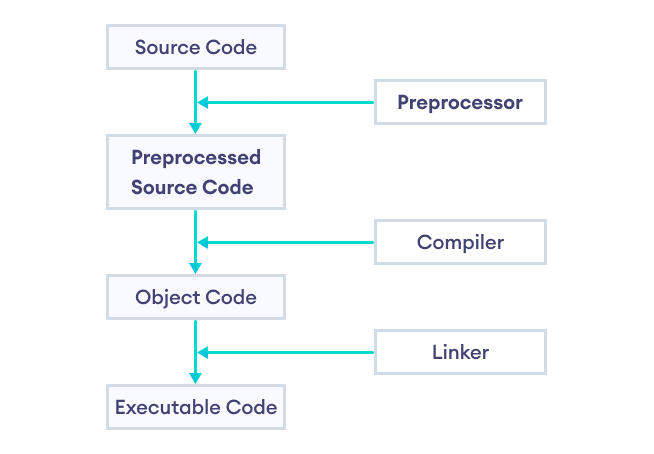
This ability to conditionally include or exclude text before compilation is called conditional compilation. It's the standard technique used in high-performance C++ to manage features like logging and profiling.
To see this technique in action, let's watch a segment from a video by The Cherno that explains how this is used in practice.
This video, 'Macros in C++', provides a clear, practical example of using preprocessor directives to enable logging in debug builds and completely disable it in release builds.
Watch the clip from 09:02 to 13:28. Focus on: The concept of having different build configurations (Debug vs. Release). How #ifdef, #else, and #endif are used to define a LOG macro differently for each configuration. The result: when the PR_DEBUG symbol is not defined, the LOG macro expands to nothing, effectively removing the log call from the code.
2. Implementing the "On/Off" Switch for PROFILE_EVENT
As the video demonstrated, the core mechanism is a set of conditional directives that check for the existence of a preprocessor symbol. We'll create a symbol named ENABLE_PROFILING to act as our switch.
The structure will look like this:
// This will be our switch. If this line is present, profiling is on.
#define ENABLE_PROFILING

#ifdef ENABLE_PROFILING
    // "ON" state: Define the macro as we did in the last lesson.
    #define PROFILE_EVENT(format, ...) \
        TelemetryLog(__FILE__, __LINE__, format __VA_OPT__(,) __VA_ARGS__)
#else
    // "OFF" state: Define the macro to do nothing (a "no-op").
    #define PROFILE_EVENT(format, ...) /* What goes here? */
#endif
When ENABLE_PROFILING is defined, the preprocessor includes our full macro definition. When it's not defined (e.g., if we comment out the #define line), the preprocessor will instead use the version in the #else block.
3. Crafting a Safe No-Op Macro
The obvious way to make the macro do nothing is to define it as empty:
#define PROFILE_EVENT(format, ...) // Expands to nothing
However, this seemingly simple solution hides a subtle but dangerous bug. Consider this code:
if (player.health < 0)
    PROFILE_EVENT("Player died");
else
    player.respawn();
When profiling is disabled, the PROFILE_EVENT line expands to nothing, but the semicolon remains:
if (player.health < 0)
    ; // The semicolon from the macro call is now the entire 'if' body.
else // This 'else' has no matching 'if', causing a compilation error!
    player.respawn();
This is a classic C++ pitfall. The standard, robust solution is to define the no-op macro in a way that it "swallows" the trailing semicolon, forming a complete, valid, but empty statement.
Proper C preprocessor macro no-op
The problem of creating a safe no-op macro is well-understood. This Stack Overflow answer clearly explains the common pitfalls and presents the canonical solution.
Please read the accepted answer by Sergey Kalinichenko. Pay close attention to the two drawbacks of defining a macro to nothing. Then, see how the do {} while (0) trick solves both issues.
As the resource explains, the do {} while (0) idiom is the correct way to define a no-op macro. It creates a complete statement that does nothing and correctly consumes the user's semicolon.
Our #else block should therefore be:
#else
    // "OFF" state: A safe, statement-like no-op macro.
    #define PROFILE_EVENT(format, ...) do {} while(0)
#endif
This ensures our macro behaves predictably and safely, whether it's inside an if/else block or anywhere else in the code.
Test your understanding!
A colleague suggests a different way to create a no-op macro: #define PROFILE_EVENT(...) {;}. They argue it also creates a block statement and should be safe.
What is the problem with this approach in the context of an if/else statement without braces?
if (error)
    PROFILE_EVENT("An error occurred");
else
    handle_success();
Show answer
The macro would expand the code to:
if (error)
    {;}; // The extra semicolon here is the issue!
else
    handle_success();
The semicolon after the closing brace } terminates the if statement. The else that follows is now orphaned because its corresponding if statement has already ended. This will cause a compile-time error: "else without a previous if". The do {} while(0) trick avoids this because it requires a semicolon to be a complete statement, perfectly "swallowing" the one the user types.
4. Controlling the Switch from the Build System
Hardcoding #define ENABLE_PROFILING in our source file is fine for testing, but it's not ideal for managing real projects. The standard practice is to control these flags from the build command line. This separates the code's logic from its build configuration.
Most C++ compilers, including GCC and Clang, support a -D flag to define a preprocessor symbol.
C++ Macros, defines, __LINE__, and std::source_location (C++ 20) | Modern Cpp Series Ep. 107
To see how this works, let's watch a quick segment from Mike Shah's video on C++ macros.
Watch the clip from 07:05 to 07:57. The key takeaway is how the -D flag is used on the command line to define a symbol (like DEBUG=1), which can then be checked within the code.
Using this technique, we can compile our application in two distinct ways without ever touching the source code:
- Profiling Build:
g++ main.cpp -std=c++20 -DENABLE_PROFILING -o app_profiled - Release Build:
g++ main.cpp -std=c++20 -o app_release
5. Putting It All Together
Let's combine everything into a complete example.
#include <iostream>
#include <chrono>
#include <cstdarg>

// The helper function that does the actual work (only used when profiling is enabled)
void TelemetryLog(const char* file, int line, const char* format, ...) {
    long long timestamp_ns = std::chrono::steady_clock::now().time_since_epoch().count();
    printf("[%lld] %s:%d - ", timestamp_ns, file, line);
    va_list args;
    va_start(args, format);
    vprintf(format, args);
    va_end(args);
    printf("\n");
}

// --- Our Conditional Macro Definition ---
#ifdef ENABLE_PROFILING
    // "ON" state: The real macro that calls our logging function.
    #define PROFILE_EVENT(format, ...) \
        TelemetryLog(__FILE__, __LINE__, format __VA_OPT__(,) __VA_ARGS__)
#else
    // "OFF" state: The safe no-op macro.
    #define PROFILE_EVENT(format, ...) do {} while(0)
#endif
// ------------------------------------

int main() {
    std::cout << "Application starting...\n";

    PROFILE_EVENT("Initializing subsystems.");

    int user_id = 42;
    if (user_id > 0)
        PROFILE_EVENT("Processing user %d", user_id);
    else
        PROFILE_EVENT("No user to process");

    std::cout << "Application finished.\n";

    return 0;
}
If you compile and run this code with and without the -DENABLE_PROFILING flag, you'll see the difference:
Compiled with profiling:g++ main.cpp -std=c++20 -DENABLE_PROFILING -o app_profiled./app_profiled
Application starting...
[237482934...] main.cpp:32 - Initializing subsystems.
[237483109...] main.cpp:36 - Processing user 42
Application finished.
Compiled without profiling:g++ main.cpp -std=c++20 -o app_release./app_release
Application starting...
Application finished.
Success! The PROFILE_EVENT calls were completely removed from the release build, achieving our zero-overhead goal.
Conclusion
You have now mastered a fundamental technique in systems programming. By using conditional compilation, you've made our instrumentation macro both powerful when needed and completely invisible when not.
Key Takeaways:
- Conditional compilation (
#ifdef/#else/#endif) allows the preprocessor to include or exclude code based on defined symbols. - This is the standard mechanism for creating features like profiling or debug logging that can be completely disabled in release builds.
- The
do {} while(0)trick is the robust and safe way to define a no-op macro that behaves like a proper C++ statement. - Using compiler flags like
-Dis the professional way to control build configurations without modifying source code.
What's Next?
Our macro is now efficient in its "off" state, but we can also optimize its "on" state. Right now, we're passing full strings like "Processing user %d" to our telemetry system. These strings are bulky and slow to process. In our next lesson, we will implement a string interning table using a hash map. This technique will allow us to replace each unique string with a simple integer ID, dramatically reducing the amount of data we capture and speeding up later analysis.