Welcome to the first lesson of your journey to build an operating system! To write software that speaks directly to the hardware, we must first understand the hardware itself. This initial module is all about peeling back the layers of abstraction to see the "bare metal" that your future OS will command.
Today, we'll start with the heart of the computer: the Central Processing Unit, or CPU. Our goal is to identify its main components—the Arithmetic Logic Unit (ALU), the Control Unit (CU), and registers—and understand their fundamental roles in the process that allows a computer to execute programs. This knowledge will be the bedrock upon which we'll build everything else.
From Switches to Calculations
At its most basic level, a computer is a machine that manipulates information. But how does a physical device represent and process abstract information like numbers and instructions? The answer begins with the humble electronic switch. Your background in electrical and electronics engineering will certainly make the connection between physical circuits and logical operations feel familiar.
The article "A First-Principles Approach to Computer Architecture" provides an excellent bottom-up explanation of how we get from simple switches to a machine that can compute.
Understanding Computer Organization from First Principles
This reading will walk you through the conceptual construction of a simple processor. It starts from the basic requirements of computation and builds up the necessary hardware components, which is a great way to frame our thinking.
Start from the section Building a Very Simple Processor and read down to the end of the subsection on logic gates and adders. As you read, focus on how the problem of "how to add two numbers" leads to the need for: A way to represent information (binary). Physical components that can be switched on and off (transistors). Reusable circuits that perform logical operations (logic gates like AND, OR, XOR). Then, continue reading the brief section on The ALU. This part formally introduces the first key component of our CPU.
As the article explains, by combining logic gates, we can create circuits that perform arithmetic. A simple adder circuit is a great example, but a real CPU needs to do much more than just add. It must handle subtraction, multiplication, division, and logical operations like AND, OR, and NOT.
This is the role of the Arithmetic Logic Unit (ALU). The ALU is the computational engine of the CPU. It's a collection of specialized circuits, called functional units, each designed for a specific mathematical or logical operation. When the CPU needs to compute something, it's the ALU that does the actual work.
Where Does Data Live? The Role of Registers
The ALU is a powerful calculator, but it needs somewhere to get its input numbers from and a place to put the results. While the computer's main memory (RAM) holds all the program's data and instructions, it's relatively slow and far away from the ALU. For its immediate calculations, the ALU needs an extremely fast, on-chip scratchpad. This is the role of registers.
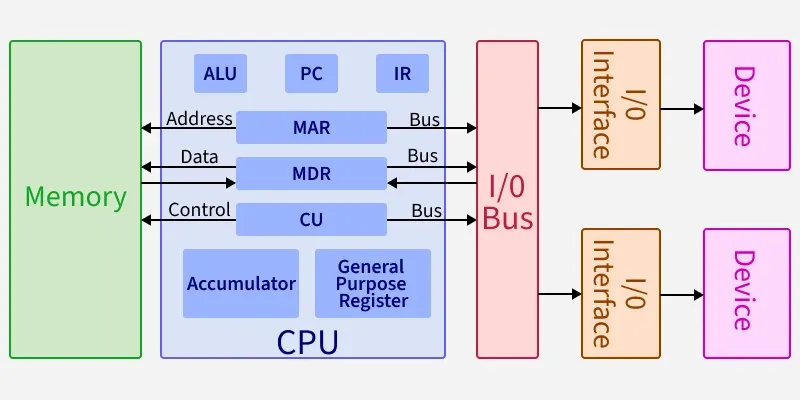
Registers are small, fixed-size storage locations built directly into the CPU. Because they are physically on the same chip and built from the same high-speed circuitry as the ALU, accessing them is nearly instantaneous.
Let's continue with the same article to see how registers fit into our processor model.
Understanding Computer Organization from First Principles
This next section introduces registers as the solution to the storage problem for the ALU.
Please read the section The Need for Storage. Note how the data flows from a "register file" (a collection of registers) into the ALU and how the result might be stored back in a register.
There are different types of registers, each with a specific job. For now, we are most interested in General-Purpose Registers (GPRs), which are used as a temporary workspace for the ALU. As we progress, we'll encounter many specialized registers.
For a more detailed look at the variety and function of registers, let's turn to another resource.
Anatomy of a CPU. The Core of Digital Evolution
This article provides a concise breakdown of the components inside a modern CPU core.
First, quickly review the list under the "Core Components" heading, from Control Unit (CU) to the end of the list. This gives you a good map of the territory. Then, focus on the section Registers. Pay attention to the classification of registers. You'll see GPRs, but also the Program Counter (PC), Stack Pointer (SP), and Status Registers. We'll be dealing with all of these directly when we build our OS.
The Orchestrator: The Control Unit
So, we have an ALU to perform calculations and registers to hold the data. But what directs the whole show? What tells the registers to send their values to the ALU? What tells the ALU whether to add or subtract? And what ensures that instructions are executed in the correct order?
This is the job of the Control Unit (CU). The CU is the orchestrator of the CPU. It doesn't perform any calculations itself. Instead, it reads instructions from memory, decodes them, and generates a series of timed electrical signals that control all the other components. It tells the memory to fetch data, directs the ALU to perform a specific operation, and routes the output back to the correct register.
This video gives a good overview of how the Control Unit acts as "middle management", coordinating the other parts of the CPU.
Ep 079: Basic CPU Architecture and Instruction Execution
This video, "Basic CPU Architecture and Instruction Execution," provides a clear, diagram-based explanation of how the different CPU components interact.
Watch the segment from the beginning, where the presenter introduces the bus interface unit, instruction decoder, ALU, and registers. Focus on how the instruction decoder (a key part of the CU) interprets the instruction and communicates with the ALU and registers. Then, watch from the explanation of the Control Unit's role as the "middle management" that schedules and assigns tasks.
The Heartbeat of the CPU: The Instruction Cycle
Now we have all the key players: the ALU (the muscle), the registers (the hands), and the Control Unit (the brain). These components work together in a relentless, cyclical process to execute program instructions. This process is known as the Fetch-Decode-Execute cycle. It is the fundamental operation of nearly every modern computer.
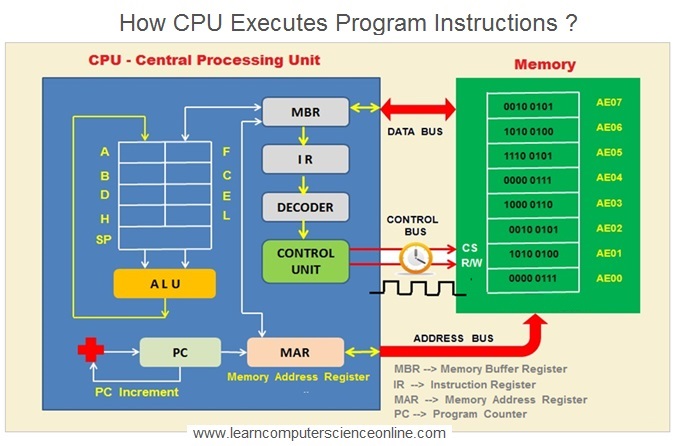
- Fetch: The Control Unit fetches the next instruction from memory. It knows where to find it because a special register, the Program Counter (PC) (also called the Instruction Pointer or IP), holds the memory address of that instruction. The fetched instruction is then placed in another special register, the Instruction Register (IR).
- Decode: The CU examines the binary pattern of the instruction in the IR. It deciphers what operation is to be performed (the opcode) and what data is to be used (the operands).
- Execute: The CU sends control signals to the appropriate components. If it's an arithmetic operation, data is routed from registers to the ALU, the ALU performs the operation, and the result is written back to a register. If it's a data movement instruction, the CU might manage a transfer between memory and a register.
After the execute stage is complete, the Program Counter is updated to point to the next instruction, and the entire cycle begins again. This happens billions of times per second.
Let's read the final sections of our first article, which tie all these concepts together.
Understanding Computer Organization from First Principles
These sections complete our conceptual processor by adding the Control Unit and explaining the full execution cycle.
First, read the two sections The Control Unit and Decoders and The Instruction Pointer. This explains how the CU deciphers binary instructions and introduces the fetch-decode-execute cycle. Finally, read the summary sections The Instruction Fetch-Decode-Execute Cycle and the Conclusion. They provide a great recap of all the components we've discussed.
To see this cycle in action, let's watch a fantastic animation that builds a CPU from the components we've discussed and walks through the execution of a small program.
CRAFTING A CPU TO RUN PROGRAMS
This video, "CRAFTING A CPU TO RUN PROGRAMS," provides a superb visual demonstration of the concepts we've just learned.
Watch the section from the demonstration that explains how the control unit works. Pay close attention to how the Address Register (Program Counter) is used to fetch instructions from memory into the Instruction Register, and how the CU then orchestrates the decoding and execution of each instruction (load, add, store).
Conclusion
In this lesson, we have dissected the CPU and identified its three core components, establishing a foundational model for how a computer executes programs.
- Registers: These are the CPU's immediate, high-speed storage, holding the data and instructions it's currently working on. We have general-purpose registers for calculations and special-purpose registers like the Program Counter and Instruction Register.
- Arithmetic Logic Unit (ALU): This is the calculator of the CPU, performing all mathematical and logical operations.
- Control Unit (CU): This is the orchestrator, which directs the flow of information and coordinates the actions of all other components.
These parts work in concert, endlessly repeating the Fetch-Decode-Execute cycle to run the instructions that make up every piece of software, from the simplest script to a complex operating system.
In our next lesson, we will take a closer look at this cycle, diving deeper into how a single instruction is fetched from memory, decoded by the control unit, and finally executed by the hardware.