In our last lesson, you mastered multi-dimensional aggregation with GROUP BY, learning to slice data using the existing columns in your tables. This is a powerful technique, but what happens when the categories you need for your analysis don't exist as columns? For instance, how would you group products into "High Price" and "Low Price" buckets if you only have a raw price column?
This lesson introduces the CASE statement, which is SQL's version of conditional if/then/else logic. As a developer, you're already very familiar with conditional structures in languages like PHP. In analytical SQL, the CASE statement is primarily used to create new, calculated columns based on logical rules. This allows you to define your own categories, or dimensions, directly within a query, giving you immense flexibility to shape the data for your analysis.
The "If/Then/Else" of SQL: Understanding CASE
The CASE statement evaluates a list of conditions in order and returns a value when the first condition is met. It's a fundamental tool for adding programmatic logic to your queries.
To get a solid grasp of the syntax and the logical flow, the following video provides an excellent visual explanation.
SQL CASE WHEN Statement (Visually Explained) | #SQL Course 20
This video from "Data with Baraa" provides a clear, step-by-step introduction to the CASE statement, using flowcharts to illustrate how SQL processes the conditional logic.
Please watch the following segments: First, watch the overview of the syntax to understand the keywords: CASE, WHEN, THEN, ELSE, and END. Next, observe how SQL executes the logic. Pay close attention to how the order of conditions matters and how the ELSE clause provides a default value, preventing NULLs.
The image below provides a fantastic summary of the syntax, the top-to-bottom evaluation flow, and the different contexts in which a CASE statement can be used in a query.

Notice the two forms presented:
- Searched CASE (most flexible):
CASE WHEN <condition> THEN <result> ... END. This is the form you'll use most often in data analysis because it allows for complex conditions (e.g.,price > 100 AND category = 'Electronics'). - Simple CASE (equality match only):
CASE <column> WHEN <value> THEN <result> ... END. This is a shorthand for when you are only checking for equality against a single column.
Creating Custom Categories with CASE
The most common analytical use of CASE is to "bin" or "bucket" data—especially numerical data—into descriptive categories. For example, you might transform raw order values into categories like 'Small', 'Medium', and 'Large'. This makes the data much easier to summarize and report on.
You can create these categories by stacking multiple WHEN/THEN clauses. The database evaluates them in the order you write them, stopping at the first one that is true for a given row.
SQL CASE Statement | Intermediate SQL
This section of the ThoughtSpot SQL tutorial demonstrates how to build more complex categorization logic using multiple conditions.
Please read the section on multiple conditions. Pay attention to how the order of the WHEN clauses is critical for the logic to work as intended.
Your Turn: Categorizing Products
Let's apply this in Metabase. Open a new question with the native SQL editor and we'll categorize products from the Products table based on their price.
Run the following query:
SELECT
  title,
  price,
  CASE
    WHEN price < 20.00 THEN 'Inexpensive'
    WHEN price >= 20.00 AND price < 75.00 THEN 'Mid-Range'
    WHEN price >= 75.00 THEN 'Premium'
    ELSE 'Unknown'
  END AS price_category
FROM products
ORDER BY price;
In the results, you'll see a new price_category column that doesn't exist in the original table. You created it on the fly. This is the first step towards more advanced analysis.
The Real Power: CASE and GROUP BY
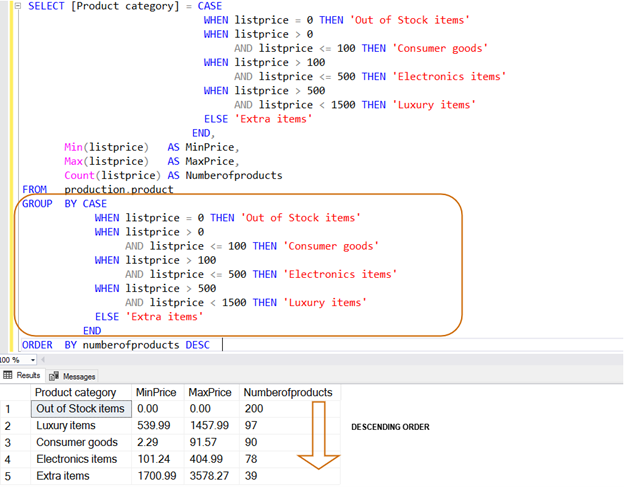
Here is where this lesson connects directly with the previous one. Once you've defined a custom category with a CASE statement, you can immediately use it in a GROUP BY clause to aggregate your data. This allows you to summarize your data based on your own business logic, not just the raw columns available.
The query in the image below is a perfect example of this pattern. It first defines a Product category using a CASE statement in the SELECT list and then uses that exact same CASE statement in the GROUP BY clause.
Your Turn: Aggregating by Custom Categories
Now, let's adapt our previous query to answer a business question: "How many products do we have in each price category, and what's the average price within each category?"
To do this, you'll group by the price_category you just defined.
SELECT
  CASE
    WHEN price < 20.00 THEN 'Inexpensive'
    WHEN price >= 20.00 AND price < 75.00 THEN 'Mid-Range'
    WHEN price >= 75.00 THEN 'Premium'
    ELSE 'Unknown'
  END AS price_category,
  COUNT(*) AS number_of_products,
  AVG(price) AS average_price
FROM products
GROUP BY price_category -- You can group by the alias of your CASE statement!
ORDER BY number_of_products DESC;
Note: Most modern database systems, including PostgreSQL which powers the Metabase sample data, allow you to use the column alias (price_category) in the GROUP BY clause. This makes the query much cleaner than repeating the entire CASE block.
By running this query, you've combined the logic of CASE with the power of GROUP BY to create a completely custom summary report. This is a daily activity for data analysts.
Other Practical Applications of CASE
While categorization is the main use case for analysis, CASE is a versatile tool. Here are a couple of other common patterns.
- Performing Conditional Calculations: The
THENclause isn't limited to returning static strings. It can perform calculations. This is useful for modeling scenarios, like calculating sales commissions that vary by performance tier or, as shown in this video, calculating salary raises based on job title.
Intermediate SQL Tutorial | Case Statement | Use Cases
This clip from "Alex The Analyst" demonstrates a powerful application of CASE for conditional calculations.
Watch this segment on calculating salary raises. Notice how the THEN clause contains a mathematical formula that changes based on the condition.
- Mapping and Cleaning Data:
CASEis also frequently used in the "Transform" step of an ETL process to clean up messy data or map codes to more descriptive values. For example, you might map cryptic status codes like1,2,3to'Shipped','Delivered','Returned'. This makes the data much more user-friendly for reporting in tools like Power BI.
Conclusion
In this lesson, you've added a crucial tool to your analytical SQL toolkit. You've seen that CASE is far more than just an if/else block; it's the key to creating custom dimensions, enabling you to reshape and analyze data according to your specific business rules. By combining CASE with GROUP BY, you can now move beyond simple aggregations and build truly insightful summary reports.
Key Takeaways:
- The
CASEstatement providesif/then/elselogic within an SQL query. - Its primary analytical purpose is to create new, calculated columns that categorize or "bin" data.
- You can, and frequently will,
GROUP BYthe results of aCASEstatement to perform aggregations on your custom categories. - The order of
WHENconditions is critical, as SQL stops at the first true condition. - The
ELSEclause is essential for handling any rows that don't meet yourWHENconditions. - All possible results from the
THENandELSEclauses must have a compatible data type.
Your queries are starting to get more complex and powerful. What happens when a single query involves multiple steps of logic, perhaps even multiple CASE statements? It can become difficult to read and debug. In our next lesson, we'll introduce Common Table Expressions (CTEs), a powerful feature for structuring complex queries into clean, logical, and readable steps.