Hello! Welcome back to our module on the Foundations of AI Agents.
In our last lesson, we built a ReAct agent capable of reasoning and using tools to solve a multi-step problem within a single turn. However, you likely noticed a key limitation: the agent has no memory. Its "scratchpad" is reset with every new request, making it impossible to hold a conversation or recall information from previous interactions.
Today, we will fix that. This lesson is designed to help you implement short-term memory for an agent using conversation buffer techniques. By the end, your agent will be able to remember past messages, refer to them for context, and engage in more natural, multi-turn dialogues.
Why Agents Need Memory
At their core, LLMs are stateless. Each API call is independent, with no inherent memory of past calls. To create the illusion of a continuous conversation, we must externally manage the history and pass it back to the LLM with each new query. This is the essence of conversational memory.
This process can be visualized as a simple pipeline:
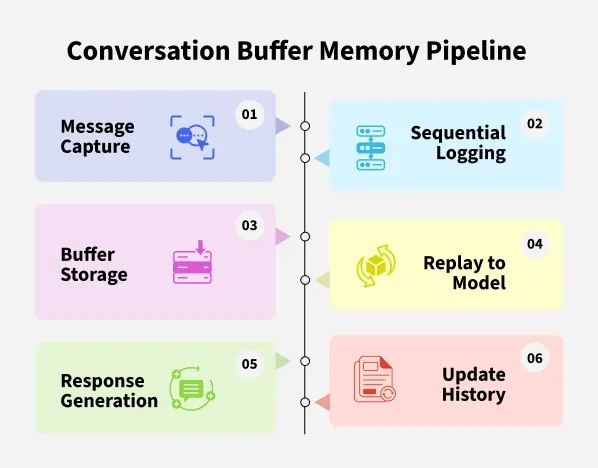
While this seems straightforward, it introduces a significant engineering challenge: the LLM's context window. As a conversation grows, the history can become too large to fit within the model's context limit, leading to errors or performance degradation. Therefore, we need different strategies to manage this memory effectively.
Types of Conversation Memory
Let's explore the common strategies for managing conversation history. While we'll be using the latest LangChain methods for implementation, understanding these conceptual types is crucial.
Conversational Memory in LangChain
The following article, "Conversational Memory in LangChain," provides an excellent overview of different memory strategies. We will focus on the concepts it introduces rather than its older implementation details.
Please read the introduction and the section 'LangChain's Memory Types'. This will introduce you to the core ideas behind ConversationBufferMemory, ConversationBufferWindowMemory, and ConversationSummaryMemory.
As you've just read, the main approaches are:
- Conversation Buffer Memory: This is the simplest strategy. It stores the entire conversation history verbatim. It's perfect for short conversations but quickly runs into context window limits.
- Conversation Buffer Window Memory: A more practical approach. It only keeps the last
kmessages. This prevents the context from growing indefinitely but means the agent will "forget" older parts of the conversation. - Conversation Summary Memory: A sophisticated strategy where an LLM is used to progressively summarize the conversation. This keeps the context size small while retaining key information, but it adds latency and cost due to the extra LLM calls.
For a software engineer, the class hierarchy for these memory types might look something like this, showing how specialized memory classes inherit from more general base classes.

Implementing Memory in LangChain Agents
In modern LangChain, short-term memory for agents is managed through a checkpointer. A checkpointer is responsible for saving and loading the agent's state, which includes the message history. This allows a conversation (or "thread") to be paused and resumed at any time.
Short-term memory - Docs by LangChain
The official LangChain documentation explains how to add short-term memory using this modern checkpointer system. Let's review the core concept.
Read the 'Overview' and 'Usage' sections. Focus on the role of the checkpointer and how InMemorySaver is used to enable thread-level persistence.
Hands-On: Building an Agent with Memory
Let's upgrade the agent from our last lesson to have a memory. We'll use InMemorySaver, which is perfect for learning as it stores the conversation history in a Python dictionary in memory.
Step 1: Set up the Agent with a Checkpointer
We'll use the same tools as last time but construct the agent using create_agent and pass in a checkpointer. create_agent is the modern, recommended way to build agents in LangChain. It uses langgraph under the hood to manage state.
# Make sure you have the necessary libraries installed:
# pip install langchain langchain-openai langgraph

import os
from langchain_openai import ChatOpenAI
from langchain.tools import tool
from langchain.agents import create_agent, AgentExecutor
from langgraph.checkpoint.memory import InMemorySaver

# Set your OpenAI API key
# os.environ["OPENAI_API_KEY"] = "your-api-key"

# --- Tools from the previous lesson ---
@tool
def search_tool(query: str) -> str:
    """Searches for information on the current US president's age."""
    print(f"--> Searching for: {query}")
    if "current us president's age" in query.lower():
        return "The current US president is 81 years old."
    return "I can only search for the current US president's age."

@tool
def calculator(expression: str) -> str:
    """Evaluates a simple mathematical expression."""
    print(f"--> Calculating: {expression}")
    try:
        # A safer alternative to eval() for production
        return str(eval(expression, {"__builtins__": None}, {"pow": pow}))
    except Exception as e:
        return f"Error: {e}"

tools = [search_tool, calculator]
llm = ChatOpenAI(model="gpt-4-turbo", temperature=0)

# --- The key addition: A Checkpointer for memory ---
memory_saver = InMemorySaver()

# Create the agent with the checkpointer
# Note: We don't need a custom prompt; create_agent handles it for tool-calling models.
agent_executor = create_agent(
    llm,
    tools,
    checkpointer=memory_saver,
)
Step 2: Have a Multi-Turn Conversation
Now, we'll interact with the agent across multiple invoke calls. The key is to pass a thread_id in the configurable dictionary. All calls with the same thread_id belong to the same conversation.
# A unique ID for our conversation thread
thread_id = "my-convo-1"
config = {"configurable": {"thread_id": thread_id}}

# --- Turn 1: Introduce yourself ---
response = agent_executor.invoke({"messages": ["Hi, my name is Alex."]}, config)
print("--- Agent Response 1 ---")
print(response["messages"][-1].content)

# --- Turn 2: Ask a question that requires a tool ---
response = agent_executor.invoke({"messages": ["What is the current US president's age?"]}, config)
print("\n--- Agent Response 2 ---")
print(response["messages"][-1].content)

# --- Turn 3: Ask a follow-up that requires context and another tool ---
response = agent_executor.invoke({"messages": ["Great, now what is that age raised to the power of 0.5?"]}, config)
print("\n--- Agent Response 3 ---")
print(response["messages"][-1].content)

# --- Turn 4: Test the agent's memory ---
response = agent_executor.invoke({"messages": ["By the way, what's my name?"]}, config)
print("\n--- Agent Response 4 ---")
print(response["messages"][-1].content)
When you run this, you'll see the agent correctly answers "Your name is Alex." in the final turn. The InMemorySaver checkpointer automatically saved the history after each invoke and loaded it at the start of the next one for the same thread_id.
Managing Long Conversations with a Window Buffer
Our current agent uses a simple buffer memory, which will eventually break on long conversations. The modern way to handle this in LangChain agents is to use middleware. Middleware functions can inspect and modify the agent's state before or after the LLM call.
We can create a trim_messages middleware function that acts as a window buffer, keeping only the most recent messages.
Short-term memory - Docs by LangChain
Let's return to the LangChain documentation to see how to implement message trimming using middleware.
Read the sections 'Common patterns' and 'Trim messages'. Pay close attention to the @before_model decorator and the logic inside the trim_messages function. This is the recommended pattern for managing context window size.
As the documentation shows, we can use the @before_model decorator to create a function that runs just before the state is passed to the LLM. Let's implement this.
from langchain.agents.middleware import before_model
from langgraph.graph.message import AIMessage, HumanMessage, SystemMessage, RemoveMessage, add_messages
from typing import Any

# We'll set a small window size to see the effect clearly
MAX_MESSAGES = 4

@before_model
def trim_messages(state: dict, config: dict) -> dict[str, Any] | None:
    """Keeps only the last few messages to fit the context window."""
    messages = state["messages"]

    # Don't trim if we are within the limit
    if len(messages) <= MAX_MESSAGES:
        return None

    # The first message is often a system prompt, which we want to keep.
    first_message = messages[0]

    # Keep the last `MAX_MESSAGES - 1` messages
    last_messages = messages[-(MAX_MESSAGES - 1):]

    # The new message list that will be sent to the model
    new_messages = [first_message] + last_messages

    # `add_messages` is a special function that correctly handles message updates
    return {"messages": add_messages(new_messages)}


# Re-create the agent with the trimming middleware
agent_with_window_memory = create_agent(
    llm,
    tools,
    checkpointer=memory_saver,
    middleware=[trim_messages] # Add our new middleware here
)

# Let's start a new conversation to test this
thread_id_window = "my-convo-2"
config_window = {"configurable": {"thread_id": thread_id_window}}

# --- Have a conversation that exceeds the window size ---
agent_with_window_memory.invoke({"messages": ["Hi, my name is Sam."]}, config_window)
agent_with_window_memory.invoke({"messages": ["I live in New York."]}, config_window)
agent_with_window_memory.invoke({"messages": ["I like to play chess."]}, config_window)
agent_with_window_memory.invoke({"messages": ["My favorite color is blue."]}, config_window)

# By now, the first message where we mentioned our name should have been trimmed.
final_response = agent_with_window_memory.invoke({"messages": ["What is my name?"]}, config_window)

print("\n--- Final Response (Windowed Memory) ---")
print(final_response["messages"][-1].content)
When you run this second example, the agent will likely respond that it doesn't know your name. This is because our trim_messages function kept only the most recent messages, and the one containing "My name is Sam" was pushed out of the context window.
Test your understanding!
In the trim_messages function, we preserved the very first message (first_message) in addition to the most recent ones. Why is this often a good practice when managing conversation history?
Show answer
The first message in an agent's history is typically a SystemMessage that contains the core instructions for the agent (e.g., "You are a helpful assistant," instructions on how to use tools, its persona, etc.). If we trimmed this message, the agent might forget its fundamental purpose or constraints, leading to unpredictable behavior. By always preserving the system prompt, we ensure the agent's core instructions remain intact throughout the conversation.
Conclusion
Congratulations! You've successfully given your agent a memory. We've seen that while LLMs are stateless, we can build stateful, conversational applications by managing the message history externally.
Key Takeaways:
- Conversational memory is essential for creating agents that can hold multi-turn dialogues.
- The primary challenge is managing the growing conversation history to fit within the LLM's context window.
- In modern LangChain, agent memory is managed via a
checkpointer, which saves and loads the agent's state for a given conversation thread. - We can implement different memory strategies, like a window buffer, by using middleware (
@before_model) to modify the agent's state before it's passed to the LLM.
What's Next?
Now that our agent can understand context within a conversation, we can tackle more nuanced interactions. In the next lesson, we will dive deeper into the agent's decision-making process by exploring how it selects the best tool from its toolbox, especially in situations where a user's request is ambiguous or could be handled by multiple tools.