Hello! Welcome back to our module on the Foundations of AI Agents.
In our last lesson, we mastered the art of creating custom tools, effectively building a "toolbox" for our agent. We learned how to use LangChain's @tool decorator and BaseTool class to wrap Python functions, making them accessible to an LLM. However, giving an agent tools is only half the story. The real power comes from the agent's ability to reason about which tool to use, when to use it, and how to combine multiple tool uses to solve a complex problem.
Today, we will explore the fundamental reasoning engine that makes this possible. This lesson is designed to help you build a basic agent that follows the ReAct (Reason+Act) pattern using a framework like LangChain. We will demystify how an agent "thinks" and bridge the gap between having tools and using them intelligently.
What is the ReAct Pattern?
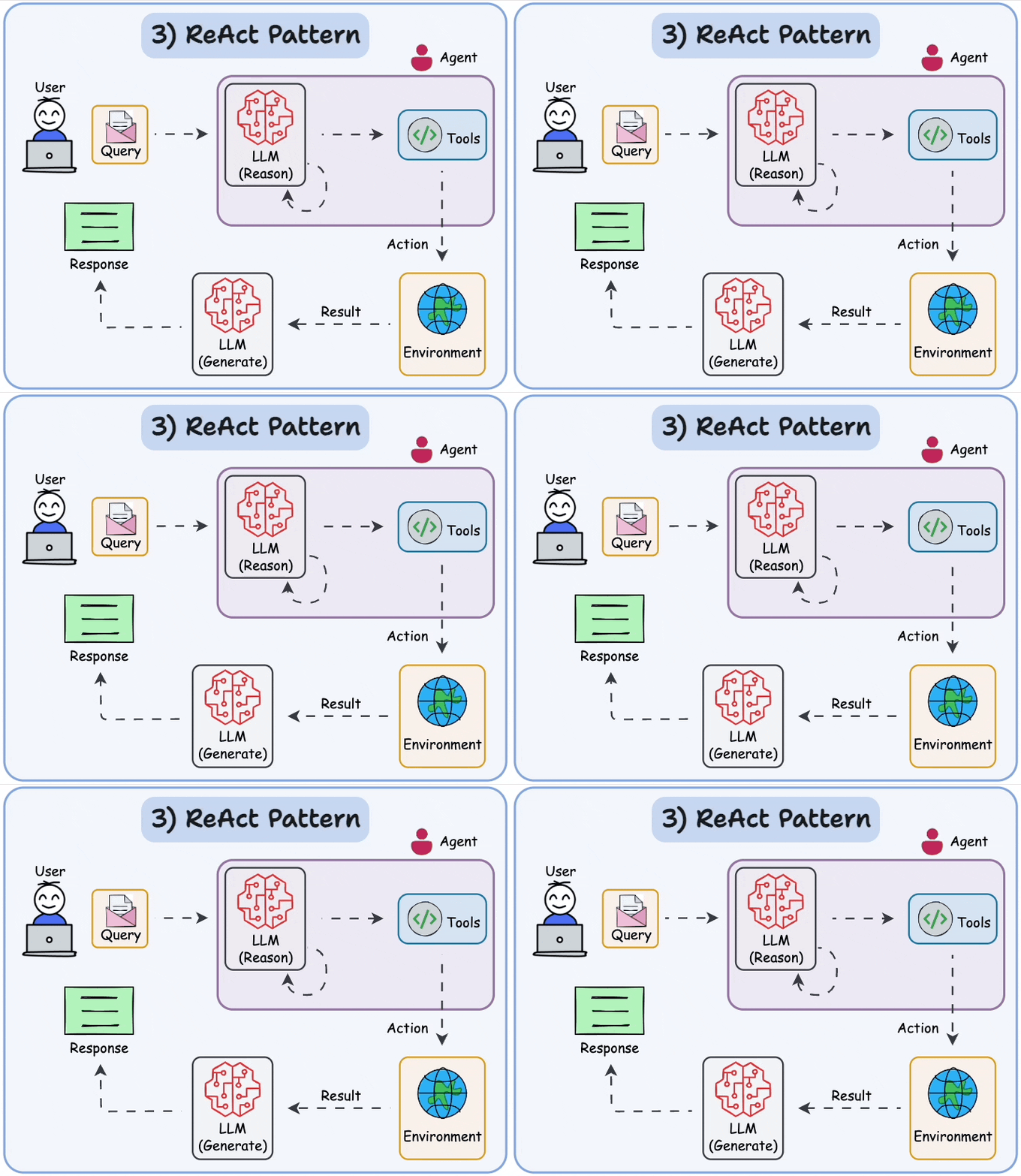
ReAct, which stands for Reason and Act, is a powerful paradigm that enables an agent to systematically work through a problem. Instead of trying to find a solution in a single step, the agent enters an iterative loop:
- Reason (Thought): The agent analyzes the problem and its current state, then "thinks" about the next logical step.
- Act (Action): Based on its reasoning, the agent decides to use a specific tool with specific inputs.
- Observe (Observation): The agent executes the action and observes the outcome or result from the tool.
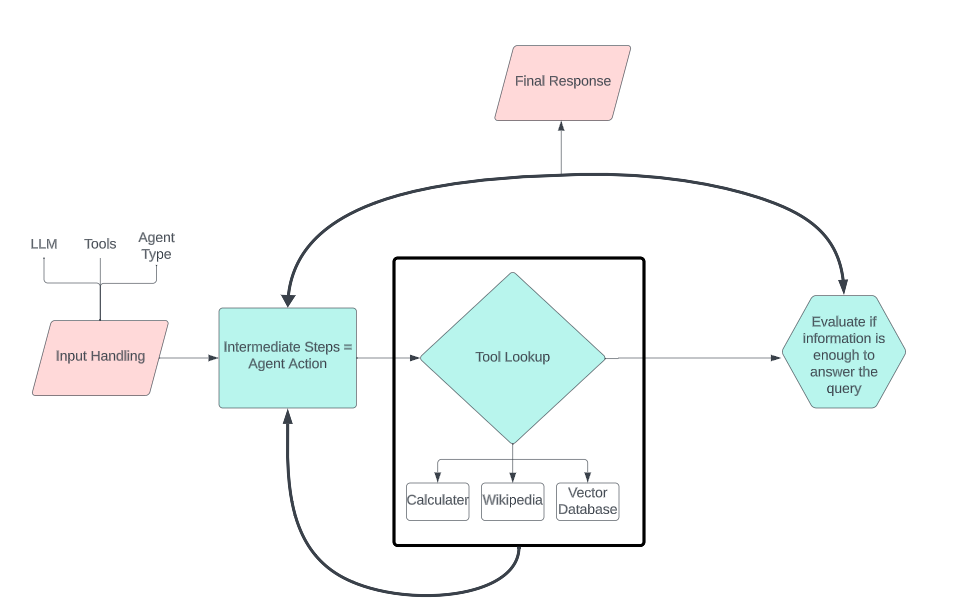
This loop repeats, with each observation feeding into the next reasoning step, until the agent has gathered enough information to provide a final answer. For a software engineer, you can think of this as a structured, observable debugging process for an LLM's thought process.
Let's start by getting a high-level visual understanding of this flow.
The Magic Behind ReAct: It's All in the Prompt
So, how do we get an LLM to follow this structured loop? The core mechanism is a cleverly designed prompt. The agent doesn't have an internal "state machine" in the traditional software sense; instead, its state is managed entirely through the context of the prompt.
Understanding LangChain Agents: create_react_agent vs ...
This article does an excellent job of explaining the core idea behind different agent types. It highlights that the main distinction lies in the prompting strategy used to guide the LLM.
Please read the introduction, 'What Are AI Agents?', and the section 'create_react_agent: The Text-Based Reasoner'. Pay close attention to the detailed example of the iterative prompt sent to the LLM. This will show you exactly how the 'Thought/Action/Observation' cycle is managed through text.
As you saw in the reading, the agent maintains an internal "scratchpad." After each tool use, it appends the Observation to this scratchpad and feeds the entire history back to the LLM. This gives the model the full context of its previous thoughts and actions, allowing it to decide what to do next.
This iterative process is what makes ReAct agents so transparent and debuggable. You can literally read the agent's mind by inspecting the chain of thoughts and actions.
Building a ReAct Agent with LangChain
Now, let's put this theory into practice. We'll build an agent that can solve a multi-step problem requiring both searching for information and performing a calculation.
For this, we will use LangChain's create_react_agent function, which is designed specifically for this pattern. While newer LangChain versions have a more abstract create_agent function, create_react_agent is excellent for learning because its structure maps directly to the ReAct principles we've just discussed.
Step 1: Set Up the Environment and Tools
First, let's set up our LLM and define the tools the agent can use. We'll create two simple tools: a mock "search" tool and the calculator from our previous lesson.
# Make sure you have the necessary libraries installed:
# pip install langchain langchain-openai

import os
from langchain_openai import ChatOpenAI
from langchain.tools import tool

# Set your OpenAI API key
# os.environ["OPENAI_API_KEY"] = "your-api-key"

# Define the tools
@tool
def search_tool(query: str) -> str:
    """
    Searches for information on a given topic.
    For this demo, it returns a fixed answer for a specific query.
    """
    print(f"Searching for: {query}")
    if "current US president's age" in query.lower():
        return "The current US president, Joe Biden, was born on November 20, 1942, making him 81 years old as of late 2023."
    return "I can only search for the current US president's age."

@tool
def calculator(expression: str) -> str:
    """Evaluates a simple mathematical expression."""
    print(f"Calculating: {expression}")
    # In a real app, use a safer math library instead of eval()
    try:
        return str(eval(expression, {"__builtins__": None}, {}))
    except Exception as e:
        return f"Error: {e}"

# Initialize the LLM
llm = ChatOpenAI(model="gpt-4-turbo", temperature=0)

# Create the list of tools
tools = [search_tool, calculator]
Step 2: Define the ReAct Prompt Template
This is the most critical part. The prompt must instruct the LLM on how to format its response to include Thought and Action. It also includes placeholders that the agent's runtime (AgentExecutor) will fill in.
from langchain_core.prompts import PromptTemplate

# This template is based on the standard ReAct prompt structure
template = """
Answer the following questions as best you can. You have access to the following tools:

{tools}

Use the following format:

Question: the input question you must answer
Thought: you should always think about what to do
Action: the action to take, should be one of [{tool_names}]
Action Input: the input to the action
Observation: the result of the action
... (this Thought/Action/Action Input/Observation can repeat N times)

Thought: I now know the final answer
Final Answer: the final answer to the original input question

Begin!

Question: {input}
Thought:{agent_scratchpad}
"""

prompt = PromptTemplate.from_template(template)
Let's break down the placeholders:
{tools}: TheAgentExecutorwill automatically populate this with a formatted list of tool names and their descriptions.{tool_names}: This will be a comma-separated list of tool names.{input}: The user's initial question.{agent_scratchpad}: This is where the magic happens. TheAgentExecutorwill insert the sequence of previousAction/Observationpairs here, creating the iterative loop.
Step 3: Create and Run the Agent
With the tools and prompt ready, we can now create the agent and the AgentExecutor that will run it. The AgentExecutor is the runtime environment that orchestrates the ReAct loop.
from langchain.agents import AgentExecutor, create_react_agent

# Create the agent
agent = create_react_agent(llm, tools, prompt)

# Create the agent executor
agent_executor = AgentExecutor(agent=agent, tools=tools, verbose=True)

# Now, let's invoke the agent with a multi-step problem
question = "What is the current US president's age raised to the power of 0.5?"
response = agent_executor.invoke({"input": question})

print("\n--- Final Answer ---")
print(response["output"])
When you run this code, pay close attention to the output from verbose=True. You will see the agent's reasoning process printed out, step-by-step.
Expected Output Walkthrough:
- Thought: The agent will reason that it first needs to find the president's age. It cannot do this with the calculator.
- Action: It will decide to use
search_tool. - Action Input: The input will be something like "current US president's age".
- Observation: The
agent_executorruns the tool, and the output ("...81 years old...") is captured. - Thought: Now the agent has the age (81). It sees the second part of the question is a math operation ("raised to the power of 0.5"). It reasons that it should now use the calculator.
- Action: It will decide to use
calculator. - Action Input: The input will be the expression, like
81**0.5. - Observation: The calculator returns
9.0. - Thought: The agent now has all the information it needs and has solved the problem. It will state that it knows the final answer.
- Final Answer: The agent will formulate the final response to the user, e.g., "The current US president's age raised to the power of 0.5 is 9."
This transparent chain of reasoning is the hallmark of the ReAct pattern.
Test your understanding!
What do you think would happen if you asked the agent the same question, but removed the calculator tool from the tools list? How would the agent's reasoning change, and what would the final output likely be?
Show answer
If you remove the calculator tool, the agent's reasoning would proceed as follows:
- It would still correctly use the
search_toolto find the president's age is 81. - After getting the age, its next
Thoughtwould be that it needs to calculate81**0.5. - It would look at its available tools and see only
search_tool. It would realize that this tool cannot perform mathematical calculations. - The agent would likely get "stuck" in a loop, possibly trying to use the search tool again, or it would conclude that it cannot answer the question. A well-behaved agent would ultimately state that it doesn't have the necessary tool to perform the calculation and cannot provide the final answer. It would not try to calculate the answer itself, as the ReAct framework forces it to use a tool for any action.
Conclusion
In this lesson, we demystified the core reasoning mechanism behind many AI agents. We moved from simply creating tools to understanding how an agent can use them in a logical, multi-step sequence to solve problems.
Key Takeaways:
- ReAct (Reason+Act) is an iterative pattern where an agent loops through Thought, Action, and Observation to solve problems.
- This pattern is powered by a specific prompting strategy. The agent's "thinking" process is externalized into the prompt's context.
- The
agent_scratchpadis a crucial part of the prompt that maintains the history of actions and observations within a single query, enabling stateful reasoning. - LangChain's
create_react_agentandAgentExecutorprovide the necessary components to build and run this loop, withverbose=Trueoffering a transparent window into the agent's "mind."
What's Next?
The ReAct loop we built today has a memory that lasts for just a single query. The agent_scratchpad is cleared every time we call invoke(). This makes our agent very capable for single-turn tasks but unable to hold a conversation. In our next lesson, we will address this limitation by implementing short-term memory for an agent using conversation buffer techniques, allowing it to remember past interactions and engage in more natural dialogues.