Hello! Welcome to the first lesson in our new module, "Optimizing and Scaling LLM Applications."
In our previous module, we moved from building single agents to constructing and evaluating complex, multi-agent systems. You learned how to measure an agent's performance using metrics like task completion rate and decision quality. Now, we shift our focus from functionality to production-readiness. Building a working prototype is one thing; building a scalable, efficient, and robust AI application is another.
A fundamental challenge you'll face as an AI Engineer is the finite context window of Large Language Models. Whether it's a long conversation history, a dense legal document, or an extensive codebase, you will often encounter inputs that are too large for a model to process in one go.
This lesson directly addresses that problem. Our learning outcome is to implement a sliding window or summarization strategy to process context that exceeds an LLM's context window. We will explore the trade-offs of each approach and learn how to implement them using practical, code-level examples.
The Context Window: A Core Constraint
Every LLM has a context window, which is the maximum number of tokens it can consider when generating a response. This limit has been a major driver of innovation in LLM application design.
- Older models like
gpt-3.5-turbohad windows of 4k or 16k tokens. - Modern models boast much larger windows (e.g., Gemini 1.5 Pro with up to 1 million tokens).
While larger windows are helpful, they don't eliminate the problem. Processing enormous contexts can be slow and expensive. Furthermore, some documents or data streams are effectively infinite. As a software engineer, you know that designing for constraints leads to more robust systems. Relying solely on a large context window is like assuming you'll always have infinite RAM; it's not a sustainable strategy.
We will focus on two primary strategies to manage this constraint: summarization and sliding windows.
Strategy 1: Summarization
The most intuitive approach is to compress the context. If the text is too long, we use an LLM to create a shorter summary that preserves the most important information. There are different ways to apply this, depending on the use case.
Summarization for Conversational History
In chatbots and agents, the context is an ever-growing conversation history. A simple but powerful technique is to progressively summarize the conversation as it unfolds.
Conversational Memory for LLMs with Langchain
The article 'Conversational Memory for LLMs with Langchain' from Pinecone provides an excellent overview of different memory strategies. We'll start by focusing on their summarization approach.
Read the section titled 'ConversationSummaryMemory'. Pay attention to how it uses an LLM to create a 'running summary' of the conversation. Note the comparison chart showing how its token usage scales compared to keeping the full history.
As the article explains, ConversationSummaryMemory works by taking the existing summary and the latest user/AI messages, and then generating a new, updated summary.
- Pro: It can theoretically handle infinitely long conversations, as the summary length grows much slower than the raw transcript.
- Con: It relies on the summarization ability of the LLM. If the summarizer omits a crucial detail from an early part of the conversation, that information is lost forever. It also adds a bit of latency and cost to each turn, as it requires an extra LLM call for summarization.
Summarization for Large Documents: Recursive "Map-Reduce"
What if your context isn't a conversation, but a single, large document? For this, we can use a recursive approach often called the "map-reduce" strategy. It's a classic pattern in distributed systems, and it applies beautifully here.
- Map: Split the large document into smaller chunks that each fit within the context window.
- Summarize (the "map" step): Pass each chunk to an LLM to be summarized independently.
- Combine (the "reduce" step): Join the individual summaries together.
- Repeat if necessary: If the combined summary is still too large, you repeat the process on the summaries themselves until you have a final summary that fits your target size.
This next resource provides a clear, code-driven explanation of this process.
Enhancing LLM Context with Recursive Summarization ...
This guide on GitHub, 'Enhancing LLM Context with Recursive Summarization', breaks down the map-reduce approach into simple Python functions using the transformers library.
Read from the beginning ('Introduction to LLM Context Enhancement') through 'Slide 5: Recursive Summarization Process'. Focus on understanding the logic in the chunk_text, summarize_chunk, and recursive_summarize functions. This shows you how the map-reduce pattern is implemented in code.
This method is powerful for distilling large bodies of text into a manageable size for tasks like question-answering or high-level analysis.
Strategy 2: The Sliding Window
Instead of summarizing, the sliding window approach simply discards the oldest information. It maintains a fixed-size buffer of the most recent context. This is analogous to how window functions work in databases or stream processing.
This image provides a great mental model for the sliding window concept.
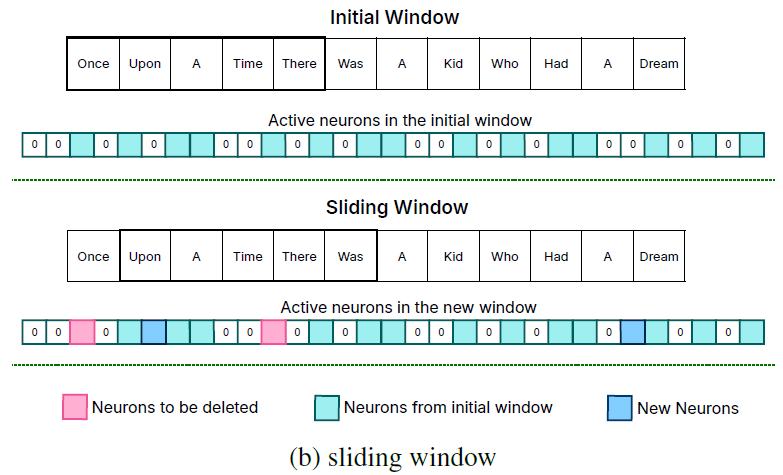
For conversational agents, this means keeping only the last k interactions.
Conversational Memory for LLMs with Langchain
Let's return to the Pinecone article, which implements this exact strategy with LangChain's ConversationBufferWindowMemory.
Read the section 'ConversationBufferWindowMemory'. Notice how setting k=1 causes the model to forget information from just a few turns ago. This highlights the primary trade-off of this method.
The sliding window approach has clear pros and cons:
- Pro: It is simple, fast, and computationally cheap. It doesn't require extra LLM calls. It ensures perfect recall of the most recent context.
- Con: It suffers from complete amnesia regarding anything that falls outside the window. As shown in the article's example, if the user's original goal was stated early in the conversation, the model will forget it.
The Best of Both Worlds: Hybrid Strategies
Since summarization and sliding windows have complementary strengths and weaknesses, a powerful solution is to combine them. This hybrid approach uses a sliding window for recent messages (to ensure perfect recall) and a summary for older messages (for long-term context).
Conversational Memory for LLMs with Langchain
The final memory type we'll study from the Pinecone article is this hybrid model, which provides a robust, balanced solution.
Read the section 'ConversationSummaryBufferMemory'. This is arguably one of the most practical and widely applicable strategies. Understand how it combines a max_token_limit buffer for recent messages with a summary of everything older.
This hybrid strategy is often a great default choice for building sophisticated conversational agents, as it balances the need for long-term memory with perfect short-term recall, all while managing the context size.
Test your understanding!
You are building an AI agent to act as a programmer's assistant. Its job is to help a developer write, debug, and refactor a large file of code (e.g., 5,000 lines). The developer will have a conversation with the agent, asking it to perform various tasks on the code.
Which context management strategy would be most appropriate here, and why? Consider the nature of the data (code) and the interaction (conversational).
Show answer
A hybrid strategy is likely the best fit, but with a twist.
-
Initial Loading: The 5,000-line code file is too large for most models. A recursive summarization (map-reduce) strategy would be an excellent first step to create a high-level summary of the entire file's structure and purpose. This summary could serve as the initial "system prompt" or background context for the agent.
-
Conversational Interaction: For the conversation itself, a hybrid
ConversationSummaryBufferMemorywould be ideal.- The buffer window is critical because debugging often involves focusing on very specific, recent changes or error messages. The agent needs perfect, verbatim recall of the last few turns.
- The summary component is important for remembering the broader goals of the session (e.g., "we are trying to refactor the database connection logic") even if the conversation drifts to specific implementation details.
A simple sliding window would forget the overall goal, and a simple summarization strategy might lose critical, verbatim details from a recent error message. The combination is most powerful.
Conclusion
You now have a solid understanding of the primary methods for managing an LLM's context window—a critical skill for any AI Engineer.
Key Takeaways:
- Context windows are a fundamental design constraint in LLM applications, affecting cost, latency, and capability.
- Summarization strategies are excellent for compressing information but risk losing details. The "map-reduce" pattern is a key technique for handling large, static documents.
- Sliding window strategies are efficient and provide perfect recall of recent information but suffer from long-term amnesia.
- Hybrid approaches combine summarization and sliding windows to offer a balanced and practical solution, especially for complex conversational applications.
What's Next?
Managing context size is one key optimization. Another, equally important for user-facing applications, is managing latency. A user won't wait 30 seconds for an answer, even if it's a great one. In our next lesson, we will tackle this by learning how to implement streaming to reduce perceived latency in user-facing LLM applications.