Hello! Welcome back to your AI video creation course.
In our last two lessons, you crafted the complete audio "mood" for your videos, generating a professional voiceover and custom background music. Today, we'll add the final layer of audio polish that makes videos feel alive and engaging: sound effects.
This lesson directly addresses the learning outcome of generating specific sound effects (e.g., whoosh, pop) using AI to enhance video engagement. You'll learn why AI-generated SFX are a massive leap forward from traditional sound libraries and master the art of writing descriptive prompts to create precisely the sound you need. By the end of our session, you'll be able to generate custom SFX for your UGC ads and animated stories using a free AI tool.
1. The Creative Freedom of AI Sound Effects
For decades, video creators have relied on stock sound libraries. While useful, they can be restrictive, expensive, and repetitive. How many times have you heard the exact same "whoosh" sound in different YouTube videos? AI changes this entirely.
To understand why AI audio generation is such a game-changer, let's explore a short article that breaks down the benefits.
Your Guide to Free AI Audio Generators - SFX Engine
The article 'Your Guide to Free AI Audio Generators' from SFX Engine explains the creative and practical advantages of using AI over traditional sound libraries.
Please read two parts of this article: Start at the beginning and read down to the table titled 'Traditional Sound Libraries vs AI Audio Generation.' Focus on how AI offers more uniqueness and customization. Then, jump to the section 'Common Questions About AI Audio Generators' and read the first two questions: 'Is the Audio Truly Royalty-Free?' and 'What Are the Limits on a Free Plan?'. This is crucial for using these tools correctly.
The key takeaway is that AI empowers you to move from searching for a sound that's "good enough" to creating the perfect sound from scratch. This gives your content a unique sonic identity. The tools for this are surprisingly simple, often revolving around a single text box.

2. Crafting the Perfect Sound Prompt
The quality of the sound effect you generate is directly tied to the quality of your prompt. A simple prompt like "door creak" will give you a generic sound. A detailed prompt, however, can produce a sound effect with character, atmosphere, and emotional weight.
The article from SFX Engine has an excellent section that breaks down how to think like a foley artist when writing prompts.
Your Guide to Free AI Audio Generators - SFX Engine
Let's return to the SFX Engine guide to learn a powerful framework for writing effective prompts.
Please read the sections 'Breaking Down an Effective Prompt' and 'Advanced Prompting Techniques for Better Results.' Pay close attention to the four key elements it identifies: The Object, The Action, The Material, and The Environment. Absorb how it builds from a simple 'door creak' to a much more descriptive prompt.
As you've just read, the best prompts include these four elements:
- The Object: What is making the sound? (e.g., a heavy wooden door)
- The Action: What is it doing? (e.g., creaking open slowly)
- The Material: What is the object made of? (e.g., old, splintering wood)
- The Environment: Where is it happening? (e.g., in a vast, stone-walled castle hall)
Combining these turns a generic idea into a specific, high-quality audio scene: "A heavy, splintering wooden door creaking open slowly in a vast, stone-walled castle hall, with a slight echo."
3. Hands-On: Generating SFX with ElevenLabs
Let's put this theory into practice. We will use ElevenLabs, the same platform you may have used for text-to-speech. It has a fantastic, easy-to-use sound effects generator with a free tier.
First, let's see how it works. This official walkthrough provides a quick and clear overview of the interface and its features.
How to Use AI Sound Effects – ElevenLabs SFX v2 Walkthrough
This walkthrough from the ElevenLabs channel, 'How to Use AI Sound Effects – ElevenLabs SFX v2 Walkthrough,' will get you up to speed on the tool.
Please watch from 00:56 to 02:45. Focus on how the user types a prompt, generates four variations, and the options available for downloading—including high-quality WAV files for professional use.
Now you can see the results of this process. The AI takes a text prompt and generates multiple unique takes on that sound.
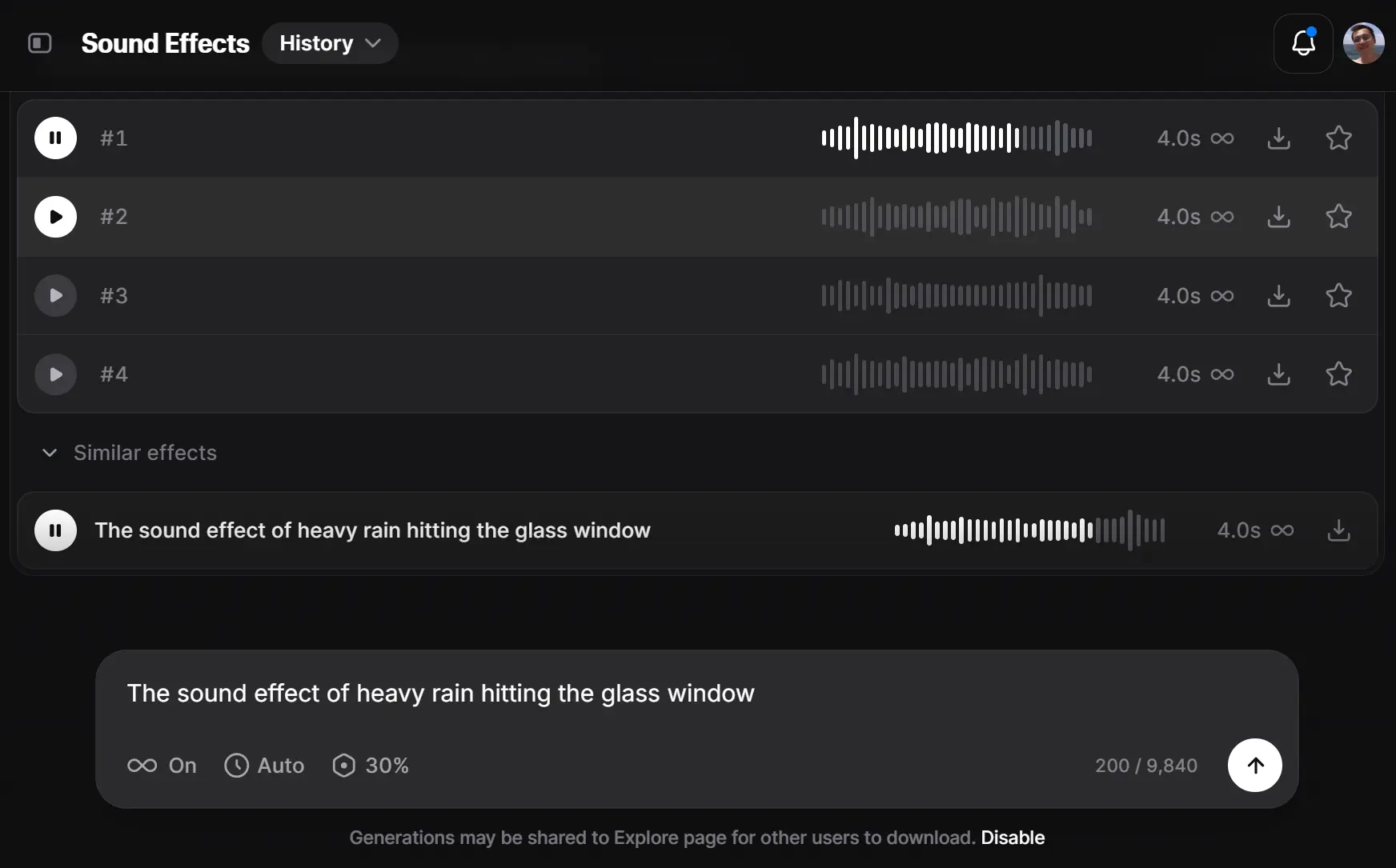
4. Exercise: Adding SFX to Your Projects
It's your turn to be the sound designer. We'll generate effects for the same two scenarios you've been working on: the UGC ad and the animated story.
Scenario 1: UGC Marketing Video
For social media videos, short, sharp sound effects are crucial for highlighting on-screen text, transitions, and calls-to-action.
- Goal: Generate a "pop" and a "whoosh" sound effect.
- Tool: ElevenLabs Sound Effects
Your Task (10 minutes):
- Go to ElevenLabs and navigate to the Sound Effects generator.
- Generate a "Pop":
- Start with a simple prompt:
pop - Now, refine it using the prompting framework. Think about the material and character. Try something like:
soft, satisfying bubble pop, clean soundorsharp digital pop for a notification. - Generate and listen to the variations.
- Start with a simple prompt:
- Generate a "Whoosh":
- Start with:
whoosh - Refine it. Is it fast or slow? High or low pitched? Try:
fast, sharp whoosh transition effect, high-pitchedordeep, cinematic whoosh for a title reveal. - Generate a few options.
- Start with:
- Download your favorite "pop" and "whoosh" as WAV files. These are ready to be used in CapCut to make your visuals more dynamic.
Scenario 2: Short Animated Story
For a narrative, atmospheric sounds are key to building an immersive world.
- Goal: Generate the sound of a mysterious object being discovered.
- Tool: ElevenLabs Sound Effects
Your Task (10 minutes):
- Imagine a scene where a character finds an ancient, glowing stone in a damp cave.
- Use the four-element framework to build a detailed prompt.
- Object: A small, smooth stone.
- Action: Emitting a low, magical hum that slowly gets higher in pitch.
- Material: Crystalline, magical energy.
- Environment: A small, damp cave with water dripping.
- Combine these into a single prompt. For example:
A low, magical humming sound from a crystal, slowly rising in pitch, inside a damp cave with occasional water drips, ethereal, mysterious. - Generate the sound. Notice how much more character and story this sound has compared to a simple "hum."
- Download the best result.
Conclusion
Excellent work! You have now completed the entire AI-powered soundtrack for your videos. You have a voice, background music, and now the detailed sound effects that will make your projects stand out.
Key Takeaways:
- AI for Uniqueness: AI sound effect generators free you from the limitations of stock audio, allowing you to create a unique sonic brand.
- Detail is Everything: The specificity of your prompt (Object, Action, Material, Environment) is the key to generating high-quality, believable sound effects.
- Iterate and Refine: Don't expect the perfect sound on the first try. Generate variations and refine your prompt to zero in on the exact audio you imagine.
- High-Quality Output: Whenever possible, download your sound effects in a high-quality format like WAV to ensure the best audio fidelity in your final video.
Next Lesson Preview:
You have now mastered the full audio pipeline, from scripting to voice, music, and SFX. In our next module, we will shift our focus to visuals and motion. The next lesson will teach you how to animate static images to create dynamic motion shots, turning the still images you've generated into captivating video clips.