Hello! Welcome back to your second lesson.
In our first session, you successfully set up your professional data analysis environment with Anaconda and Jupyter Notebook. You're now ready to move from setting up tools to using them to write code.
Today, we'll dive into the absolute fundamentals of the Python language. This lesson is about learning the basic vocabulary and grammar you need to start giving instructions to the computer. Specifically, we will cover three core concepts: variables, data types, and operators. By the end of this lesson, you'll be able to store information, understand the different kinds of information Python can handle, and perform basic calculations and comparisons.
These concepts are the foundation for everything that follows. Mastering them will allow you to start manipulating data, which is the heart of data analysis.
1. Variables: Naming Your Data
Think of a variable as a labeled box where you can store a piece of information. Instead of using the raw data every time, you can just refer to the label on the box. The "equals" sign (=) is used to place data into the variable—this is called assignment.
For example, instead of remembering a specific sales number like 1573.50, you can store it in a variable named daily_sales.
daily_sales = 1573.50
Now, anytime you need that number, you can just use daily_sales.
To get a solid grasp of how variables work, let's watch a short video. It covers how to create variables, the importance of variable names, and some best practices.
Variables in Python | Python for Beginners
This video from Alex The Analyst provides a clear introduction to variables in Python. It explains what they are, how to assign values, and important rules for naming them.
Please watch from the beginning to 03:20, and then skip to 05:41 to watch until 09:53. Focus on: How to assign a value to a variable (e.g., x = 22). How Python automatically determines the data type. How variables can be overwritten. Why variable names are case-sensitive. The different naming conventions (camelCase, PascalCase, and snake_case) and the rules for valid names.
Key Takeaways on Variables:
- Assignment: Use the
=operator to assign a value to a variable. - Case-Sensitivity:
my_variableis different fromMy_Variable. - Naming Rules: Variable names must start with a letter or an underscore (
_). They can only contain letters, numbers, and underscores. - Pythonic Convention: The standard convention for variable names in Python is
snake_case, where all letters are lowercase and words are separated by underscores (e.g.,customer_age,total_revenue). This is the style we will use throughout the course.
Practice in Your Notebook
- Launch Jupyter Notebook and create a new notebook named
Lesson 2 - Python Fundamentals. - In a code cell, create a variable to store the number of new customers, say
25.new_customers = 25 - In the next line of the same cell, print the variable's value.
print(new_customers) - Run the cell (Shift + Enter). You should see the number
25as the output.
2. Data Types: The Nature of Your Data
Every variable in Python has a data type, which tells the computer what kind of data it is holding. This is crucial because the data type determines what operations you can perform on it. For example, you can do multiplication with numbers, but not with text in the same way.
Let's look at the most common data types you will encounter in data analysis. The mind map below gives a great visual overview.
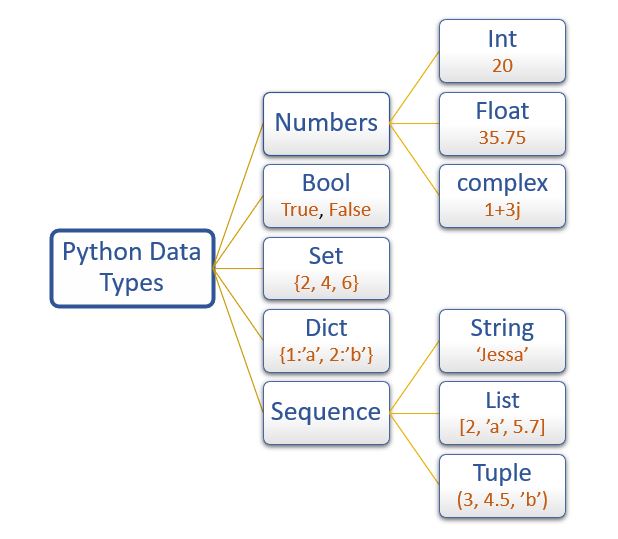
The video below provides a detailed tour of these essential data types.
Data Types in Python | Python for Beginners
Let's continue with the same instructor to explore Python's built-in data types. This is a comprehensive overview, but we will focus on the most critical ones for now.
Watch the video, paying closest attention to the following sections: Numeric Types (00:19 - 01:52): int for integers and float for decimals. Boolean Type (01:52 - 02:44): bool for True/False values. String Type (02:44 - 07:22): str for text data. List Type (07:22 - 11:09): list for ordered collections of items. Dictionary Type (16:52 - 21:36): dict for key-value pairs. You can skim the sections on complex numbers, tuples, and sets for now; we'll revisit them if needed.
Summary of Core Data Types:
| Data Type | Name | Description | Example |
|---|---|---|---|
| Integer | int |
Whole numbers (positive/negative) | 42, -100 |
| Float | float |
Numbers with a decimal point | 3.14, -0.01, 25.0 |
| String | str |
Text, enclosed in ' or " |
'Hello', "Data Analysis" |
| Boolean | bool |
Logical values True or False |
True, False |
| List | list |
An ordered, changeable collection | ['apple', 'banana', 100] |
| Dictionary | dict |
Unordered key-value pairs | {'name': 'Alice', 'age': 30} |
Checking the Type of a Variable
You can always check a variable's data type using the built-in type() function. This is an extremely useful tool for debugging your code.
Practice in Your Notebook
In a new cell in your Jupyter Notebook, create one variable for each data type listed above and use the type() function to confirm its type.
# Integer
sales_count = 54
print(type(sales_count))


# Float
average_sale_value = 12.99
print(type(average_sale_value))


# String
customer_name = "John Smith"
print(type(customer_name))


# Boolean
is_member = True
print(type(is_member))


# List
monthly_sales = [120, 155, 130]
print(type(monthly_sales))


# Dictionary
customer_profile = {'id': 101, 'name': 'John Smith'}
print(type(customer_profile))
Run the cell. The output should show you the class for each variable, like <class 'int'>, <class 'float'>, and so on.
3. Operators: Performing Actions
Operators are the special symbols in Python that carry out arithmetic or logical computation. You already know one: the assignment operator =. Now let's explore others.
We'll focus on four key types of operators:
- Arithmetic: For doing math.
- Assignment: For assigning and updating values.
- Comparison: For comparing two values.
- Logical: For combining boolean expressions.
This web page from Codecademy provides an excellent, structured overview with practical examples.
This resource provides a clear breakdown of Python's operators. Each section includes a handy table and a real-world code example.
Please read the sections on 'Arithmetic Operators', 'Assignment Operators', 'Comparison Operators', and 'Logical Operators'. Pay attention to the tables summarizing the operators and the code examples that put them in context (e.g., calculating a shopping cart total).
Key Takeaways on Operators:
- Arithmetic: You can use
+,-,*,/as you'd expect. Also useful are**for exponentiation (e.g.,2**3is 8) and%(modulo) for the remainder of a division (e.g.,10 % 3is 1). - Assignment:
+=and-=are handy shortcuts.x += 5is the same asx = x + 5. - Comparison: These operators (
==,!=,>,<) compare two values and always return a Boolean (TrueorFalse). A very common mistake for beginners is using=(assignment) when they mean==(comparison). - Logical:
and,or,notare used to build more complex conditions. For example, to check if an age is between 18 and 65, you might writeage >= 18 and age <= 65.
Practice in Your Notebook
Let's apply these operators. Imagine you're analyzing some simple sales data.
# Arithmetic Operators
price = 19.99
quantity = 3
subtotal = price * quantity
print(subtotal)


# Assignment Operators
total_customers = 100
total_customers += 5  # 5 new customers arrived
print(total_customers)


# Comparison Operators
revenue_A = 500
revenue_B = 600
is_A_greater = revenue_A > revenue_B
print(f"Is Revenue A greater than B? {is_A_greater}")


# Logical Operators
age = 25
is_in_target_demographic = age >= 18 and age <= 35
print(f"Is customer in target demographic? {is_in_target_demographic}")
Note: The f before the string in the print statements creates an "f-string," which is a modern way to embed variable values directly inside a string. It's a very convenient feature.
4. Putting It All Together: A Practical Mini-Problem
Let's solve a small problem that requires everything we've learned: variables, data types, and operators. This is a very common task in data analysis: you receive data in one format and need to convert it to another to perform calculations.
Problem: You have received sales data for the week, but it's in string format. Calculate the total sales for the week and the average daily sales.
mon_sales = "121"
tues_sales = "105"
wed_sales = "110"
thurs_sales = "98"
fri_sales = "95"
If you try to add these directly (mon_sales + tues_sales), Python will perform string concatenation and give you "121105", which is not what you want.
You need to convert these strings to numbers first. You can use the int() function for this.
Your Task:
In a new cell in your notebook, write code to:
- Convert each daily sales string into an integer.
- Calculate the total sales for the week.
- Calculate the average daily sales (as a float).
- Print the total and average sales in a clear, readable format.
Click here to see a possible solution.
# Sales data as strings
mon_sales = "121"
tues_sales = "105"
wed_sales = "110"
thurs_sales = "98"
fri_sales = "95"


# 1. Convert strings to integers
total_sales = int(mon_sales) + int(tues_sales) + int(wed_sales) + int(thurs_sales) + int(fri_sales)


# 2. Print the total sales
print(f"This week's total sales: {total_sales}")


# 3. Calculate the average daily sales
# We divide by 5.0 to ensure the result is a float
average_sales = total_sales / 5.0


# 4. Print the average sales
print(f"Average daily sales: {average_sales}")
This type of conversion is a daily activity for data analysts, who often work with data imported from various sources that may not have the correct data types.
Conclusion
Excellent work! In this lesson, you have learned the fundamental building blocks of Python programming.
Key Takeaways:
- Variables are used to store and label data. Use
snake_casefor naming. - Every variable has a data type (
int,float,str,bool, etc.), which defines what you can do with it. You can check it with thetype()function. - Operators are the symbols that perform actions, from arithmetic (
+,*) to comparison (==,>) and logic (and,or). - Data types matter: you often need to convert data (e.g., from
strtoint) before you can work with it.
You are now equipped to write simple Python scripts that store data and perform calculations.
In our next lesson, we will build directly on these concepts. You'll learn how to control the flow of your programs using conditional statements (if, elif, else) and loops (for, while). This will allow your code to make decisions and perform repetitive tasks—two abilities that are essential for automating any data analysis process.