Hello! Welcome to the fifth lesson in our Python fundamentals module.
In our last lesson, you learned how to create functions to encapsulate and reuse code. We even used a list of sales data as an argument to a function. Today, we're going to take a closer look at the data structures that hold such collections: lists and dictionaries.
These are two of the most fundamental and versatile data structures in Python. Mastering them is essential for any data analyst, as they are the primary way you will store and organize data before loading it into more specialized analysis tools.
This lesson directly addresses your goal of building a solid technical foundation. By the end, you will be able to manipulate data collections using Python lists and dictionaries, allowing you to perform foundational data wrangling tasks.
1. Collections: Lists vs. Dictionaries
Before we dive in, let's establish the core difference between a list and a dictionary.
- A list stores an ordered sequence of items. You access items by their numerical position (index), starting from 0. Think of it like a single column in a spreadsheet.
- A dictionary stores a collection of key-value pairs. You access a value by its unique key. Think of it as a row in a spreadsheet, where the column headers are the keys.
This image provides a great visual summary of the concept:
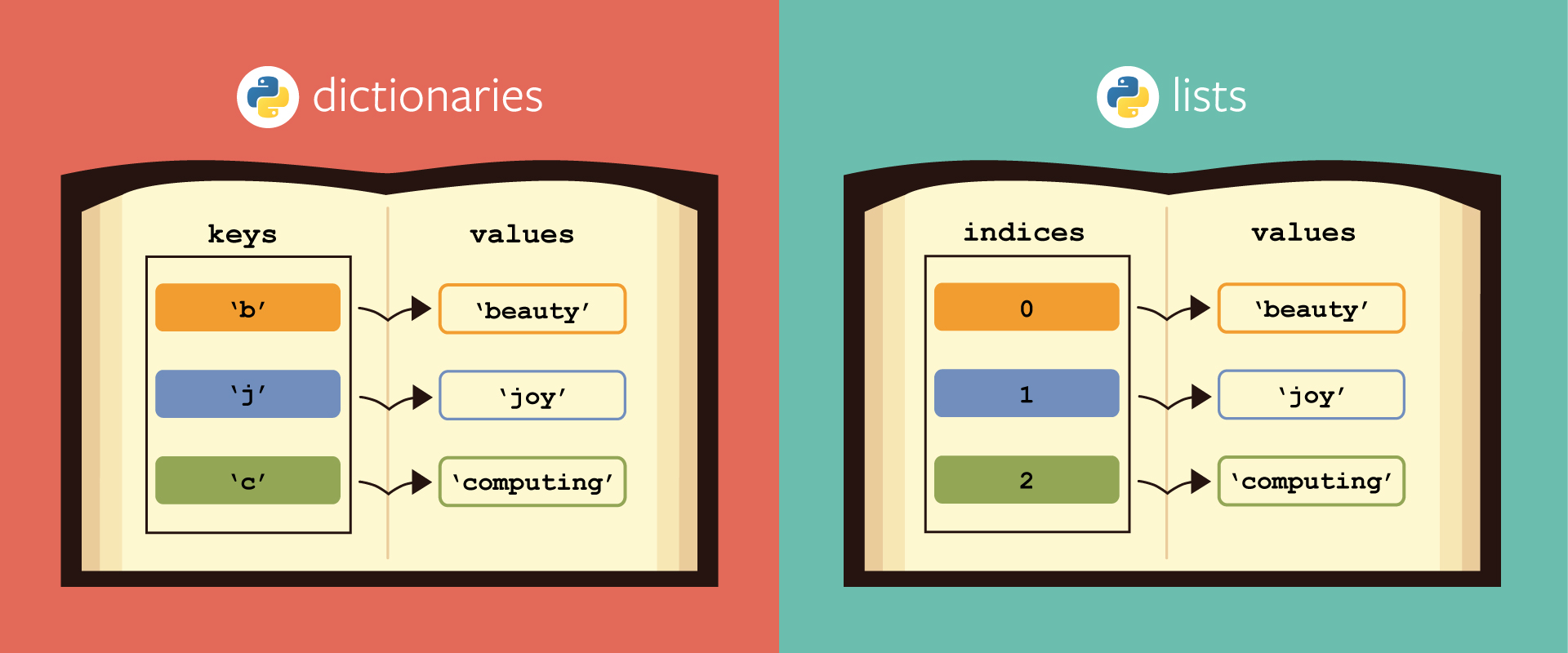
We will explore each of these in detail.
2. Working with Lists
Lists are your go-to structure for holding an ordered collection of items. This could be a sequence of daily sales figures, a list of customer names, or sensor readings over time.
Creating, Accessing, and Slicing Lists
First, let's see how to create a list and access its contents. The most powerful feature here is slicing, which allows you to select subsets of your list—a very common task in data selection.
Python Tutorial for Beginners 4: Lists, Tuples, and Sets
This video from Corey Schafer's renowned Python series offers a clear and concise introduction to the basics of list manipulation.
Watch from the beginning to 05:16. Pay close attention to: How lists are created with square brackets []. How to access single elements using an index, like courses[0]. The concept of negative indexing, like courses[-1] to get the last item. How to 'slice' a range of items, like courses[0:2].
To summarize the key points:
- Indexing:
my_list[0]gets the first item,my_list[1]the second. - Negative Indexing:
my_list[-1]gets the last item,my_list[-2]the second to last. - Slicing:
my_list[start:stop]gets items from thestartindex up to (but not including) thestopindex. Omittingstart(my_list[:3]) begins from the start, and omittingstop(my_list[1:]) goes to the end.
Modifying Lists
Once you have a list, you'll often need to change it. Python provides several methods to add or remove items.
Python Tutorial for Beginners 4: Lists, Tuples, and Sets
Let's continue with the same video to learn how to modify lists.
Watch from 05:16 to 10:02. Focus on the distinction between these methods: append(): Adds one item to the end. insert(): Adds one item at a specific index. extend(): Adds all items from another list to the end. remove(): Removes the first occurrence of a specific value. pop(): Removes and returns the item at a specific index (or the last item if no index is given).
Common List Operations for Analysis
For data analysis, you'll frequently perform calculations on lists of numbers. Python has built-in functions for this, and lists have methods for sorting.
Getting started with Python lists and dictionaries
The article 'Getting started with Python lists and dictionaries' from Scaleway provides excellent, quick examples of these operations.
Read the section titled 'Useful list operations'. It clearly demonstrates sort(), sum(), len(), min(), and max(). Notice how sum() and len() can be combined to calculate an average.
Here is a practical example you can run in your Jupyter Notebook. It uses the daily_sales data from our previous lesson:
# A list of sales data for one week
daily_sales = [1550.5, 2100.0, 1850.75, 2400.25, 950.0]


# Add a new day's sales to the end of the list
daily_sales.append(1980.0)
print(f"Updated sales data: {daily_sales}")


# Find the highest and lowest sales day
highest_sale = max(daily_sales)
lowest_sale = min(daily_sales)
print(f"Highest sale: ${highest_sale:.2f}")
print(f"Lowest sale: ${lowest_sale:.2f}")


# Calculate total and average sales
total_sales = sum(daily_sales)
average_sales = total_sales / len(daily_sales)
print(f"Total sales: ${total_sales:.2f}")
print(f"Average sales: ${average_sales:.2f}")


# Sort the sales from lowest to highest
daily_sales.sort()
print(f"Sorted sales: {daily_sales}")
3. Understanding Dictionaries
Dictionaries are perfect for storing data that has a clear label, like a person's contact information or the properties of a product. Each piece of information (value) is stored with a unique identifier (key).
To organize our learning, we can think about manipulating dictionaries using the CRUD framework, a common term in software development:
- Create: Make a new dictionary.
- Read: Access values from it.
- Update: Change or add values.
- Delete: Remove values.
Create, Read, Update, and Delete in Dictionaries
The following reading provides a comprehensive guide to performing all these actions on a dictionary.
Getting started with Python lists and dictionaries
Let's return to the Scaleway article to learn the fundamentals of dictionaries.
Read the sections from 'Dictionaries' through to 'Removing items from a dictionary'. This will take you through the complete CRUD cycle. Pay special attention to: Creating dictionaries with curly braces {}. Accessing a value with its key: student_marks['Sara']. The difference between accessing with [] (which gives an error if the key doesn't exist) and .get() (which returns None or a default value). Adding or updating a value: student_marks['Paxton'] = 76. Removing a key-value pair with pop() or del.
Iterating Over Dictionaries
A common task is to loop through the contents of a dictionary. You can iterate over its keys, its values, or its key-value pairs.
my_dict.keys(): Returns a view of all the keys.my_dict.values(): Returns a view of all the values.my_dict.items(): Returns a view of all the key-value pairs as tuples.
This is especially powerful when combined with a for loop, a concept you learned in a previous lesson.
# A dictionary representing a product in an inventory
product = {
    "name": "Laptop",
    "stock": 42,
    "price": 1200.00,
    "category": "Electronics"
}


# Looping through keys
print("--- Product Keys ---")
for key in product.keys():
    print(key)


# Looping through values
print("\n--- Product Values ---")
for value in product.values():
    print(value)


# Looping through key-value pairs (most common)
print("\n--- Product Items ---")
for key, value in product.items():
    print(f"{key}: {value}")
4. Practice: Combining Lists and Dictionaries
In data analysis, you will very often encounter a list of dictionaries. This structure is extremely common, especially when working with data from web APIs (in a format called JSON). Each dictionary in the list represents one observation or record, like a row in a table.
Let's practice with a simple dataset of customer transactions.
Your Task: In your Jupyter Notebook, run the code below. Then, write your own code to calculate the total revenue from all transactions. You will need to:
- Create a variable
total_revenueand set it to 0. - Loop through the
transactionslist. - In each loop, get the
quantityandpricefrom the dictionary. - Multiply them to get the revenue for that transaction.
- Add this revenue to your
total_revenuevariable. - Print the final result.
# A list of dictionaries, where each dictionary is a transaction
transactions = [
    {"product_id": 101, "quantity": 2, "price": 15.00},
    {"product_id": 102, "quantity": 1, "price": 120.50},
    {"product_id": 101, "quantity": 5, "price": 15.00},
    {"product_id": 103, "quantity": 10, "price": 5.25}
]


# --- YOUR CODE GOES HERE ---
Click here to see the solution
total_revenue = 0

for transaction in transactions:


    # Access the values for 'quantity' and 'price' keys in each dictionary
    quantity = transaction['quantity']
    price = transaction['price']


    # Calculate revenue for the current transaction and add to the total
    total_revenue += quantity * price

print(f"Total Revenue: ${total_revenue:.2f}")


# Expected output: Total Revenue: $278.00
This exercise is a miniature version of what data analysts do every day: iterating through structured data to perform aggregations.
Conclusion
Great job! You have now mastered the fundamental skills for creating and manipulating Python's core data collections.
Key Takeaways:
- Lists are ordered collections accessed by numerical index. They are ideal for sequences of data where order is important.
- Dictionaries are collections of key-value pairs accessed by a unique key. They are perfect for storing labeled data points.
- You can perform CRUD (Create, Read, Update, Delete) operations on both lists and dictionaries using various methods (
append,pop,.get(), etc.). - A list of dictionaries is a powerful and common pattern for representing tabular data in Python.
In our next lesson, we will introduce external Python libraries. You'll see how libraries like Pandas build upon the concepts of lists and dictionaries to provide even more powerful and efficient tools for data analysis, allowing you to perform complex tasks like the one you just did in a single line of code.