Hello! Welcome to the fourth lesson in our Python fundamentals module.
In our last lesson, you learned about control flow using conditional statements and loops. This gave you the power to make your programs make decisions and repeat tasks. As you saw, combining these can lead to powerful but complex blocks of code.
Today, we will learn how to organize that power. This lesson is about functions, which are named, reusable blocks of code that perform a specific task. If variables are nouns and loops/conditionals are verbs and conjunctions, then functions are like well-structured paragraphs that you can call upon whenever you need them. They are the single most important tool for writing clean, efficient, and scalable code.
This lesson directly addresses your goal of bridging technical skills and business application by teaching you how to build your own tools. Instead of rewriting the logic for a common business calculation every time, you can write it once in a function and reuse it.
By the end of this lesson, you will be able to define and call custom functions to encapsulate reusable code, a foundational skill for any data analyst.
1. Why Use Functions? The DRY Principle
In programming, there's a principle called DRY: Don't Repeat Yourself. Imagine your manager asks you to calculate the net profit for three different product lines. You could write the calculation logic three separate times. But what if the formula changes? You'd have to find and update it in all three places, which is inefficient and a recipe for errors.
Functions solve this problem. You write the logic once inside a function and then simply "call" that function for each product line.
The following video provides an excellent real-world example of this, showing how repeating code to check sales lists becomes unmanageable and how a function elegantly solves the problem.
Python Functions for Data Science / Data Analysis - P.5
Watch this segment from the video 'Python Functions for Data Science / Data Analysis' by Luke Barousse. It clearly demonstrates why functions are essential for avoiding code repetition.
Please watch the first 4 minutes and 39 seconds of the video. Focus on the transition from copying and pasting a for loop to creating a single, reusable function called even_checker.
2. The Anatomy of a Python Function
Now that you've seen why we use functions, let's break down how to build one.
A function has two main parts:
- Definition: This is where you create the function, give it a name, and write the code it will execute.
- Call: This is where you actually use the function and tell it to run.
The basic syntax for defining a function uses the def keyword, a function name, parentheses (), and a colon :. The code that belongs to the function is indented underneath.
Functions in Python | Python for Beginners
This short clip from Alex The Analyst breaks down the simplest way to define and call a function.
Watch from the beginning until 01:45. Pay close attention to the def keyword, the function name, the parentheses (), the colon :, and the indented code block.
This image helps visualize the flow of execution. The program defines the function, continues on, and only when the function is called does the program's execution jump into the function's code block.
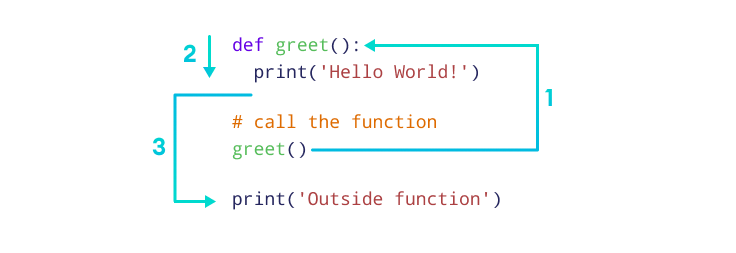
For a more detailed textual reference on the syntax, you can review the "How to Define a Function" and "How to call a function" sections in the article below.
Python Functions: How to Call & Write Functions
This DataCamp article provides a solid written summary of function syntax.
Read the sections titled 'How to Define a Function: User-Defined Functions (UDFs)' and 'How to call a function'. This will reinforce the syntax you just saw in the video.
3. Passing Data to Functions: Parameters and Arguments
A function becomes truly powerful when you can pass data into it. For example, a function to calculate sales tax needs to know the price of the item.
- Parameters are the variables you list inside the parentheses in the function definition. They are placeholders for the data the function expects.
- Arguments are the actual values you provide to the function when you call it.
You can also set default values for parameters, making them optional when the function is called.
This next video segment demonstrates how to add parameters to a function, pass arguments to it, and set default values.
Python Functions for Data Science / Data Analysis - P.5
Let's return to Luke Barousse's video. This segment clearly explains how to make functions dynamic by passing in data.
Watch the segment from 07:53 to 13:29. Focus on: How a parameter like text acts as a variable inside the function. How to pass multiple arguments (greeting, company). How to set a default value, like company="dunder mifflin", to make an argument optional.
4. Getting Results from Functions: The return Statement
So far, our functions have only print-ed things to the screen. For data analysis, this is not enough. We need our functions to perform a calculation and give us the result back so we can store it in a variable or use it in further analysis. This is the job of the return statement.
When a function hits a return statement, it immediately stops and sends the specified value back to wherever the function was called.

The video segment you just watched (from 7:53 to 13:29) also concludes with an example of the return statement. It's a crucial concept, so feel free to re-watch that final part (from around 11:45) where the function is changed from print to return.
A function can also return multiple values, which Python automatically packs into a tuple.
Python Functions: How to Call & Write Functions
For more detail on the return statement, including how to return multiple values, read this section from the DataCamp article.
Read the section 'The return statement'. Notice the difference between a function that prints a value versus one that returns it, and see the example of returning two values at once.
5. Practice: Building Your First Data Analysis Function
Let's put everything together. In your Jupyter Notebook, create a function that takes a list of daily sales figures and calculates the total and average sales. This combines the loops you learned in the last lesson with the function skills from this one.
# A list of sales data for one week
daily_sales = [1550.5, 2100.0, 1850.75, 2400.25, 950.0]

def analyze_sales(sales_data):
    """
    Analyzes a list of sales figures.

    Args:
        sales_data (list): A list of numbers representing sales.

    Returns:
        tuple: A tuple containing the total sales and average sales.
    """
    total_sales = sum(sales_data)
    number_of_days = len(sales_data)


    # Avoid division by zero if the list is empty
    if number_of_days == 0:
        average_sales = 0
    else:
        average_sales = total_sales / number_of_days

    return total_sales, average_sales


# Call the function and unpack the returned tuple into two variables
total, average = analyze_sales(daily_sales)

print(f"Total Sales: ${total:.2f}")
print(f"Average Daily Sales: ${average:.2f}")


# What happens if we pass an empty list?
total_empty, average_empty = analyze_sales([])
print(f"\nAnalysis for empty list: Total=${total_empty:.2f}, Average=${average_empty:.2f}")
Note: The part between the triple quotes """...""" is a docstring. It's a best practice for documenting what your function does, what arguments it expects, and what it returns. This helps others (and your future self!) understand your code.
6. A More Complex Application
The simple function above is a great start. To see how these concepts are applied in a more realistic mini-project, the final segment of Luke Barousse's video is highly recommended. He builds a function from scratch to read a CSV file of script lines from The Office and count how many lines a specific actor has. This is a perfect example of encapsulating a complete data-processing task into a single, reusable function.
Python Functions for Data Science / Data Analysis - P.5
This final segment shows the end-to-end process of building a practical function for a data analysis task.
Watch from 17:56 to the end. You don't need to understand every single line of code, especially the file reading part, which we'll cover later. Instead, focus on the overall process: Defining the goal. Building the logic step-by-step inside a function (actor_counter). Making the function flexible by adding a parameter (actor). Using the function's return value in a loop to analyze multiple actors.
Conclusion
Excellent work! You've just learned one of the most fundamental concepts in programming. By mastering functions, you are moving from just writing scripts to engineering clean, modular, and professional-grade code.
Key Takeaways:
- Encapsulation and Reusability: Functions bundle code to perform a specific task, allowing you to reuse it easily (the DRY principle).
- Definition: You define a function with
def function_name(parameter1, parameter2):. - Calling: You execute a function by writing its name followed by parentheses
(), passing arguments inside if needed. returnvs.print:print()shows a value to the user, butreturnsends a value back from the function, allowing it to be stored and used in other parts of your program.- Arguments: Functions are made flexible by passing data to them through arguments, which can be required, have default values, or be identified by keyword.
In our next lesson, we will dive deeper into two of Python's most important data structures for data analysis: lists and dictionaries. You'll learn how to manipulate these collections, and we'll start writing functions that take them as input and produce new, transformed collections as output.