Introduction
In the previous lesson, we successfully created a Freestyle project that checked out code and, as a final step, generated a build-info.txt file inside the job's workspace. However, we noted that the workspace is an ephemeral environment, meaning it can be cleaned or overwritten by subsequent builds. This raises a crucial question: how do we preserve the important outputs of our build process?
This lesson answers that question by introducing you to build artifacts. You will learn how to configure your Freestyle project to properly save, or "archive," the files it produces, making them a permanent and accessible part of your build's history. This is a fundamental concept in CI/CD, as the ultimate goal of a build is often to produce a deployable package, a test report, or other valuable outputs.
The Importance of Archiving Artifacts
The outputs of a build process are known as artifacts. These can be anything from a compiled Java .jar or .war file, a C++ executable, a compressed .zip archive of web assets, a PDF of documentation, or, in our case, a simple text file with build metadata.
Relying on the workspace to store these artifacts is unreliable. Jenkins may clean the workspace to save disk space, or the next build will overwrite its contents. The purpose of archiving is to instruct Jenkins to copy specified files from the workspace after a build completes and store them in a permanent location tied to that specific build record. This ensures that:
- The outputs are preserved for later use (e.g., deployment, analysis, or manual download).
- Each build has its own set of artifacts, creating a traceable history.
- The artifacts are easily accessible directly from the Jenkins UI.
The Complete Guide To Setting Up Freestyle Projects In Jenkins.
The article "The Complete Guide to Setting Up Freestyle Projects in Jenkins" provides a great overview of post-build actions.
Focus on the section titled Post-build Actions. Pay close attention to the list of common actions and the example configuration for archiving artifacts. This will set the context for the practical steps we're about to take.
Configuring Your Project to Archive Artifacts
Let's pick up where we left off with our python-app job and configure it to archive the build-info.txt file.
- Navigate to your Jenkins dashboard and click on the
python-appjob. - In the left sidebar, click Configure.
- Scroll all the way down to the Post-build Actions section. This section allows you to define tasks that run after the main build steps are completed, regardless of whether the build succeeded or failed (though this can be configured).
- Click the Add post-build action dropdown and select Archive the artifacts.
You will now see a new block with a field labeled "Files to archive". This is where you tell Jenkins which files to save.
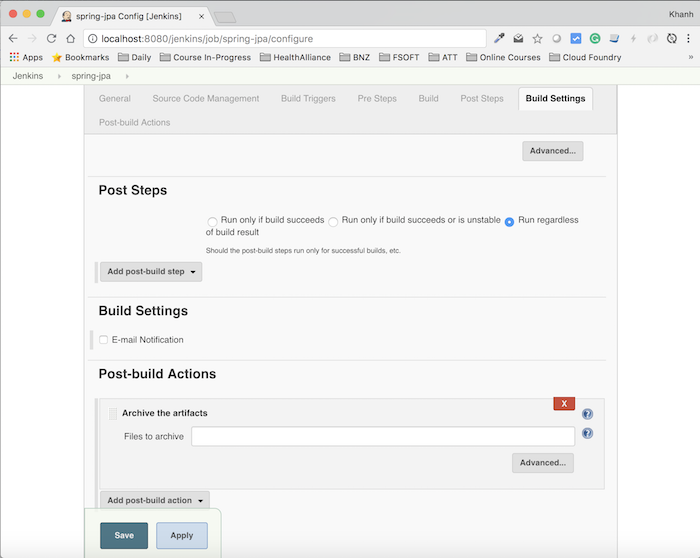
Adding the 'Archive the artifacts' action in the Post-build Actions section of a Freestyle project's configuration.
- In the "Files to archive" field, type
build-info.txt.
For now, we are targeting a single, specific file. However, this field is very powerful and accepts "Ant glob" patterns, which are similar to file wildcards you might be familiar with from the command line. For example:
**/*.jar: This would archive all files with a.jarextension, no matter where they are in the workspace's directory structure. The**means "match any directory, recursively."reports/*: This would archive all files inside a directory namedreports.
- Click Save at the bottom of the page.
Your project is now configured. The build steps will still create the build-info.txt file in the workspace, but now, a post-build action will copy it to a safe, permanent location.
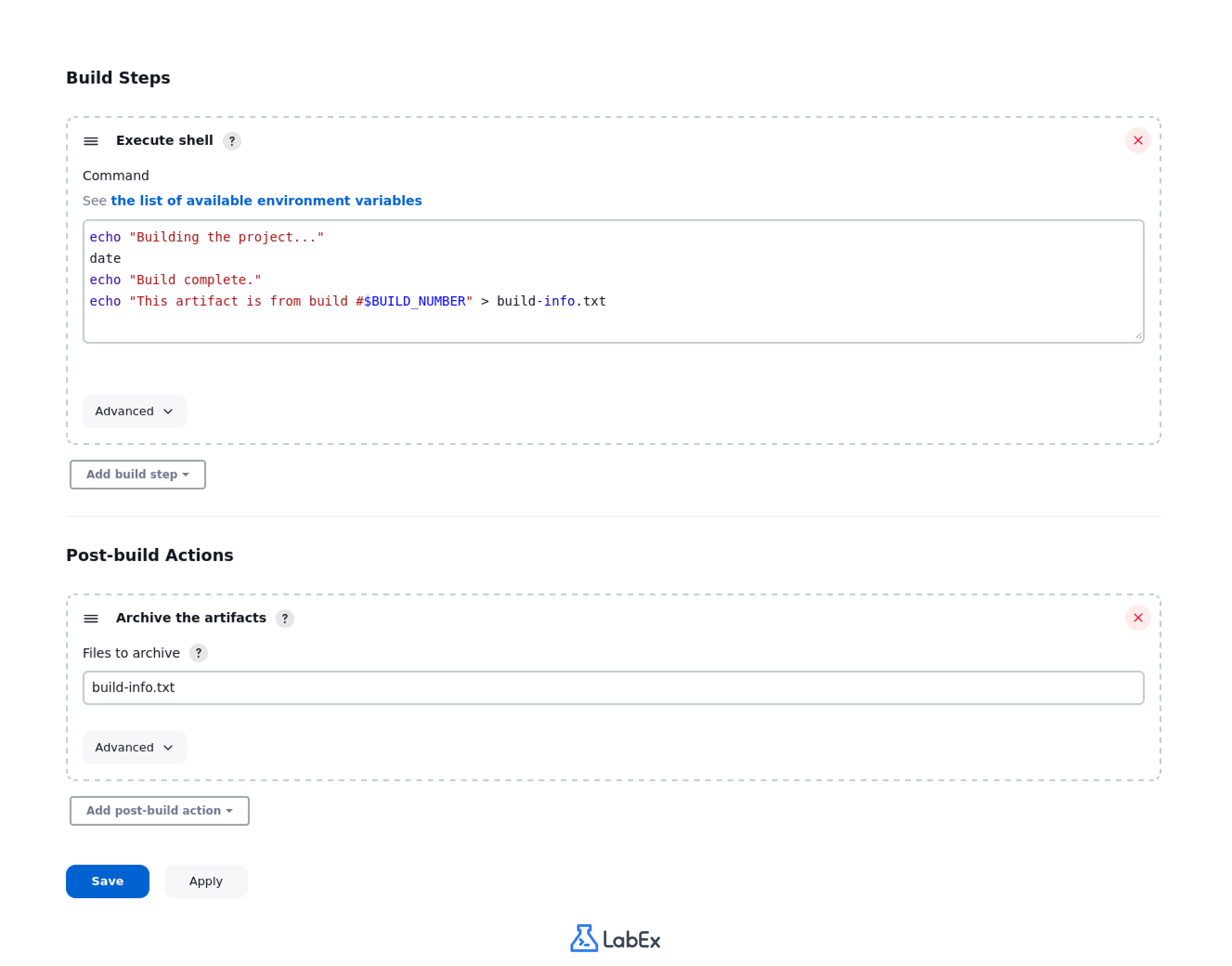
A complete Freestyle project configuration showing the 'Execute shell' step that creates build-info.txt and the 'Archive the artifacts' post-build action configured to save it.
Running the Build and Accessing the Artifact
Let's run the job to see our new configuration in action.
- On the
python-appproject page, click Build Now. - Once the build completes successfully (indicated by a blue ball in the Build History), click on the latest build number (e.g.,
#3).
You will now see a new section on the build's page: Build Artifacts.
Under this section, build-info.txt is listed as a link. Clicking on it will open the file in your browser, showing you the exact contents that were generated during that specific build.
Furthermore, if you go back to the main python-app project page, you will see a link for Last successful artifacts right on the dashboard, providing quick access to the outputs of the most recent good build.
Under the Hood: Where Does Jenkins Store Artifacts?
You might be wondering where these files are physically stored. Jenkins is, at its core, a file-based system. When you archive an artifact, Jenkins copies it from the workspace into a special archive directory within that specific build's record on the Jenkins controller's file system.
The following video provides an excellent visual demonstration of this process. While it uses a Pipeline job for the demo, the underlying storage mechanism and file path structure for archived artifacts are identical for Freestyle projects.
Where Does Jenkins Store Archived Artifacts?
The video "Where Does Jenkins Store Archived Artifacts?" from CloudBeesTV gives a clear, under-the-hood look at the file system.
Watch from the beginning up to the end of the demo. The presenter will show you the exact directory path ($JENKINS_HOME/jobs/<job-name>/builds/<build-number>/archive) where the archived files reside. This connects the Jenkins UI to the physical file system, which is a key concept for any DevOps practitioner.
Understanding this helps demystify Jenkins. It's not magic; it's a well-organized file system that you can interact with, which is especially useful for troubleshooting or backup purposes.
Conclusion
This lesson marks the completion of our first module and your initial journey into Jenkins. You've gone from a bare server to running fully automated jobs that produce persistent, valuable outputs.
Here are the key takeaways from this session:
- Build artifacts are the valuable outputs of a build process (e.g., executables, libraries, reports).
- The workspace is temporary, so artifacts must be archived to be preserved.
- The Archive the artifacts post-build action copies files from the workspace to a permanent location tied to the build record.
- You can use specific filenames or powerful glob patterns (
**/*.jar) to specify which files to archive. - Archived artifacts are accessible directly through the Jenkins UI on both the build page and the main project dashboard.
You have now mastered the fundamentals of Jenkins Freestyle projects. You can set up a job, connect it to version control, execute build commands, and save the results.
In the next module, we will transition from the UI-driven approach of Freestyle projects to the powerful world of Pipeline-as-code. You will learn how to define your entire CI/CD process in a script called a Jenkinsfile, which provides more power, flexibility, and version control for your build logic.