In our last lesson, we took the essential first step in structuring your Python code by separating reusable functions into a dedicated module, finance_utils.py, and importing them into a main script. This created a clear distinction: one file contained the tools (the module), and another used them (the script). Today, we'll build on that by exploring how to make a single Python file that can cleverly act as both a reusable module and a runnable script.
This lesson focuses on a fundamental and widely used Python construct: the if __name__ == '__main__' statement. Mastering this will allow you to add examples, tests, or simple execution logic directly into your modules without interfering with their primary purpose, which is to be imported. This technique is a cornerstone of writing clean, self-contained, and professional Python code.
The Problem: A Module is Not Runnable
Recall our finance_utils.py file from the previous lesson. It contains useful functions, but if you try to run it directly from your terminal (python finance_utils.py), nothing happens. Its code is only executed when another script imports it.
What if you wanted to add some code to finance_utils.py to quickly test its functions or demonstrate how they work? If you just add print() calls or other statements at the top level of the file, that code will run every time the module is imported, creating unwanted side effects in your main scripts. We need a way to tell Python: "Only run this specific block of code when I'm executing this file directly."
The Solution: Python's Special __name__ Variable
Python provides a built-in mechanism to solve this exact problem. Whenever the Python interpreter executes a file, it automatically creates a few special variables behind the scenes. One of the most important is __name__. The value of this variable changes depending on how the file is being used.
- When run directly: If you execute a file from your command line (e.g.,
python my_script.py), Python sets the__name__variable within that script to the special string"__main__". - When imported: If the file is imported as a module into another script (e.g.,
import my_script), Python sets its__name__variable to the module's name, which is typically the filename (e.g.,"my_script").
This simple distinction is incredibly powerful. Let's watch a short, animated video that makes this concept crystal clear.
Python if __name__ == '__main__': Visually Explained
The channel Visually Explained has a fantastic video titled "Python if name == 'main': Visually Explained" that breaks down this concept.
Watch the first two parts of the video. First, see the explanation of what the __name__ variable is. Then, pay close attention to the two-file example from "why is name equal to Main", which shows exactly how the value of __name__ changes depending on the context.
To dig a bit deeper into the mechanics, the following reading provides a more formal explanation.
What Does if __name__ == "__main__" Do in Python?
This article from Real Python offers an in-depth look at this Python idiom.
Please read the section "How Does the Name-Main Idiom Work?". This will solidify your understanding of how Python assigns a value to the __name__ variable. Focus on the distinction between the top-level environment (when a script is run directly) and an imported module.
Applying the if __name__ == '__main__' Guard
Now we can use this behavior to create a conditional block of code. By checking if __name__ == "__main__", we create a "guard" that ensures the code inside it only runs when the file is the main program being executed.
Let's modify our finance_utils.py file to include a runnable example.
# finance_utils.py

def calculate_variance(actual, budget):
    """Calculates the variance between an actual and a budget value."""
    return actual - budget

def calculate_variance_percent(actual, budget):
    """Calculates the variance percentage. Avoids division by zero."""
    if budget == 0:
        return float('inf') if actual > 0 else 0
    return (actual - budget) / budget * 100


# This block of code will only run when we execute this file directly.
# It will NOT run when this file is imported by another script.
if __name__ == "__main__":
    print("--- Running finance_utils.py as a standalone script ---")


    # Example 1: Standard variance calculation
    actual_rev = 110000
    budget_rev = 100000
    var = calculate_variance(actual_rev, budget_rev)
    var_pct = calculate_variance_percent(actual_rev, budget_rev)

    print(f"\nExample 1: Revenue")
    print(f"Actual: ${actual_rev:,.0f}, Budget: ${budget_rev:,.0f}")
    print(f"  -> Variance: ${var:,.0f}")
    print(f"  -> Variance %: {var_pct:.2f}%")
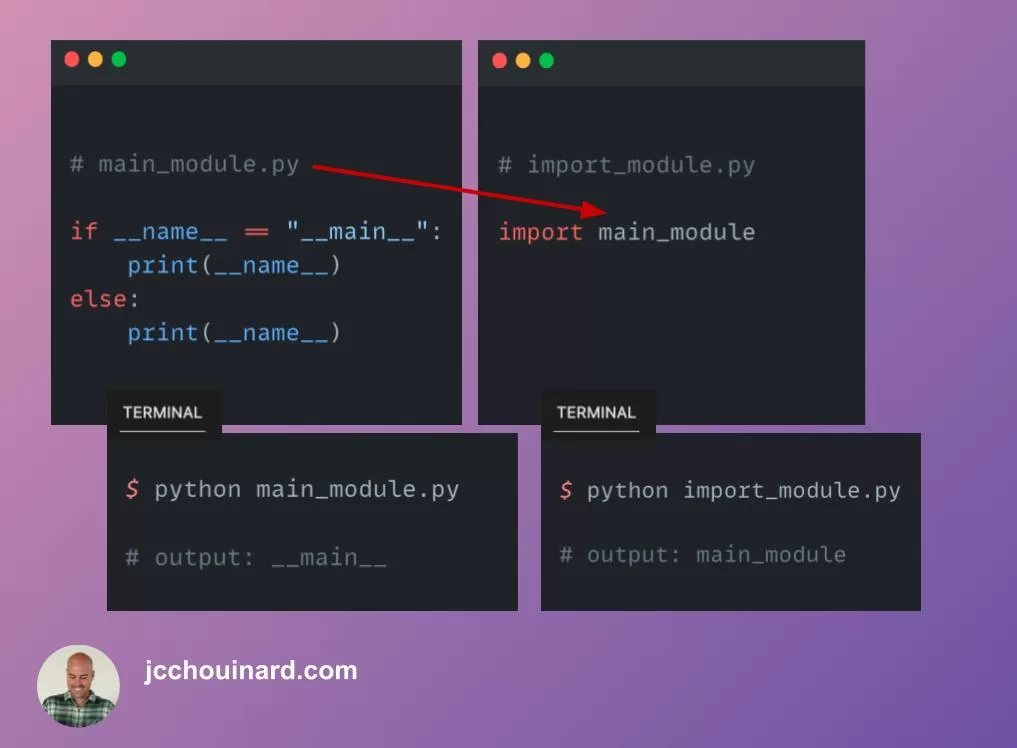
Now, let's observe the two scenarios:
- Run Directly: Open your terminal, navigate to the directory with
finance_utils.py, and runpython finance_utils.py. The output will be:--- Running finance_utils.py as a standalone script --- Example 1: Revenue Actual: $110,000, Budget: $100,000 -> Variance: $10,000 -> Variance %: 10.00% - Import as a Module: Run your
monthly_report.pyscript from the last lesson, which containsimport finance_utils. The output will be exactly as it was before, with no trace of the "standalone script" message or example calculation.
The following image perfectly summarizes this behavior.
For a practical demonstration of building this from scratch, Corey Schafer provides another excellent walkthrough.
Python Tutorial: if __name__ == '__main__'
Corey Schafer's video, "Python Tutorial: if name == 'main'", clearly demonstrates this concept with two simple modules.
First, watch from the beginning to the two-module example, where he shows how __name__ changes. Then, continue watching from the implementation of the check to see how he uses the if statement to control which code runs upon direct execution versus import.
Best Practice: The main() Function Pattern
While you can place any amount of code inside the if __name__ == "__main__" block, a widely accepted best practice is to keep it minimal. The standard convention is to encapsulate your script's main logic into a function, often called main(), and then call this single function from within the guard.
Let's refactor our finance_utils.py using this pattern:
# finance_utils.py

def calculate_variance(actual, budget):


    # ... (function code is unchanged)

def calculate_variance_percent(actual, budget):


    # ... (function code is unchanged)

def main():
    """Contains the script's main execution logic."""
    print("--- Running finance_utils.py as a standalone script ---")


    # Example 1: Standard variance calculation
    actual_rev = 110000
    budget_rev = 100000
    var = calculate_variance(actual_rev, budget_rev)
    var_pct = calculate_variance_percent(actual_rev, budget_rev)

    print(f"\nExample 1: Revenue")
    print(f"Actual: ${actual_rev:,.0f}, Budget: ${budget_rev:,.0f}")
    print(f"  -> Variance: ${var:,.0f}")
    print(f"  -> Variance %: {var_pct:.2f}%")


# The guard is now just one clean line that calls our main function.
if __name__ == "__main__":
    main()
This might seem like a small change, but it has significant benefits that are crucial for building larger, more professional applications:
- Clarity: It makes the script's entry point explicit and easy to find.
- Reusability: The
main()function itself can be imported and executed by other scripts if needed, for example, in an automated testing setup. - Readability: It separates the "what" (the logic in
main()) from the "when" (theifguard).
This pattern is the standard way to structure a runnable Python script.
What Does if __name__ == "__main__" Do in Python?
The Real Python article also covers this important convention.
In the section "In What Way Should You Include the Name-Main Idiom?", scroll to the bottom and read the part about using a main() function. Pay close attention to the advice on keeping the code minimal inside the if block and the advantages of defining a main() function.
As you move from notebooks to building larger projects, you will eventually have a central script, often named main.py, that imports all your other custom modules and orchestrates the entire workflow. This main.py script will be the primary entry point for your application and will be built around this if __name__ == "__main__" structure.
The Journey from Jupyter to Programmer: A Quick-Start ...
This article frames our topic within the larger context of building a complete program.
Please read the section titled "The ‘main’ event". This piece shows how the if __name__ == '__main__' block serves as the single-entry point for an entire program, which is exactly how we will structure our final automation project.
Conclusion
You have now added a powerful tool to your Python arsenal. By understanding and using the if __name__ == '__main__' guard, you can write modules that are both cleanly importable and conveniently runnable for testing or demonstration. This is a fundamental skill for moving beyond simple scripts and building the modular, software-like tools you aim to create.
Key Takeaways:
- Python sets a special variable
__name__in every file it runs. - If a file is run directly, its
__name__is"__main__". - If a file is imported, its
__name__is its filename (e.g.,"finance_utils"). - The
if __name__ == "__main__"statement creates a block of code that only executes when the file is run directly. - Best practice is to place your script's execution logic in a
main()function and call it from within theifguard.
In our next lesson, we will zoom out. We've learned how to structure code within files, and now we'll learn how to structure the files themselves within a project. We will explore how to create a standard project directory with clear separation for source code, data, and reports, setting the stage for building truly organized and scalable automation tools.