Hello! In our last lesson, we saw how to isolate a ViewModel from its synchronous dependencies using mocks and dependency injection. This gave us full control over our test environment, leading to fast and reliable tests.
Today, we address a very common scenario: what happens when a dependency doesn't return data immediately? Many operations, like network requests or database queries, are asynchronous. A standard unit test will not wait for them to finish, leading to incorrect or unreliable results.
Our goal for this lesson is to learn how to test asynchronous code within a ViewModel using XCTestExpectation. This is a fundamental skill for testing real-world applications where asynchronous operations are everywhere. We will also see how modern Swift concurrency simplifies this process.
The Problem: A Race Condition in Your Tests
Let's imagine a ViewModel that fetches data from a network service. The fetchData method takes a closure (a completion handler) that is executed once the network request is complete.
// In our ViewModel
func fetchData(completion: @escaping (Result<[String], Error>) -> Void) {
    // Simulates a network call that takes 1 second
    DispatchQueue.global().asyncAfter(deadline: .now() + 1) {
        // This code runs later!
        completion(.success(["Item 1", "Item 2"]))
    }
}
Now, consider a naive unit test for this method:
func testFetchData_naive() {
    // Arrange
    let viewModel = MyViewModel()

    // Act
    viewModel.fetchData { _ in } // Call the async method

    // Assert
    // This assertion runs immediately!
    XCTAssertEqual(viewModel.items.count, 2) // This will fail
}
This test will almost certainly fail. The XCTAssertEqual assertion runs immediately after fetchData is called, but the completion handler that actually updates the viewModel.items property won't run until one second later. The test function and the asynchronous work are in a race, and the test function will always win.
This video demonstrates this exact problem, showing how a test can even pass incorrectly while completely ignoring the asynchronous logic it's supposed to be testing.
Unit testing Asynchronous Code In Swift ✅
The video 'Unit testing Asynchronous Code In Swift' from the tundsdev channel clearly illustrates the problem with testing asynchronous code.
Watch from the beginning to 03:51. Pay close attention to why the initial test passes, but a breakpoint reveals that the assertion code inside the closure is never actually executed.
For a deeper explanation of why this happens, let's look at the execution order.
Async Unit Testing: The Comprehensive Guide
The article 'Async Unit Testing: The Comprehensive Guide' provides an excellent written breakdown of this race condition.
Read 'Part IV — Advanced Async Testing: Unstructured Concurrency', specifically the sections 'Problems with task and testing' and 'It looks like our assumptions about the order of execution are wrong.' While the example uses a Task, the principle is identical for any closure-based async operation like DispatchQueue.asyncAfter or a URLSession completion handler: the test's execution continues linearly without waiting for the async block to run.
The Solution: XCTestExpectation
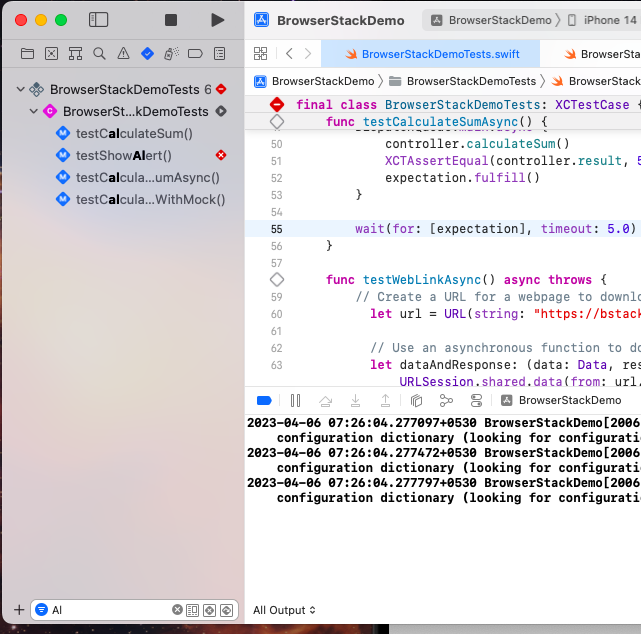
To solve this, we need to tell our test to pause and wait. The XCTest framework provides a mechanism for this called XCTestExpectation. It works like a promise that something will happen in the future.
The pattern has three steps:
- Create an Expectation: You create an
XCTestExpectationinstance at the start of your test. - Fulfill the Expectation: You call
expectation.fulfill()inside your asynchronous callback, right after the work you're testing is complete. This signals that the "promise" has been kept. - Wait for the Expectation: You call
wait(for:timeout:)at the end of your test. This pauses the test's execution until either the expectation is fulfilled or a timeout is reached.
If the timeout is reached before fulfill() is called, the test fails.
Let's see how to refactor our failing test to use this pattern.
Unit testing Asynchronous Code In Swift ✅
Let's return to the tundsdev video. The author now refactors the failing test to correctly use an expectation.
Watch from 03:51 to 08:20. This section introduces the XCTestExpectation class and demonstrates the complete create-fulfill-wait cycle to make the test reliable.
Here is the corrected code structure, applying the pattern you just saw:
func testFetchData_withExpectation() {
    // Arrange
    let viewModel = MyViewModel()
    // 1. CREATE the expectation
    let expectation = expectation(description: "Data fetching completes")

    // Act
    viewModel.fetchData { result in
        // This block runs when the async operation finishes
        // Update view model state based on result...

        // 2. FULFILL the expectation
        expectation.fulfill()
    }

    // 3. WAIT for the expectation to be fulfilled
    wait(for: [expectation], timeout: 2.0)

    // Assert
    // This code runs only after the expectation is fulfilled or times out.
    XCTAssertEqual(viewModel.items.count, 2)
}
Handling More Complex Scenarios
This pattern is very flexible. You can adapt it to test various outcomes and sequences.
Testing Success vs. Failure
Your ViewModel should handle both successful data fetches and network errors. Your tests must verify both paths. You can use a switch statement on the Result type within your completion handler to check the outcome.
In a success test, you fulfill the expectation in the .success case and might use XCTFail in the .failure case. In an error test, you do the opposite.
Waiting for Multiple Events
Sometimes an asynchronous process involves multiple steps. For example, you might want to verify that a loading spinner is shown, then hidden, and then data is displayed.
You can set an expectedFulfillmentCount on your expectation. The test will only pass after fulfill() has been called that many times.
let expectation = expectation(description: "UI updates happen in sequence")
expectation.expectedFulfillmentCount = 3 // Expect 3 events

// In your test...
// fulfill() is called once when loading starts
// fulfill() is called again when loading ends
// fulfill() is called a third time when data is set

wait(for: [expectation], timeout: 5.0)
The following video segment demonstrates both testing Result types and using expectedFulfillmentCount.
Unit testing Asynchronous Code In Swift ✅
Let's see how to apply expectations to test for multiple events and to handle both success and error cases.
First, watch from 08:41 to 13:48, which shows how to use expectedFulfillmentCount to test nested or sequential asynchronous calls. Then, watch from 19:06 to 29:14, which refactors the code to use a Result type and demonstrates how to test both the .success and .failure paths.
The Modern Approach: async/await
While XCTestExpectation is essential for testing legacy closure-based APIs, modern Swift development heavily favors the async/await syntax. XCTest has first-class support for this, making asynchronous testing much simpler and more readable.
If the function you are testing is marked async, you can simply mark your test function async as well. This allows you to await the result directly, completely eliminating the need for expectations.
Here’s how our test would look if fetchData were an async function:
// If the ViewModel method is async
func fetchData() async throws -> [String] {
    try await Task.sleep(nanoseconds: 1_000_000_000) // 1 second
    return ["Item 1", "Item 2"]
}

// The test becomes much cleaner
func testFetchData_async() async throws {
    // Arrange
    let viewModel = MyViewModel()

    // Act
    try await viewModel.fetchData() // The test pauses here!

    // Assert
    XCTAssertEqual(viewModel.items.count, 2)
}
This code is synchronous-looking, easier to read, and less error-prone. The video you've been watching provides a perfect side-by-side comparison.
Unit testing Asynchronous Code In Swift ✅
To understand the benefits of the modern approach, let's compare the expectation-based test with its async/await equivalent.
Watch from 13:48 to 18:32. Notice how much code is removed and how the test's logic becomes clearer when switching from expectations to async/await.
Even if you are testing older code, recent versions of Xcode provide a modern way to wait for expectations in an async test function using await fulfillment(of:timeout:). This can be useful when you need to mix async/await with older, closure-based dependencies.
Conclusion
You now have the tools to test asynchronous logic, a critical skill for any professional iOS developer.
Key Takeaways:
- Testing asynchronous code with a standard, synchronous test leads to a race condition where assertions run before the async operation completes.
XCTestExpectationsolves this for closure-based APIs using a create-fulfill-wait pattern.- The expectation is created in the test, fulfilled inside the asynchronous callback, and the test waits for it to be fulfilled.
- You can test both success and failure paths, and use
expectedFulfillmentCountto wait for multiple events. - Modern Swift
async/awaitsimplifies asynchronous testing dramatically by allowing you to writeasynctests andawaitresults directly, making the code cleaner and easier to reason about.
Preview of the Next Lesson:
So far, we've been writing code first and then testing it. But what if we reverse the process? In the next lesson, we will explore a powerful methodology where you write your tests before your implementation. You will learn how to apply the Test-Driven Development (TDD) workflow (Red-Green-Refactor) to implement a new function.