Hello! Welcome to our next lesson on advanced architecture.
In our previous lessons, you successfully decoupled navigation logic from view controllers by implementing the Coordinator pattern. This was a fantastic first step in creating more modular and maintainable apps. Today, we're going to zoom out and apply that same principle of separation to the entire application's logic.
This lesson will introduce you to Clean Architecture, a design philosophy popularized by Robert C. Martin ("Uncle Bob"). Our goal is to outline the principles of Clean Architecture and its core layers: Entities, Use Cases, and Presenters. Understanding these concepts is crucial as they form the foundation for many advanced iOS architectures, including VIPER, which we'll explore next.
The Core Idea: The Dependency Rule
Before we dive into the layers, it's essential to understand the single, overarching rule that governs Clean Architecture: The Dependency Rule.
In short, source code dependencies can only point inwards.
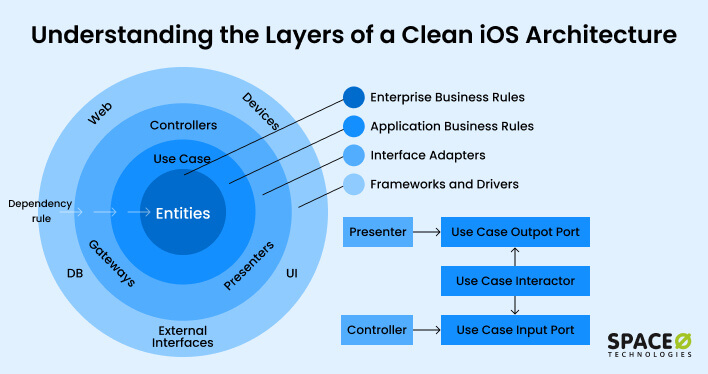
What does this mean in practice?
- The UI can depend on business logic, but the business logic cannot have any knowledge of the UI.
- The business logic can depend on core data models, but those data models cannot depend on the business logic.
- Your app's core logic should not depend on external frameworks like networking libraries or databases. Instead, these frameworks are treated as plugins or implementation details in the outer layers.
This strict, one-way dependency flow is what makes a system built with Clean Architecture so flexible, testable, and maintainable.
Principles in Action
To see how this works, let's watch a short video that introduces the key principles and the benefits they provide.
The Beginner's Guide to Clean Architecture
This video from Milan Jovanović provides a concise, high-level introduction to Clean Architecture, its benefits, and the core design principles it follows. While the examples are in .NET, the concepts are universal and explained very clearly.
Watch from 01:54 to 04:48. Focus on understanding the two key principles discussed: Separation of Concerns: How the architecture promotes this by assigning specific responsibilities to different layers. Dependency Inversion: How inner layers define abstractions (interfaces/protocols) that outer layers implement. This is the mechanism that enforces The Dependency Rule.
As the video explains, by making outer layers depend on abstractions defined by inner layers, the core of your application becomes completely independent of external details like databases, UI frameworks, or network clients.
The Layers of Clean Architecture
Now, let's break down the layers shown in the diagram and map them to concrete components you'd build in an iOS app. We'll focus on the three components mentioned in our learning outcome: Entities, Use Cases, and Presenters.
For a Swift-specific perspective, the following article provides excellent code examples.
The Clean Architecture for Swift - Ege Sucu
The article 'The Clean Architecture for Swift' by Ege Sucu gives a practical look at implementing these layers in a Swift project. We'll use it as a reference for the code examples.
You don't need to read this article front-to-back right now, but keep it handy. We'll refer to specific sections as we discuss each layer.
1. Entities (The Innermost Circle)
-
What they are: Entities are the core business objects of your application. They encapsulate the most general and high-level rules. In Swift, these are often simple
structs orclasses that are framework-agnostic. They contain no logic related to UI, networking, or storage. -
Example: In a fitness app, an
ExerciseorWorkoutstruct would be an Entity. In a financial app, aTransactionstruct would be an Entity. -
Code in Practice: Refer to the "Entities" section of the article by Ege Sucu. Notice how the
Jokestruct is a plain,CodableSwift object. It has no dependencies on UIKit, SwiftUI, or any other framework.struct Joke: Identifiable, Codable { let id: Int let joke: String }This is the heart of your application's domain.
2. Use Cases (or Interactors)
-
What they are: Use Cases represent the application-specific business logic. They orchestrate the flow of data to and from the Entities. Each Use Case should correspond to a single action a user can perform, like "Log in User," "Fetch Products," or "Save Workout." They are the workhorses of your application.
-
Dependency: Use Cases depend on Entities but know nothing about the layers outside of them (like the UI or database). To fetch or save data, they communicate through abstract interfaces (protocols in Swift), which are implemented by repositories in an outer layer.
-
Code in Practice: Look at the "Use Cases" section in the same article. The
SearchJokeUseCasehas one job: to execute a search. It depends on an abstractHumorRepositoryprotocol to do its work. It doesn't know or care if the data comes from a network API, a local database, or a test mock.struct SearchJokeUseCase { private let repository: any HumorRepository // Depends on an abstraction init(repository: any HumorRepository) { self.repository = repository } func execute(searchTerms: String, number: Int) async throws -> [Joke] { try await repository.searchJokes(keywords: searchTerms, number: number) } }
3. Presenters (Part of the "Interface Adapters" Layer)
- What they are: Presenters sit in the "Interface Adapters" layer. Their primary role is to act as a bridge between the Use Cases (business logic) and the UI (presentation). A Presenter invokes a Use Case, receives the result (typically an Entity), and then formats that data into a display-friendly format for the View. This formatted data is often called a "View Model."
- Responsibility: The Presenter ensures that data from the pure business domain (e.g., a
Dateobject, aDecimalnumber) is converted into something the UI can easily display (e.g., a"1 hour ago"string, a"$19.99"formatted string). This keeps presentation logic out of your Views and business logic out of your Presenters. In modern iOS, this role is often fulfilled by aViewModelin an MVVM architecture. - Code in Practice: Let's look at another excellent, iOS-focused article that describes this layer.
Clean Architecture in iOS Development: A Comprehensive Guide
This guide from Medium provides another clear, iOS-specific breakdown of the layers.
Read the sections titled '1. Presentation Layer' and '2. Domain Layer'. Notice how the AppointmentViewModel (which acts as a Presenter) interacts with the GetAppointmentsUseCase.
The AppointmentViewModel in this example perfectly illustrates the Presenter's role: it holds a reference to a use case and exposes a function (fetchAppointments) that the View can call. Internally, it uses the use case to get the business data.
The Complete Flow
So, how does a request travel through these layers? The diagram below, adapted for iOS, illustrates the flow.
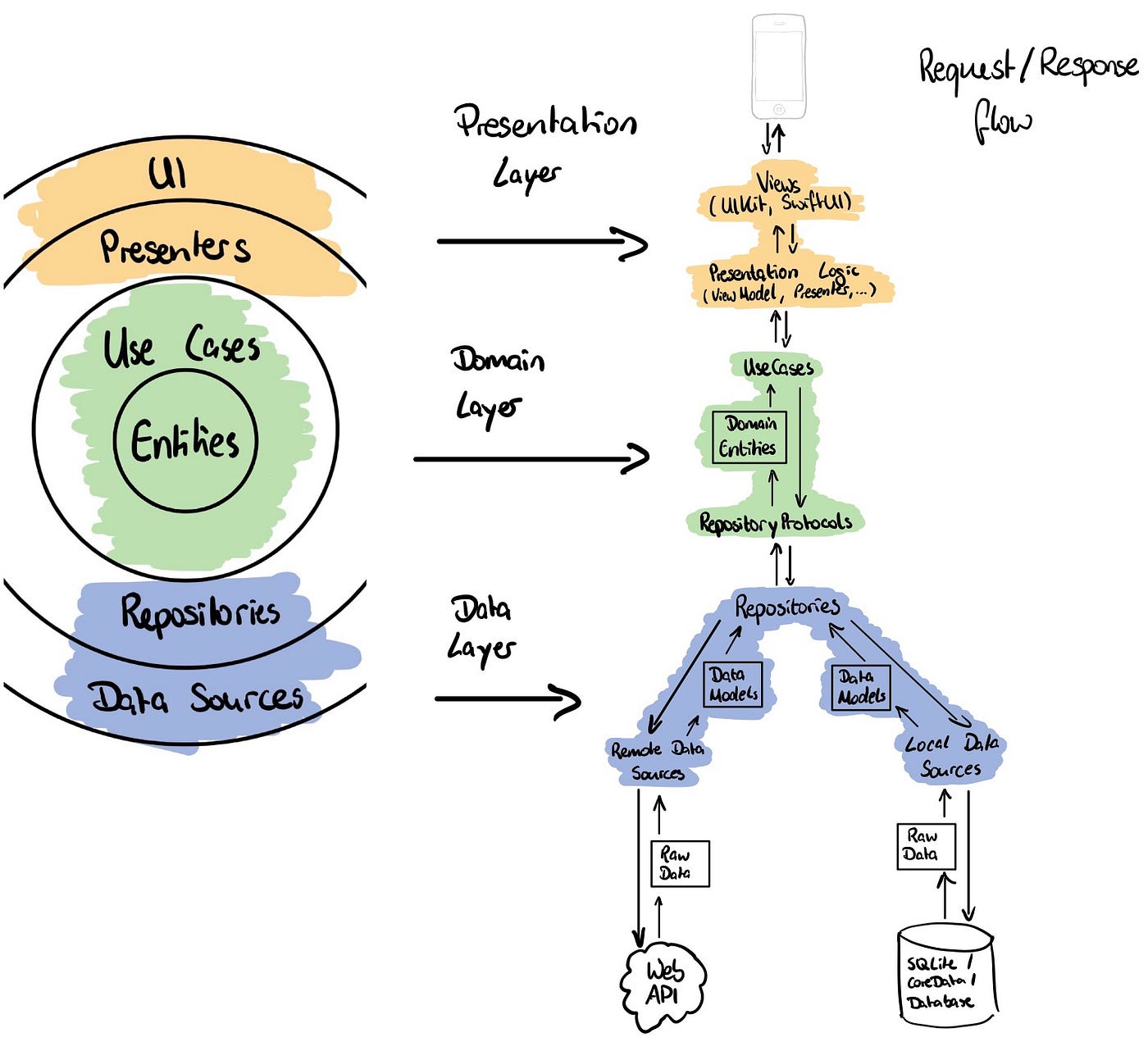
- View: A user taps a "Refresh" button. The
UIViewControllerorSwiftUI Viewcalls a method on itsViewModel(e.g.,viewModel.fetchData()). - ViewModel/Presenter: The
ViewModelexecutes the appropriateUseCase(e.g.,getAppointmentsUseCase.execute()). - Use Case: The
UseCaseasks theRepositoryprotocol for the data (e.g.,repository.getAppointments()). It receives back pureEntityobjects. - Repository (Data Layer): The concrete implementation of the
Repositoryprotocol makes a network call or queries a database and maps the raw data into theEntityobjects requested by the Use Case. - Return Flow: The
Entitiestravel back to theViewModel/Presenter, which then formats them into displayable data (View Models) and updates theView.
Conclusion
In this lesson, we've outlined the fundamental principles of Clean Architecture. You've learned about its core philosophy and the roles of its key layers.
Key Takeaways:
- The Dependency Rule is the guiding principle: dependencies must always point inwards, making the core business logic independent of external frameworks and UI.
- Entities are the pure, high-level business objects at the very core of your application.
- Use Cases (Interactors) represent specific application business rules and orchestrate the Entities.
- Presenters (or ViewModels) bridge the gap between the business logic and the UI, formatting data from Use Cases into a display-ready format for the Views.
This structure might seem like it introduces a lot of boilerplate for simple apps, and that's a valid critique. However, for large, complex projects, the benefits in testability, maintainability, and scalability are immense.
Preview of the Next Lesson:
With this conceptual foundation in place, we are ready to look at a concrete, opinionated implementation of these ideas for iOS. In our next lesson, we will describe the roles of the View, Interactor, Presenter, Entity, and Router in the VIPER architecture. You will see a direct mapping: VIPER's "Interactor" is a Use Case, and its "Entity" and "Presenter" are exactly what we've discussed today.