Welcome to the next step in your journey to becoming an API engineer. In our last lesson, we explored Python dictionaries, the fundamental data structure for organizing complex information. You learned how to create, access, and manipulate nested dictionaries, which is the perfect preparation for today's topic.
This lesson bridges the gap between Python's internal data structures and the outside world of APIs. We'll focus on JSON (JavaScript Object Notation), the universal language of web APIs. You will learn how to use Python's built-in json library to parse JSON data received from an API into a Python dictionary, and how to generate JSON data from a Python dictionary to send in an API request. Mastering this skill is non-negotiable for building the applications you aim to create.
What is JSON?
JSON is a lightweight, text-based format for data interchange. Its syntax is heavily inspired by JavaScript object literals, but it has become a language-independent standard. The reason we spent so much time on dictionaries is that JSON maps almost perfectly to them.
Take a look at the following table from the Purple Tutor guide on JSON parsing. It clearly shows the direct relationship between JSON data types and their Python equivalents.
Python json parsing tutorial for data manipulation and performance
This article provides a concise introduction to JSON and its relationship with Python.
Focus on the table under the section "Understanding JSON fundamentals" that starts with this header. This mapping is the key to understanding why the json library works so seamlessly.
As you can see, a JSON object becomes a Python dict, a JSON array becomes a list, and other primitive types like strings, numbers, and booleans have direct counterparts. This makes the process of converting between the two formats, known as serialization and deserialization, remarkably straightforward.
The Four Core Functions
Python's json module is built around four primary functions. Understanding the difference between them is crucial. The distinction boils down to whether you are working with a file or a Python string.
json.load(): Loads JSON from a file object into a Python object.json.loads(): Loads JSON from a string into a Python object. (Note the 's' for 'string').json.dump(): Dumps a Python object into a file object as JSON.json.dumps(): Dumps a Python object into a JSON-formatted string. (Again, 's' for 'string').
The diagram below provides an excellent visual summary of this flow.
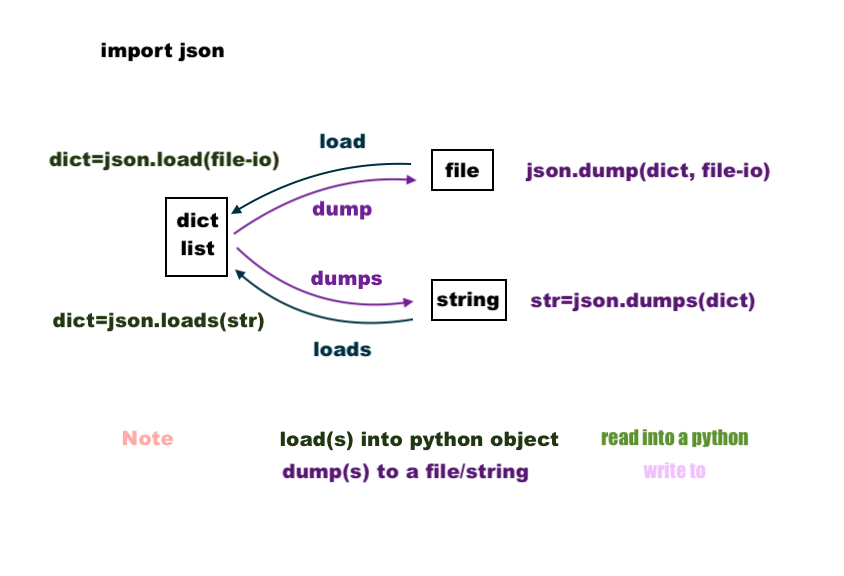
Let's see these functions in action. The following video by Corey Schafer provides a comprehensive and practical walkthrough of the entire process. We will work through it section by section.
Python Tutorial: Working with JSON Data using the json Module
This tutorial is a complete guide to using Python's json module, from basic operations to a real-world API example.
We will refer to different parts of this video throughout the lesson.
Parsing JSON (Deserialization)
Deserialization is the process of converting a JSON-formatted string into a Python object. This is what you'll do every time you receive a response from an LLM API.
From a String: json.loads()
When an API sends you data, it often arrives as a block of text. To work with it in Python, you need to parse this string.
Python Tutorial: Working with JSON Data using the json Module
Let's return to the Corey Schafer video to see how to load a JSON string into a Python dictionary.
Watch the segment from loading a JSON string. Pay attention to how he uses json.loads() and then immediately starts treating the result as a standard Python dictionary and list, looping through it and accessing keys. The conversion table he shows is the same one we discussed earlier.
From a File: json.load()
Sometimes, JSON data is stored in files, such as for application configuration or for caching API responses. The json.load() function reads directly from a file object.
Python Tutorial: Working with JSON Data using the json Module
Now, let's see how to load data from a file.
Watch this clip on loading a JSON file. Notice the pattern: he opens the file using a with statement and then passes the file handle f directly to json.load().
Generating JSON (Serialization)
Serialization is the reverse process: converting a Python object (like a dictionary or list) into a JSON-formatted string. You'll do this to construct the body of a request that you send to an API.
To a String: json.dumps()
To send a Python dictionary as part of an API request, you first need to serialize it into a string. The json.dumps() function is perfect for this and offers helpful formatting options.
Python Tutorial: Working with JSON Data using the json Module
The video demonstrates how to dump a Python object back into a JSON string.
Watch the segment from dumping to a string. The indent and sort_keys arguments shown here are incredibly useful for debugging, as they produce human-readable JSON output.
To a File: json.dump()
Similarly, you can write your Python data structures directly to a file in JSON format, which is great for saving state or configuration.
Python Tutorial: Working with JSON Data using the json Module
Finally, let's look at writing to a file.
Watch this part on writing to a JSON file. The json.dump() function takes the Python object and the file handle as arguments, along with the same helpful indent parameter.
To reinforce the importance of formatting, let's look at a text resource that dives into these options. Cleanly formatted JSON is much easier to debug.
Working With JSON Data in Python
This Real Python article provides excellent details on formatting and optimizing your JSON output.
First, read the section Prettify JSON. This reinforces the use of the indent parameter, which you'll use constantly during development. Then, skim the section Minify JSON. This introduces the separators argument. While you won't use it as often, it's good to know for production environments where you want to make your API requests as small as possible to save bandwidth.
Real-World Application & Error Handling
Let's put it all together. Your goal is to work with APIs, so let's see exactly what that looks like. The final part of the video walks through a complete, practical example: fetching data from a public web API, parsing the JSON response, and extracting the specific information needed.
Python Tutorial: Working with JSON Data using the json Module
This is the most important part of the video, as it directly mirrors the workflow of an API engineer.
Watch this final segment from the real-world example. Notice the steps: Make a web request to get raw data. Use json.loads() to parse the raw string into a Python dictionary. Use json.dumps() with indent=2 to print the structure and understand it. Write a for loop to iterate through the nested lists and dictionaries, chaining keys (data['list']['resources']) to drill down to the required values.
This process of inspecting the structure and then methodically accessing nested data is a core skill you will use every day.
Finally, what happens when the API sends you malformed data, or a file is corrupted? Your application shouldn't crash. Since you've expressed interest in production-level concerns, learning to handle errors is vital.
Python json parsing tutorial for data manipulation and performance
This section of the Purple Tutor article focuses specifically on handling errors that can occur during JSON parsing.
Read the section on Error handling. Focus on the try...except JSONDecodeError block. This is the standard, robust way to handle potentially invalid JSON and prevent your program from failing.
Conclusion
You have now learned one of the most critical skills for an API engineer: translating between the language of web APIs (JSON) and the language of your application (Python objects).
Here are the key takeaways from this lesson:
- JSON is the standard text-based format for data exchange, and it maps closely to Python's dictionaries and lists.
- Python's
jsonmodule has four core functions:load(from file),loads(from string),dump(to file), anddumps(to string). - Deserialization (
load/loads) is for parsing incoming data from APIs. - Serialization (
dump/dumps) is for preparing data to be sent in API requests. - Using parameters like
indentwhen dumping JSON is essential for creating readable output for debugging. - Robust applications must handle parsing failures using
try...except JSONDecodeError.
We've just seen how try/except is used to handle a very specific type of error. In our next lesson, we will expand on this concept and learn how to handle all sorts of potential runtime errors gracefully, a crucial step in building reliable, production-ready applications.