Hello! In our last lesson, we mastered functions, learning how to package our code into reusable and organized blocks. This is a crucial skill for building any application. Now, we're going to turn our attention to the data that our functions will operate on.
This lesson focuses on Python dictionaries, the single most important data structure for working with web APIs. Your goal is to build applications that interact with LLM APIs, and those APIs almost exclusively communicate using a data format called JSON. As you'll soon see, Python dictionaries are the natural way to represent and manipulate this JSON data. We will cover how to create dictionaries, access their data safely, and, most importantly, work with the nested structures that are characteristic of real-world API responses.
The Anatomy of a Dictionary: Key-Value Pairs
At its core, a dictionary is an unordered collection of data stored as key-value pairs. You can think of it like a real-world dictionary: the "key" is the word you look up, and the "value" is its definition. This structure is incredibly efficient for retrieving data when you know the key.
In Python, keys are typically strings or numbers and must be unique within a dictionary. Values, however, can be any data type: a number, a string, a list, or even another dictionary.
The following video provides an excellent and thorough introduction to the fundamental operations you'll use with dictionaries.
Python Tutorial for Beginners 5: Dictionaries - Working with Key-Value Pairs
This tutorial from Corey Schafer is a clear and comprehensive guide to Python dictionaries. It covers everything from creation to manipulation.
Please watch the following segments. As you watch, feel free to open your Python interpreter and try out the examples yourself. Creating and Accessing: This covers the basic syntax for creating a dictionary and retrieving values using a key. Adding and Updating: Learn how to add new key-value pairs or modify existing ones. Deleting Entries: See how to remove key-value pairs using del and the .pop() method. Looping and Methods: Understand how to iterate through a dictionary's keys, values, or both, using methods like .keys(), .values(), and .items().
Writing Robust Code: Safe Dictionary Access
When you try to access a dictionary key that doesn't exist using square brackets (e.g., my_dict['unknown_key']), your program will crash with a KeyError. This is a common bug, especially when dealing with API responses where certain fields might be optional. To write robust, production-ready code, you need a safer way to access data.
The .get() method is the solution. It allows you to retrieve a value by its key, but if the key is not found, it returns None (or another default value you specify) instead of raising an error.
Python Tutorial for Beginners 5: Dictionaries - Working with Key-Value Pairs
Let's return to the Corey Schafer video to see how the .get() method works.
Watch this short clip on using the get() method to avoid KeyError exceptions. This is a critical practice for professional development.
Using my_dict.get('key', 'default_value') is a powerful pattern you'll use constantly when parsing API data to prevent your application from failing unexpectedly.
Nested Structures: Handling Real-World Data
API responses are rarely simple, flat lists of key-value pairs. They often contain hierarchical data, where a value can be another dictionary or a list of dictionaries. This is where nested dictionaries come into play.
Given your interest in cricket, imagine representing a player's statistics. A nested dictionary is a perfect fit:
player_stats = {
    'Virat Kohli': {
        'matches': {'test': 113, 'odi': 292, 't20i': 117},
        'runs': {'test': 8848, 'odi': 13848, 't20i': 4037},
        'highest_score': 254
    },
    'Jasprit Bumrah': {
        'matches': {'test': 36, 'odi': 89, 't20i': 62},
        'wickets': {'test': 159, 'odi': 149, 't20i': 74},
        'best_bowling': '6/19'
    }
}
Here, the main dictionary has player names as keys. The value for each player is another dictionary containing their stats, some of which are themselves dictionaries (like matches and runs).
The image below provides a great conceptual diagram of this structure.
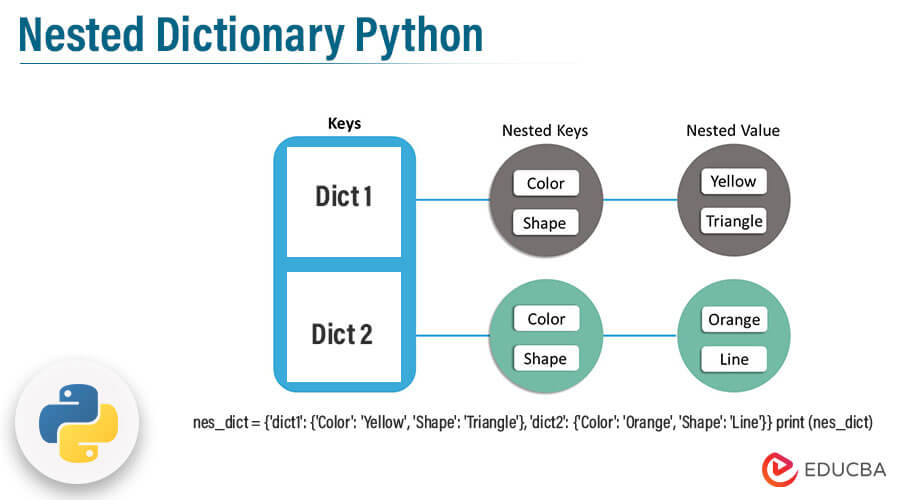
To work with these structures, you simply chain the keys together. To get Virat Kohli's ODI runs from our example, you would use:player_stats['Virat Kohli']['runs']['odi']
The following article from AlgoMaster.io provides a concise guide to the mechanics of creating, accessing, and modifying these nested structures.
Nested Dictionaries | Python - AlgoMaster.io
This article clearly demonstrates the core operations for nested dictionaries, reinforcing the concepts with simple examples.
Please read the following three sections: Start with Creating Nested Dictionaries to see the syntax. Next, read Accessing Nested Dictionary Values. This section will show you how to chain keys and will reinforce the importance of the .get() method for safety. Finally, review Modifying Nested Dictionaries to learn how to add, update, and delete data within these structures.
Often, you'll encounter a list containing multiple dictionaries, which is a common way for APIs to return a collection of items (e.g., a list of news articles, products, or, as in the image below, baseball teams).

A Practical Example: Parsing a Nested API Response
Now let's tie everything together. The ultimate goal is to take a raw API response and extract the specific pieces of information we need. The video below provides a complete, practical walkthrough of this exact process. The presenter takes a real-world JSON data structure, loads it into Python, and navigates through multiple layers of nested dictionaries and lists to pull out the desired data.
This is a perfect demonstration of the skills you are learning in the context of our course goal.
Python - Accessing Nested Dictionary Keys
This video from Academind is a fantastic real-world example of navigating a complex, nested data structure that originated as a JSON API response.
Watch the following segments to see the entire process from start to finish: Loading JSON into Python: The video starts by loading data from a file into a Python object. Notice how Python automatically converts the top-level JSON object into a dictionary. Accessing Top-Level Data: The presenter accesses the first key ('results') and discovers its value is a list. Accessing List and Nested Dicts: He then shows how to access an element of the list by its index, revealing that each list item is another dictionary. This is the "list of dictionaries" pattern we saw earlier. Looping to Extract Data: Finally, he uses for loops to iterate through the nested lists and dictionaries, chaining key access (['replies'][0]['user']['display_name']) to methodically drill down and extract the specific data he needs. Pay close attention to how he fluidly switches between accessing dictionary keys (with ['key']) and list elements (with [index]). This is the fundamental skill for parsing complex API responses.
Conclusion
You've now learned about Python's most powerful data structure for handling the kind of information we'll be getting from LLM APIs. Mastering dictionaries is non-negotiable for API engineering.
Here are the key takeaways from this lesson:
- Dictionaries store data as key-value pairs, allowing for fast data retrieval.
- The basic operations are creating (
{}), accessing (['key']), updating (['key'] = new_value), and deleting (del). - For robust code, always use the
.get()method to access keys that might be missing, which prevents your program from crashing. - Nested dictionaries and lists of dictionaries are the standard way to represent complex, hierarchical data from APIs.
- You navigate these nested structures by chaining accessors for keys and indices, like
data['level1_key'][0]['level2_key'].
The Academind video you just watched gave a preview of the json library to load data from a file. In our next lesson, we will dive deep into this built-in Python library. You'll learn how to formally parse JSON-formatted text from an API response into a Python dictionary and, conversely, how to generate a JSON string from a dictionary to send in an API request.