Hello! Welcome back.
In our last lesson, you successfully wrote and launched your first CUDA kernel, vectorAdd. In doing so, you implicitly used the most fundamental of the GPU's memory spaces: global memory. The arrays you allocated with cudaMalloc and passed to your kernel all resided there.
However, relying solely on global memory is often not enough to achieve high performance. A GPU's architecture features a rich memory hierarchy, with different types of memory offering various trade-offs in terms of speed, size, and scope. Understanding this hierarchy is the most critical step toward writing highly optimized CUDA code.
This lesson is dedicated to exploring that hierarchy. Our goal is to describe the different GPU memory spaces (global, shared, constant, and registers) and their use cases. Think of it like a workshop: you have a massive warehouse for all your materials (global memory), but for efficient work, you also have a workbench for parts you're currently using (shared memory) and your own toolbelt for immediate-use items (registers). Knowing what to put where is key.
1. The CUDA Memory Hierarchy: A High-Level View
The CUDA memory model is designed to expose the physical memory hierarchy of the GPU directly to the programmer. Each level in the memory hierarchy corresponds to a level in the thread hierarchy (threads, blocks, grid) that you learned about previously.
Let's start with a visual map. The diagram below illustrates the different memory spaces and their relationship to the host (CPU) and the GPU's threads and blocks.
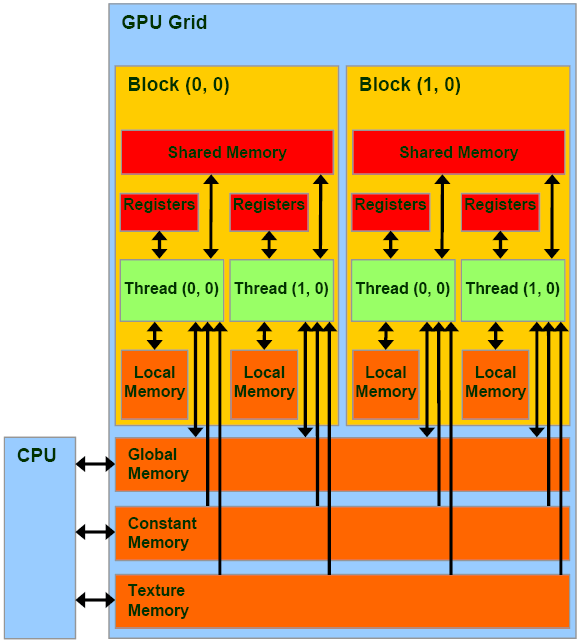
To get a quick walkthrough of how these memory spaces relate to the thread hierarchy, the following short video provides an excellent introduction.
Intro to CUDA (part 5): Memory Model
This video from Josh Holloway introduces the CUDA memory model and its direct correspondence to the thread hierarchy.
Please watch from the beginning until 03:11. This segment provides a concise overview of how local, shared, and global memory map to threads, blocks, and grids, respectively.
Now, let's dive into the details of each memory space. We'll group them by their physical location: off-chip memory (the large, slower "warehouse") and on-chip memory (the small, faster "workbench").
2. Off-Chip Memory: Large but Latent
Off-chip memory is located on the GPU's dedicated DRAM, which is physically separate from the GPU processing cores. This makes it large but also much slower to access than on-chip memory.
Global Memory
This is the memory space you are already familiar with.
- Scope: Accessible by all threads in the grid and by the host (CPU).
- Location: Off-chip DRAM.
- Speed: Slow (high latency, though high bandwidth is achievable).
- Use Case: The primary means of communication between the host and device. It's used for the main input data and final output results of your kernels.
- Declaration: Pointers to global memory are obtained via
cudaMallocon the host and passed as arguments to a kernel.
In our vectorAdd example, the arrays d_A, d_B, and d_C were all in global memory. While essential, frequent access to global memory can become a major performance bottleneck.
Local Memory
The name "local memory" can be misleading. While it is logically local to a single thread, it is physically located in off-chip DRAM, just like global memory. This means it is just as slow.
- Scope: Private to a single thread.
- Location: Off-chip DRAM.
- Speed: Slow.
- Use Case: The compiler uses local memory automatically in two main situations:
- Register Spilling: When a kernel uses more local variables than can fit in the GPU's fast on-chip registers, the excess variables "spill" into local memory.
- Local Arrays with Variable Indices: If you declare a small array inside a kernel (e.g.,
float data[10];) and the compiler cannot determine the array index at compile time, it may place this array in local memory.
- Declaration: Implicit. You don't declare local memory directly; the compiler uses it as a fallback.
Because local memory is slow, register spilling is a significant performance hazard to be aware of and generally avoid.
3. On-Chip Memory: Small but Fast
On-chip memory is physically located on the same silicon as the GPU's processing cores (the Streaming Multiprocessors, or SMs). This proximity makes it extremely fast, but also very limited in size. Effective use of on-chip memory is the hallmark of high-performance CUDA code.
Registers
Registers are the fastest memory available on the GPU.
- Scope: Private to a single thread.
- Location: On-chip.
- Speed: Fastest (single-cycle latency).
- Use Case: Storing frequently accessed private variables within a kernel.
- Declaration: The compiler automatically places scalar variables declared within a kernel (e.g.,
int i = ...;orfloat temp = ...;) into registers whenever possible.
There is a finite pool of registers per SM, which is shared among all threads running on that SM. Using too many registers per thread can limit the number of threads that can run concurrently, which can hurt overall performance. This is a key trade-off you'll manage as you optimize kernels.
Shared Memory
Shared memory is a uniquely powerful feature of the CUDA model. It acts as a small, programmable cache that is shared by all threads within a block.
- Scope: Accessible by all threads within the same block.
- Location: On-chip.
- Speed: Very fast (orders of magnitude faster than global/local memory).
- Use Cases:
- Inter-thread Communication: Allows threads in a block to cooperate and exchange data to solve a larger problem.
- Data Reuse (User-Managed Cache): The most common use case. A block of threads can collectively load a "tile" of data from slow global memory into fast shared memory once. Then, all threads in the block can perform multiple computations on that data by accessing it from shared memory, dramatically reducing traffic to global memory.
- Declaration: You declare shared memory inside a kernel using the
__shared__keyword. For example:__shared__ float tile[256];
When threads in a block cooperate using shared memory, you often need to synchronize them using __syncthreads(), which we'll explore in a future lesson.
Constant Memory
Constant memory is another specialized, cached memory space.
- Scope: Accessible by all threads in the grid (read-only).
- Location: Physically in off-chip DRAM, but aggressively cached on-chip.
- Speed: Very fast if a cache hit occurs.
- Use Case: Ideal for data that is read by many threads and does not change during the kernel's execution. It is most efficient when all threads in a warp (a group of 32 threads) read the exact same memory address. Think of physical constants, filter coefficients, or small lookup tables.
- Declaration: You declare constant memory at a global scope (outside any function) using the
__constant__keyword. For example:__constant__ float filter_coeffs[9];
4. Putting It All Together: A Comprehensive Overview
To solidify your understanding, let's turn to a video that provides a comprehensive tour of all these memory spaces and also introduces the L1/L2 caches that support them.
NVIDIA CUDA Tutorial 5: Memory Overview
This video from Creel provides a detailed walkthrough of all the CUDA memory types, including a discussion of caches and practical considerations for each.
This video ties everything together. Please watch the following segments: Global and Local Memory (01:42 - 04:20): Reinforces the properties of off-chip memory and register spilling. Shared Memory (11:15 - 12:33): Discusses the speed and purpose of this critical on-chip memory. Registers (12:33 - 14:04): Explains their role as the fastest memory and the impact of register usage. Constant Memory (06:52 - 08:56): Details the use case and caching benefits of constant memory. Summary (14:04 - 15:00): A great recap diagram that visualizes the speed and location hierarchy.
The article "CUDA Memory Management & Use cases" also provides excellent examples of why this matters. While you don't need to study the code in-depth right now, it's useful to see the motivation. For example, it discusses using shared memory to optimize a matrix transpose and constant memory to store a filter for a convolution operation. These are classic optimization patterns we will build towards.
Conclusion
You now have a mental map of the GPU's memory architecture. This is a foundational concept that underpins almost every performance optimization technique in CUDA.
Key Takeaways:
- GPU Memory is a Hierarchy: It ranges from very fast but small on-chip memory (registers, shared) to large but slow off-chip memory (global, local).
- Location Dictates Speed: On-chip access is orders of magnitude faster than off-chip access.
- Scope Dictates Sharing: Memory can be private to a thread (registers, local), shared within a block (shared memory), or accessible to all (global, constant).
- Choosing the Right Memory is Key: Effective CUDA programming involves minimizing slow global memory traffic by intelligently using fast registers, shared memory, and constant memory.
Here is a summary table for your reference:
| Memory Type | Scope | Location | Speed | Access by Kernel | Primary Use Case |
|---|---|---|---|---|---|
| Registers | Thread | On-chip | Fastest | R/W | Local variables, loop counters. |
| Local Memory | Thread | Off-chip | Slow | R/W | Automatic spillover for registers. |
| Shared Memory | Block | On-chip | Very Fast | R/W | Inter-thread communication, user-managed cache. |
| Global Memory | Grid | Off-chip | Slow | R/W | Data transfer with host, large datasets. |
| Constant Memory | Grid | Off-chip (Cached) | Fast (on hit) | Read-Only | Broadcast of read-only values (e.g., coefficients). |
In our next lesson, we will focus on our first major optimization: optimizing global memory access by ensuring memory coalescing. You'll learn that how you access global memory can be just as important as how much you access it.