Hello! Welcome to the final lesson in our "Infrastructure for Scalable Systems" module.
In our last session, we explored the core strategies for building fault-tolerant systems: replication and checkpointing. We saw how these techniques provide reliability and allow systems to recover from failures. A key theme was the complexity involved in managing this reliability, from ensuring replica consistency to coordinating checkpoints.
Today, we'll see how this complexity is often managed for us by cloud providers. This leads us directly to our learning outcome: Compare cloud computing service models: IaaS, PaaS, and SaaS. We will investigate how cloud computing abstracts away different layers of the technology stack, offering various trade-offs between control and convenience. This will provide a crucial framework for understanding where and how scalable applications are deployed in the modern world.
1. The Technology Stack: A Layered View
To understand cloud service models, we must first understand the components required to deliver an application to a user. This is often visualized as a "stack" of technologies, with physical hardware at the bottom and the application itself at the top.
Let's begin by watching a short video that breaks down this stack and introduces the idea that different service models are defined by which layers you manage versus which layers the cloud provider manages.
AZ-900 Episode 5 | IaaS vs PaaS vs SaaS cloud service models | Microsoft Azure Fundamentals Course
This video from Adam Marczak - Azure for Everyone clearly breaks down an application's technology stack and uses this to define the on-premises, IaaS, PaaS, and SaaS models.
Watch from 00:37 to 06:48. Focus on: The different layers of the stack: infrastructure, platform, and software. How the responsibility for managing these layers shifts between you and the provider in each model.
The video provides a clear, structured way to differentiate the models. The following chart, a classic in cloud computing, visualizes this "shared responsibility model" perfectly.

Let's walk through this chart:
- On-Premises: This is the traditional model where you own and manage everything in your own data center, from the physical networking and servers to the application itself.
- Infrastructure as a Service (IaaS): The provider manages the physical infrastructure (networking, storage, servers) and the virtualization layer. You are responsible for everything above that: the operating system, middleware, runtime, and your application code and data. You are essentially renting raw compute, storage, and networking resources.
- Platform as a Service (PaaS): The provider manages everything IaaS does, plus the operating system, middleware, and runtime environment. You are only responsible for your application code and data. The provider gives you a "platform" on which to build and run your applications without worrying about the underlying system administration.
- Software as a Service (SaaS): The provider manages the entire stack, including the application itself. You simply consume the software, typically through a web browser. You are responsible only for your own data and how you use the application.
2. An Intuitive Analogy: The Transportation Service Model
While the stack model is precise, an analogy can help build a strong intuition for the trade-offs involved. A common and effective one compares these services to modes of transportation.
This video from IBM Technology introduces an excellent analogy comparing the cloud service models to transportation.
Please watch the segment from 01:53 to 03:01. Pay attention to how leasing a car, renting a car, and taking a taxi map to IaaS, PaaS, and SaaS, respectively.
To summarize the analogy:
- IaaS is like leasing a car. You don't own the car, but you have full control over how you drive it and where you go. You are also responsible for maintenance, gas, and tolls. This maps to the high degree of control and responsibility you have in IaaS.
- PaaS is like renting a car. You get a car for a specific purpose (e.g., a trip). You don't care about the long-term maintenance or ownership, just that it works for your journey. You still have to drive it and pay for gas. This maps to how PaaS lets you focus on your application (the journey) without managing the underlying platform (the car).
- SaaS is like taking a taxi or Uber. You don't drive, you don't worry about the car, maintenance, or gas. You just state your destination and are taken there. This maps to SaaS, where you simply use the service without any concern for the underlying technology.
3. A Detailed Comparison
Now that we have both a technical and an intuitive understanding, let's dive into a more detailed comparison across several key criteria. This is the core of our learning outcome.
The following reading provides an excellent, in-depth comparison of the three models.
This article from Splunk offers a comprehensive comparison of IaaS, PaaS, and SaaS across several important factors, from deployment and security to cost and customization.
Please read the section titled 'Comparing SaaS, IaaS & PaaS'. It starts after the initial definitions and is broken down by subheadings like 'Model deployment', 'Learning curve', 'Security', etc. Focus on understanding the trade-offs for each criterion.
Based on the reading and our previous discussion, let's consolidate the comparison into a summary table. This table will be a valuable reference for analyzing system design choices.
| Criterion | IaaS (Infrastructure as a Service) | PaaS (Platform as a Service) | SaaS (Software as a Service) |
|---|---|---|---|
| What you Manage | OS, Middleware, Runtime, Data, Applications | Data, Applications | Your data within the application |
| Control/Customization | High. Full control over OS, software stack, and network configuration. | Medium. Control over application deployment and some environment settings. Limited by the platform's offerings. | Low. Limited to user-specific settings provided by the application vendor. |
| Target User | System Administrators, DevOps Engineers | Application Developers | End Users |
| Responsibility | You are responsible for patching the OS, securing the network, and managing the entire software stack. | Shared. Provider secures the platform; you secure your application and data. | Provider is responsible for securing and maintaining the entire stack. |
| Scalability | You are responsible for configuring auto-scaling, load balancing, etc. Highly flexible but requires expertise. | Platform often provides built-in, automated scaling. Easier to implement but constrained by the platform's rules. | Handled entirely by the provider. The service scales transparently to the user. |
| Pricing Model | Pay-as-you-go for raw resources (CPU hours, GB of storage, network egress). | Pay-as-you-go for application resources, often tiered. May include a base subscription fee. | Typically a per-user, per-month/year subscription fee. |
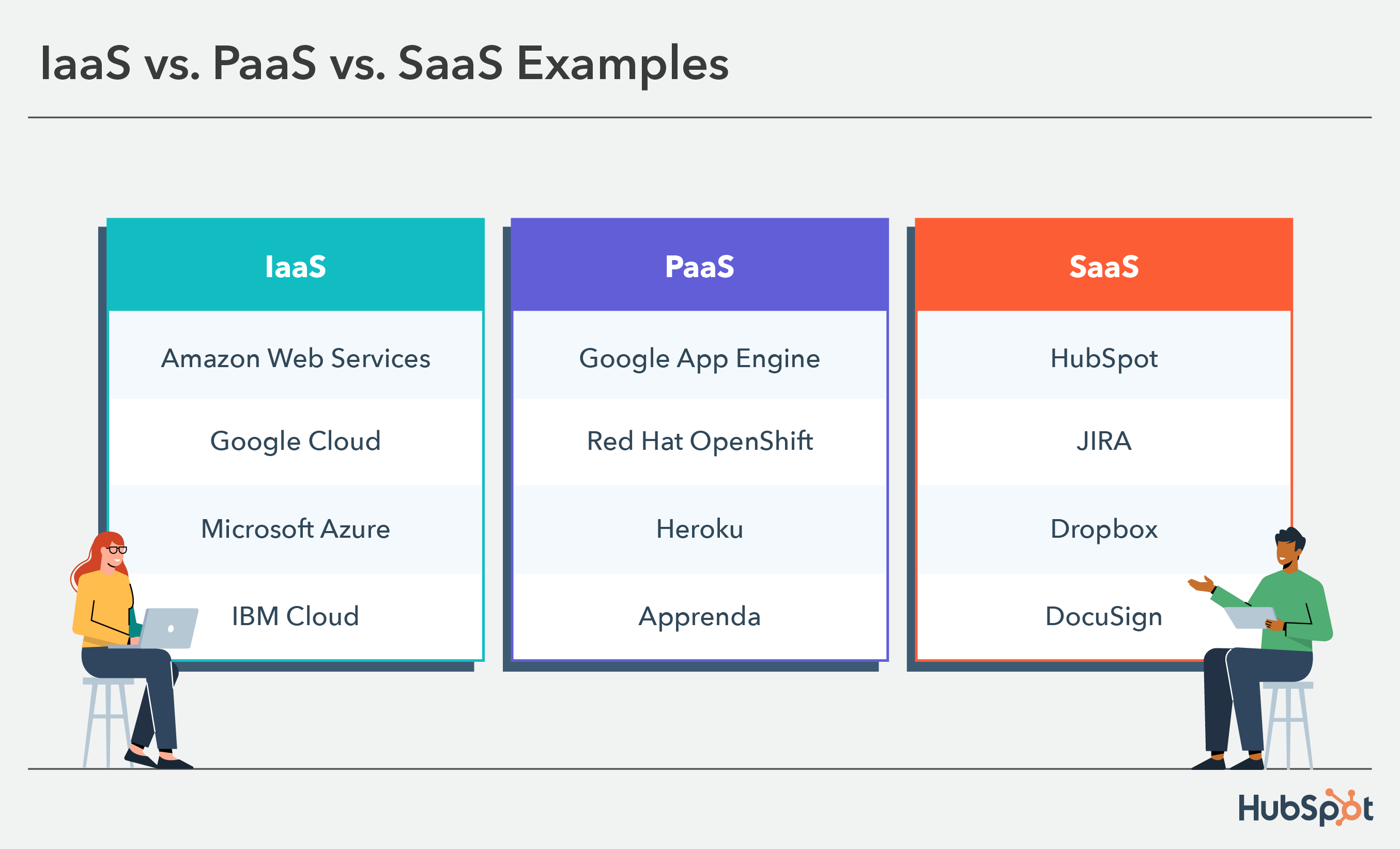
To make these models even more concrete, here are some well-known examples for each category.
Conclusion
Today, we've dissected the three primary cloud computing service models. Understanding the differences between IaaS, PaaS, and SaaS is fundamental to modern system design, as the choice profoundly impacts cost, scalability, development speed, and operational overhead.
Key Takeaways:
- Cloud service models are defined by the division of responsibility between the customer and the provider across the technology stack.
- IaaS offers the most control and flexibility by providing raw infrastructure, but also carries the most management responsibility. It is ideal for custom architectures and migrating existing on-premises systems.
- SaaS offers the most convenience and lowest overhead by delivering a ready-to-use application, but provides minimal control or customization.
- PaaS sits in the middle, providing a powerful platform for developers to build and deploy applications without managing the underlying infrastructure. It represents a trade-off that accelerates development at the cost of some control.
- The choice of model is a strategic decision based on your team's expertise, business needs, and desired level of control versus convenience.
This lesson concludes our module on the infrastructure of scalable systems. We've journeyed from the fundamental architecture of a single computer, through the memory hierarchy, and into the principles of parallel and distributed systems.
In our next module, we will begin our study of "Data-Parallel Processing with MapReduce." We will move from the infrastructure that enables scale to a specific programming model designed to process massive datasets on that infrastructure. Our first lesson will explain the MapReduce model, including its core map, shuffle, and reduce phases.