Introduction
In our last lesson on RISC vs. CISC architectures, we saw how a processor's design philosophy deeply influences the compiler's role. A CISC architecture aims to simplify the compiler's job by providing powerful, complex instructions, while a RISC architecture relies on a "smart" compiler to generate highly optimized sequences of simple instructions.
This naturally raises the question: what does a compiler, like the g++ or clang++ you use for your C++ projects, actually do? How does it transform the high-level source code you write into the low-level machine instructions that a CPU can execute?
This lesson demystifies that process. We will trace a C++ source file on its journey from text to binary. Our learning outcome is to describe the compilation pipeline: preprocessing, compiling, and assembling source code into object files. You'll see how your .cpp file is transformed first into preprocessed code, then into assembly language, and finally into a binary object file (.o). This knowledge provides a crucial link between your software development experience and the underlying hardware.
The Compilation Pipeline: A High-Level View
The journey from a .cpp file to an executable is not a single step but a sequence of stages known as the compilation pipeline. Each stage takes the output from the previous one, transforms it, and passes it along.
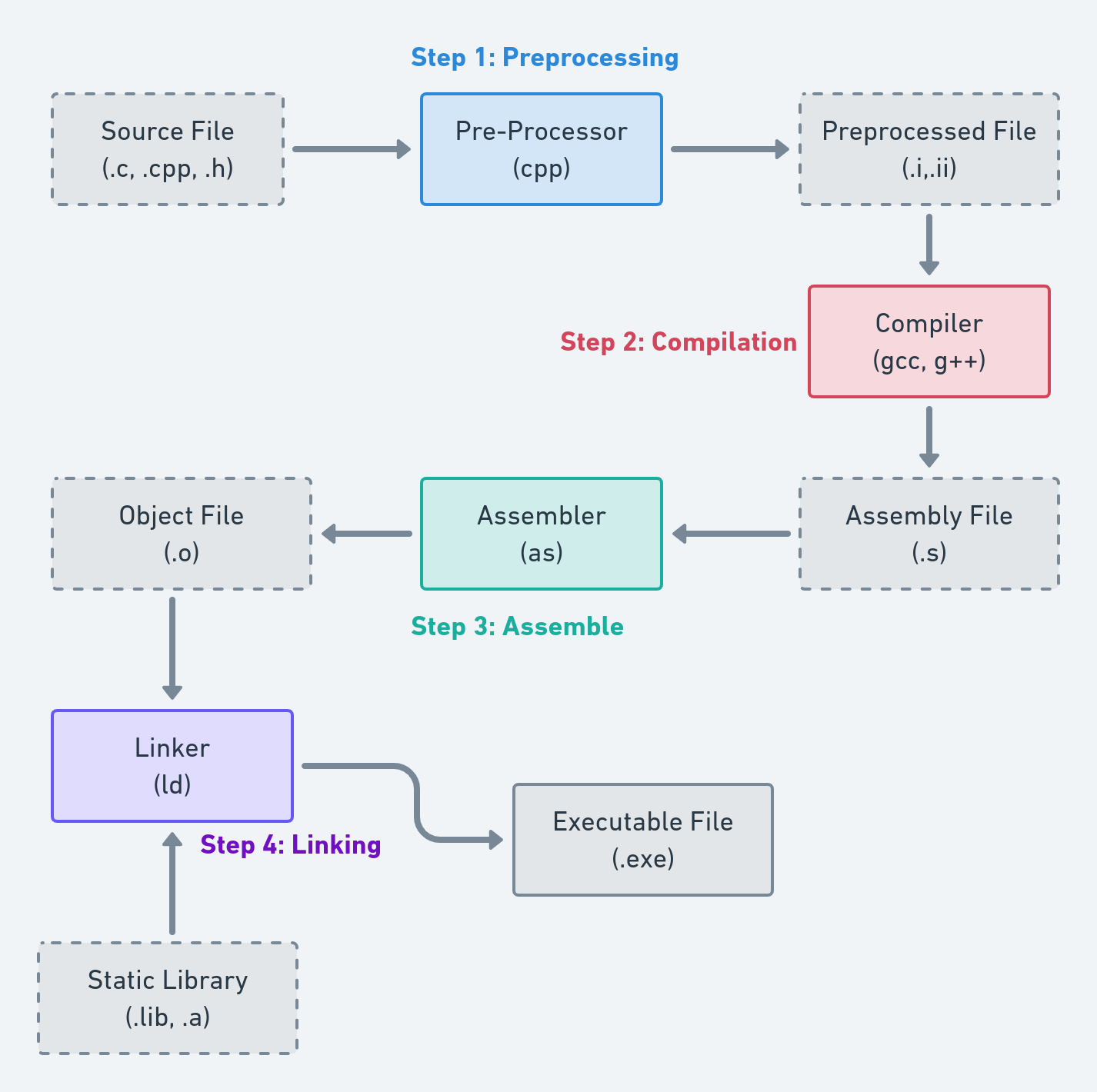
As the diagram illustrates, the primary stages are:
- Preprocessing: Handles text-based directives.
- Compilation: Translates the code to architecture-specific assembly language.
- Assembly: Converts assembly language into machine code.
- Linking: Combines one or more machine code files into a final executable.
This lesson focuses on the first three stages, which take us from a single source file to a single object file. The final linking stage, which combines these object files, will be the subject of our next lesson.
Stage 1: Preprocessing
Before the C++ compiler even begins to analyze your code's structure, a program called the preprocessor performs text-based manipulations. Since you are familiar with C++, you've been using preprocessor directives all along.
The preprocessor's main tasks include:
- File Inclusion: Handling
#includedirectives by literally copying and pasting the contents of the specified file into the current file. - Macro Expansion: Replacing symbols defined with
#definewith their corresponding text. This is a simple text substitution, which can lead to subtle bugs if not handled carefully (e.g., with function-like macros). - Conditional Compilation: Including or excluding blocks of code based on
#if,#ifdef, and#ifndefdirectives. This is commonly used for platform-specific code and for include guards, which prevent the same header from being included multiple times.
The output of this stage is a single, large text file (often with a .i or .ii extension) that is still valid C++ code, but with all directives processed.
To see this in action, I recommend watching the following video segment. It provides a practical, hands-on walkthrough of the preprocessing stage using g++.
In 54 Minutes, Understand the whole C and C++ compilation process
The video 'In 54 Minutes, Understand the whole C and C++ compilation process' by Mike Shah provides an excellent practical demonstration. This first segment focuses on the preprocessor.
Watch from 06:16 to 20:13. The presenter uses simple C++ files to demonstrate how to stop the pipeline after the preprocessing stage using the g++ -E flag. Pay close attention to how #include is expanded and how include guards solve the multiple-definition problem.
As the video shows, you can inspect the preprocessor's output yourself. If you have a file main.cpp, you can generate the preprocessed file main.i with the command:
g++ -E main.cpp -o main.i
Opening main.i will reveal your code, but with all the header files (like <iostream>) fully expanded and macros replaced.
Stage 2: Compilation (Source to Assembly)
After preprocessing, the resulting code is fed to the compiler proper. The compiler's job is to parse the C++ code, check it for correctness, and translate it into low-level assembly language. Assembly language is a human-readable representation of the machine instructions for a specific CPU architecture (like x86-64 or ARM).
This stage is itself composed of several phases:
- Lexical Analysis: The source code is broken down into a stream of "tokens" (e.g., keywords like
int, identifiers likemyVar, operators like+). - Syntax Analysis (Parsing): The compiler checks if the sequence of tokens follows the grammatical rules of C++. It typically builds a tree-like data structure called an Abstract Syntax Tree (AST) to represent the code's structure.
- Semantic Analysis: The compiler analyzes the AST for logical correctness. This includes type checking (e.g., you can't add a string to an integer), resolving function calls, and instantiating templates.
- Optimization: The compiler analyzes and transforms the code to make it faster or smaller. This can involve anything from simple constant folding (
2 + 2becomes4) to complex loop transformations. - Code Generation: Finally, the optimized internal representation is converted into the target assembly language.
The following resource provides a clear textual overview of these phases.
C++ Compilation Process: From Source Code to Object Files
The article 'C++ Compilation Process' gives a detailed but accessible look at the inner workings of the compiler.
Read the sections 'Phase 2: Lexical Analysis', 'Phase 3: Syntax Analysis', 'Phase 4: Semantic Analysis', and 'Phase 7: Code Generation'. These sections map directly to the sub-stages we just discussed and explain the transformation from tokens to AST to assembly.
You can instruct the compiler to stop after this stage and emit the assembly file (usually with a .s extension).
In 54 Minutes, Understand the whole C and C++ compilation process
Let's return to Mike Shah's video for another practical demonstration. This segment shows how to generate and inspect the assembly code output.
Watch from 20:13 to 27:58. The video explains how the compiler generates assembly and shows the g++ -S flag to produce the .s file. Notice that the assembly code contains mnemonics like mov (move data) and add (add data).
The command to produce an assembly file main.s from our preprocessed main.i file is:
g++ -S main.i -o main.s
Stage 3: Assembly (Assembly to Object Code)
We now have an assembly file, which is human-readable but cannot be executed by the CPU. The final step in our journey today is the assembly stage, where a program called the assembler translates the assembly instructions into machine code.

The output of this stage is an object file (e.g., .o on Linux/macOS, .obj on Windows). An object file contains the binary machine code for the functions and variables defined in the source file.
However, an object file is typically not a complete program. It also contains metadata, most importantly a symbol table. This table lists:
- Defined Symbols: Functions and global variables that exist within this object file.
- Undefined Symbols: Functions and variables that are referenced in this file but defined elsewhere (e.g.,
printffrom the C standard library, or a function from another.cppfile in your project).
These "undefined" references are like placeholders that the linker will resolve in the final stage.
This last video segment demonstrates how to create and inspect an object file.
In 54 Minutes, Understand the whole C and C++ compilation process
This final segment from Mike Shah's video covers the assembly stage, demonstrating the creation of an object file and a brief look at its contents.
Watch from 27:58 to 34:16. Focus on how the g++ -c flag is used to generate an object file (.o). The presenter also introduces the objdump tool to inspect the symbol table, which is a perfect lead-in to our next topic.
To create an object file main.o from the assembly file main.s, the command is:
g++ -c main.s -o main.o
In practice, you'll almost always use a shortcut that runs all three stages at once, compiling directly from a source file to an object file:
g++ -c main.cpp -o main.o
This command preprocesses, compiles, and assembles main.cpp in one go, producing main.o.
Conclusion
In this lesson, we deconstructed the initial stages of compilation, tracing the path from a C++ source file to a binary object file. You now understand that running a command like g++ initiates a multi-stage pipeline.
Key Takeaways:
- The compilation pipeline transforms source code through distinct stages: preprocessing, compilation, and assembly.
- Preprocessing is a text-substitution phase that handles directives like
#includeand#define, producing a single.ifile. - Compilation involves parsing and analyzing the C++ code, translating it into architecture-specific assembly language in a
.sfile. - Assembly converts the human-readable assembly instructions into machine code, creating an object file (
.o). - An object file contains machine code and a symbol table, which lists defined and undefined symbols, leaving placeholders for external functions and variables.
Preview of the Next Lesson:
Our journey ended with one or more object files, none of which is a complete, runnable program. How are these pieces put together? How does the call to printf in main.o find the actual machine code for printf, which lives in a separate library? The answer lies in the final stage. In our next lesson, we will explain the role of the linker in resolving symbols and combining object files to create a final executable.