Hello! Welcome to your next lesson on data-parallel processing.
In our previous lessons, we've assembled the key building blocks of the Hadoop ecosystem. We explored:
- The MapReduce programming model: What we want to do (map, shuffle, reduce).
- HDFS architecture: Where our data lives (NameNode, DataNodes, blocks, replicas).
- YARN: Who manages the cluster resources and orchestrates the work.
Today, we'll connect all these pieces. Our goal is to trace the data flow and component interaction during the execution of a MapReduce job. You will see how a simple client request kicks off a complex but highly coordinated dance between multiple system components to process terabytes of data in parallel.
1. The Cast of Characters
Before we trace the execution, let's re-introduce the main components involved in running a MapReduce job on YARN.
This presentation slide from IIT Roorkee provides a concise list and description of the five key components we'll be tracking. It's a useful reference for the roles each one plays.
Please review slide 8, titled 'MapReduce on YARN Components'. Familiarize yourself with the roles of the Client, Resource Manager, Node Manager, MapReduce Application Master, and HDFS.
To summarize, we have:
- Client: The user's machine that submits the job.
- HDFS: The distributed file system storing the input and output data.
- ResourceManager (RM): The ultimate authority for cluster resources. The "air traffic controller".
- NodeManager (NM): The agent running on each worker machine, responsible for launching and monitoring containers (processes).
- MapReduce ApplicationMaster (MRAppMaster): A special, short-lived process that acts as the "foreman" for a single MapReduce job. It negotiates resources from the RM and manages the map and reduce tasks.
2. A Job's Journey: From Submission to Completion
The execution of a MapReduce job is a multi-stage process. We can think of it as a story in five acts, detailing the interactions between our cast of characters. The diagram below provides a complete map of this journey.
MapReduce Job Execution on YARN
This diagram illustrates the full sequence of interactions during a MapReduce job on YARN. It shows the flow from the client submission (step 1) through resource negotiation and container launching, to the final execution of tasks (step 12).
Let's walk through these steps in detail.
MapReduce Job Execution on YARN
These slides provide a step-by-step textual explanation that corresponds to the diagram above. Reading this will solidify your understanding of the component interactions.
Please read the numbered lists on slides 10 and 11. These describe steps 1 through 12 in the execution flow. As you read, trace each step on the diagram from slide 9.
Let's organize this complex flow into a clear narrative.
Act 1: Job Submission (Client)
- Preparation (Client-side): Your code, running on a client machine, first calculates the input splits. It queries HDFS to see how the input file(s) are broken into blocks and creates a logical split for each block (or part of a block). This determines how many map tasks will be needed.
- Copy Resources (Client -> HDFS): The client copies the job's JAR file, configuration, and the computed input split information into a shared directory on HDFS. This makes the job's "DNA" available to all nodes in the cluster.
- Submit Application (Client -> ResourceManager): The client makes a call to the ResourceManager, formally requesting to run a new application (our MapReduce job).
Act 2: Job Initialization (ResourceManager & ApplicationMaster)
- Launch the Foreman (ResourceManager -> NodeManager -> MRAppMaster): The ResourceManager receives the request. It finds a NodeManager with available resources and instructs it to launch a container. This container runs the MRAppMaster. From this point on, the client's direct involvement is mostly finished, and the MRAppMaster takes over management of the job.
- Get Ready (MRAppMaster -> HDFS): The newly started MRAppMaster initializes itself. Its first action is to retrieve the job resources (input splits, config) that the client uploaded to HDFS. It now knows what work needs to be done.
Act 3: Map Task Execution
- Request Mappers (MRAppMaster -> ResourceManager): The MRAppMaster looks at the input splits it just downloaded. For each split, it sees which DataNodes hold the corresponding data block. It then sends resource requests to the ResourceManager, asking for containers to run map tasks. Crucially, it provides data locality hints, requesting that the containers be on or near the nodes holding the data to minimize network traffic.
- Launch Mappers (ResourceManager -> NodeManager -> Map Task): The ResourceManager fulfills these requests by allocating containers on various NodeManagers (ideally, the ones requested). The MRAppMaster is notified of the allocations and then directly contacts the relevant NodeManagers, telling them to launch the map task process (
YarnChild) within the allocated containers. The map tasks start executing the user'smap()function on their assigned input split.
Act 4: The Shuffle and Sort
This is the heart of the data flow, where the "reduce" phase is prepared. It's not a single step but a complex process that happens between the map and reduce tasks.
- Partitioning: As each map task produces output key-value pairs, it passes them through a
Partitionerfunction. The partitioner decides which reducer should receive each pair (e.g.,hash(key) % num_reducers). - Sorting & Spilling: The map task collects its output in a memory buffer. It sorts the pairs by key within this buffer. When the buffer is full, it "spills" the sorted data to a temporary file on the local disk of the NodeManager. This can happen multiple times.
- Merging: Once the map task is complete, it merges all its sorted spill files into a single sorted output file.
- The Pull: The reduce tasks (which are starting up concurrently) are notified by the MRAppMaster where the map outputs are. Each reducer "pulls" its relevant partition from every mapper machine.
- Merge & Sort: As a reducer receives its map output partitions, it merges and sorts them, ensuring that all values for a single key are grouped together. This grouped data is what is finally fed to your
reduce()function.
Act 5: Reduce Task Execution & Completion
- Request & Launch Reducers (MRAppMaster -> RM -> NM -> Reduce Task): Concurrently with the map phase, the MRAppMaster requests containers from the ResourceManager for the reduce tasks. Once allocated, it instructs the NodeManagers to launch them.
- Run Reducers: The reduce tasks execute the shuffle phase (pulling data), then run the user's
reduce()function on the grouped key-value pairs. The final output is written directly to HDFS. - Report and Complete: Throughout this process, all tasks report their progress and status to the MRAppMaster every few seconds. The MRAppMaster has a complete view of the job's state. Once all map and reduce tasks have succeeded, the MRAppMaster writes a final job summary and de-registers from the ResourceManager. Its container then shuts down, and the job is complete.
3. A Data-Centric View
The steps above describe the interaction of the system components. Let's now look at the journey of the data itself.
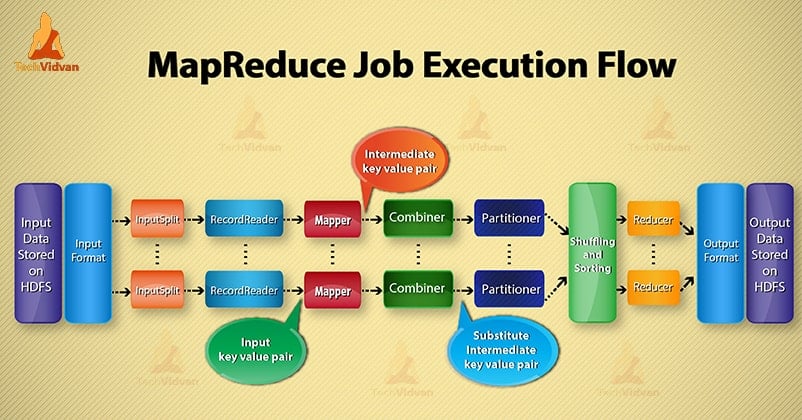
This view clarifies what happens inside the "Map Task" and "Reduce Task" containers:
- InputFormat and RecordReader: Work together to read the raw input splits from HDFS and convert them into the initial
(key, value)pairs fed to the mapper. For text files, this is typically(byte_offset, line_of_text). - Mapper: Applies your user-defined logic.
- Combiner: An optional optimization step. It's a "mini-reducer" that runs on the mapper node to aggregate data locally before it's sent over the network, reducing shuffle traffic.
- Partitioner: As discussed, it steers map output to the correct reducer.
- Reducer: Applies your final aggregation logic.
- OutputFormat: Writes the final
(key, value)pairs from the reducer to a file on HDFS.
4. Putting It All Together: Word Count Example
Let's make this concrete by tracing the word count example we've discussed before.
Map Reduce explained with example | System Design
This video from ByteMonk provides a clear, animated walkthrough of the word count example. We'll use this as a reference to connect the conceptual data flow to the YARN execution model we just learned.
Watch the segment from 06:00 to 07:41. As you watch, think about how each step maps to the YARN components:
Let's connect the video's flow to the YARN process:
- Input Files: The two input files shown in the video reside on HDFS, split into blocks across multiple DataNodes.
- Job Submission: You, the client, submit your word count JAR. The ResourceManager launches an MRAppMaster.
- Map Phase:
- The MRAppMaster sees two input splits and requests two containers for two map tasks, aiming for data locality.
- The two parallel "mapper" operations shown in the video are two separate
YarnChildprocesses running in containers on (ideally two different) NodeManagers. - Each mapper reads its lines and outputs pairs like
(this, 1),(is, 1),(apple, 1).
- Shuffle Phase:
- The
Partitionerensures all pairs with the key "apple" are designated for the same reducer, say Reducer #1. All pairs with the key "is" are also sent to Reducer #1, while "red" might go to Reducer #2, etc. - The "shuffle" diagram in the video, where keys are grouped, represents the reducers pulling this partitioned data from the mappers' local disks.
- The
- Reduce Phase:
- A reducer task, running in its own container, receives the grouped data, for example:
apple: [1, 1]andis: [1, 1]. - It runs your
reduce()function on each group, summing the values to produce the final key-value pairs:(apple, 2)and(is, 2). - The
OutputFormatwrites these final pairs to a file in a designated output directory on HDFS.
- A reducer task, running in its own container, receives the grouped data, for example:
Conclusion
In this lesson, we traced the end-to-end execution of a MapReduce job. We saw how a high-level data processing paradigm is realized through a sophisticated choreography of distributed components.
Key Takeaways:
- Separation of Concerns: YARN's ResourceManager manages cluster resources, while the job-specific MRAppMaster manages the application logic and fault tolerance.
- Orchestration Flow: The process flows from Client -> ResourceManager -> ApplicationMaster -> NodeManagers -> Tasks. The ApplicationMaster is the central brain for a single job.
- Data Locality: The MRAppMaster actively tries to schedule map tasks on the same nodes that hold the data to minimize network I/O, a cornerstone of Hadoop's performance.
- The Shuffle is Key: The shuffle and sort phase is the critical, and often most complex, part of the data flow that connects the parallel map outputs to the parallel reduce inputs.
In the next lesson, we'll move from theory to practice. You will get your hands dirty and implement a basic word count program using the MapReduce paradigm, solidifying the concepts we've covered in this module.