Hello! Welcome back to our module on The Final Proofing Stage.
In our last lesson, we established the crucial distinction between copyediting and proofreading. You learned that copyediting happens on the manuscript before layout, while proofreading is the final quality-control check performed on the typeset page proofs after layout. This distinction is fundamental to the entire publishing workflow.
Today, we'll build directly on that knowledge. Now that you know when proofreading happens and why, we'll focus on the practical "what." Our learning outcome is to identify typographical, formatting, and layout errors in typeset page proofs (PDFs). By the end of this lesson, you will be able to look at a designed page and spot the specific kinds of errors that are the proofreader's responsibility to find and flag.
1. The Proofreader's Systematic Scan
A proofreader doesn't just read the book one last time for enjoyment. It's a methodical, technical process of scanning for errors that may have been missed in earlier stages or, more commonly, introduced during the typesetting and design process. These errors fall into three broad categories:
- Typographical errors: Lingering mistakes in spelling, punctuation, or grammar.
- Formatting errors: Inconsistencies in the application of the book's design.
- Layout errors: Problems with how text and other elements are arranged on the page.
Professional proofreaders often use comprehensive checklists to ensure nothing is overlooked. Let's start by looking at what such a checklist includes.
How to proofread traditional page proofs. The order of things.
Professional proofreader Louise Harnby offers an excellent breakdown of the checks involved when working with page proofs. Her article is a great window into a proofreader's methodical approach.
Please read the beginning of the article, from the start down to the end of the bulleted list (just before the heading 'Riveting vs routine'). Pay close attention to the checklist of items she looks for, as these are the exact kinds of formatting and layout issues we are focusing on today.
Harnby's list gives you a clear sense of the proofreader's dual responsibility: checking the text for final typos while also meticulously verifying every aspect of the typeset page.
2. Identifying Typographical Errors
This is the most straightforward part of proofreading and the one most people are familiar with. It is the final safety net for catching objective text errors. These include:
- Misspellings
- Incorrect punctuation
- Grammatical slips
- Double words (e.g., "the the") or missing words
- Incorrect or inconsistent capitalization
These are often errors that slipped through the copyedit or were accidentally introduced when corrections from the copyedit were being keyed in by the typesetter.
COPY EDITING AND PROOFREADING 🖊️ What's the difference, and which do you need? | Natalia Leigh
In our previous lesson, we watched Natalia Leigh's video. Let's revisit a short segment where she specifically discusses the proofreader's role as the final check for text-level mistakes.
Please watch from 09:54 to 10:14. Notice her phrasing: 'fixing any typographical errors' and 'fixing any errors that slip through the copy editing phase.'
While vital, catching typos is only one part of the job. The areas where proofreading truly distinguishes itself are in formatting and layout.
3. Identifying Formatting and Layout Errors
This is where a proofreader's eagle eye is most critical. After a book is designed, it's the proofreader's job to ensure the design has been applied correctly and consistently from the first page to the last. We can divide these errors into two groups: issues of global consistency (formatting) and page-level problems (layout).
3.1. Global Consistency Errors (Formatting)
These are errors where an element's style or placement is inconsistent with how it appears elsewhere in the book. A proofreader must check that:
- Running Heads & Footers: The content (e.g., book title, chapter title, author name) and page numbers (folios) are correct, in sequence, and consistently styled on every page.
- Chapter Openers: Every chapter title page has the same design, with the title and other elements dropped to the same position on the page.
- Headings & Subheadings: All headings of the same level (e.g., all H2s) use the same font, size, style (bold, italic), and spacing.
- Text Elements: The formatting for body text, block quotes, lists, and captions is consistent throughout. This includes font, size, indentation, and line spacing.
Editing Levels: 6: Proofreading Checklist
To further detail these checks, the 'Proofreading Checklist' by Norma J. Hill provides an exceptionally thorough list of what a professional proofreader examines.
First, read the paragraph under the main heading that begins 'The proofreader will look for corrections...'. Then, skip down to the section titled 'What does a professional proofreader look for?' and review the detailed checklists. You don't need to memorize it, but get a feel for the comprehensive nature of these checks, from 'Preliminaries' to 'End matter.'
3.2. Page-Level Problems (Layout)
These are specific, localized errors that make a page look unprofessional or difficult to read. The jargon for these is quite old and, as you'll see, rather memorable.
Widows, Orphans, Runts, Rivers. What are they in the text, and does it matter?
Some of the most common layout flaws have colorful names like 'widows,' 'orphans,' 'runts,' and 'rivers.' This short video offers clear visual definitions of each.
Watch the entire video (around 5 minutes). Focus on understanding the visual difference between each type of error so you can spot them in the wild.
Let's summarize those key terms from the video, along with a few others:
| Term | Definition | Why it's a problem |
|---|---|---|
| Widow | The final line of a paragraph appearing by itself at the top of a new page or column. | Creates a sense of disconnection from the rest of the paragraph. |
| Orphan | The first line of a paragraph appearing by itself at the bottom of a page or column. | Leaves the single line "orphaned" from the paragraph that continues on the next page. |
| Runt | A very short final line of a paragraph, especially a single word. | Creates an unsightly shape and too much white space at the end of a paragraph block. |
| River | A visual gap of white space that seems to flow down through a block of justified text. | These "rivers" are distracting to the eye and disrupt the reading flow. |
| Bad Break | A word hyphenated incorrectly at the end of a line, or a page break in an awkward location (e.g., separating a heading from its text). | Looks unprofessional and can make the text difficult to parse. |
In addition to these, a proofreader checks for things like balanced pages (making sure facing pages end at roughly the same line) and proper placement of images and tables. The Natalia Leigh video you saw also mentioned these checks for margins, alignment, and scene breaks.
4. An Example in Practice
So, what does this look like on an actual proof? When proofreaders find these errors, they mark them on the PDF for the designer to correct.
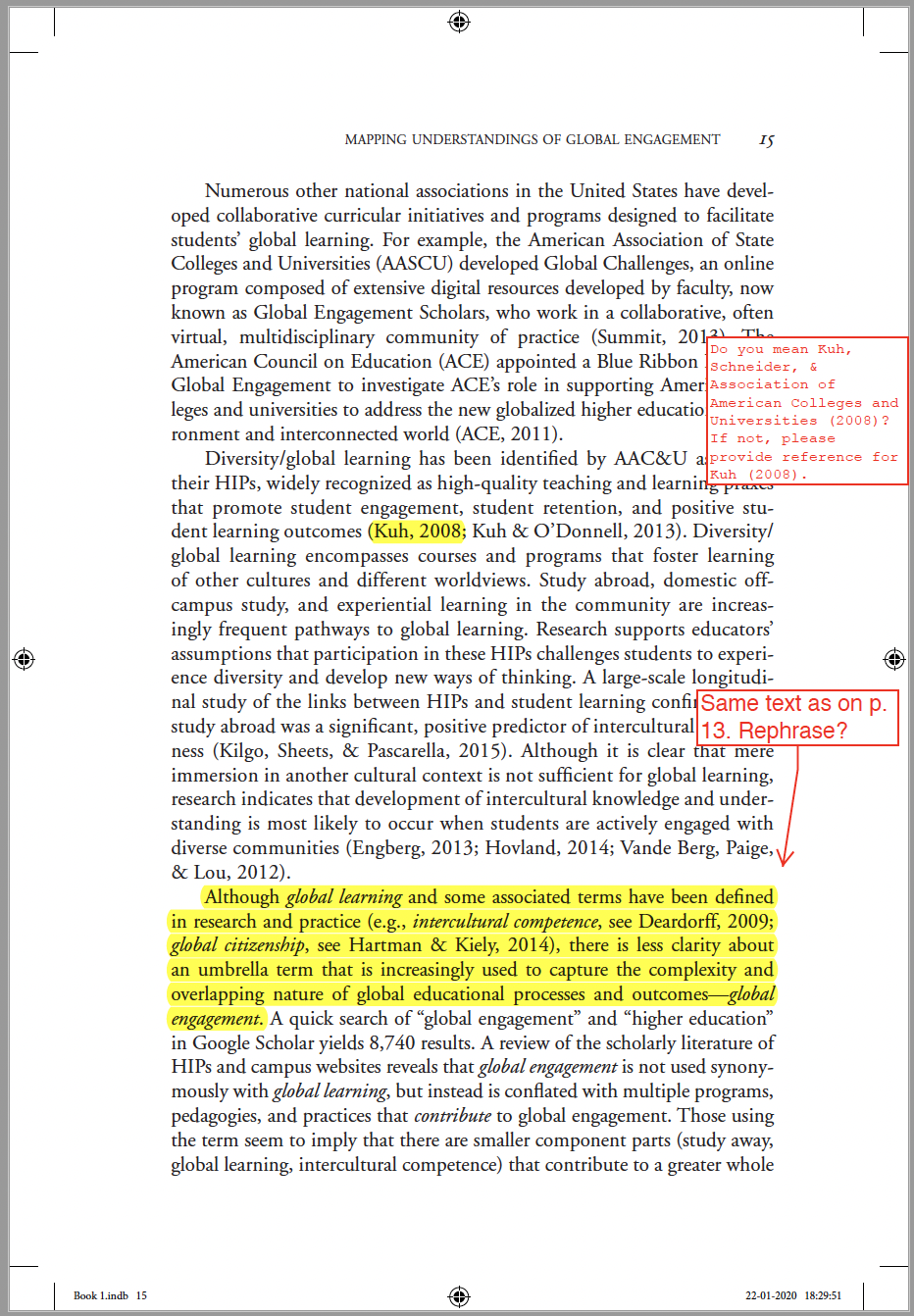
Conclusion
You now have a solid framework for the types of errors a proofreader is tasked with finding. It's not just about spelling; it's a comprehensive quality check of the final, designed product.
Key Takeaways:
- Proofreading is a systematic process of checking for typographical, formatting, and layout errors on typeset proofs.
- Typographical errors are the final check for mistakes in spelling, punctuation, and grammar.
- Formatting errors concern the global consistency of design elements like headings, running heads, and text styles.
- Layout errors are page-level problems like widows, orphans, runts, rivers, and bad breaks that affect the visual presentation and readability of the text.
Next Up:
Knowing what to look for is the first step. The next step is knowing how to communicate those corrections clearly and efficiently. In our next lesson, we will address the learning outcome: Use digital annotation tools to efficiently mark corrections and queries on a PDF proof.