Introduction
Welcome back! In the last lesson, we explored how to use the Print() function as a debugging tool to check the values of your variables and trace your program's logic. This is perfect for catching logical errors—when your code runs but doesn't do what you expect.
However, there's another type of error you'll encounter frequently, especially as a beginner: compilation errors. These are syntax mistakes, like typos or forgetting a piece of punctuation, that prevent your code from being translated into an executable program. The MetaEditor will catch these for you before the code can even run.
In this lesson, you'll learn how to identify and fix these basic compilation errors. This is a fundamental skill that builds confidence and speeds up your development process immensely. By the end of this lesson, you'll be able to:
- Understand the compilation process.
- Read and interpret error messages in MetaEditor.
- Fix the most common types of compilation errors.
1. From Code to Program: The Compilation Step
Before your Expert Advisor can run in MetaTrader 5, your human-readable source code (.mq5 file) must be translated into a machine-readable, executable file (.ex5 file). This translation process is called compilation.
Think of the compiler as a strict editor who checks your code for grammatical errors based on the MQL5 language rules. If it finds a mistake, it stops and reports it to you. It will not create the .ex5 file until all errors are fixed.
You trigger this process by clicking the Compile button (or pressing F7) in MetaEditor. The results appear in the Toolbox window, usually at the bottom of the screen.
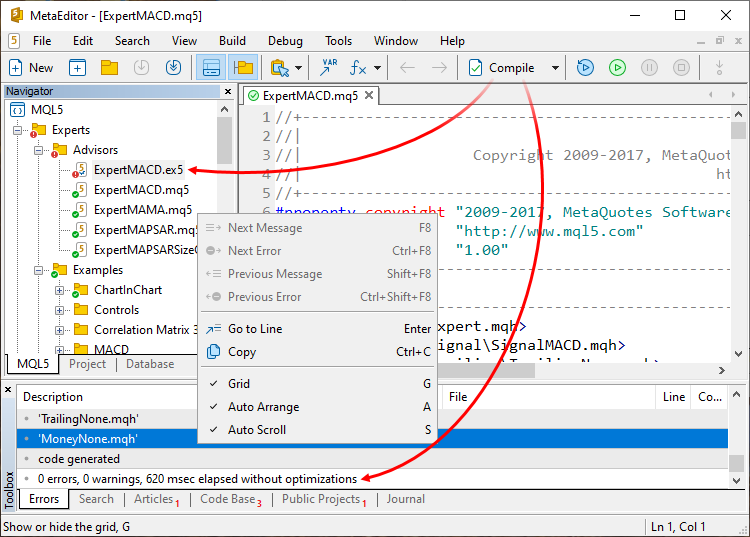
If there are problems, the Errors tab will list them out for you.
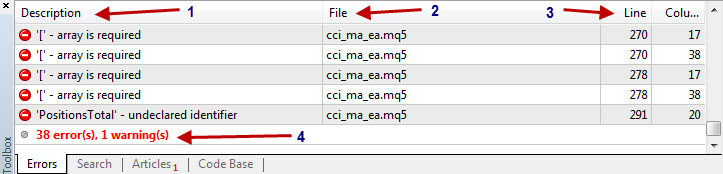
2. Reading and Responding to Error Messages
The Errors tab is your best friend when your code won't compile. Each error listed contains three crucial pieces of information:
- Description: A short message describing the error (e.g.,
'Print' - undeclared identifier,';' - semicolon expected). - Line: The line number in your code where the error was detected.
- Column: The character position in that line where the error was detected.
The single most useful feature here is that you can double-click on an error message to instantly jump to the exact line in your code that needs fixing.
When you have multiple errors, a good strategy is to always start by fixing the first one on the list. Sometimes, a single mistake at the beginning of your code can cause a cascade of other, misleading errors. Fixing the first one often makes several others disappear.
Code complete EA for MetaTrader 5 in 20 Minutes!
This short video demonstrates the process of compiling, seeing an error, and using the double-click feature to find and fix it. It also reinforces the tip to focus on the first error.
Watch from 03:57 to 05:07. Pay close attention to how the presenter compiles the code, sees an error message in the toolbox, and then double-clicks the error to navigate directly to the problematic line.
3. Hands-On: Let's Break Some Code
The best way to learn how to fix errors is to practice. We're going to intentionally write some broken code, try to compile it, and fix the errors one by one.
- Open your
MyHeikinAshiEA.mq5file in MetaEditor. - Replace the entire content of the
OnTick()function with the code below. Don't worry about what it does; just copy and paste it exactly as it is.
//--- BROKEN CODE FOR PRACTICE ---

   int candleCount = 50
   string tradeSymbol = "EURUSD"

   double highPrice

   highPrice = 1.08500

   Print(tradeSymbol, highprice);

   if (highPrice > 1.08000) {
      Print("Price is above the threshold")
// Missing closing brace for the if statement
// Missing closing brace for the OnTick function
Now, press F7 to compile it. You should see a list of errors in your Toolbox. Let's fix them together.
Error 1: ';' - semicolon expected
This is the most common error for new programmers. In MQL5, most lines of code (statements) must end with a semicolon (;). It's like the period at the end of a sentence.
- Double-click the first error in the list. It should take you to the line
int candleCount = 50. - The compiler is telling you it expected a semicolon. Add one to the end of that line.
- Add a semicolon to the end of the next line (
string tradeSymbol = "EURUSD") and the linehighPrice = 1.08500as well, as they are also missing them.
Your code should now look like this:
   int candleCount = 50;
   string tradeSymbol = "EURUSD";

   double highPrice;

   highPrice = 1.08500;
Compile again (F7). The semicolon errors should be gone, but new ones remain.
Error 2: 'highprice' - undeclared identifier
- Double-click the new top error. It will highlight
highpriceinside yourPrint()function. - The error
'undeclared identifier'means you're trying to use a variable that the compiler doesn't recognize. - Look closely. You declared the variable as
high**P**rice(with a capital P), but you tried to usehigh**p**rice(with a lowercase p). MQL5 is case-sensitive. - Change
highpricetohighPriceto match the declaration.
Compile again (F7). One more to go!
Error 3: '}' - unexpected end of program
- Double-click the final error. The cursor might jump to the very end of your file.
- This error, along with messages like
'unbalanced parentheses', usually means you've forgotten a closing brace}. - Looking at our code, we opened a brace
{for theifstatement, but never closed it. We also need a final closing brace for theOnTick()function itself. - Add the two missing closing braces.
Your final, corrected OnTick() function should look like this:
//--- CORRECTED CODE ---
void OnTick()
  {
//---
   int candleCount = 50;
   string tradeSymbol = "EURUSD";

   double highPrice;

   highPrice = 1.08500;

   Print(tradeSymbol, highPrice);

   if (highPrice > 1.08000) {
      Print("Price is above the threshold");
   } // Closing brace for the if statement
//---
  } // Closing brace for the OnTick function
Compile one last time. You should now see the satisfying message: 0 error(s), 0 warning(s).
For a more comprehensive list of common errors, the following article is an excellent reference.
Understand and Use MQL5 Strategy Tester Effectively - MQL5 Articles
This article provides clear before-and-after examples for many common compilation errors. It's a great resource to bookmark for future troubleshooting.
Skim through the section titled 'Compilation Errors and Warnings'. You don't need to memorize them all, but notice the patterns: 'semicolon expected', 'undeclared identifier', and 'unbalanced left parenthesis' are the ones we just fixed. This can serve as a helpful cheat sheet as you continue to learn.
4. Errors vs. Warnings
Sometimes, the compiler will show a warning instead of an error. What's the difference?
- Error: A rule has been broken. The code cannot be compiled.
- Warning: The code is syntactically correct and can be compiled, but you've done something that might be unintentional or could lead to problems later.
The most common warning is 'variable_name' - variable not used. This happens when you declare a variable but never use it in your code. It's safe to ignore, but it can be a helpful reminder to remove unnecessary code.
For example, if you compiled our corrected code, you would get a warning about the candleCount variable because we declared it but never used it.
Conclusion
Great job! You've just tackled one of the biggest hurdles for any new programmer: understanding and fixing compilation errors. This skill is less about knowing all the rules at once and more about learning how to respond to the compiler's feedback.
Key Takeaways:
- Compilation is the process of turning your
.mq5source code into an executable.ex5file. - Compilation errors are syntax mistakes that stop your code from compiling. They must be fixed.
- Warnings indicate potential issues but do not stop compilation.
- The Errors tab in the Toolbox is your guide. Double-click an error to find it in your code.
- Always fix the first error in the list first.
- Common errors include missing semicolons (
;), typos/case-sensitivity issues (undeclared identifier), and missing curly braces ({}).
Preview of the Next Lesson:
Now that you can write basic statements and fix syntax errors, it's time to make your code smarter. In the next lesson, we will dive into if-else statements. This is where your EA will start to make decisions, forming the core of your trading logic.