Introduction
Welcome back! In our last lesson, you took a major step forward by learning how to declare and use variables—the labeled boxes that store data in your Expert Advisor. You practiced creating int, double, string, and bool variables and used the Print() function to see their values in the Experts log.
Storing data is essential, but it's only half the story. The real power of programming comes from manipulating that data to make decisions. How do we know if a price has gone up? How do we calculate a stop-loss level? How do we check if two different conditions for a trade are met at the same time?
This is where operators come in. Operators are special symbols that perform operations on your variables and values. In this lesson, you will learn to use the three fundamental types of operators in MQL5:
- Arithmetic operators for calculations (
+,-,*,/) - Comparison operators for asking questions (
>,==,!=) - Logical operators for combining conditions (
&&,||,!)
Mastering these operators is the key to building the logical core of your Heikin Ashi trading strategy.
1. Arithmetic Operators: The Calculator
Arithmetic operators perform mathematical calculations, just like on a calculator. In trading, you'll use them constantly for tasks like calculating the distance to a take-profit target, figuring out risk/reward ratios, or determining the size of a price movement.
The main arithmetic operators are:
+(Addition)-(Subtraction)*(Multiplication)/(Division)
Let's get a formal overview of these from a comprehensive MQL5 resource.
Introduction to MQL5 (Part 2): Navigating Predefined Variables ...
The following article, "Introduction to MQL5 (Part 2)" from MQL5.com, provides a clear and structured explanation of operators. We'll use it as a reference throughout this lesson.
Please read the section titled 3.1. Arithmetic Operations. You can stop when you reach the section on Logical Operations. Focus on the examples for addition, subtraction, multiplication, and division. Don't worry about 'Modulus' or 'Increment/Decrement' for now; we'll cover them if we need them later.
Hands-On Practice: Calculating with Prices
Let's apply this. We'll modify your MyHeikinAshiEA.mq5 file to perform a simple calculation.
- Open your EA in MetaEditor.
- Go to the
OnTick()function and replace the code from the last lesson with the following:
//+------------------------------------------------------------------+
//| Expert tick function                                             |
//+------------------------------------------------------------------+
void OnTick()
  {
   // --- Part 1: Arithmetic Operators ---

   // Let's imagine an entry price and a target profit level for a trade.
   double entryPrice = 1.07500;
   double targetPrice = 1.07650;

   // Use the subtraction operator to calculate the difference in price.
   double priceDifference = targetPrice - entryPrice;

   // Use the Print() function to see the result.
   Print("The calculated price difference is: ", priceDifference);

   // We can also calculate a potential Stop Loss level.
   double stopLossLevel = entryPrice - priceDifference;
   Print("A symmetrical Stop Loss level would be: ", stopLossLevel);
  }
//+------------------------------------------------------------------+
- Compile the code (
F7). Check for any errors. - Switch to MT5 and look at the Experts tab. You will see the results of your calculations printed out. The EA is now doing math!
2. Comparison Operators: Asking Questions
Now that we can perform calculations, we need a way to compare values. Is the current price greater than our entry price? Is our profit equal to our target?
This is the job of comparison (or relational) operators. They compare two values and, most importantly, the result of the comparison is always a boolean value: true or false.
The main comparison operators are:
==(Equal to)!=(Not equal to)>(Greater than)<(Less than)>=(Greater than or equal to)<=(Less than or equal to)
A very important point: A single equal sign (=) is the assignment operator. It assigns a value to a variable. A double equal sign (==) is the comparison operator. It checks if two values are equal. Mixing these up is a very common beginner error.
Let's return to our reference article for a detailed look.
Introduction to MQL5 (Part 2): Navigating Predefined Variables ...
This section of the MQL5.com article details the comparison operators and highlights the crucial difference between '=' and '=='.
Read the section titled 3.3. Relational Operation. Pay close attention to the table of operators and the note explaining the difference between = and ==.
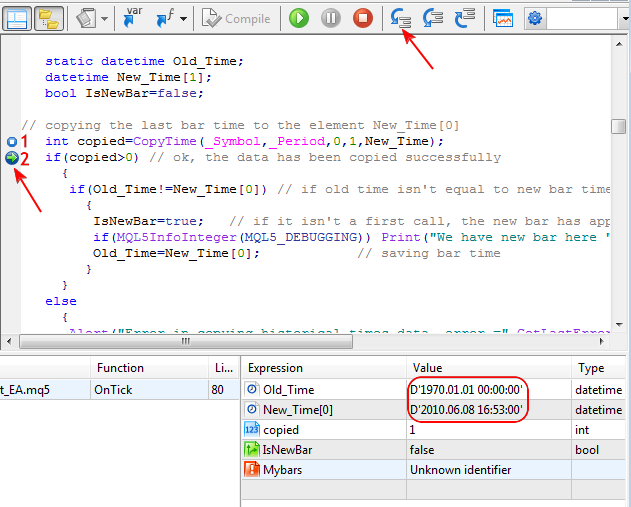
The image below shows a practical example from an MQL5 program. It uses the != (not equal) operator to check if the time of the current bar is different from the time of the previous bar. This is a standard technique to detect when a new candle has formed.
Hands-On Practice: Making Comparisons
Let's add some comparisons to your EA. Add the following code inside the OnTick() function, right below the code from Part 1.
   // --- Part 2: Comparison Operators ---

   double currentPrice = 1.07550; // Let's simulate a current market price

   // Let's ask a question: Is the current price higher than our entry price?
   // The answer (true or false) will be stored in a bool variable.
   bool isPriceInProfit = (currentPrice > entryPrice);

   Print("Is our trade in profit? ", isPriceInProfit);

   // Let's ask another question: Has the price hit our target exactly?
   bool hasPriceHitTarget = (currentPrice == targetPrice);

   Print("Has the price hit our target? ", hasPriceHitTarget);
After adding the code, compile it (F7) and observe the output in the Experts log. You should see "true" for the first question and "false" for the second. Try changing the currentPrice value and see how the output changes!
3. Logical Operators: Combining Conditions
Your trading logic will rarely depend on a single condition. You'll want to combine them: "Is the price above the moving average AND is the RSI value below 30?". Logical operators (&& for AND, || for OR, ! for NOT) are how you build these complex rules.
&&(AND): The result istrueonly if both conditions aretrue.||(OR): The result istrueif at least one of the conditions istrue.!(NOT): Reverses the boolean value.!truebecomesfalse, and!falsebecomestrue.
This image shows the "truth tables" for these operators. It's a handy reference for seeing how they evaluate different combinations of true and false.

Now, let's read the final section of the article.
Introduction to MQL5 (Part 2): Navigating Predefined Variables ...
This last section from the MQL5.com article explains the logical operators you'll use to build complex trading rules.
Read the section titled 3.2. Logical Operations. Focus on understanding the table for || (OR), ! (NOT), and && (AND).
The following video shows a real-world trading example, where multiple conditions are combined in an if statement to decide whether to open a trade. This is exactly what we are building towards.
Beginner MQL5 Trading Bot Code - Moving Average Part 1 #algotrading #stockmarket
Watch how the presenter in this video from Trading Bot Wizard combines several conditions to create a trade entry signal.
Watch from 21:18 to 22:12. Notice how the && (AND) and ! (NOT) operators are used together to check for a moving average crossover and ensure a position is not already open.
Hands-On Practice: Building a Logical Rule
Let's complete our OnTick() function by adding a logical rule. Add this final block of code to your EA.
   // --- Part 3: Logical Operators ---

   // Let's simulate another condition for our trade.
   bool isHeikinAshiBullish = true;

   // We want to enter a trade only if BOTH conditions are true:
   // 1. The Heikin Ashi candle is bullish.
   // 2. The price is currently in profit (using the bool from Part 2).
   bool isSignalValid = (isHeikinAshiBullish && isPriceInProfit);

   Print("Is our trade signal valid for entry? ", isSignalValid);

   // What if we only wanted to take action if the signal is NOT valid?
   Print("Is our signal NOT valid? ", !isSignalValid);
Compile the code one last time. Your OnTick() function now performs calculations, makes comparisons, and combines the results into a final logical conclusion.
Conclusion
Fantastic work! You've just equipped yourself with the essential tools for creating logic. You have moved from simply storing data to actively using it to ask questions and get answers.
Key Takeaways:
- Arithmetic Operators (
+,-,*,/) perform mathematical calculations on numbers. - Comparison Operators (
==,!=,>,<) compare two values and produce atrueorfalseresult. - Remember the difference:
=assigns a value, while==compares two values. - Logical Operators (
&&,||,!) combine multipletrue/falseconditions to create complex rules. - Using parentheses
()in your expressions is a good practice to ensure calculations and comparisons happen in the order you intend.
Preview of the Next Lesson:
As your code becomes more complex, you will inevitably make mistakes—a missing semicolon, a typo in a variable name, or a mismatched parenthesis. The compiler will report these as errors. In the next lesson, you will learn how to read these error messages and identify and fix basic compilation errors in MetaEditor. This is a crucial skill for any programmer.