Good to see you again. Last time, you defined a Plant struct: a value with related stored properties such as a common name, scientific name, and watering interval. That model answers, “What data describes a plant?”
This lesson answers a different question: “What phase is the identification feature in right now?” An app can be waiting for input, working, showing a result, or reporting a failure. You will model those finite, mutually exclusive states with Swift enums, attach the data that belongs to particular states using associated values, and handle every state safely with switch.
One feature, one current state
Consider an early version of the PlantIdentifier flow:
- No identification is underway.
- The app is identifying a plant.
- The app has identified a plant.
- The identification failed.
At a given instant, the feature should be in one of those conditions—not “identifying and failed,” and not “showing an identified plant but also having no result.”
A weak way to represent this might use several independent variables:
var isIdentifying = false
var identifiedPlant: Plant?
var errorMessage: String?
This permits contradictory combinations:
isIdentifying = true
identifiedPlant = monstera
errorMessage = "The image was too dark."
What should the interface show? A progress indicator, a successful result, or an error? The variables do not enforce an answer.
An enum describes a closed set of valid alternatives. Rather than allowing arbitrary combinations of flags and optional values, one enum value records the entire state.
Watch Sean Allen’s explanation of basic enums, switches, and associated values. Skip the raw-values segment in the middle; associated values are the mechanism that matters for app state.
Swift Enum - Basics, Raw Values, Associated Values, CaseIterable & More
Watch “Swift Enum - Basics, Raw Values, Associated Values, CaseIterable & More” by Sean Allen to see enum declarations and pattern matching written in a Swift playground.
Start with basic enums, focusing on an enum as a restricted group of related choices and on why switch must handle each choice. Then skip ahead to associated values. Focus on the fact that only selected cases need extra data, and that the data is extracted while matching the case.
Declare a state enum for identification
Create a new Swift file named IdentificationState.swift and add:
enum IdentificationState {
    case idle
    case identifying
    case identified(Plant)
    case failed(message: String)
}
This defines a new type, IdentificationState. Its possible values are its cases:
| Case | Meaning | Extra data |
|---|---|---|
.idle |
No current identification | None |
.identifying |
Work is in progress | None |
.identified(Plant) |
Identification succeeded | The identified Plant |
.failed(message: String) |
Identification could not finish | A useful explanation |
The case names use lower camel case, while the enum type uses upper camel case, following the same Swift naming convention you used for Plant.
You can create values of this type:
var state: IdentificationState = .idle

state = .identifying
The first declaration gives state an explicit type. After that, Swift already knows that it holds an IdentificationState, so the shorter .identifying syntax is enough.
A successful result must include a Plant:
let monstera = Plant(
    commonName: "Swiss cheese plant",
    scientificName: "Monstera deliciosa",
    lightRequirement: "Bright, indirect light",
    wateringIntervalDays: 7
)

state = .identified(monstera)
Likewise, a failure must include its message:
state = .failed(message: "The photo was too dark to identify.")
The compiler prevents invalid constructions:
// state = .identified
// Error: the identified case needs a Plant.

// state = .failed
// Error: the failed case needs a message.

// state = .idle(monstera)
// Error: idle does not accept a Plant.
This is the central advantage: the state and the data required by that state travel together.
Associated values are data for a particular case
The values in parentheses after an enum case are associated values. They are not fixed properties that every IdentificationState stores.
For example:
case identified(Plant)
means:
An
IdentificationStatecan be in theidentifiedcase, and each individualidentifiedvalue carries one particularPlant.
These are two distinct values of the same enum type:
let monsteraState = IdentificationState.identified(
    Plant(
        commonName: "Swiss cheese plant",
        scientificName: "Monstera deliciosa",
        lightRequirement: "Bright, indirect light",
        wateringIntervalDays: 7
    )
)

let pothosState = IdentificationState.identified(
    Plant(
        commonName: "Golden pothos",
        scientificName: "Epipremnum aureum",
        lightRequirement: "Medium to bright indirect light",
        wateringIntervalDays: 7
    )
)
Both have the .identified case, but each carries different associated Plant data.
The same applies to failures:
let darkImageFailure = IdentificationState.failed(
    message: "The photo was too dark."
)

let unsupportedImageFailure = IdentificationState.failed(
    message: "The selected file could not be read as an image."
)
An associated value varies every time you create that case. This differs from a raw value, which is one fixed value assigned to each enum case. Raw values can be useful for stable codes or simple labels, but they are not appropriate for a different plant result or a different error message each time. For this state model, associated values are the right tool.
Apple’s state-management guidance develops the same design principle: an enum supplies a finite set of states, and the cases that need contextual data carry it directly.
Maintaining State in Your Apps | Apple Developer Documentation
Read Apple Developer Documentation’s “Maintaining State in Your Apps” for the reasoning behind modelling an app process with one state enum rather than several loosely connected variables.
In the “Overview” and “Use an Enumeration to Capture State” sections, read the core example. Notice that the login-related cases carry a User only where it belongs. Then read the complete “Don’t Spread State Across Multiple Variables” section, beginning with the warning about separate variables. Compare its optional-user and Boolean design to the isIdentifying, identifiedPlant, and errorMessage design above.
Use switch to handle every valid state
Once you have a state enum, the usual way to decide what to do is a switch statement. It matches the current case and, when needed, extracts its associated value.
Add this below your enum:
func statusMessage(for state: IdentificationState) -> String {
    switch state {
    case .idle:
        return "Choose a plant photo to begin."

    case .identifying:
        return "Identifying plant..."

    case let .identified(plant):
        return "Identified: \(plant.commonName)"

    case let .failed(message):
        return "Could not identify plant: \(message)"
    }
}
Read the important branches carefully:
case let .identified(plant):
This says: “If state is .identified, take its associated Plant value and name it plant within this branch.” You can then use the stored properties you defined in the previous lesson:
plant.commonName
plant.scientificName
plant.wateringIntervalDays
Similarly:
case let .failed(message):
extracts the String attached to the .failed case.
The switch has no default branch. That is intentional. IdentificationState has exactly four cases, and Swift requires the switch to cover all four. If you later add a new case, such as:
case awaitingPhotoPermission
Xcode will flag every switch that has not decided what to do for that new state. This is useful compiler help: a new app condition cannot silently receive an accidental fallback interface.
If you omit a branch, you will see a diagnostic like “Switch must be exhaustive.” Apply the debugging approach from the prior lesson: read the missing case named in the diagnostic, add a branch that handles it deliberately, and build again.
Show a state-driven message in the current app
For a small compile-and-run check, temporarily change ContentView.swift to use a fixed sample state. This is not interactive state yet—the next SwiftUI module will introduce @State—but it proves that your enum, associated value, and switch work together.
import SwiftUI

struct ContentView: View {
    private let sampleState: IdentificationState = .identified(
        Plant(
            commonName: "Swiss cheese plant",
            scientificName: "Monstera deliciosa",
            lightRequirement: "Bright, indirect light",
            wateringIntervalDays: 7
        )
    )

    var body: some View {
        VStack(alignment: .leading, spacing: 12) {
            Text("Plant Identifier")
                .font(.title)

            Text(statusMessage(for: sampleState))
        }
        .padding()
    }
}

#Preview {
    ContentView()
}
Build and run with Command-R. The simulator should display:
Identified: Swiss cheese plant
Then, as a quick check, replace sampleState with:
private let sampleState: IdentificationState = .failed(
    message: "The image was too dark."
)
The exact same view and statusMessage(for:) function now display a failure-specific message. You did not need to manage an optional Plant, clear an old error, or coordinate multiple Boolean flags. The enum guarantees that the sample is either a success or a failure, never both.
States describe conditions; transitions describe changes
A state is a condition such as .idle or .identifying. A transition is the event or action that changes the state, such as the person choosing a photo or an identification request finishing.
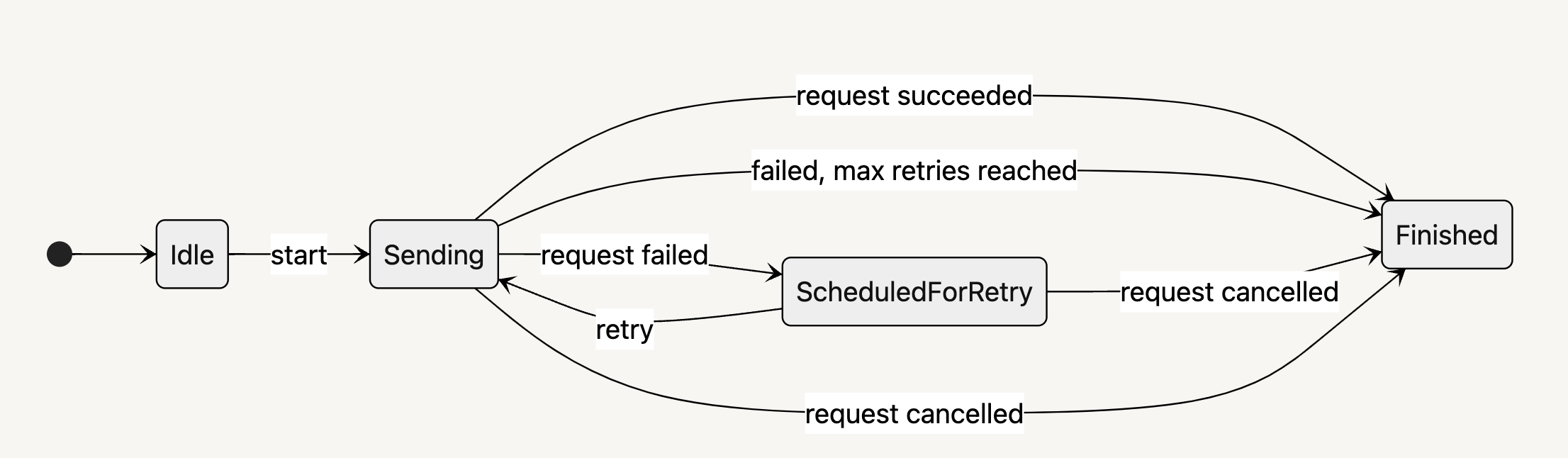
The diagram is more detailed than today’s plant identifier, but it captures an important distinction:
Idle,Sending, andScheduledForRetryare states.start,request failed,retry, andrequest succeededare transitions or events.- Only one box is current at a time.
Your enum represents the legal conditions. It does not automatically enforce every legal transition. Swift will allow this:
state = .idle
state = .identified(monstera)
even if, in a real app, you intend identification to pass through .identifying first. Later, when you build view models and asynchronous identification work, you will structure the code so user actions and results make those transitions in a sensible order.
For now, the enum already gives you a clean model:
.idle
    -> .identifying
    -> .identified(plant)

// or

.idle
    -> .identifying
    -> .failed(message: errorDescription)
Notice that a successful state carries the result required to render success, while a failed state carries the information required to explain failure. That pairing is what makes associated values particularly effective for app state.
Takeaways
You can now represent a feature with a finite, coherent state type:
enum IdentificationState {
    case idle
    case identifying
    case identified(Plant)
    case failed(message: String)
}
Key points to retain:
- An enum defines a restricted set of cases for one concept.
- A state enum prevents contradictory combinations of separate flags and optionals.
- At any moment, an
IdentificationStatevalue has one case. - Associated values attach data only to the case that needs it.
switchmatches cases and extracts associated values.- An exhaustive
switchturns future enum changes into useful compiler prompts. - States are conditions; transitions are the events that move the app from one condition to another.
Next, you will learn how to work safely with optional values using optional binding and nil coalescing. Enums reduce many unnecessary optionals, but optionals remain essential when data may genuinely be absent.