Hello! Welcome to the final lesson of our Time Intelligence module.
In our previous lessons, you've gotten hands-on experience with several powerful time intelligence functions. We used SAMEPERIODLASTYEAR for year-over-year growth and DATEADD to calculate month-over-month trends. You also saw that simpler functions like PREVIOUSMONTH exist as convenient shortcuts.
This has naturally led us to a critical question: when should you use one function over another? In this lesson, we will systematically compare the "big three" time-shifting functions—SAMEPERIODLASTYEAR, DATEADD, and PARALLELPERIOD—to clarify their distinct behaviors. Mastering these differences is a hallmark of an advanced DAX practitioner, as it allows you to select the precise tool for any analytical scenario and avoid common pitfalls.
1. The Core Difference: Dynamic vs. Static Periods
The most important distinction to understand is how these functions react to the filter context provided by your visuals (e.g., a table showing data by month, quarter, or day).
SAMEPERIODLASTYEAR: The Dynamic Shifter
As its name suggests, SAMEPERIODLASTYEAR (SPLY) returns the equivalent period from the previous year. It is dynamic because the "period" it returns adapts to the current filter context.
- If your visual is at a monthly granularity,
SPLYreturns the same month from the prior year. - If your visual is at a quarterly granularity,
SPLYreturns the same quarter from the prior year. - If your visual is at a daily granularity,
SPLYreturns the same day from the prior year.
This makes it perfect for direct, "apples-to-apples" comparisons like the Year-over-Year growth we calculated earlier.
PARALLELPERIOD: The Static Shifter
PARALLELPERIOD is more rigid. It returns a full period that is parallel to the dates in the current context, shifted by an interval you define. It is static because the type of period it returns (Month, Quarter, or Year) is fixed in the formula and does not change based on the visual's granularity.
For example, consider this measure:CALCULATE([Total Revenue], PARALLELPERIOD('Calendar'[Date], -1, YEAR))
Even if your visual shows individual months, this measure will return the total revenue for the entire previous year in every row.
This image perfectly illustrates the difference:

2. The Subtle Difference: DATEADD vs. PARALLELPERIOD
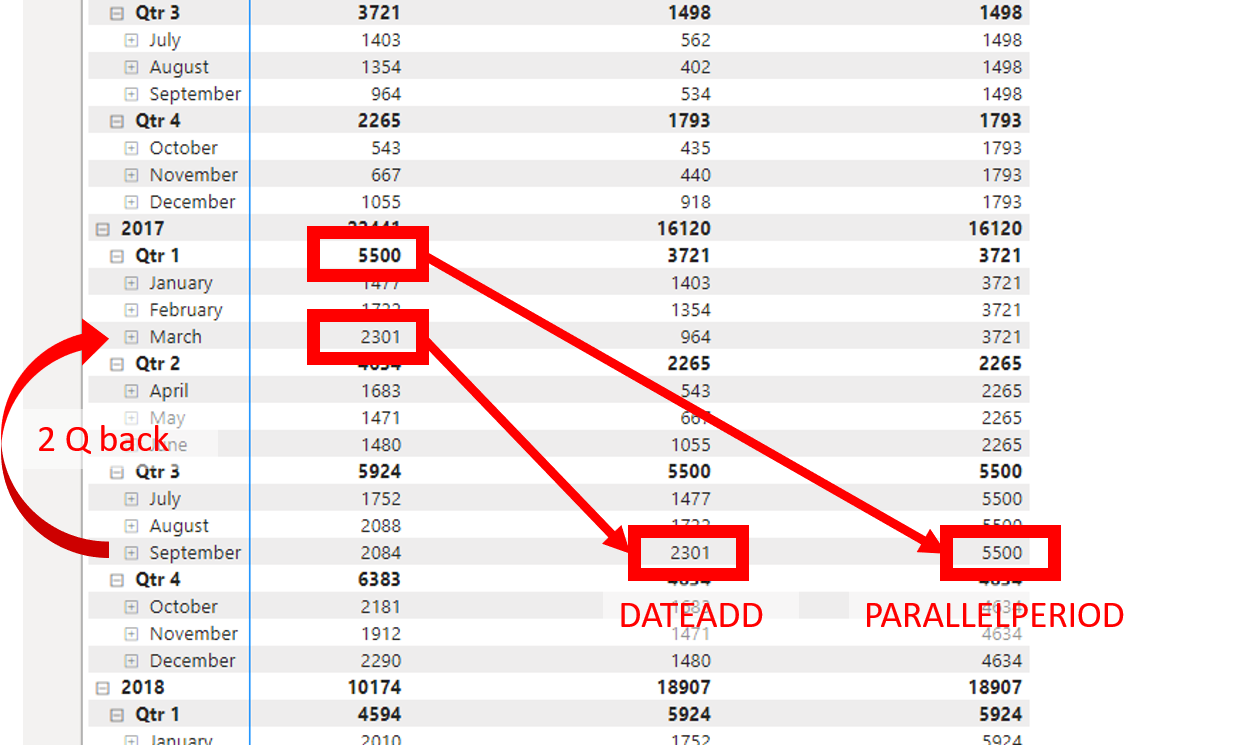
At first glance, DATEADD and PARALLELPERIOD seem very similar. Both allow you to shift by a custom number of intervals (e.g., -1, -3, +6) and by different interval types (Month, Quarter, Year). The key difference lies in how they handle partial periods.
DATEADD: The Precise Shifter
DATEADD shifts the exact set of dates present in the current filter context. If your filter context contains only the first 15 days of March, DATEADD with a -1, MONTH shift will return the first 15 days of February. It is ideal for comparing incomplete periods.
PARALLELPERIOD: The Full-Period Shifter
PARALLELPERIOD, as we've established, ignores the partial selection. In the same scenario (first 15 days of March), PARALLELPERIOD with a -1, MONTH shift will return the entire month of February. It "fills out" the period.
This image demonstrates this key behavior:
3. Deepening Your Understanding
To see these functions in action and solidify the concepts, let's turn to some resources. The following video provides a clear, step-by-step demonstration of each function and their differences.
SAMEPERIODLASTYEAR vs PARALLELPERIOD vs DATEADD // DAX Basics // Beginners Guide to Power BI in 2022
The video 'SAMEPERIODLASTYEAR vs PARALLELPERIOD vs DATEADD' by Fernan | Power BI is an excellent guide that walks through the exact comparisons we've just discussed.
Please watch from 02:23 to 14:21. The video is divided into three main parts that align with our lesson: SAMEPERIODLASTYEAR (02:23 - 05:44): Pay attention to how the result changes when the table context switches from days to months. PARALLELPERIOD (05:44 - 10:45): Note how it differs from SPLY, especially when the context is drilled down to the day level. DATEADD vs. PARALLELPERIOD (10:45 - 14:21): This is the most crucial part. Focus on the example using a date slicer to create a partial month, which clearly reveals the core difference between the two functions.
For a concise written summary, the following article is a great reference. It breaks down the differences clearly and provides a useful concluding summary.
DateAdd vs ParallelPeriod vs SamePeriodLastYear; DAX ... - radacad
The article 'DateAdd vs ParallelPeriod vs SamePeriodLastYear' from RADACAD offers a textual breakdown of these functions.
Read through the article, paying close attention to the explanations for each function. The 'Conclusion' section at the end provides an excellent, quick summary of the key differences, which is perfect for future reference.
4. Under the Hood: Syntax Sugar
To truly master these functions, it helps to know how they relate to each other internally. Experts often refer to simpler functions as "syntax sugar" for more complex, underlying functions.
-
SAMEPERIODLASTYEAR('Calendar'[Date])is simply syntax sugar forDATEADD('Calendar'[Date], -1, YEAR). This explains why their behavior is so similar—they are essentially the same function!DATEADDis just more flexible. -
Functions like
PREVIOUSYEAR,PREVIOUSMONTH, andPREVIOUSQUARTERinternally usePARALLELPERIOD. This is why they return a complete period. For a deeper technical explanation, the article "Differences between DATEADD and PARALLELPERIOD in DAX" by SQLBI is the definitive resource, though it is quite advanced.
Conclusion
Congratulations on completing the Time Intelligence module! You now have a sophisticated understanding of how to manipulate the filter context to perform complex time-based comparisons.
Key Takeaways:
SAMEPERIODLASTYEARis dynamic and returns the equivalent period from one year ago. It's syntax sugar forDATEADD(..., -1, YEAR).DATEADDis precise. It shifts the exact set of dates from the filter context and is ideal for comparing partial periods. It also supports theDAYinterval.PARALLELPERIODis static. It always returns the full shifted period (Month, Quarter, or Year) you specify, ignoring partial selections.- Your choice of function depends entirely on the business question. Do you need a direct "apples-to-apples" comparison (
DATEADD/SPLY), or do you need to compare against a complete prior period (PARALLELPERIOD)?
Preview of the Next Lesson:
We are now moving into more advanced DAX concepts that will enhance the power and readability of your code. In our next lesson, we will begin Module 9 by learning how to use Variables (VAR/RETURN). You've already seen them in some of our formulas, and now you'll learn how to leverage them to structure complex measures, improve performance, and make your DAX logic much easier to debug.