Hello! Welcome to the seventh module of our DAX course. We're now moving into one of the most powerful and frequently used areas of DAX: Time Intelligence.
Introduction
In our last lesson, you learned how to use the FILTER function to create highly specific, table-based filters within CALCULATE. This skill is a prerequisite for what comes next, as many advanced business calculations involve complex filtering based on dates.
Before we can start building powerful time-based measures like Year-over-Year (YoY) growth or Month-to-Date (MTD) totals—which are central to your goal of mastering advanced DAX—we must first build a proper foundation. This lesson focuses on a single, critical best practice: understanding why a dedicated calendar table is essential for all time intelligence calculations.
This lesson is all about the "why." By the end, you'll be able to explain the pitfalls of not using a calendar table and articulate the key benefits that make it a non-negotiable component of any professional Power BI data model.
The Problem: Gaps in Your Data
A common mistake for beginners is to use the date column directly from a fact table (like our Sales table) for time-based analysis. At first glance, this seems logical. The Sales table has an OrderDate column, so why not use it?
The problem lies in what the table doesn't contain. Your Sales table only has records for days when a sale occurred. It has no rows for weekends, holidays, or any other day without sales activity. This creates gaps, or discontinuities, in your date sequence.
DAX time intelligence functions are built on the assumption of a complete, unbroken sequence of dates. When they encounter these gaps, they can fail in confusing and misleading ways.
Let's see a practical demonstration of this failure.
Why we need a Date Table in Power BI
This video from BI Samurai is excellent at showing what goes wrong when you rely on a fact table's date column. It clearly visualizes the incorrect results.
Please watch the first part of the video, from the beginning until 06:00. The presenter will: Load a sales table with date gaps. Create standard measures like Sales Year to Date and Sales Previous Year using the sales table's date column. Show how the results are incomplete and incorrect.
As the video demonstrates, the Sales Previous Year calculation was missing values. This happened because the sales table in 2020 didn't contain a row for January 15th, so the DAX engine had no context to calculate the sales for January 15th of the previous year, even though sales occurred on that day in 2019. This is a classic example of how gaps in data lead to misleading reports.
The Solution: A Dedicated Calendar Table
The solution to this problem is to create a separate, dedicated calendar table (often called a date table). This table is the cornerstone of all time intelligence in Power BI.

A proper calendar table has a few key characteristics:
- Continuous Dates: It must contain one row for every single day in the desired period (e.g., from the first sale to the last sale), with absolutely no gaps.
- Centralized: It acts as a single source of truth for dates across your entire data model.
- Relationship: It is connected to your fact table(s) (like
Sales) via a one-to-many relationship from the calendar table's date column to the fact table's date column.
Let's quickly review the key reasons why this approach is considered a best practice.
Calendar Table in Power BI: Two (EASY!) Ways
This article from Zebra BI provides a concise summary of the core principles and benefits of using a calendar table.
Please read the sections 'Why you need a calendar table' and 'What is a calendar table in Power BI?' (specifically the subsection 'Key characteristics of a Power BI calendar table'). These sections reinforce the concepts we've just discussed.
The Key Benefits of Using a Calendar Table
Now that we've established what a calendar table is, let's break down the specific advantages it provides.
1. It Enables Correct Time Intelligence Calculations
This is the most critical benefit. With a continuous set of dates, DAX functions like TOTALYTD, SAMEPERIODLASTYEAR, and DATEADD can work as designed. They can traverse time periods reliably, even if no sales occurred on certain days, because the calendar table provides the complete "map" of time.
Let's see the "after" picture from the same video.
Why we need a Date Table in Power BI
Now watch the second half of the BI Samurai video. The presenter adds a proper calendar table and rebuilds the measures.
Watch from 06:00 to the end. Pay close attention to: How the new measures reference the calendar table's date column instead of the sales table's. The side-by-side comparison, especially the line chart, which visually shows the correct, continuous Year-to-Date calculation.
The difference is night and day. The line chart for the Year-to-Date sales now correctly shows a flat line during periods of no sales, rather than an incorrect drop to zero. The Sales Previous Year values are now all present and correct. This accuracy is the primary reason for using a calendar table.
2. It Centralizes and Standardizes Your Date Logic
In a real-world business scenario, you often have more than one fact table. You might have a Sales table, an Inventory table, and a Marketing_Campaigns table, each with its own date column.
By creating a single master calendar table and linking it to all of these fact tables, you create a single source of truth for time. This allows you to:
- Filter across tables simultaneously: A user can select "Q2 2023" on a slicer, and it will correctly filter sales, inventory levels, and marketing activities for that period.
- Standardize formatting: You define your date formats (e.g., "YYYY-MM-DD") in one place, ensuring consistency across all visuals.
7 Powerful Benefits of Using a Custom Calendar Table in Power BI
This article from Data Inseyets does a great job of explaining these benefits of centralization and standardization.
Please read the sections numbered 4, 5, and 6: 'Seamless Filtering Across Multiple Fact Tables', 'Consistent and Standardized Date Formatting', and 'Enhanced Data Modelling'.
3. It Gives You Ultimate Flexibility for Analysis
A calendar table is more than just a list of dates. It's a dimension table that you can enrich with any time-related attributes your business needs. Common additions include:
- Year, Quarter, Month, Week, Day of Week
- Month Name (e.g., "January")
- Fiscal Year, Fiscal Quarter
- Holiday Flags (e.g., TRUE/FALSE)
- Working Day Flags
Adding these as columns in your calendar table allows you and your report users to slice, dice, and analyze data in incredibly intuitive ways, like comparing sales on "Working Days vs. Weekends" or analyzing performance by "Fiscal Quarter."
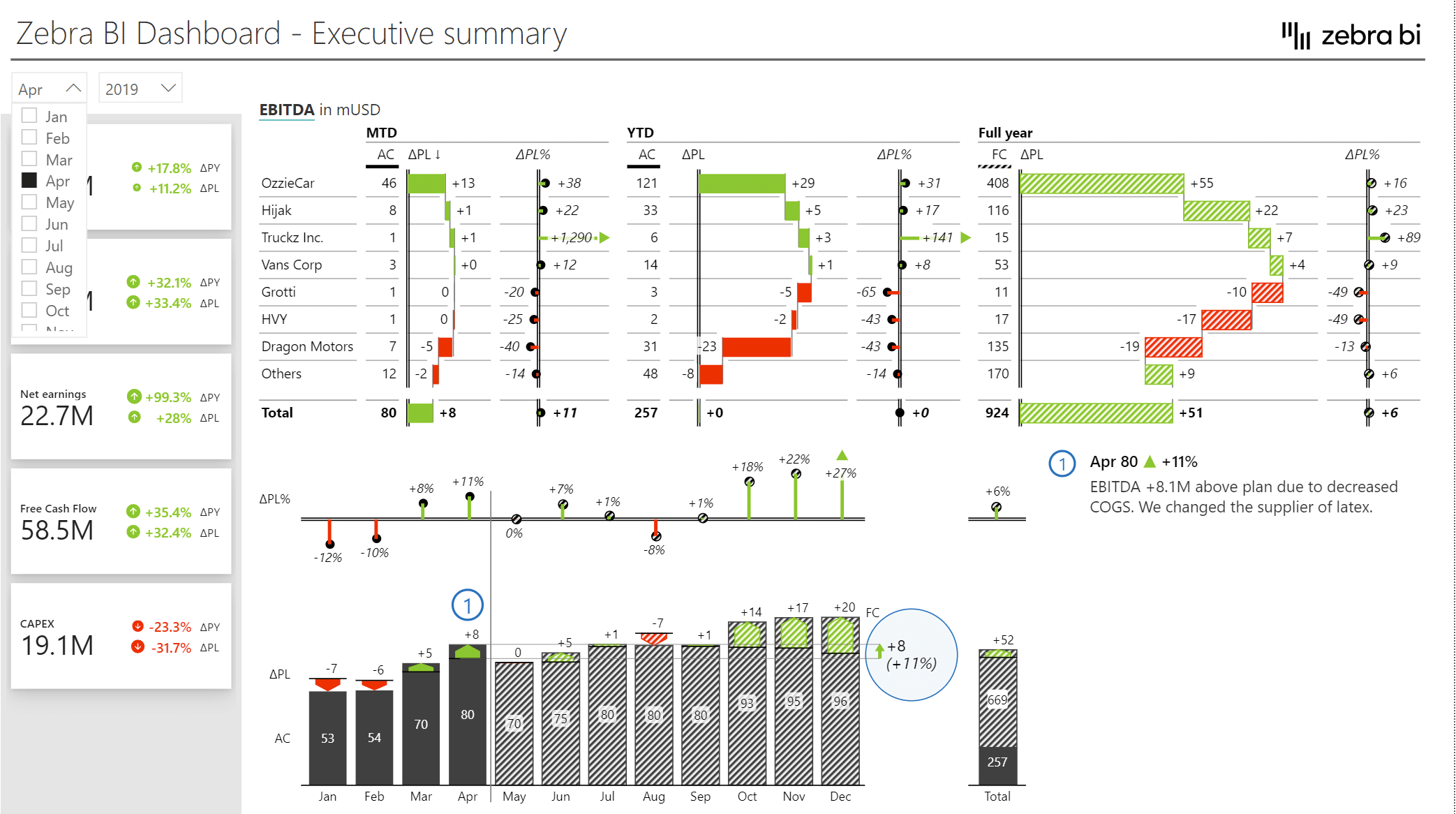
This dashboard is a great example of the end result. All of the MTD, YTD, and Plan vs. Actual comparisons rely on a robust time intelligence setup powered by a calendar table.
4. It's Superior to Power BI's Auto Date/Time Feature
Finally, it's important to understand why creating your own calendar table is better than relying on Power BI's built-in "Auto Date/Time" option. When this option is enabled, Power BI automatically creates hidden, separate date tables in the background for every single date column in your model.
This approach has major drawbacks for professional use:
- Bloats the Model: It creates redundant tables, increasing your file size.
- Inflexible: You cannot customize these hidden tables with fiscal periods or holidays.
- Inconsistent: Each auto-table is separate, so you lose the "single source of truth" benefit.
For this reason, best practice is to disable Auto Date/Time and build your own.
DAX Fridays! #173: 8 Best practices for Time Intelligence in Power BI
This short clip from Curbal summarizes the key best practices, including avoiding fact table dates and Power BI's automatic tables.
Watch from 00:11 to 02:00. The video concisely covers the first two best practices: avoiding date columns from fact tables and creating your own calendar instead.
Conclusion
You've done excellent work absorbing this foundational theory. While we didn't write any DAX today, understanding why a calendar table is necessary is just as important as knowing how to build one. It prevents you from making critical errors that lead to inaccurate and unreliable reports.
Key Takeaways:
- DAX time intelligence functions require a continuous, unbroken sequence of dates to work correctly.
- Using date columns directly from fact tables (like
Sales) creates gaps in dates, which causes time intelligence functions to produce incorrect results. - A dedicated calendar table is the best practice solution. It provides a complete date range and acts as a central dimension for time.
- The key benefits are accuracy in calculations, centralized analysis across multiple tables, and flexibility to add custom attributes like fiscal periods and holidays.
- Always create your own calendar table instead of relying on Power BI's Auto Date/Time feature.
Preview of the Next Lesson:
Now that you are convinced of the "why," the next lesson will dive into the "how." You will learn to create your own dynamic calendar table from scratch using DAX functions, and then add useful columns to it to power your future analysis.