Hello! Welcome to your first lesson in the Introduction to Cybersecurity course. I'm excited to get started with you.
Given your interest in game design and optimization, you've likely thought about how data gets from a game server to your screen efficiently. Understanding that flow of data is not just key for performance—it's also the foundation of cybersecurity. To attack or defend a system, you first need to understand how it communicates.
This lesson covers our first learning outcome: Describe the TCP/IP model and the flow of data between layers. We'll explore the fundamental "rulebook" that governs almost all communication on the internet. While this topic is conceptual, it's the map you'll need for all the practical skills we'll build in this course, from scanning networks to analyzing attacks.
1. Why We Need Rules for Communication
Imagine trying to have a conversation with someone who speaks a different language, uses different grammar, and follows different conversational etiquette. It wouldn't work. Computers face the same problem. For devices to communicate over a network, they must agree on a set of rules. These rules are called protocols.
The Transmission Control Protocol/Internet Protocol (TCP/IP) is the core set of protocols that powers the internet. It ensures that when you browse a website, send an email, or play an online game, the data gets from the source to the destination correctly.
To get a clear definition of TCP and IP, let's start with a quick reading.
What Is TCP/IP & Why It Matters for Cybersecurity
This article from Huntress, a cybersecurity company, provides a concise overview of TCP/IP from a security perspective. It will help frame why this topic is so important for our course.
Please read the section titled 'What Is TCP/IP?'. Focus on the specific roles of TCP and IP.
As you read, TCP is the reliable manager, ensuring all data arrives in order, while IP is the postal service, figuring out the best route for the data to travel.
2. A Layered Approach to a Complex Problem
Sending data across the globe is incredibly complex. To manage this complexity, network engineers use a layered model. Think of it like an assembly line for a car. Each station has one specific job: one adds the chassis, another the engine, another the wheels. Each station doesn't need to know the details of the other stations' jobs; it just needs to do its own part and pass the car along.
The TCP/IP model organizes the complex job of network communication into a stack of layers. Each layer has a specific function and provides a service to the layer above it.
To understand this concept and the model we'll be using, the following video provides an excellent, detailed explanation. It uses a great analogy of sending a letter through the postal service.
How the TCP/IP Model Actually Works | CCNA Day 3
This video from Jeremy's IT Lab is a comprehensive guide to the TCP/IP model. We will watch a large portion of it, as it perfectly covers the core concepts for this lesson.
Please watch from 07:09 to 20:01. The first part (starting at 07:09) explains the concept of a layered model using the mail system analogy. The second part (starting at 14:44) maps this analogy directly onto the five-layer TCP/IP model we will use in this course and describes the role of each layer.
3. The Five Layers of the TCP/IP Model
As you saw in the video, we'll be using a practical 5-layer model. It's important to know that you might see 4-layer or 7-layer (OSI) models elsewhere, but the concepts are the same. They are just different ways of organizing the same functions.
Here is a quick summary of the five layers and their jobs:
| Layer | Name | Primary Function | Analogy |
|---|---|---|---|
| 5 | Application | Provides network services to user applications (e.g., web browsers, email clients). It's what the user interacts with. | The content of the letter you write. |
| 4 | Transport | Provides end-to-end communication between processes on different hosts. It uses port numbers to get data to the correct application. | Addressing the letter to a specific person (e.g., "To: Bob"). |
| 3 | Internet | Moves data packets from a source host to a destination host across networks. It uses IP addresses for routing. | The house address on the envelope. |
| 2 | Local Network | Handles the delivery of data between devices on the same local network (hop-to-hop). It uses MAC addresses. | The mail truck that carries the letter on one leg of the journey (e.g., from your house to the local post office). |
| 1 | Physical | Transmits the raw bits (1s and 0s) as electrical, light, or radio signals over the physical medium (cables, Wi-Fi). | The physical roads the mail truck drives on. |
This image provides a great visual of how a request and response travel through the layers between your device and a server.
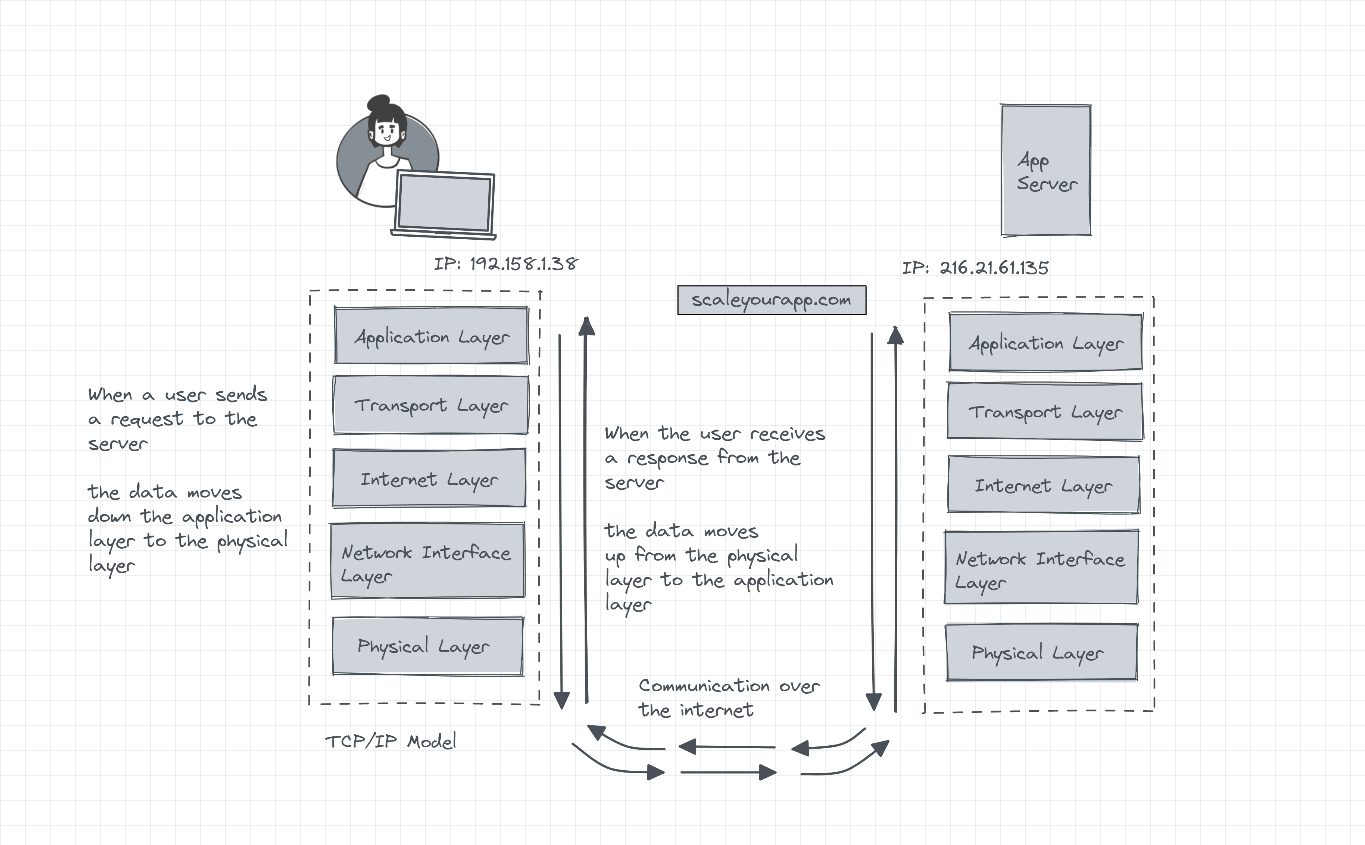
4. The Flow of Data: Encapsulation and Decapsulation
So, how does data actually move through these layers? The process is called encapsulation and decapsulation.
- Encapsulation: On the sending device, as data moves down the stack from the Application layer, each layer adds its own header (and sometimes a trailer). This is like putting a letter (data) into an envelope (Transport layer header), then putting that envelope into a bigger shipping box with a label (Internet layer header), and so on.
- Decapsulation: On the receiving device, the data moves up the stack. Each layer strips off its corresponding header, reads the information, and passes the remaining data up to the next layer until it reaches the application.
As the data is encapsulated, it gets a different name at certain layers. This is what we call a Protocol Data Unit (PDU).

Let's watch one more segment of the video to see this process explained in detail.
How the TCP/IP Model Actually Works | CCNA Day 3
Now we'll see how encapsulation and decapsulation work, and learn the specific names for data at each layer.
Please watch from 27:30 to 33:13. This section covers encapsulation, decapsulation, and the names for Protocol Data Units (PDUs): Segments/Datagrams, Packets, and Frames.
To see how this all comes together in a familiar, practical scenario, let's look at one final resource.
TCP/IP Network Model💻 : Deep Dive with an example
This article provides a fantastic, step-by-step walkthrough of what happens when you visit a website, explaining the role of each layer in both the request and the response.
Please read the section titled 'Let's understand with an example😃'. Follow the journey of a request to 'www.facebook.com' from the user's browser to the server and back again.
Key Takeaways
This was a foundational lesson, and you've covered a lot of ground. Here are the most important points:
- The TCP/IP model is a layered framework that standardizes how devices communicate over a network.
- We use a 5-layer model: Physical, Local Network, Internet, Transport, and Application. Each layer has a distinct responsibility.
- Data moving down the stack is encapsulated, meaning headers are added at each layer. Data moving up the stack is decapsulated.
- The data units have specific names at different layers: segment or datagram (Layer 4), packet (Layer 3), and frame (Layer 2).
- Understanding this flow is non-negotiable for cybersecurity, as every network attack and defense mechanism operates on one or more of these layers.
Next Steps
Excellent work completing your first lesson! You've built the "map" of how networks function. In our next lesson, we'll start exploring the key landmarks on that map. We'll dive into IP addresses, MAC addresses, and DNS, which are the systems that allow your computer to find and communicate with other devices across the internet.