Hello! Welcome to the third lesson in our "Network and Internet Fundamentals" module.
In our last session, we covered the internet's addressing system: how IP addresses provide a global location, MAC addresses identify a specific device on a local network, and DNS acts as the phone book to translate names into numbers.
Now that we know how devices are found, we'll focus on how data is transported between them. Today's learning outcome is to distinguish between TCP and UDP protocols with practical examples like web browsing and gaming.
These are the two main protocols at the Transport Layer (Layer 4) of the TCP/IP model. The choice between them involves a fundamental trade-off between reliability and speed. This decision has a huge impact on how applications perform, which is especially relevant to your interest in game design and optimization.
1. The Core Trade-Off: Reliability vs. Speed
Imagine sending a ten-page letter to a friend. You have two options:
- Registered Mail (Reliable): You send each page numbered, track the delivery, and get a confirmation when it arrives. If a page gets lost, the postal service finds it and redelivers it. The letter arrives complete and in order, but it's a slower, more complex process.
- Standard Mail (Fast): You just drop all ten pages in the mailbox. Most will probably arrive quickly, but some might get lost, arrive out of order, or be damaged. It's fast and simple, but there are no guarantees.
This is the essential difference between TCP and UDP.
- TCP (Transmission Control Protocol) is like registered mail. It's reliable.
- UDP (User Datagram Protocol) is like standard mail. It's fast and efficient.
To get a solid overview of these two protocols and their features, let's start with a video.
TCP vs UDP Comparison | Cisco CCNA 200-301
This video from CertBros provides a clear and direct comparison of TCP and UDP, introducing the core concepts we'll be discussing.
Please watch the following segments: 00:00 - 02:29: This covers the introduction and explains how TCP ensures reliable data delivery. 04:46 - 06:11: This introduces UDP as the unreliable, speed-focused alternative and gives practical examples. Focus on understanding why an application would choose one over the other.
As the video explained, the choice depends entirely on what the application needs.
| Feature | TCP (Transmission Control Protocol) | UDP (User Datagram Protocol) |
|---|---|---|
| Connection | Connection-oriented: Establishes a connection (three-way handshake) before sending data. | Connectionless: Just sends data without establishing a connection. |
| Reliability | Reliable: Guarantees data arrives, in order, and without errors. It re-sends lost packets. | Unreliable: No guarantees. Packets may be lost, duplicated, or arrive out of order. |
| Ordering | Ordered: Data is numbered and reassembled in the correct sequence. | Unordered: Packets are processed as they arrive. |
| Overhead | High: The extra features (handshake, acknowledgements, sequencing) add complexity and size. | Low: A much simpler, smaller header makes it faster and more efficient. |
| Use Cases | Web browsing (HTTP/HTTPS), email (SMTP), file transfers (FTP). Anything where data integrity is crucial. | Online gaming, video/voice streaming (VoIP), DNS lookups. Anything where speed is more important than perfect reliability. |
2. Why Games Prefer UDP
Given TCP's reliability, it might seem like the obvious choice for everything. But as the table shows, many games prefer UDP. Why would a game developer choose a protocol that might lose player data? Your interest in game optimization makes this a key point to understand.
The answer lies in a problem called "head-of-line blocking."
Because TCP must deliver everything in order, if one packet is lost, the entire stream of data has to wait until that lost packet is re-sent and received. For a web page, this is fine—you just wait an extra moment for an image to load. For a fast-paced game, it's a disaster.
The following article, written from a game developer's perspective, explains this perfectly.
This classic article from Gaffer On Games explains exactly why TCP is the wrong choice for real-time multiplayer games.
Please read the following sections: Start at the heading "TCP vs. UDP" and read through the bulleted comparison lists. Continue reading through "How TCP really works" and "Never use TCP for time critical data". Pay close attention to the explanation of what happens when a packet is lost in a game using TCP.
As the article describes, with TCP, a single lost packet of old player-position data could freeze your game for half a second while you wait for it to be re-sent, only to receive a flood of now-outdated information.
With UDP, if a packet containing a player's position is lost, the game engine can simply ignore it and use the next one that arrives. The result might be a tiny "hiccup" or "rubber-banding" effect on screen, but the game itself doesn't grind to a halt. This prioritizes a smooth, real-time experience over perfect data delivery.
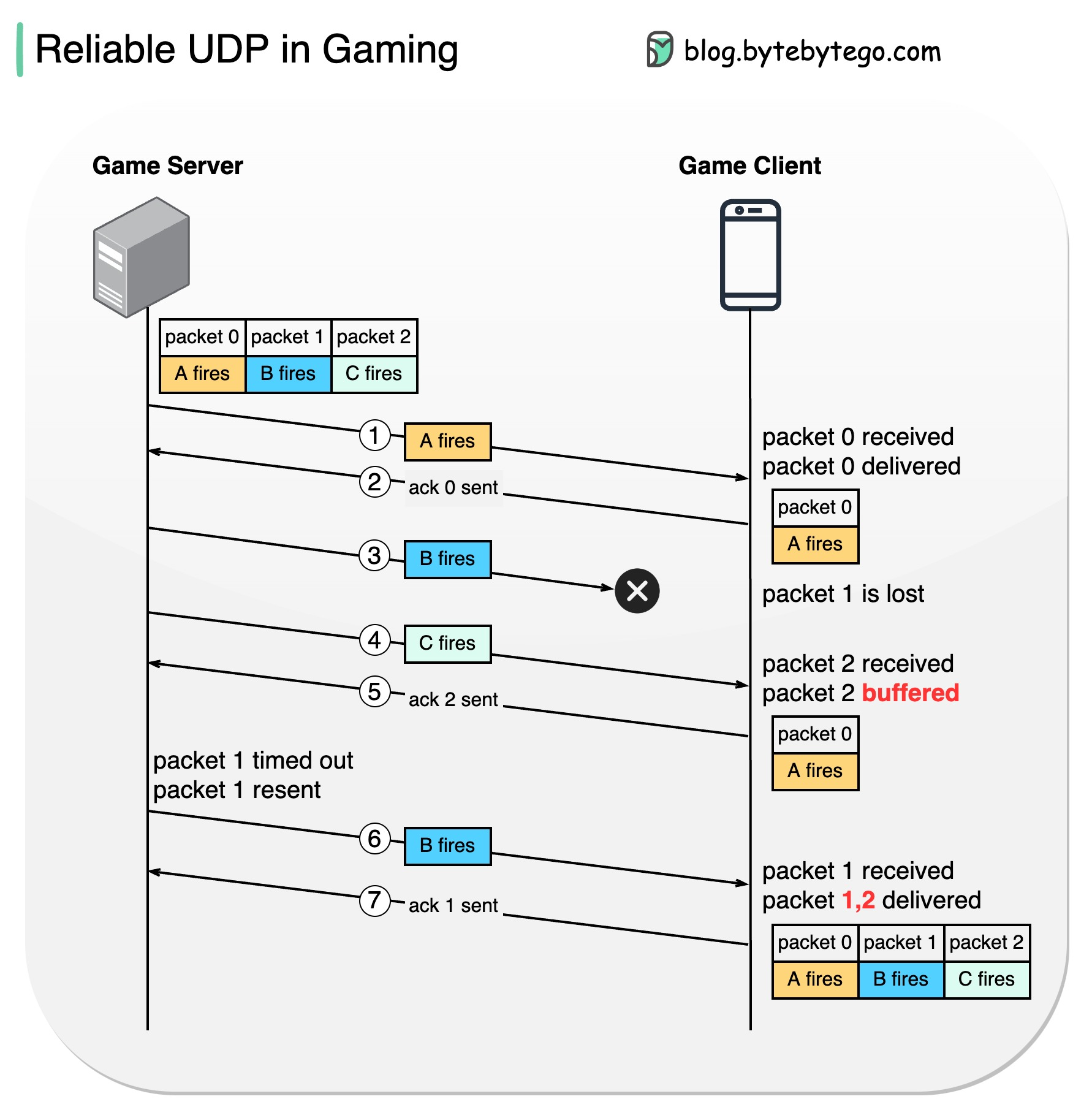
3. A Hybrid Approach: "Reliable UDP"
So, if games use UDP, what happens when they need to send information that must arrive, like a "player purchased an item" message or a chat message? They can't afford to lose that data.
The solution is that game developers often build their own reliability layer on top of UDP at the application level. They can choose to require an acknowledgement only for critical packets, while letting non-critical data (like movement) fly by without checks.
This gives them the best of both worlds: the raw speed of UDP for most traffic, with custom-built reliability for the things that matter.
4. Seeing TCP and UDP in Action
To make this more practical, let's see what these protocols look like from a network analysis perspective. The tool Wireshark, which we'll use in a later lesson, allows you to capture and inspect every single packet moving across your network.
The following video demonstrates what you would see in Wireshark when analyzing UDP and TCP traffic.
TCP vs UDP Explained // Hands On Lab Example with Wireshark
Chris Greer, a professional network analyst, walks through a packet capture to show the practical difference between a UDP and TCP exchange.
Please watch from 00:37 to 03:22. The first part (until 02:45) shows a DNS request, which uses UDP. Notice how simple and quick it is: one request, one reply. The second part shows the start of a TCP connection. Notice the three-way handshake (SYN, SYN-ACK, ACK) that establishes the connection before any real data is sent. This is TCP's reliability mechanism in action.
This hands-on view shows the "cost" of TCP's reliability—it requires more packets and setup just to get started. For a simple DNS query, the efficiency of UDP is clearly better.
Key Takeaways
You've now explored the critical trade-off between reliability and speed at the transport layer.
- TCP is connection-oriented, reliable, and ordered. It uses mechanisms like the three-way handshake and acknowledgements to guarantee data delivery. It's the workhorse for applications like web browsing, email, and file transfers where accuracy is paramount.
- UDP is connectionless, unreliable, and fast. It strips away all the reliability features for maximum speed and low overhead. It's ideal for time-sensitive applications like online gaming, video streaming, and voice calls, where losing a little data is better than waiting for delayed data.
- The choice of protocol is a design decision based on the application's needs. Games often use UDP for real-time data and may implement their own reliability logic for critical information.
Next Steps
Great job! You now understand the two main ways data is transported across the internet. In our next lesson, we'll get even more hands-on. You will learn to use command-line tools ping and traceroute to test connectivity and map network paths. This will allow you to actively probe the network and see the path your data takes to its destination, building directly on what we've learned about addressing and transport.