Hello!
In our previous lessons, we established that the browser constructs a DOM tree from HTML markup, even when that markup is malformed, and that we should aim to write semantic HTML to create an accessible experience. Today, we're going to dive deep into the formal process behind this resilience.
Your background in computer science and interest in "under-the-hood" mechanics will be particularly relevant here. We're moving beyond the simple observation that browsers are forgiving and into the specific, standardized algorithm that dictates how they are forgiving. Our goal is to explain the HTML parsing algorithm, understand why it's so different from a traditional compiler's parser, and contrast its design philosophy with the strictness of XML parsing.
This lesson directly addresses the learning outcome: Explain the HTML parsing algorithm and how it differs from XML parsing.
1. Why HTML Needs a Special Parser
If you've written a compiler or worked with formal languages, you might wonder why browsers can't use a standard parsing technique, like a top-down or bottom-up parser generated from a context-free grammar. The answer lies in the fundamental design philosophy of HTML.
To start, please read the following sections from the article "How browsers work." It provides the crucial context for why HTML parsing is a unique challenge.
This article explains the core reasons why conventional parsing methods fail for HTML and sets the stage for understanding the custom algorithm browsers must use.
Please read the sections titled 'Parsing - general' and 'HTML Parser'. Focus on the three reasons given for why HTML cannot be parsed by regular parsers: its forgiving nature, the need for error tolerance, and its reentrant quality (e.g., via document.write()).
As the article highlights, HTML's "soft" syntax is a feature, not a bug. It was designed for human authors, not for strict machine validation. This is the primary point of divergence from XML.
XML (eXtensible Markup Language) is designed for data integrity and interoperability. Its syntax is strict:
- Every tag must have a corresponding closing tag.
- Tags must be properly nested.
- Attribute values must be quoted.
- There must be a single root element.
Any violation of these rules is a fatal error. An XML parser will stop and report failure. HTML's philosophy is the opposite: never fail. The priority is to display something to the user.
This video from the Chrome for Developers team hilariously and effectively demonstrates this philosophical difference.
Magic tricks with the HTML parser | HTTP 203
This video shows the practical implications of HTML's error-tolerant parsing compared to a strict XML-like approach.
Watch from 05:08 to 08:15. Pay attention to the example of a doctor's surgery website. This perfectly illustrates the trade-off: XML's strictness ensures correctness but can lead to total failure, while HTML's leniency prioritizes delivering content to the user, even if the source is flawed.
Before HTML5, this error handling was not standardized, leading to frustrating inconsistencies between browsers. The HTML5 specification introduced a single, deterministic parsing algorithm that all modern browsers now follow, ensuring that the same invalid markup produces the same DOM tree everywhere.
2. The HTML5 Parsing Algorithm
The algorithm is defined as a state machine that proceeds in two stages: tokenization and tree construction.
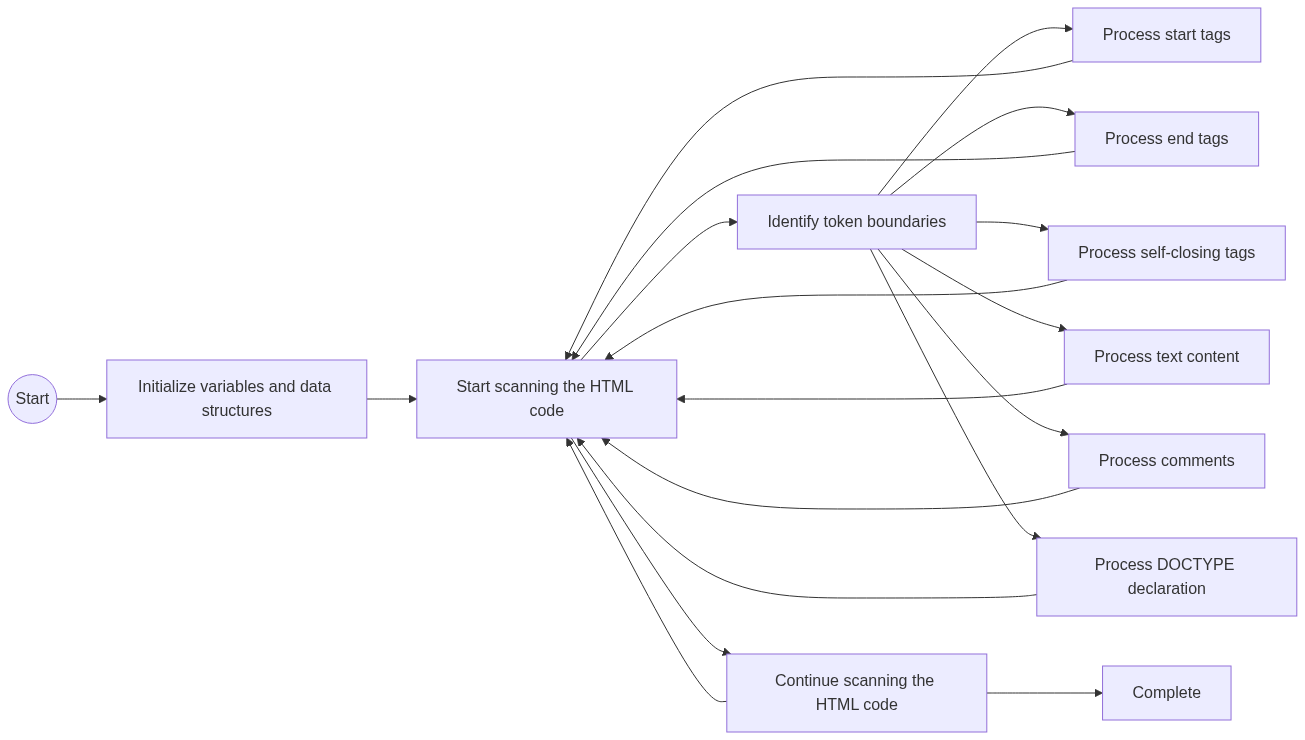
Let's break down these stages.
Stage 1: Tokenization
The tokenizer (or lexer) consumes the stream of input characters and emits a sequence of tokens. These tokens include things like "start tag," "end tag," "character," "comment," and "end-of-file."
The tokenizer is a state machine. It begins in a "Data state." When it encounters a < character, it transitions to a "Tag open state." If the next character is a letter, it transitions to a "Tag name state" and begins consuming the tag name. This continues until it hits a > or a space, causing another state transition.
This process is meticulously defined for every possible character in every possible state. The following resource gives a fantastic, detailed walkthrough of this process.
This chapter from 'The HTML parser' book, written by a key contributor to the spec, provides an excellent, in-depth look at the tokenizer. It's the most authoritative source on this topic outside the spec itself.
Please read the section 'Tags and text'. It walks through the tokenization of <p>Hello</p> step-by-step, explaining the state transitions and the resulting tokens. This will give you a concrete feel for the state machine logic.
Stage 2: Tree Construction
As the tokenizer emits tokens, the tree constructor receives them and builds the DOM tree. For each token, the tree constructor consults the current state (the "insertion mode") and the stack of open elements to decide what to do.
This is where the magic of error correction happens. For example:
- If the tokenizer emits a
<p>start tag token, the tree constructor creates apelement, adds it to the DOM, and pushes it onto the stack of open elements. - If it later sees an
</em>end tag token, but the top of the stack is a<p>element, it knows something is wrong. The spec defines a set of rules for this scenario (part of the "in body" insertion mode). It will generate an implied</p>end tag, pop thepelement from the stack, and then handle the</em>tag (which might now be valid, or might trigger further error handling).
The HTTP 203 video we saw earlier has a great segment demonstrating some of these error-correction mechanisms. The "agency adoption algorithm" mentioned is the colloquial name for a specific, complex part of the tree construction rules for handling mismatched nesting.
Interaction with JavaScript
The parsing process is also reentrant. A <script> tag can contain document.write(), which injects new characters into the input stream while it is being parsed. This is another reason standard parsers are unsuitable. The HTML5 parser has explicit rules for handling this.
The parser also has a "stack of open elements" that tracks the current nesting. Synchronous JavaScript can modify the DOM during parsing, but the parser's stack remains independent. Watch this segment to see a mind-bending example of this.
Magic tricks with the HTML parser | HTTP 203
This part of the 'Magic tricks with the HTML parser' video demonstrates how the parser's internal stack of open elements allows it to correctly place content even if JavaScript moves parent elements around in the DOM during parsing.
Watch from 16:26 to 19:31. The key insight here is that the parser's state (specifically, the stack of open elements) is separate from the live DOM tree. It continues to insert content into elements based on its stack, even if those elements have been moved or detached from the document by script.
3. Comparison: HTML vs. XML Parsing
Let's consolidate the differences into a clear comparison.
| Feature | HTML Parsing | XML Parsing |
|---|---|---|
| Error Handling | Error-Tolerant: Standardized rules for handling almost any error (e.g., mismatched tags, missing tags). The goal is to always produce a usable DOM tree. | Draconian: Any violation of well-formedness rules (e.g., unclosed tag, improper nesting) is a fatal error. The parser stops processing. |
| Syntax Rules | Forgiving: Allows for optional tags (<html>, <body>), unclosed tags (<p>, <li>), unquoted attribute values, etc. |
Strict: All tags must be explicitly closed, elements must be perfectly nested, and attribute values must be quoted. |
| Element Types | Special-cased Elements: Void elements (<img>, <br>) are forbidden from having content. Content of <script>, <style>, and <textarea> is parsed using special RAWTEXT/RCDATA rules. |
Uniform Elements: All elements are treated the same. There are no void elements; a <br> must be self-closed as <br/>. |
| Root Element | Optional: If <html>, <head>, or <body> are missing, the parser creates them implicitly. |
Required: The document must have exactly one root element that contains all other elements. |
| Driving Philosophy | Resilience & Usability: Prioritize displaying content to the human user, no matter how broken the source markup is. | Data Integrity: Prioritize structural correctness and machine-readability. The data must be perfect or it is rejected. |
You can experience this difference directly. If you serve an HTML file with the MIME type application/xhtml+xml, you force the browser to use its strict XML parser. Even a minor error, like an un-escaped ampersand (&) in text, will cause the entire page rendering to fail and display an error message.
Conclusion
Today we've peeled back the final layer of abstraction between an HTML file and the DOM. You now understand the fundamental principles and design philosophy behind the HTML parsing algorithm.
Key Takeaways:
- HTML parsing is designed for resilience, not strictness. Its primary goal is to display content to the user, leading to a forgiving, error-correcting algorithm.
- XML parsing is designed for data integrity. Its goal is structural correctness, leading to strict, fatal error handling.
- The HTML5 parsing algorithm is a deterministic state machine that ensures all browsers build a consistent DOM from the same markup.
- The algorithm has two main stages: Tokenization (breaking character stream into tokens) and Tree Construction (building the DOM from tokens and correcting errors).
- The parser's resilience handles issues like optional tags, malformed nesting, and even reentrant modifications from
document.write().
This deep understanding of how the browser processes your source code is a hallmark of a senior engineer. It informs debugging, performance optimization, and the ability to reason about framework behavior.
What's Next?
We have now completed our deep dive into how a browser turns an HTML document into a structured DOM. In the next module, we will shift our focus to styling. Our first lesson will cover the foundational rules of CSS: the cascade, specificity, and the box model. These are the core concepts that determine which styles are applied to which elements, and how those elements occupy space on the page.