Introduction
Welcome to the next lesson in our advanced React series. In our previous session, we contrasted useState and useReducer, establishing them as the primary hooks for scheduling state updates that trigger component re-renders. We concluded by posing a critical performance-related question: what happens if you call setState or dispatch multiple times in quick succession? Does React diligently re-render for every single call?
The answer lies in one of React's core performance optimizations: state update batching. This lesson directly addresses the learning outcome: Explain how React batches state updates and the historical differences in batching behavior inside and outside of event handlers.
We'll explore what batching is, why it's crucial for a responsive UI, and how its implementation evolved dramatically with the release of React 18. This exploration will take us into the mechanics of React's rendering engine, satisfying your interest in the "why" behind the magic.
1. What is State Batching?
At its core, state batching is a performance optimization. It's React's process of grouping multiple state update calls into a single re-render pass. Instead of triggering a separate render for each setState, React collects them and applies them all at once.
Think of it like a barista at a busy coffee shop. It's far more efficient to take several orders (state updates) from a group of friends and then make all the drinks at once (a single render), rather than taking one order, making it, serving it, and then repeating the entire process for each person in the group.
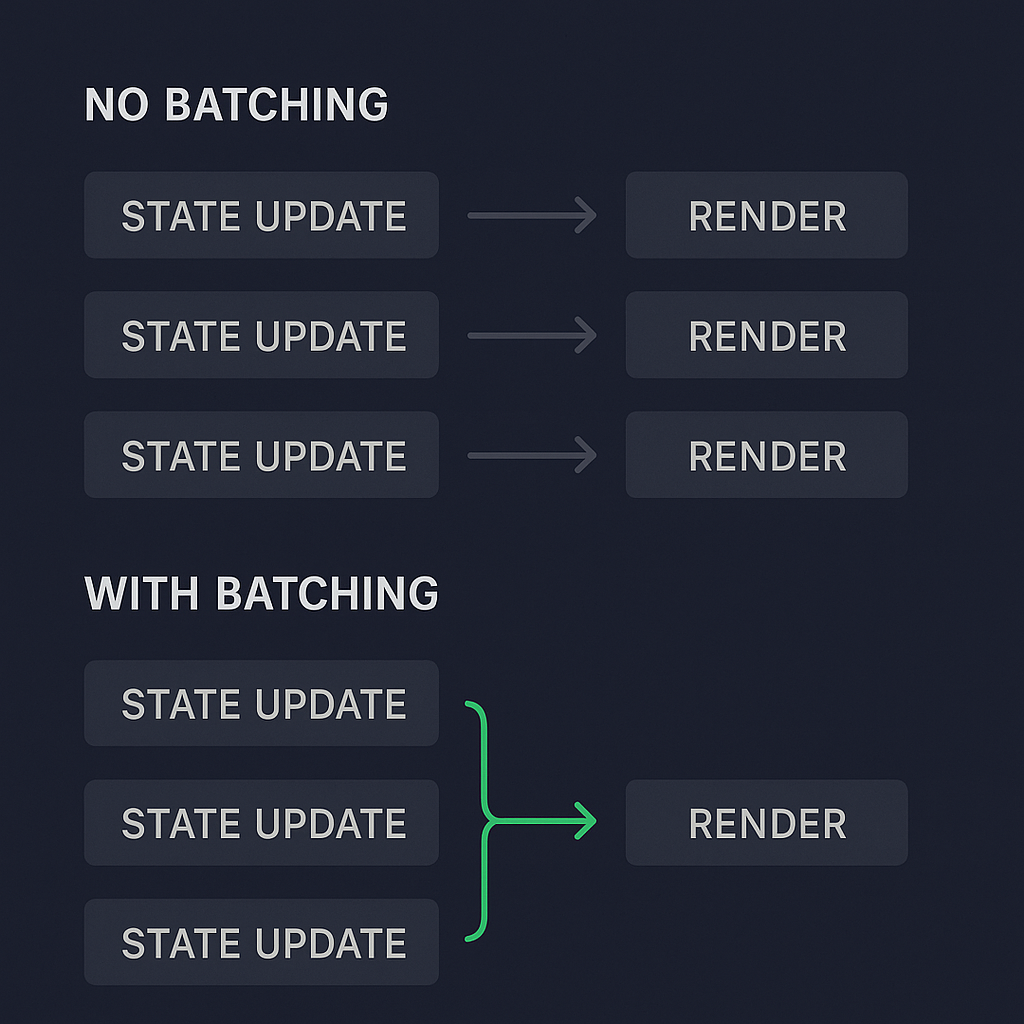
This reduction in rendering work is critical for preventing UI jank and maintaining a smooth user experience, especially in complex components.
2. The Historical Context: Inconsistent Batching in React 17
Prior to React 18, this powerful batching mechanism had a significant limitation: it only worked consistently within React-controlled event handlers.
This meant if you had multiple setState calls inside an onClick or onChange handler, React would batch them beautifully into a single render. However, if those same state updates occurred outside of a React event context—for example, inside a setTimeout, a native DOM event listener, or after an await within an async function—they would not be batched. Each setState would trigger its own, immediate, synchronous re-render.
This inconsistent behavior could lead to subtle bugs and performance issues. A component might behave perfectly when a state update is triggered by a button click, but then cause multiple, jarring re-renders when the same logic is triggered by a data fetch response.
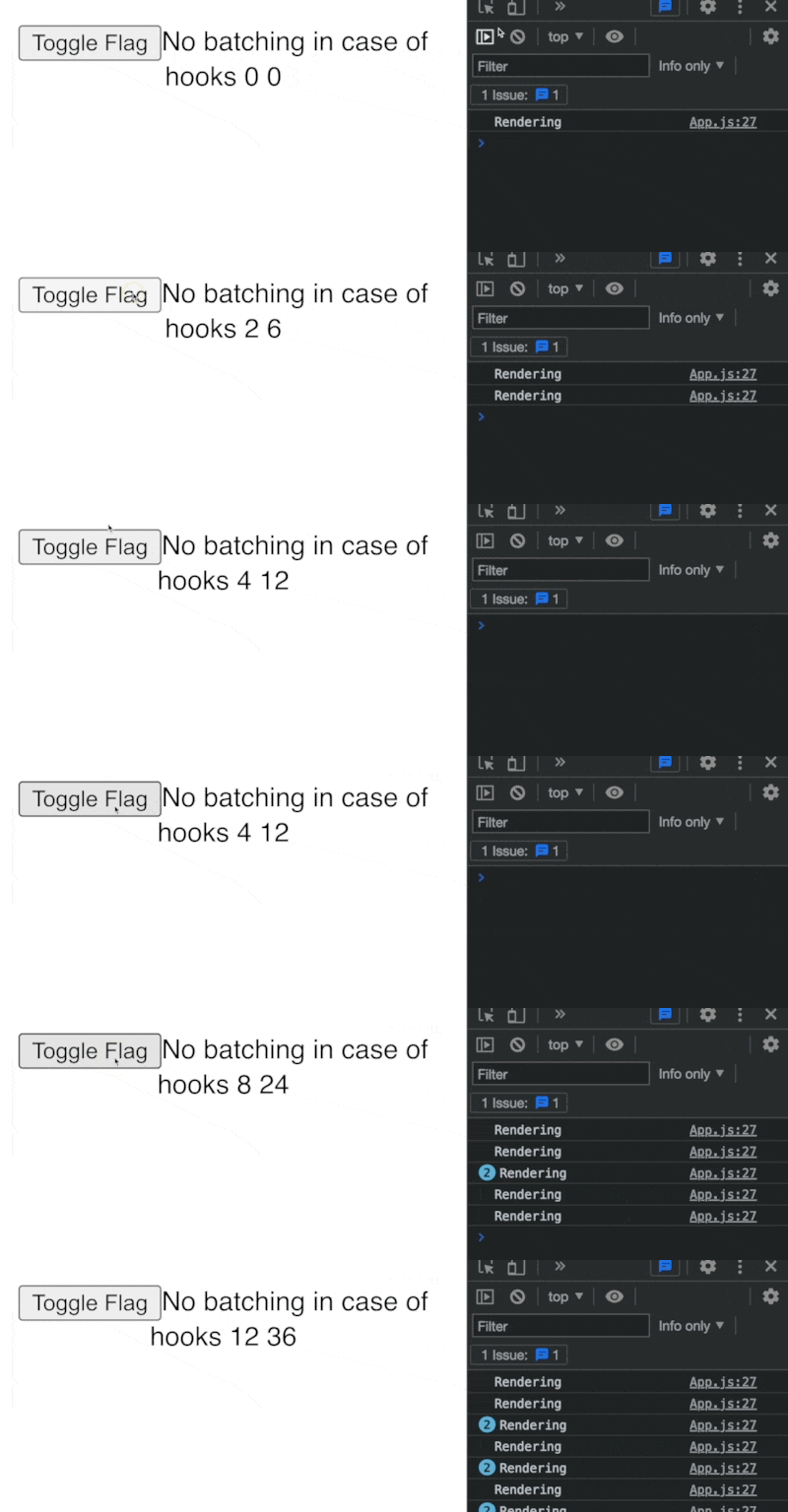
The following video provides a practical code demonstration of this exact issue.
Mastering React Batch Updating
The video 'Mastering React Batch Updating' by Jack Herrington clearly demonstrates the difference in batching behavior in React versions prior to 18.
Watch the segment from 00:03:22 to 00:05:47. Pay close attention to the console output. You'll see how state updates within a synchronous function result in a single, batched re-render, whereas the same updates inside an async function (after the await boundary) cause multiple, separate re-renders.
To solve this, developers had to resort to a workaround: manually opting into batching using an unstable, non-public API.
Mastering React Batch Updating
The same video shows how developers historically forced batching in asynchronous contexts.
Now watch from 00:05:47 to 00:06:33. The presenter uses unstable_batchUpdates from react-dom to wrap the asynchronous state updates, forcing React to batch them into a single render. This highlights the manual effort required to achieve consistent behavior in older versions.
This inconsistency was a well-known friction point, which the React team set out to solve permanently.
3. The Modern Solution: Automatic Batching in React 18
With the release of React 18, this inconsistency was eliminated. React now performs automatic batching by default.
This means that no matter where state updates originate—from event handlers, promises, timeouts, or native event listeners—React will automatically batch them as long as they occur within the same event loop tick. The unstable_batchUpdates API is no longer necessary for this purpose.
This change provides a more predictable mental model and better out-of-the-box performance. To enable this and other new concurrent features, you must adopt the new root API.
// Before (React 17)
import ReactDOM from 'react-dom';
import App from './App';
ReactDOM.render(<App />, document.getElementById('root'));

// After (React 18)
import ReactDOM from 'react-dom/client';
import App from './App';
const root = ReactDOM.createRoot(document.getElementById('root'));
root.render(<App />);
The following resources explain this change and its impact.
React 18 - What's New, What Changed & Upgrade Guide
The channel Academind provides a concise overview of the key changes in React 18, including automatic batching.
Watch the section on state batching from 00:04:52 to 00:06:14. It clearly explains the problem that existed in React 17 and how React 18 solves it by batching updates everywhere by default.
Mastering React Batch Updating
Let's return to Jack Herrington's video to see the effect of upgrading the project to React 18.
Finally, watch from 00:06:33 to 00:08:09. Notice how after upgrading the dependencies and switching to the createRoot API, the previously un-batched asynchronous updates are now automatically batched into a single render, without needing unstable_batchUpdates.
4. Under the Hood: How the Fiber Architecture Enables Automatic Batching
Your interest lies in the "why," so let's connect this feature to React's underlying architecture. Automatic batching isn't just a patch; it's a natural consequence of the React Fiber architecture, introduced in React 16 and fully leveraged for concurrency in React 18.
The previous reconciliation algorithm (the "Stack" reconciler) was synchronous and couldn't be interrupted. Once a render started, it ran to completion. Fiber, on the other hand, is a complete reimplementation that allows rendering work to be broken into chunks, prioritized, paused, and resumed. It effectively reimplements the call stack as a linked list of "fiber" nodes, giving React's scheduler fine-grained control over the rendering process.
To understand how this enables automatic batching, we need to look at Fiber's scheduling system.
A Deep Dive into React Fiber — The Engine Behind Modern React
This article, 'A Deep Dive into React Fiber', provides an excellent, low-level explanation of Fiber's internal mechanics. We will focus on the parts relevant to scheduling and batching.
Please read the following sections: The introduction: This sets the stage by explaining why Fiber was created to overcome the limitations of the old synchronous reconciler. Scheduling, Priority Lanes, and Concurrency: This is the core concept. Pay close attention to the idea of lanes. The article explains that every update is assigned a priority 'lane'. Updates sharing the same lane are processed together. Automatic Batching (subsection): This section explicitly connects the dots: 'React 18’s new default batching is a direct outcome of Fiber’s scheduler.' It explains that because the scheduler can group updates by lane, it can batch them even if they originate from asynchronous sources like setTimeout.
In essence, the Fiber scheduler doesn't just react to setState calls blindly. It assigns them a priority and puts them into a queue. When it's time to process the queue, it can intelligently group all pending updates from the same task into a single "batch," leading to the automatic batching behavior we now see in React 18. This sophisticated scheduling is the key architectural shift that makes React more performant and responsive.
Conclusion
In this lesson, we've dissected the concept of state update batching in React, tracing its evolution from a limited feature to a powerful, automatic optimization.
Key Takeaways:
- Batching is a Performance Win: It groups multiple state updates into a single re-render, preventing unnecessary and computationally expensive UI updates.
- Historical Inconsistency: In React 17 and earlier, batching was limited to React's own synchronous event handlers, leading to performance pitfalls in asynchronous code.
- Automatic Batching in React 18: Enabled by the new
createRootAPI, React 18 automatically batches all updates that occur within the same task, regardless of their origin. - Powered by Fiber: This robust behavior is not a simple fix but a fundamental benefit of the React Fiber architecture, whose advanced scheduling and prioritization model allows for more intelligent handling of rendering work.
What's Next?
We've now established how React decides to group updates into a single render. However, this raises another crucial question: what causes a component to be considered for a re-render in the first place? Sometimes, components re-render even when their props haven't visibly changed, leading to wasted cycles.
In our next lesson, we will investigate this phenomenon. We will describe common causes of unnecessary component re-renders and how to diagnose them using React DevTools, equipping you with the skills to profile and optimize your applications effectively.