Introduction
Welcome to our next lesson on React Hooks! In our previous session, we delved into the internal mechanics of useState, discovering how it leverages the component's fiber node and an update queue to manage state and trigger re-renders. We established that calling a state setter doesn't immediately change a value but rather schedules an update.
Today, we'll build on that foundation to tackle side effects—operations that interact with the world outside of your component's rendering logic, like fetching data, managing subscriptions, or directly manipulating the DOM. For this, we use the useEffect hook.
Our goal is to explain the purpose of the useEffect dependency array and the role of its cleanup function in preventing memory leaks. You'll learn not just what they do, but how React uses them internally to give you precise control over your component's lifecycle. We'll explore:
- How the dependency array acts as a gatekeeper, determining precisely when your effect code runs.
- How the cleanup function prevents common but tricky bugs like memory leaks and race conditions.
By the end, you'll have a robust mental model for managing side effects predictably and efficiently.
Part 1: The Dependency Array - Controlling Effect Execution
Let's start with a common scenario: fetching data when a component mounts. A naive implementation might look like this:
function UserProfile({ id }) {
  const [user, setUser] = useState(null);

  useEffect(() => {
    fetch(`https://api.example.com/users/${id}`)
      .then(res => res.json())
      .then(data => setUser(data));
  }); // No dependency array!

  // ... render user data
}
What happens here?
- The component renders.
useEffectruns, fetching data and callingsetUser.- The state update from
setUsertriggers a re-render. - The component re-renders, and since there's no dependency array,
useEffectruns again. - This creates an infinite loop of fetching and re-rendering.
This demonstrates the fundamental purpose of the dependency array: to tell React when to re-run an effect.
To understand how to control this, let's watch a video that walks through this exact problem and its solution.
The video 'Mastering React's useEffect' by Jack Herrington provides a clear, practical demonstration of the infinite loop problem and how the dependency array solves it.
Please watch from the beginning up to 05:18. Pay close attention to: The demonstration of the infinite re-render loop (03:14 - 05:09). How adding an empty dependency array [] solves the problem and why (05:09 - 05:18).
As the video showed, the dependency array gives us precise control. Here’s a summary of its behavior:
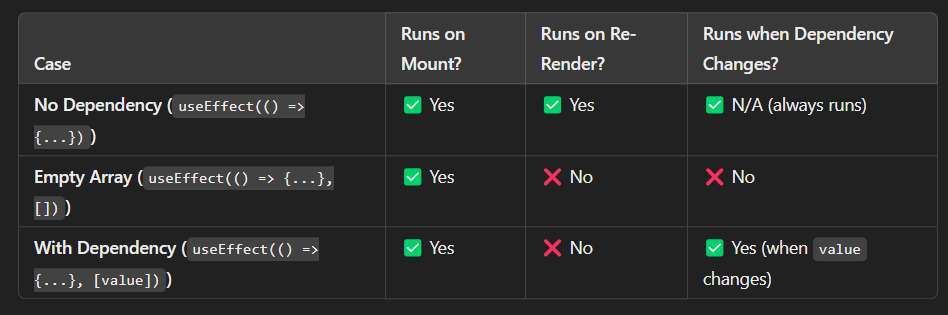
- No dependency array:
useEffect(callback)runs after every single render. - Empty dependency array:
useEffect(callback, [])runs only once, after the initial render (on mount). - Populated dependency array:
useEffect(callback, [dep1, dep2])runs on mount, and then only if any of the dependencies have changed since the last render.
How React Checks Dependencies Under the Hood
This is where your interest in internal mechanics comes into play. How does React know if a dependency has "changed"?
When useEffect runs, React stores the dependency array you provided. On the next render, it gets the new dependency array and compares each value in the new array to the corresponding value in the old one, one by one.
The comparison is done using the Object.is() algorithm. This is very similar to a strict equality check (===), but it correctly handles a few edge cases (like NaN being equal to NaN).
This has a critical implication that often trips up developers:
- Primitive values (strings, numbers, booleans) are compared by value.
5is always equal to5. - Reference types (objects, arrays, functions) are compared by reference. A new object
{ id: 1 }is not equal to another{ id: 1 }because they are different objects in memory, even if their contents are identical.
This distinction is crucial for performance and bug prevention. Let's return to the video to see a fantastic explanation of this concept.
This next segment from the same video explains the difference between value and reference comparison in JavaScript and how it directly impacts useEffect's dependency check.
Please watch from 06:49 to 12:16, and then from 14:40 to 15:27. (06:49 - 12:16): This is the core of the concept. The video uses a code sandbox to demonstrate how JavaScript compares primitives vs. objects and arrays. It then shows how React's dependency comparison logic works internally. (14:40 - 15:27): This segment shows the practical solution: instead of passing a whole object into the dependency array, pass only the primitive value you actually need (e.g., options.url instead of options).
To reinforce this, let's briefly look at a simplified, reverse-engineered implementation of useEffect. This will connect back to what we learned about useState and the internal array of hooks.
How Do React Hooks Actually Work? React.js Deep Dive #3
The video 'How Do React Hooks Actually Work?' by Philip Fabianek demonstrates how useEffect could be implemented. This perspective will solidify your understanding of the dependency checking mechanism.
Watch from 06:33 to 09:20. Notice how the implementation: Uses an index to access the correct hook data, just like useState. Stores the old dependencies. Loops through the new dependencies and compares them to the old ones to decide if the effect callback should run.
Part 2: The Cleanup Function
Now that we can control when an effect runs, we need to address what happens when it's no longer needed. This is the job of the cleanup function.
A cleanup function is a function that you can optionally return from your effect's callback.
useEffect(() => {
  // Side effect logic goes here.
  // ...

  // Return a cleanup function.
  return () => {
    // Cleanup logic goes here.
  };
}, [/* dependencies */]);
When Does the Cleanup Function Run?
This is a frequently misunderstood topic. The cleanup function is called in two key circumstances:
- When the component unmounts: React will run the cleanup to tidy up any lingering effects.
- Before the effect runs again: If a dependency has changed and the effect is scheduled to re-run, React will first run the cleanup function from the previous render before executing the new effect.
This "cleanup-then-rerun" cycle is essential for keeping effects isolated and preventing bugs.
Use Case 1: Preventing Memory Leaks
The most common use case for cleanup is managing subscriptions or event listeners. If you add an event listener in useEffect but never remove it, you create a memory leak. Even if the component unmounts, the listener remains in memory, holding a reference to your component and preventing it from being garbage collected.

Use Case 2: Preventing Race Conditions
A more subtle but critical use for the cleanup function is preventing race conditions with asynchronous operations, like the fetch calls we discussed earlier.
Consider this scenario:
- Your component renders with
id: 1. The effect fetches user 1. This request is slow. - Before the first fetch completes, the user clicks a button, and the component re-renders with
id: 2. The effect re-runs and fetches user 2. This request is fast. - The fetch for user 2 completes, and the state is set to
user: 2. The UI correctly shows user 2. - A moment later, the slow fetch for user 1 finally completes. It calls
setUserwith user 1's data, overwriting the correct state. Now your UI is incorrectly showing user 1, even though the component'sidprop is 2.
The cleanup function solves this elegantly. The following article provides an excellent explanation of this problem and its solution.
The useEffect cleanup and the two circumstances it's called.
The article 'The useEffect cleanup and the two circumstances it's called' from React Training is a fantastic, focused resource on this topic. It clearly explains the race condition problem.
Please read the sections 'Race conditions', 'The other circumstance the cleanup gets called...', and the timeline that follows. Focus on: The example of fetching user data with a changing userId. The explanation of how network requests can resolve out of order, leading to incorrect state. How the cleanup function from the previous effect runs before the new effect, allowing you to 'cancel' the outdated operation.
As the article demonstrates, you can use a boolean flag like isCurrent or isCancelled inside your effect. The cleanup function sets this flag to false. The async callback checks this flag before setting state. When the cleanup for the old effect runs, it "disarms" the old fetch call, preventing it from setting state when it eventually resolves.
The Big Picture: Effects in the Render/Commit Cycle
To complete your mental model, let's place useEffect within the render/commit cycle we've discussed.
How useEffect Works Behind the Scenes in React
The article 'How useEffect Works Behind the Scenes in React' provides a deep dive into the internal implementation, connecting useEffect to the Fiber architecture and render phases. This is perfect for understanding the 'why' behind its behavior.
Please read these sections to understand the full lifecycle of an effect: 'Render vs. Commit Phases': Note the key takeaway: effects are registered during the render phase but run after the commit phase. This is why they don't block the UI from updating. 'The Commit Phase: When Effects Actually Run': Understand the sequence: DOM updates happen first, then cleanups from previous effects run, and finally, new effects are executed asynchronously. 'The Cleanup Process: React's Memory Management': This reinforces the two moments when cleanup runs (before the next effect and on unmount). 'Common Misunderstandings About useEffect': This is a great summary that addresses common pitfalls related to timing and dependencies.
In essence, React performs a carefully orchestrated dance:
- Render Phase: Your component function runs. React sees the
useEffectcall, compares the new dependencies to the old ones, and if they've changed, it schedules the effect to run. - Commit Phase: React updates the actual DOM. The user sees the changes on the screen.
- Post-Commit: Only after the browser has painted the changes does React execute your scheduled effects. This ensures that side effects, which can be slow, never make your UI feel sluggish. Before running the new effect, it runs the cleanup from the previous one.
Conclusion
You've now unpacked the core mechanics of useEffect. It's not just a function that runs on render; it's a sophisticated system for synchronizing your component with the outside world.
Key Takeaways:
- Dependency Array: Its purpose is to control when your effect re-runs. It works by comparing dependencies using
Object.is(), which means you must be mindful of reference equality for objects, arrays, and functions. - Cleanup Function: Its purpose is to prevent side effects from "leaking" outside their intended lifecycle. It runs on component unmount and before the next effect execution.
- Primary Roles of Cleanup: The two most critical roles are preventing memory leaks (from subscriptions, timers, event listeners) and avoiding race conditions in asynchronous operations.
- Execution Timing: Effects and their cleanups are scheduled during the render phase but run asynchronously after React has committed changes to the DOM and the browser has painted, ensuring a responsive UI.
What's Next?
We've seen how creating new object or function references on every render can cause useEffect to run unintentionally. This begs the question: how can we preserve the same reference across renders for performance-critical operations?
In our next lesson, we will explore useMemo and useCallback. These hooks are designed specifically for this purpose: memoizing values and functions to prevent unnecessary re-renders and effect executions. This will complete your foundational toolkit for optimizing React components.