Introduction
Welcome back! In our previous lesson, we established the fundamental "Rules of Hooks" and uncovered the "why" behind them: React relies on a stable call order to associate state with the correct hook, using a linked list of hooks stored on a component's internal fiber node.
Today, we'll zoom in on the most foundational hook: useState. Our goal is to move beyond simply using it and to describe how useState manages component state and triggers re-renders. True to your interest in the underlying mechanics, we'll dissect the entire process—from the initial state creation during a component's "mount" to the update-and-render cycle that happens when you call the setter function.
By the end of this lesson, you'll have a precise mental model of the lifecycle of a piece of state in React, understanding exactly what happens when you call [count, setCount] = useState(0) and later, setCount(1).
The Render and Commit Cycle: A Quick Recap
Before we dive into useState's specifics, let's frame the process. When you update state, React kicks off a re-render. This isn't a single, instantaneous event but a two-phase process.

When setCount is called, it acts as the trigger. This leads to the render phase, where React re-executes your component function to determine what, if anything, has changed. Finally, in the commit phase, React takes the calculated changes and updates the actual DOM.
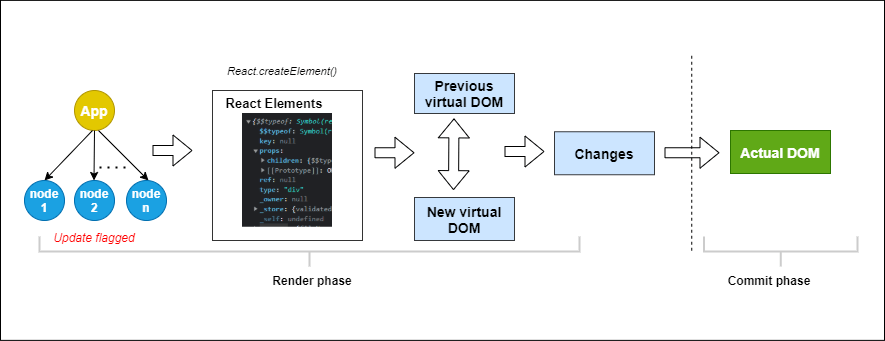
Our focus today is on how useState initiates this trigger and how it provides the new state during the subsequent render phase.
Part 1: The Initial Render (Mounting State)
In the last lesson, we learned that hooks are stored as a linked list on a component's fiber node. Let's see how useState creates the first entry in that list.
When your component runs for the first time (the "mount" phase), the useState call executes mountState internally. This function has a clear job:
- Create a new
hookobject. - Store the initial value you provided (e.g.,
0) inhook.memoizedState. - Create an
update queuewithin the hook object to hold future updates. - Create and return the
dispatchfunction (yoursetCount), binding it to the current component's fiber and the newly created queue. - Link this new
hookobject to the component's fiber node. If other hooks are present, it's added to the end of the linked list.
To see a great narrative of this process, let's turn to an article that connects the concepts of fibers and hooks.
A journey through the implementation of the useState hook
The following article, 'A journey through the implementation of the useState hook', clearly explains how React associates state with the component's fiber node using a linked list. It's a great bridge from our last lesson to the deeper mechanics we're exploring now.
Please read the section titled 'Updating the hook'. While its title is about updates, this section provides the clearest explanation of how React manages hooks for a component. Focus on: The role of the fiber object. How the memoizedState property on the fiber points to a linked list of hook objects. How the next property on each hook object creates this chain. This directly explains why the Rules of Hooks are so critical.
After this initial render, the component's fiber node now holds a hook object in its memoizedState linked list. This object contains both the current value (memoizedState) and an empty queue waiting for updates.
Part 2: The Update Process
Now for the most interesting part: what happens when you call setCount(count + 1)?
It's a common misconception that this function immediately changes the count variable. It does not. Instead, it dispatches an update and schedules a re-render.
The process looks like this:
- The
setCount(ordispatch) function creates anupdateobject. This object contains the new value or the updater function you provided (e.g.,c => c + 1). - This
updateobject is pushed into thependingqueue of the corresponding hook object. - React's scheduler is notified that this component's fiber is "dirty" and needs to be re-rendered. This is done by calling
scheduleUpdateOnFiber. The re-render doesn't happen synchronously; the scheduler decides when to do it (though for user events, it's typically very fast). - Later, when the scheduler processes the re-render, it calls your component function again.
- When the
useStateline is executed this time, React sees it's an update render. It callsupdateStateinternally, which processes theupdateobjects in the hook's queue, calculates the new state, and returns it. - The new state is then stored in
hook.memoizedStatefor the next render.
This entire flow is complex, and the best way to understand it is to see a guided walkthrough of the actual internal logic.
React Internals Deep Dive 5 - How does useState work internally?
The video 'React Internals Deep Dive 5 - How does useState work internally?' by JSer is an excellent, code-level exploration of this entire process. It's dense, but it will give you the precise conceptual model you're looking for.
This is a detailed video, so focus on these specific segments: Mount Phase (06:34 - 10:20): Briefly watch this part. The key takeaway is seeing the creation of the hook object with its memoizedState and queue. This visualizes the concepts from the article you just read. Update Phase (15:36 - 25:10): This is the most critical part of the lesson. Watch carefully to see how clicking the button triggers dispatchSetState. Observe how an update object is created and how scheduleUpdateOnFiber is called. This is the 'trigger' phase. Re-render Processing (25:10 - 35:30): Continue watching to see the re-render. The key function here is updateState (which calls updateReducer). Notice how it processes the queue to compute the new state, which is then returned from the useState call. Bonus: The Updater Function (51:30 - 52:49): Finally, watch this short segment. It explains exactly why using a function (setCount(c => c + 1)) is safer, connecting it directly to the fact that updates are queued and processed in batches.
For a textual reference that you can review, the companion article to this video provides annotated source code for these exact functions.
How does useState() work internally in React? - JSer.dev
This article, 'How does useState() work internally in React?', is the written version of the video. It's a great resource to solidify your understanding of the code flow.
You don't need to read this in-depth right now, but skim the sections '1. useState() in initial render(mount)', '2. What happens in setState()?', and '3. useState() in re-render'. Notice how the functions mountState, dispatchSetState, and updateReducer map directly to the process we've just discussed. Keep this article as a reference for when you want to review the specific implementation details.
Conclusion
By looking under the hood, we've replaced the "magic" of useState with a concrete, logical process.
Key Takeaways:
- Mounting: On the initial render,
useStatecreates ahookobject with amemoizedStateand anupdate queue, linking it to the component's fiber node. - Updating: The setter function (
setCount) is adispatchfunction. It doesn't change state directly. Instead, it creates anupdateobject, adds it to the hook's queue, and tells React's scheduler to re-render the component. - Re-rendering: During the next render,
useStateprocesses the updates in the queue to compute the new state, returns it, and updates thememoizedStateon the hook object for future renders. - Functional Updates: Using an updater function (e.g.,
setCount(c => c + 1)) is robust because React queues the function itself, not a potentially stale value. This ensures calculations are always based on the most recent state in the queue.
This model of dispatching updates to a queue is a core pattern in React and is also fundamental to how useReducer works, which we will touch on in a later module.
What's Next?
We've now covered how to manage state that is directly tied to a component's render output. But what about actions that aren't part of the main render logic, such as fetching data, setting up subscriptions, or manually manipulating the DOM? These are called "side effects." In our next lesson, we will explore the useEffect hook, which is React's primary tool for managing side effects within the component lifecycle.