Introduction
In our last lesson, we focused on how to handle asynchronous operations in Express and, most importantly, how to propagate errors from your route handlers to the middleware chain using next(error). We established that this is the standard mechanism for signaling that something has gone wrong.
This brings us to the crucial next question: where does that error go, and what happens to it? This lesson completes the picture. Our learning outcome is to explain how Express handles errors through dedicated error-handling middleware. We will explore how Express identifies these special middleware functions, how to build a robust handler that provides consistent and secure error responses, and the architectural patterns that separate error detection from error response.
This is the final piece of our Node.js and Express module. Mastering this will give you a complete understanding of the request-response and error-handling lifecycle, a core competency for any backend developer.
1. The Contract: A Special Middleware Signature
In a standard Express middleware stack, control flows from one function to the next via next(). However, when you call next() with an argument, like next(error), Express deliberately breaks this chain. It skips all subsequent regular middleware and looks for a specific type of handler: an error-handling middleware.
What makes it special? It's not the name or the file location, but its function signature. Express identifies an error-handling middleware by checking the number of parameters it accepts.
- Regular Middleware:
(req, res, next)— three parameters. - Error-Handling Middleware:
(err, req, res, next)— four parameters.
This four-argument signature is a strict contract. The first parameter is reserved for the error object that was passed to next().
Express.js Middleware Architecture Deep Dive
The article 'Express.js Middleware Architecture Deep Dive' explains this fundamental rule very clearly. It's a small but critical detail that underpins the entire error-handling mechanism.
Read the short sections 'Error-Handling Middleware' and the part of 'Troubleshooting Common Middleware Problems' titled 'Error handler not being called'. Note how the text emphasizes that the four-argument signature is a mandatory contract for Express to recognize the function as an error handler.
2. Building and Invoking an Error Handler
Now that we know the signature, let's see how to build and trigger a basic error handler. The process involves two steps:
- Triggering the error: In a route handler (or another middleware), create an
Errorobject and pass it tonext(). - Handling the error: Define a middleware with the
(err, req, res, next)signature to receive the error and formulate a response.
This video provides a practical walk-through of creating a global error-handling middleware and using it to handle a "route not found" scenario.
#91 Global Error Handling Middleware | Error Handling in Express | A Complete NODE JS Course
The video '#91 Global Error Handling Middleware' by procademy demonstrates the complete flow from triggering to handling an error.
Watch from 01:59 to 12:41. Pay close attention to these key points: The Middleware Definition (01:59 - 07:37): Observe how the error handler is defined with app.use and the four-parameter function. Notice how it dynamically uses err.statusCode or defaults to 500. Invoking the Middleware (07:37 - 12:41): See how a new Error object is created, properties like statusCode and status are attached to it, and it's then passed to next() to trigger the handler.
This simple mechanism of passing an object to next() is what bridges the gap between your application logic and your centralized error handler.
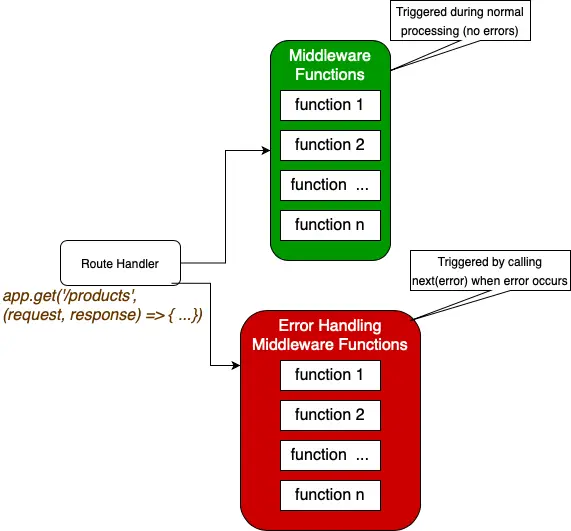
3. Best Practice: Placement is Everything
The order in which you register middleware is critical. Because an error handler is meant to be a final catch-all, it must be registered after all other app.use() calls and route definitions.
If you place your error handler before a route, it will never be called for errors that occur in that route. The request will be handled (or an error will occur) before Express even reaches the point where the error handler is registered in the middleware stack.
Express.js Middleware Architecture Deep Dive
The 'Express.js Middleware Architecture Deep Dive' article provides an excellent example of a production-ready middleware stack, which makes the correct placement of the error handler very clear.
Review the section 'Middleware Execution Order and Why It Matters' and find the 'Best Practices' list at the end. Note the first bullet point: 'Register error-handling middleware last.' This is a non-negotiable rule for a functioning error pipeline.
4. Architecting a Production-Grade Error Handler
A simple error handler is a good start, but a robust application needs a more sophisticated approach. This involves distinguishing between different types of errors and providing more structured information.
Operational vs. Programmer Errors
It's useful to distinguish between two categories of errors:
- Operational Errors: These are expected, predictable problems that can occur during normal operation (e.g., invalid user input, a database record not found, a failed call to an external API). These are not bugs. We should handle them gracefully and send a clear, user-friendly error message.
- Programmer Errors: These are bugs in the code (e.g., trying to read a property of
undefined, a logical flaw). They are unexpected. In these cases, it's often best to log the detailed error for debugging and potentially restart the server process to avoid an unstable state.
Using Custom Error Classes
To help our error handler make this distinction, we can move beyond the generic new Error('message'). By creating custom error classes that extend the built-in Error, we can attach important metadata, such as an HTTP status code and an isOperational flag.
// A base class for all our operational errors
class AppError extends Error {
  constructor(message, statusCode) {
    super(message);
    this.statusCode = statusCode;
    this.status = `${statusCode}`.startsWith('4') ? 'fail' : 'error';
    this.isOperational = true; // Mark as an operational error

    Error.captureStackTrace(this, this.constructor);
  }
}

// A specific error for "Not Found"
class NotFoundError extends AppError {
    constructor(message = 'Resource not found') {
        super(message, 404);
    }
}
Now, in your route, you can throw a specific, meaningful error:if (!user) throw new NotFoundError('User not found');
This approach is far superior to setting properties on a generic Error object as it leverages the type system to create a more predictable and maintainable architecture.
Let's look at two resources that champion this pattern.
How to handle Node.js errors like a Pro?
The video 'How to handle Node.js errors like a Pro?' gives a great rationale for why extending the native Error object is a powerful pattern.
Watch from 00:45 to 04:06. The speaker explains the limitations of throwing strings or generic errors and makes a strong case for creating a custom AppError class. Pay attention to the properties being added, like httpCode and the isOperational flag.
Node.js Error Handling Best Practices
The article 'Node.js Error Handling Best Practices' from Sematext provides concrete code examples for creating a BaseError and specific API errors like Api404Error.
Read the sections '1. Use Custom Errors to Handle Operational Errors' and '2. Use a Middleware'. This will solidify your understanding of how to structure the custom error classes and then use them within a centralized middleware handler.
The Central Handler Logic
With custom errors in place, your global error handler becomes much smarter. It can now inspect the error object and act accordingly. A good production handler should:
- Log the error to the console or a logging service.
- Check if it's a trusted, operational error (
err.isOperational). - If it is operational, send a clean, JSON response to the client with the error's message and status code.
- If it's an unknown or programmer error, send a generic "Internal Server Error" message to avoid leaking implementation details.
- In a development environment, you might also send the stack trace for easier debugging.
Here is a complete example from the Express.js Middleware Architecture Deep Dive resource (LINK), which elegantly combines these ideas:
// Global error handler -- must be the very last app.use()
app.use(function(err, req, res, next) {
    // Determine the status code from the error, or default to 500
    const status = err.status || err.statusCode || 500;

    // Log the full error details on the server for debugging
    console.error(JSON.stringify({
        timestamp: new Date().toISOString(),
        error: err.message,
        stack: err.stack, // Full stack trace
    }));

    // For production, avoid sending sensitive details to the client
    const isProduction = process.env.NODE_ENV === 'production';
    const clientError = {
        message: (isProduction && status === 500) ? 'An unexpected error occurred' : err.message,
        // You might add a machine-readable error code if you have one
        code: (isProduction && status === 500) ? 'INTERNAL_ERROR' : err.code || 'ERROR',
    };

    // Send the sanitized error response to the client
    res.status(status).json({ error: clientError });
});
Conclusion
This lesson concludes our deep dive into the server-side with Node.js and Express. You now have a complete mental model of how requests, responses, and errors flow through an Express application.
Key Takeaways:
- The Contract: Express identifies error-handling middleware by its unique four-parameter signature:
(err, req, res, next). - The Trigger: Calling
next()with any argument (typically an error object) skips all regular middleware and jumps to the next available error handler. - The Golden Rule: Error-handling middleware must be registered at the very end of your middleware stack, after all routes.
- Robust Architecture: The best practice is to create custom error classes that extend
Errorand include metadata likestatusCodeandisOperational. This allows your central error handler to make intelligent decisions about logging and formatting the client response. - Separation of Concerns: Your application logic (routes, services) is responsible for detecting errors and throwing specific
AppErrortypes. The central error middleware is responsible for handling these errors and formatting a consistent response.
What's Next?
We've now built a solid foundation covering HTML semantics, advanced CSS, the core mechanics of JavaScript, and the architecture of a Node.js/Express backend. We are now ready to pivot back to the client side and explore the powerful library that has revolutionized frontend development: React.
In the next module, we will start by understanding React's fundamental rendering model. We'll explore how JSX is transpiled into React.createElement function calls, demystifying the "magic" behind React's declarative syntax and setting the stage for understanding the Virtual DOM.