In our last session, we accomplished a major milestone by constructing a fully linked three-statement financial model. We saw firsthand how the cash flow statement acts as the crucial bridge between the income statement and the balance sheet, culminating in a Balance Check row that confirmed our model was working.
Today, we will elevate that simple check into a core principle of professional financial modeling. This lesson focuses on the importance and implementation of robust validation checks. You will learn not just how to verify that your balance sheet balances, but why it must, what it means when it doesn't, and how to programmatically enforce this rule. Mastering this will give you confidence in your model's integrity, a non-negotiable requirement for any serious financial analysis.
The Unbreakable Rule: The Accounting Equation
At the heart of a financial model's integrity is the fundamental accounting equation. It's a simple but powerful identity that must hold true for every accounting period.
Balance Sheet | Template + Example
This article from Wall Street Prep introduces the foundational concept that governs the balance sheet.
Please read the brief introduction, starting from the formula. The key takeaway is that the balance sheet is not merely a list of numbers; it's a statement of equilibrium.
As the reading states, this equation is:
If this equation is not satisfied, your model contains an error. There are no exceptions. This makes the balance check the most important diagnostic tool you have. A model that doesn't balance is fundamentally untrustworthy.
In practice, this is implemented by adding a "check" row at the bottom of the balance sheet. This row calculates Total Assets - (Total Liabilities + Equity). If the model is correctly linked, the result for every period will be zero.
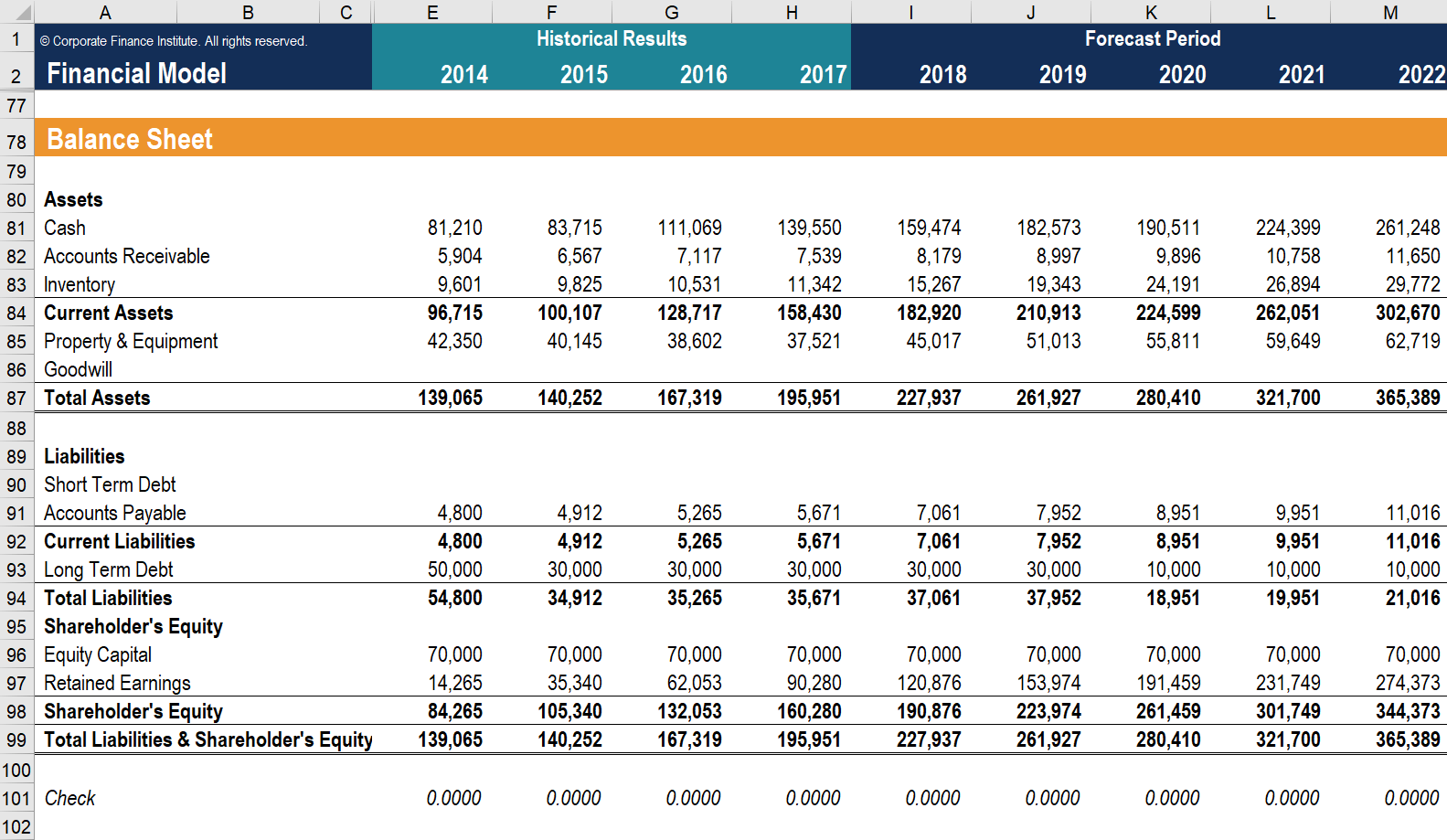
A typical balance sheet from a financial model. The 'Check' row at the bottom confirms that for every period, from historicals to forecasts, the accounting equation holds true.
The "Moment of Truth": Seeing the Check in Action
The balance check isn't just a final verification; it's a dynamic indicator of your model's health throughout the building process. A common experience when building a model is seeing the balance sheet go out of balance and then back into balance as the final links are connected.
The following video provides an excellent visual demonstration of this process. The presenter builds a balance sheet and explicitly shows that it doesn't balance until the cash flow statement is built and the resulting cash figure is linked back.
Build a Dynamic 3 Statement Financial Model From Scratch
This video by Kenji Explains walks through a full 3-statement model build, and in these clips, he demonstrates the critical role of the balance check.
Please watch these two key moments: The Imbalance : After projecting the income statement and most of the balance sheet, the presenter shows that the balance check is not zero. He correctly diagnoses that this is because the cash line is not yet linked. The Resolution : After building the cash flow statement, he links the calculated Ending Cash back to the balance sheet's cash line. Watch as he scrolls down to the balance check row, which now correctly shows zero for all projected years. This is the "moment of truth."
This sequence powerfully illustrates that the balance check is your model's built-in quality control system. An imbalance is not a failure, but a "red flag" signaling that a logical link is missing or incorrect.
How to Build a 3 Statement Financial Model
This article from Chalifour Consulting reinforces the importance of this validation step.
Please read the sections "Make Sure It All Balances" and "Use Checks and Balances". Note the language used: "moment of truth," "red flag," and "built-in quality control." This emphasizes how central this check is to the modeling discipline.
Trust, but Verify: A Data Analyst's Approach
Your background in data science and analytics has likely instilled a "trust, but verify" mindset. You know that data pipelines require sanity checks and validation at multiple stages to ensure the final output is reliable. Financial modeling is no different.
The following video demonstrates this principle perfectly. The presenter uses Python and pandas to analyze a balance sheet, but instead of blindly trusting the provided totals, he recalculates them from the constituent parts to verify their accuracy.
Balance Sheet Analysis using Python [Part 1] - Episode 6 in Value Investing Security Analysis
In this video, Taewoo Kim applies a data validation mindset to financial statement analysis, which should resonate with your own analytical practices.
Watch how he programmatically validates the totals: Verifying Current Assets : He sums the individual current asset accounts and compares his calculated total to the Total Current Assets figure provided in the data. They match, giving him confidence in the data's integrity. Finding a Discrepancy : He repeats the process for liabilities. This time, his calculated total doesn't match the provided figure for some periods. He investigates and finds missing data in the source file. This is a perfect example of why validation is crucial—it catches errors that would otherwise corrupt your analysis.
This approach of programmatic verification is exactly what we will formalize in our Python model.
Implementing and Automating the Balance Check
Let's update our script from the previous lesson to include a more robust and automated balance check. We already have the necessary components, but now we'll structure the code to make the validation explicit.
We will ensure our projected_bs DataFrame has clear totals and a Balance Check row. Then, we will add an assert statement. Assertions are a feature in Python that check if a condition is true. If it is, the program continues. If it's false, the program halts and raises an error. This is a powerful way to ensure your model stops immediately if it becomes unbalanced.
import pandas as pd
import numpy as np

# --- Code from previous lesson (condensed) ---
years = ['2021A', '2022A', '2023A', '2024F', '2025F', '2026F']
forecast_years = ['2024F', '2025F', '2026F']

# Income Statement & Assumptions
# ... (same as before) ...
projected_is = pd.DataFrame(index=['Sales'], columns=years)
projected_is.loc['Sales'] = [150.0, 170.0, 195.0, 214.5, 236.0, 259.6]
assumptions = {
    'cogs_margin': 0.60, 'sga_margin': 0.15, 'depr_margin': 0.05, 'tax_rate': 0.22,
    'capex_margin': 0.07, 'dividend_payout': 0.30, 'ar_days': 45, 'inv_days': 60, 'ap_days': 30
}
projected_is.loc['COGS'] = projected_is.loc['Sales'] * -assumptions['cogs_margin']
projected_is.loc['Gross Profit'] = projected_is.loc['Sales'] + projected_is.loc['COGS']
projected_is.loc['SG&A'] = projected_is.loc['Sales'] * -assumptions['sga_margin']
projected_is.loc['Depreciation'] = projected_is.loc['Sales'] * -assumptions['depr_margin']
projected_is.loc['EBIT'] = projected_is.loc['Gross Profit'] + projected_is.loc['SG&A'] + projected_is.loc['Depreciation']
projected_is.loc['Interest Expense'] = 0
projected_is.loc['EBT'] = projected_is.loc['EBIT'] + projected_is.loc['Interest Expense']
projected_is.loc['Tax'] = -projected_is.loc['EBT'].apply(lambda x: x * assumptions['tax_rate'] if x > 0 else 0)
projected_is.loc['Net Income'] = projected_is.loc['EBT'] + projected_is.loc['Tax']

# Balance Sheet Projections (Incomplete without Cash)
projected_bs = pd.DataFrame(columns=years)
projected_bs.loc['Cash', '2023A'] = 30.0
projected_bs.loc['Accounts Receivable', '2023A'] = 25.0
projected_bs.loc['Inventory', '2023A'] = 20.0
projected_bs.loc['PP&E', '2023A'] = 100.0
projected_bs.loc['Accounts Payable', '2023A'] = 15.0
projected_bs.loc['Retained Earnings', '2023A'] = 80.0

projected_bs.loc['Accounts Receivable'] = (assumptions['ar_days']/365) * projected_is.loc['Sales']
projected_bs.loc['Inventory'] = (assumptions['inv_days']/365) * -projected_is.loc['COGS']
projected_bs.loc['Accounts Payable'] = (assumptions['ap_days']/365) * -projected_is.loc['COGS']

capex = projected_is.loc['Sales'] * assumptions['capex_margin']
depreciation_val = -projected_is.loc['Depreciation']
dividends = -projected_is.loc['Net Income'] * assumptions['dividend_payout'] # Dividends are cash outflows

for year_idx in range(3, len(years)):
    prev_year = years[year_idx - 1]
    curr_year = years[year_idx]
    projected_bs.loc['PP&E', curr_year] = projected_bs.loc['PP&E', prev_year] + capex[curr_year] - depreciation_val[curr_year]
    projected_bs.loc['Retained Earnings', curr_year] = projected_bs.loc['Retained Earnings', prev_year] + projected_is.loc['Net Income', curr_year] + dividends[curr_year]

# Build the Cash Flow Statement
projected_cfs = pd.DataFrame(columns=forecast_years)
bs_changes = projected_bs.diff(axis=1)
cfo = projected_is.loc['Net Income'] + depreciation_val - bs_changes['Accounts Receivable'] - bs_changes['Inventory'] + bs_changes['Accounts Payable']
projected_cfs.loc['CFO'] = cfo
projected_cfs.loc['CFI'] = -capex
projected_cfs.loc['CFF'] = dividends
projected_cfs.loc['Net Change in Cash'] = projected_cfs.loc[['CFO', 'CFI', 'CFF']].sum()

# Link Cash Flow back to the Balance Sheet
for year_idx in range(3, len(years)):
    prev_year = years[year_idx - 1]
    curr_year = years[year_idx]
    projected_bs.loc['Cash', curr_year] = projected_bs.loc['Cash', prev_year] + projected_cfs.loc['Net Change in Cash', curr_year]
# --- End of condensed previous code ---


# --- New/Formalized Validation Code ---
# Define asset and liability/equity components
asset_items = ['Cash', 'Accounts Receivable', 'Inventory', 'PP&E']
liab_equity_items = ['Accounts Payable', 'Retained Earnings'] # Simplified for our model

# Calculate totals
projected_bs.loc['Total Assets'] = projected_bs.loc[asset_items].sum()
projected_bs.loc['Total Liabilities & Equity'] = projected_bs.loc[liab_equity_items].sum()

# Implement the balance check
projected_bs.loc['Balance Check'] = projected_bs.loc['Total Assets'] - projected_bs.loc['Total Liabilities & Equity']

print("\n--- Final Projected Balance Sheet ---")
print(projected_bs.round(1))

# --- Automated Validation ---
# We check only the forecast years. np.allclose handles potential floating point inaccuracies.
check_values = projected_bs.loc['Balance Check', forecast_years].values
assert np.allclose(check_values, 0), "VALIDATION FAILED: Balance Sheet does not balance!"

print("\nSUCCESS: Balance Sheet is validated and balanced.")
When you run this code, the assert statement will pass silently if the check is successful. If there were a broken link somewhere in the logic, the program would stop and alert you with the failure message. This automated check is invaluable, especially as models become more complex.
Finally, what do you do if the check fails? The most common culprits are broken links between the statements.
How to Build a 3 Statement Financial Model
This FAQ section provides a practical troubleshooting guide.
Read the first question: "My balance sheet isn’t balancing.". This gives you the two most likely places to check for errors: the link between Net Income and Retained Earnings, and the link between the CFS and the Balance Sheet's cash account.
Conclusion
You have now formalized a critical practice in financial modeling. By implementing an explicit and automated balance check, you've transformed your model from a mere calculation tool into a self-validating system.
Key Takeaways:
- The Golden Rule: The accounting equation
Assets = Liabilities + Equityis non-negotiable. - Built-in Quality Control: The balance check is your model's primary diagnostic tool. An imbalance is a "red flag" for a broken logical link.
- Programmatic Validation: Using Python's
assertstatement allows you to automate this check, ensuring your model's integrity at all times. - Troubleshooting: When a model is unbalanced, the first places to investigate are the links from Net Income to Retained Earnings and from the Cash Flow Statement to the Balance Sheet's cash balance.
With a robust, validated model in hand, you can now use it with confidence to explore different financial possibilities. In our next lesson, we will do just that by building a scenario analysis framework to model base, bull, and bear cases for our company's future.