Hello! Welcome to your next lesson.
In our previous session, we dissected the design of a social media feed, concluding that for such a system, prioritizing availability and performance over strong consistency is the winning strategy. We embraced eventual consistency as a feature, not a bug, to achieve massive scale.
Today, we shift gears to a problem with a distinctly different set of constraints. The learning outcome for this lesson is to design a real-time chat application covering messaging, presence, and delivery guarantees. While a feed can tolerate a few seconds of staleness, a chat message arriving late—or not at all—is a critical failure. This will force us to re-evaluate our trade-offs and focus intently on latency, reliability, and correctness.
1. Framing the Problem: Requirements and Core Components
As always, we start by clarifying the scope. A chat system interview requires you to define the core features and, more importantly, the guarantees the system will provide.
Design Whatsapp: System Design Interview w/ a Ex-Meta Senior Manager
Let's watch how a senior candidate would approach this. The video 'Design Whatsapp' from Hello Interview begins by methodically breaking down the functional and non-functional requirements. Pay close attention to how the presenter quantifies requirements like latency and explicitly states the need for guaranteed delivery.
Watch the first two segments on requirements (02:08 - 09:36). Focus on: Functional Requirements: What core features are included (1-on-1 vs. group chat, offline access)? Non-Functional Requirements: What are the key constraints (low latency, guaranteed delivery, scalability)? Notice the emphasis on quantifying these where possible (e.g., <500ms latency).
Based on that discussion, here are our core requirements:
- Functional: 1-on-1 chat, group chats (up to 100 members), presence (online indicator).
- Non-Functional:
- Low Latency: Messages should feel instantaneous (<500ms).
- Guaranteed Delivery: Messages must not be lost, even if a user is offline.
- Scalability: Support for millions of concurrent users.
- High Availability: The service must be resilient to failures.
The Communication Backbone: Choosing a Protocol
To achieve low-latency, "instant" messaging, the client can't just keep asking the server, "Any new messages for me?". This is inefficient polling. We need the server to be able to push messages to the client.
FAANG System Design Interview: Design A Chat System (WhatsApp, Facebook Messenger, Discord, Slack)
The video 'Design A Chat System' by ByteByteGo provides a clear and concise explanation of the different communication protocols and why WebSockets are a superior choice for this use case.
Watch from 00:38 to 02:05. This segment quickly compares polling, long polling, and WebSockets, arriving at a hybrid approach.
The consensus is clear: WebSockets are the ideal protocol for a chat system's client-server communication. A WebSocket provides a persistent, bi-directional connection, allowing the server to push data to the client at any time with minimal overhead. While sending messages from the client could be done over standard HTTP, using the WebSocket for both directions simplifies the architecture.
High-Level Architecture
A scalable chat system separates the concerns of managing connections from the business logic of handling messages. This is a crucial senior-level design principle.
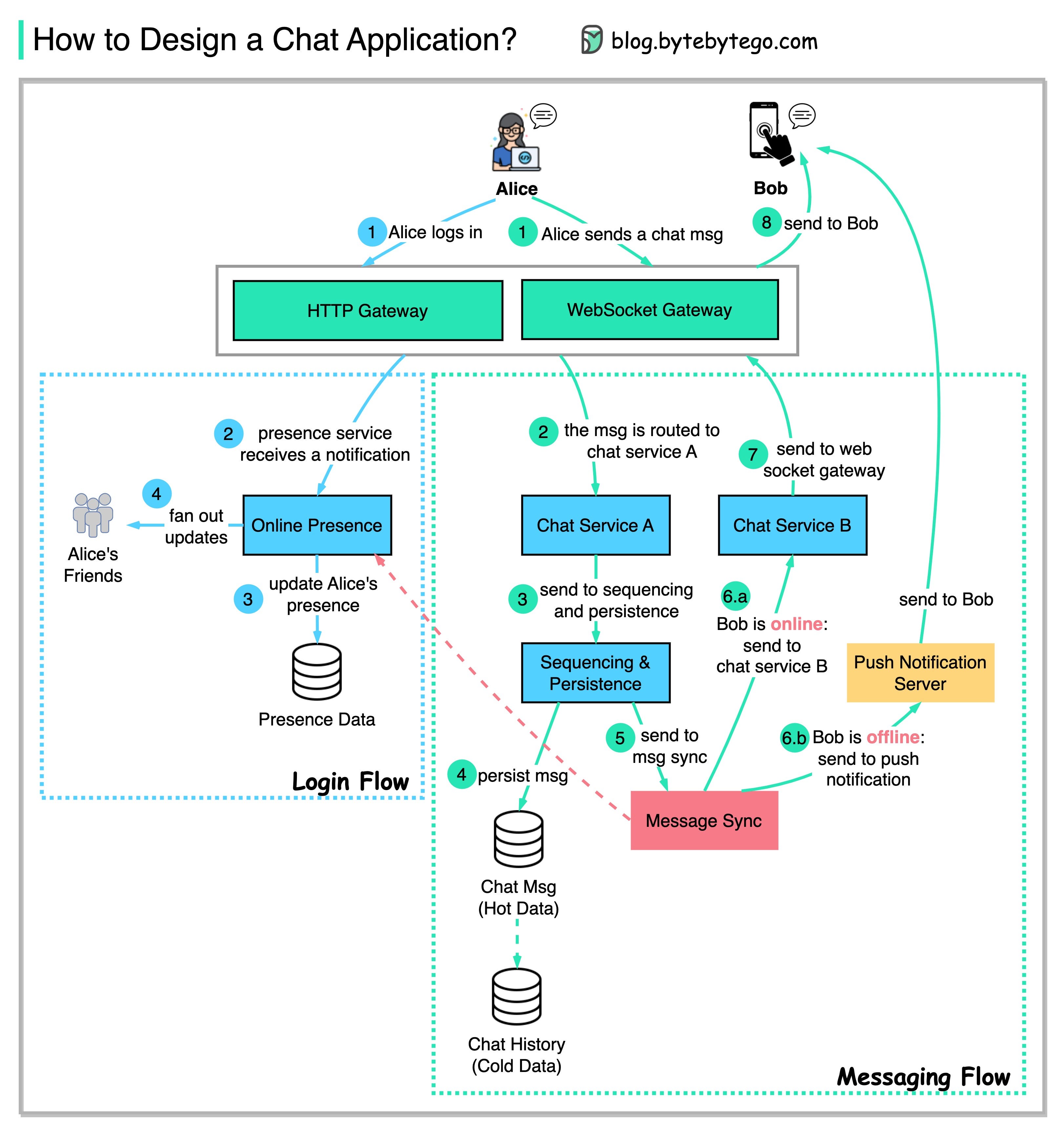
This architecture can be broken down into three logical layers:
- Stateless Services: Standard backend services for user accounts, authentication, profiles, etc. These are typically fronted by a load balancer and communicate over HTTP.
- Stateful Services (The Core):
- Chat/Gateway Servers: These are the stateful workhorses. They maintain persistent WebSocket connections with thousands of clients. Their primary job is to manage these connections and pass messages between clients and the backend.
- Presence Servers: These track user online/offline status.
- Backend & Third-Party Integrations:
- Messaging Service/Logic: A stateless service that handles routing, persistence, and fan-out logic.
- Persistence: A database (typically a Key-Value store) for storing user data and message history.
- Push Notification Service: Integrates with services like APNS (Apple) and FCM (Google) to notify offline users.
2. The Message Flow: Sending, Routing, and Receiving
Let's trace a message's journey from sender to receiver.
The Send Path: Durability First
When a user sends a message, the connected Chat Server receives it. What happens next is critical for reliability. The server should not immediately try to forward the message. It must first ensure the message is safely stored.
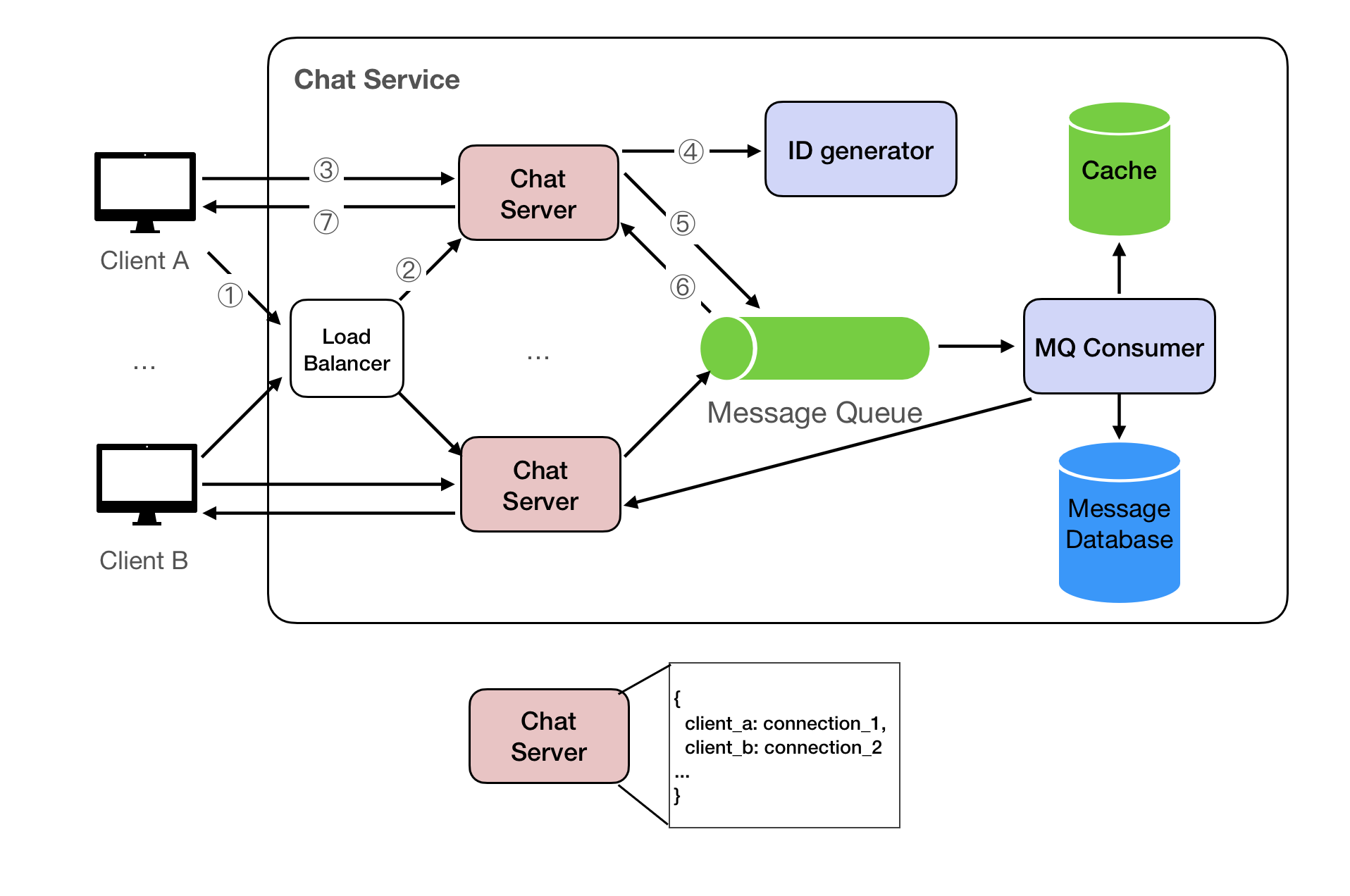
This flow prioritizes durability and write performance:
- The client sends a message to its connected Chat Server.
- The Chat Server validates the request and publishes it to a durable message queue (like Kafka or RabbitMQ).
- The Chat Server immediately acknowledges the message receipt to the sender's client.
- A separate pool of workers consumes messages from the queue, assigns a permanent sequence ID, and saves them to the persistence layer (e.g., a Key-Value store like Cassandra or DynamoDB).
By persisting the message before attempting delivery, we guarantee that even if the entire real-time delivery system fails, the message is not lost.
The Routing Problem: Reaching the Recipient
In a scaled-out system, the sender and receiver are likely connected to different Chat Servers. How does the message get from Server A to Server B?
Design Whatsapp: System Design Interview w/ a Ex-Meta Senior Manager
This routing challenge is one of the most interesting parts of the design. The 'Design Whatsapp' video provides an excellent deep dive, exploring and critiquing several solutions. This is a perfect example of the trade-off analysis expected in a senior interview.
Watch the segments on scaling and inter-server communication (32:04 - 48:04). Focus on understanding: The Problem: Why a simple Layer 7 load balancer doesn't work for stateful WebSocket connections. The Routing Challenge: Why Server A can't directly talk to User B's WebSocket. The Solutions & Trade-offs: Pay close attention to the discussion around using Kafka (and its flaws for this use case), consistent hashing, and finally, Redis Pub/Sub as a lightweight notification bus.
To summarize the excellent analysis in the video, a lightweight Pub/Sub system (like Redis) is a great solution for this inter-server communication.
- When a user connects to a Chat Server, that server subscribes to a topic for that user in Redis (e.g.,
user_123_topic). - When the messaging service needs to deliver a message to User 123, it publishes the message to
user_123_topic. - Redis forwards this message to the specific Chat Server subscribed to that topic.
- That Chat Server then pushes the message down the correct WebSocket to the user's device.
This decouples the Chat Servers and allows them to discover each other without direct communication.
3. Presence: The Green Dot
Presence—knowing if a user is online, offline, or away—is a "soft state" feature. It doesn't require the same strict guarantees as message delivery. Eventual consistency is perfectly acceptable.
The system works as follows:
- Connection: When a user's client establishes a WebSocket connection, the Presence Server marks them as "online" in a fast cache like Redis, with a specific Time-to-Live (TTL), e.g., 60 seconds.
- Heartbeat: The client periodically sends a lightweight "heartbeat" ping to the server (e.g., every 30 seconds). Each heartbeat resets the TTL on the user's "online" key in Redis.
- Disconnection: If the server doesn't receive a heartbeat within the TTL period (e.g., 60 seconds), it assumes the client has disconnected, and the key expires. The user is now considered "offline". This handles network drops gracefully without flapping the user's status on and off.
- Fan-out: When a user's status changes, the Presence Server publishes this change to a fan-out service (again, Redis Pub/Sub is a good fit). Friends who are online and subscribed to this user's presence topic will receive the update in real-time.
Chat System Design - Educative.io
The article 'Chat System Design' from Educative.io has a superb, concise section on why presence should be eventually consistent by design.
Read the section 'Presence and typing: eventually consistent by design'. Note the key takeaway: it's a soft-state feature where over-engineering for strong consistency is a common mistake.
4. Delivery Guarantees: The Correctness Layer
This is the most critical part of the design and what separates a basic answer from a senior-level one. How do we guarantee message delivery, especially for offline users and across multiple devices?
The key insight is: Real-time push is an optimization; a robust sync mechanism is the guarantee of correctness.
The Inbox Model and At-Least-Once Delivery
When the messaging service processes a message, it doesn't just push it to an online user. It also writes it to a logical "inbox" for each recipient. This ensures that if the push fails or the user is offline, there's a record of the message that needs to be delivered. We aim for at-least-once delivery, which means we must design for idempotency to handle potential duplicate messages.
Cursors: The Heart of Synchronization
How does a client know which messages it has already received? We use per-device cursors.
Chat System Design - Educative.io
The Educative.io article provides the best explanation of this concept. It moves beyond the simple 'inbox' idea to a truly robust, recoverable state-management system. This is a must-read.
Read the following three sections: 'Message delivery flow': Focus on how a server-side sequence number is assigned for ordering. 'Multi-device sync and state tracking': This is the core concept. Understand what a per-device cursor (last_delivered_seq) is and how it's used on reconnect. 'Walkthrough 2: online → offline message...': This ties it all together, showing how push notifications act as a hint to wake the app, which then uses its cursor to reliably sync missed messages.
Let's summarize this powerful synchronization model:
- Server-Side Sequencing: Every message within a conversation is assigned a monotonically increasing sequence number (
seq). This establishes a definitive order. - Per-Device Cursors: Each client device (phone, laptop) tracks the
last_delivered_seqit has received for every conversation. - Sync on Reconnect: When a client connects or reconnects, it tells the server, "For conversation X, my
last_delivered_seqis 100." The server then queries the database for all messages in conversation X whereseq > 100and streams them to the client. - Push as an Optimization: For an online client, the server pushes the new message in real-time. But even if that push fails, the client will fetch the message the next time it syncs.
- Push Notifications as a Hint: For an offline client, the server sends a push notification. This notification is unreliable and contains minimal data (e.g., "New message in conversation X"). Its only job is to wake up the client app. Once woken, the app connects and performs the reliable cursor-based sync described above.
This model is resilient to network failures, app crashes, and failed push notifications. Correctness is guaranteed by the sync mechanism.
Conclusion
Designing a chat system is a fantastic interview problem because it forces a discussion on real-time communication, state management, and reliability under failure.
Key Takeaways:
- Architecture: Separate stateful connection gateways from stateless logic services.
- Real-Time Messaging: Use WebSockets for persistent, bi-directional communication, with a Pub/Sub system like Redis for inter-server message routing.
- Presence: Treat presence as an eventually consistent "soft state" using heartbeats and a TTL cache.
- Delivery Guarantees (The Crux):
- Implement at-least-once delivery by persisting messages before fan-out.
- Use server-side sequence numbers for ordering.
- The core of reliability is a cursor-based sync mechanism. A client should always be able to recover its state by telling the server the last message it saw.
- Treat real-time pushes and mobile push notifications as optimizations and hints, not the primary mechanism for correctness.
Next Lesson Preview:
We've now seen how to use push notifications as a "wake-up hint" in our chat system. In the next lesson, we will focus on building the system that delivers these hints. We will design APIs and data models for a multi-channel notification system that can send not just mobile pushes, but also emails and SMS messages, at scale.