Hello! Welcome back.
In our last lesson on designing a chat system, we established a crucial principle: push notifications serve as an unreliable but important hint to wake up a client, which then uses a reliable cursor-based sync to fetch missed messages. This decouples the real-time chat functionality from the notification delivery mechanism.
Today, we're going to build that delivery mechanism. This lesson focuses on the learning outcome: Design APIs and data models for a multi-channel notification system. We'll architect a system that can send not just mobile push notifications but also emails, SMS, and other alerts, all while being scalable, reliable, and respectful of user preferences. This is a classic system design question that tests your ability to design for flexibility and scale.
1. Scoping the System: From Requirements to High-Level Design
As a senior engineer, your first step is always to clarify ambiguity and define the problem boundaries. A notification system can range from a simple script to a massive, distributed platform. Let's define our scope.
Notification System Design: Architecture & Best Practices
The article 'Notification System Design: Architecture & Best Practices' from MagicBell provides an excellent framework for how to approach this problem in an interview. It starts by systematically clarifying functional and non-functional requirements.
Please read the first two parts of the 'System Design Interview Preparation' section, titled 'Step 1: Clarify Requirements' and 'Step 2: High-Level Design'. Pay attention to the kinds of questions you should be asking your interviewer to scope the problem.
Based on that framework, here are the key requirements we'll design for:
- Functional Requirements:
- Multi-Channel Delivery: Support for Push Notifications (iOS/Android), Email, and SMS.
- User Preferences: Users must be able to opt-out of channels, set quiet hours, and control frequency.
- Templating: The system should support templates to standardize notification content while allowing for personalization.
- Notification History: Users can view a history of their recent notifications.
- Non-Functional Requirements:
- High Scalability & Throughput: The system must handle millions of notifications daily with significant peak loads.
- Reliability: At-least-once delivery is required. No notification should be lost in transit.
- Fault Tolerance: The system must be resilient to failures of individual components or third-party providers (e.g., if the email service is down, push notifications should still work).
High-Level Architecture
With the requirements in mind, we can sketch out the main components. The core idea is to decouple the initial request from the actual delivery process using message queues.
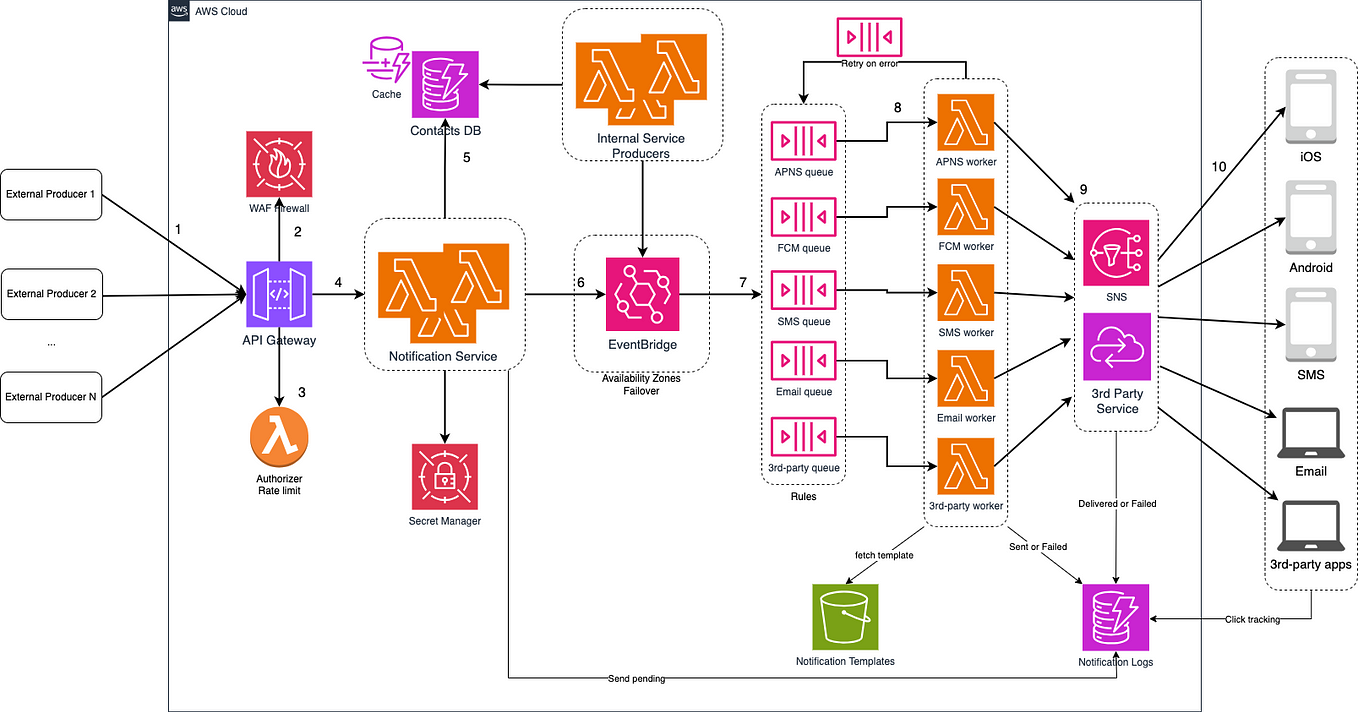
This architecture consists of several key services that we'll design the APIs and data models for:
- Notification Service (API Gateway): The public-facing entry point for all notification requests.
- User Preferences Service: Stores and retrieves user-specific settings.
- Template Service: Manages notification content templates.
- Channel-Specific Workers: Processes and sends notifications via third-party providers (e.g., APNs, Twilio, SendGrid).
- Tracking & Analytics Service: Logs the status of every notification.
2. Designing the API: The System's Contract
The API is the front door to our system. A well-designed API is flexible, easy to use, and robust. For a notification system, a single, powerful endpoint to trigger notifications is a common and effective pattern.
Proposed Endpoint: POST /v1/notifications
The real design work is in the request payload. It needs to be flexible enough to support various channels and use cases.
Notification System Design: Architecture & Best Practices
Let's examine a well-structured API request. The MagicBell article provides a great example.
Review the section '1. Notification Service (API Gateway)' and focus on the 'Example API Request'. We will analyze and build upon this structure.
Drawing from that example, here is a robust API payload structure:
POST /v1/notifications
Idempotency-Key: <unique_client_generated_key>

{
  "recipient": {
    "user_id": "user_12345"
  },
  "channels": ["push", "email"],
  "template_id": "order_shipped",
  "data": {
    "order_id": "ORD-98765",
    "tracking_url": "https://shipping.co/track/xyz"
  },
  "overrides": {
    "email": {
      "subject": "Special Update: Your Order ORD-98765 Has Shipped!"
    }
  },
  "metadata": {
    "source_service": "ecommerce_backend",
    "trace_id": "trace-abc-123"
  }
}
Let's break down the key fields and the design choices behind them:
Idempotency-Key(Header): This is crucial for reliability. If a client sends the same request twice due to a network error, the server can use this key to recognize the duplicate and not send a second notification. This helps achieve at-least-once delivery without causing unwanted side effects.recipient: An object specifying who gets the notification. Usinguser_idallows our system to look up the necessary delivery details (email address, phone number, device tokens) from other services.channels: An array specifying which delivery channels to attempt. The final delivery will depend on user preferences.template_id: This decouples content from the API call. Instead of passing the full message, the client passes an ID. The system then fetches the corresponding template (e.g., "Your order {order_id} has shipped!"), merges it with thedata, and sends it. This allows non-engineers to edit notification content.data: The dynamic content to be injected into the template.overrides: Provides flexibility to override parts of a template for a specific send, like a custom email subject line for a high-value customer.metadata: For tracing and debugging. This is essential in a microservices architecture to track a request's journey.
3. Data Model Design: The System's Brain and Memory
The data model is where the system's intelligence and state reside. A common mistake is to lump everything into one giant notifications table. A more scalable approach involves separating concerns into distinct models.
The article "The Art of Notifying" provides a fantastic walkthrough of evolving a data model from a naive, messy table to a flexible, maintainable structure. It's a perfect illustration of the thought process you should articulate in an interview.
The Art of Notifying: A System Design Journey
Let's walk through the evolution of a data model. This article does a brilliant job of showing the 'why' behind the design decisions.
Read the first three sections, which cover the journey from a simple, messy table to a flexible, channel-agnostic data model and a plug-in architecture for senders. This demonstrates the separation of concerns, a key principle for senior roles.
This evolutionary thinking leads us to three primary data models: Templates, User Preferences, and Notification Logs.
A. User Preferences Model
This model is critical for respecting user choices and avoiding notification fatigue. It should be stored in a low-latency database (like PostgreSQL, MySQL, or even a Key-Value store) that can be queried quickly by the Notification Processor.
Notification System Design: Architecture & Best Practices
Let's look at a concrete schema for user preferences. The MagicBell article provides a detailed and practical example.
Read section '5. User Preferences Service' and study the user_preferences table schema. Note how it stores everything from enabled channels to quiet hours and language preferences.
Based on this, a user_preferences table would look something like this:
Table: user_preferences
| Column | Type | Description |
|---|---|---|
user_id |
VARCHAR(255) (PK) |
Foreign key to the main users table. |
enabled_channels |
JSONB |
["email", "push"] - List of channels user wants. |
quiet_hours |
JSONB |
{"start": "22:00", "end": "08:00", "enabled": true} |
timezone |
VARCHAR(50) |
e.g., 'America/New_York'. Essential for quiet hours. |
category_opt_outs |
JSONB |
["marketing", "social"] - Allows fine-grained control. |
locale |
VARCHAR(10) |
'en-US'. For localization of templates. |
B. Template Model
Storing templates separately allows for easy management and personalization.
Table: notification_templates
| Column | Type | Description |
|---|---|---|
template_id |
VARCHAR(255) (PK) |
e.g., 'order_shipped'. |
template_name |
VARCHAR(255) |
A human-readable name. |
channels |
JSONB |
Contains the template content for each channel. |
version |
INTEGER |
For versioning templates. |
The channels JSON blob is the core of the multi-channel design:
{
  "email": {
    "subject": "Your order {{order_id}} has shipped!",
    "html_body": "...",
    "text_body": "..."
  },
  "push": {
    "title": "Order Shipped",
    "body": "Your order {{order_id}} is on its way."
  },
  "sms": {
    "body": "Your order {{order_id}} has shipped. Track it here: {{tracking_url}}"
  }
}
C. Notification Log Model
This table acts as the system's ledger. It's write-heavy and can grow enormous. It must be designed for scale. Using a NoSQL database like Cassandra or DynamoDB, or a SQL database with aggressive partitioning, is essential.
Table: notification_logs
| Column | Type | Description |
|---|---|---|
notification_id |
UUID (PK) |
A unique ID generated for this specific notification instance. |
user_id |
VARCHAR(255) |
Who received it. Indexed for user-facing history. |
channel |
VARCHAR(50) |
The channel used for delivery (e.g., 'email'). |
status |
VARCHAR(50) |
sent, delivered, failed, opened, clicked. |
sent_at |
TIMESTAMP |
When we handed it off to the provider. |
provider_response |
TEXT |
Any response from the third-party service. |
created_at |
TIMESTAMP |
When the notification request was received. |
For a SQL database, this table would be partitioned by created_at (e.g., monthly partitions) to keep queries fast and make archiving old data manageable. You would also have an index on (user_id, created_at) to efficiently fetch a user's notification history.
Conclusion
In this lesson, we moved from high-level concepts to the concrete details of designing the public contract (API) and internal memory (data models) for a multi-channel notification system.
Key Takeaways:
- API Design: Design a single, flexible API endpoint. Use an idempotency key for reliability. Decouple content from the trigger by using templates.
- Data Modeling for Flexibility: Avoid a single, wide table. Separate concerns into distinct models for User Preferences, Notification Templates, and Notification Logs.
- Separation of Concerns: The API defines what to send, the template model defines the content, the user preferences model defines the rules, and the log model tracks the outcome.
- Design for Scale: The choice of database and schema (e.g., partitioning the logs table) is critical for handling high write volumes and maintaining query performance over time.
Next Lesson Preview:
We have now designed the "what" (APIs and data) of our notification system. But how does a notification request actually get processed, sent, and retried upon failure? In the next lesson, we will architect the scalable asynchronous pipeline that connects these pieces. We'll dive into message queues, worker processes, and patterns for handling failures and retries to ensure the reliability our system demands.