Hello! Welcome to your lesson on a foundational component of modern scalable systems.
In our last lesson, we explored the circuit breaker pattern, a key mechanism for building resilient systems that can withstand and recover from component failures. We focused on the runtime communication and reliability aspect of system design. Today, we shift our focus from communication to another fundamental pillar: data storage.
Many system design problems, from "design Instagram" to "design Dropbox," involve handling massive amounts of user-generated content like photos, videos, and documents. Storing this unstructured data efficiently and reliably at scale is a core challenge. Your learning outcome for this lesson is to describe blob/object storage systems and their use cases. Understanding this component is non-negotiable for any large-scale system design interview.
We will cover:
- The fundamental differences between object, file, and block storage.
- Why traditional databases are a poor choice for storing large files (blobs).
- The core architectural principles of object storage: flat namespaces, immutability, and HTTP-based access.
- How object storage achieves extreme durability and scalability using replication and erasure coding.
- Key patterns for using object storage in interviews, such as direct client uploads with pre-signed URLs.
1. Why Not Just Use a Database? The Need for Object Storage
As a backend engineer, your first instinct when thinking about storage might be a relational database like PostgreSQL or a NoSQL database like Cassandra. Let's start by addressing a crucial question: why can't we just store large files, like a user's profile picture or a video, directly in our database?
This first video explains the significant problems this approach creates.
Object Storage in System Design Interviews w/ Ex-Meta Staff Engineer
Watch this clip from 'Object Storage in System Design Interviews' by Hello Interview. It clearly articulates why traditional databases are not suited for storing large binary objects (blobs).
Watch the first 3 minutes and 28 seconds of the video. Pay close attention to the three main issues discussed: performance degradation, replication overhead, and backup/restore times.
As the video highlights, storing large files (megabytes or gigabytes) inside a database designed for small, transactional records (kilobytes) leads to several issues:
- Performance: Large objects bloat database pages, slowing down queries even for unrelated data.
- Replication: Copying multi-megabyte files to every database replica for every write consumes immense bandwidth and introduces lag.
- Backups: Including large, static files in nightly database backups makes them enormous, turning a quick restore process into a multi-hour ordeal.
This leads to a fundamental design principle: separate metadata from the actual object data.
- Metadata (e.g., file name, owner ID, creation date, size) is small and structured. It belongs in a traditional database (SQL or NoSQL) where it can be queried and indexed efficiently.
- Object Data (the file bytes themselves) is large and opaque. It belongs in a specialized system designed for this purpose: object storage. The database simply stores a reference (like a URL or a unique ID) to the object.
2. Positioning Object Storage: Block vs. File vs. Object
To fully appreciate object storage, it's helpful to understand its place among the three main storage paradigms.
Block Vs File Vs Object Storage
This article from AlgoMaster.io provides an excellent, concise comparison of the three storage types. The 'At a Glance' table is a perfect summary for interviews.
Read the introductory section and study the 'At a Glance' table. This will give you a clear framework for distinguishing the three types based on their data unit, access method, protocol, and ideal use cases.
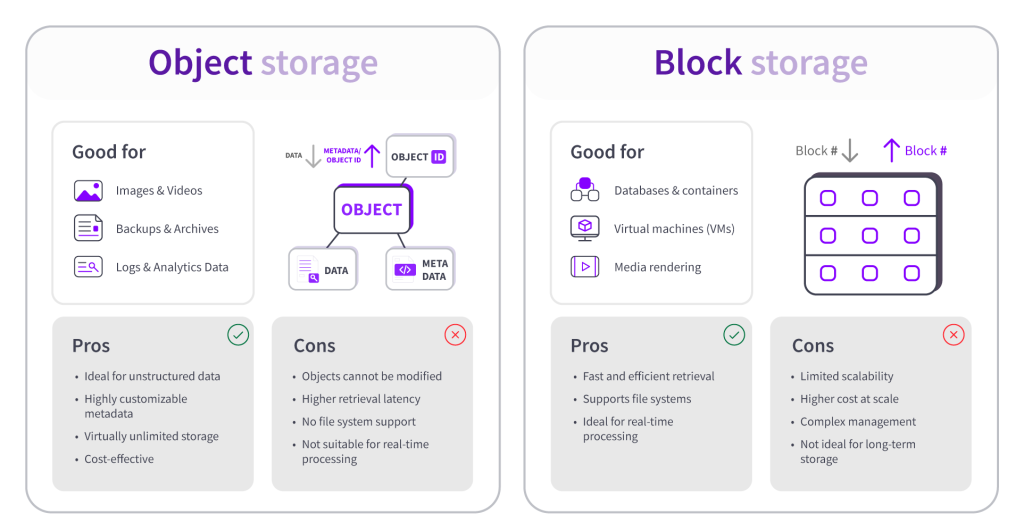
In summary:
- Block Storage (e.g., Amazon EBS, local SSD): Provides raw, low-level access to disk volumes (blocks). It's extremely fast (low latency) and is used for databases, virtual machine boot volumes, and anything requiring high-performance, random read/write operations. It's like a hard drive for a single server.
- File Storage (e.g., Amazon EFS, NFS servers): Presents a familiar hierarchical file system (files and folders). It's ideal for shared access where multiple servers need to read and write to the same files, like shared configuration or home directories.
- Object Storage (e.g., Amazon S3, Google Cloud Storage): Stores data as discrete objects in a flat structure. It's built for massive scalability, high durability, and low cost, but has higher latency. It's the go-to for unstructured data.
3. How Object Storage Works: Core Principles
Object storage achieves its incredible scale by adhering to a few simple but powerful architectural principles.
Flat Namespace and HTTP API
Unlike a file system's nested directories, object storage uses a flat namespace. Think of it as a giant, distributed key-value store where the key is a unique string ID and the value is the data object.
Block Vs File Vs Object Storage
Let's return to the AlgoMaster.io article to understand the implications of the flat namespace and HTTP-based access.
Read Section 3.1 'How Object Storage Works', Section 3.2 'HTTP/REST Access', and Section 3.3 'Flat Namespace vs Hierarchy'. Focus on how the entire path is the key, and why using HTTP as the access protocol enables universal accessibility and CDN integration.
You might see an object key like videos/user-123/profile-intro.mp4. The / characters are just part of the key string; they do not represent actual directories. This flat structure eliminates the performance bottlenecks of traversing a directory tree, which is a key reason object storage can scale to trillions of objects. Access via a standard HTTP REST API (GET, PUT, DELETE) makes it universally accessible from any language or tool, including web browsers.
Immutability
Objects in object storage are generally immutable. You cannot change a part of a file; to "update" an object, you must upload a new version that replaces the old one entirely. This seems like a limitation, but it's a feature that simplifies the system immensely. It eliminates the need for complex locking mechanisms and makes caching and replication far easier.
High-Level Architecture
At a high level, an object storage system is composed of two main logical parts:
- Metadata Service: A highly available service that maps object keys to their physical location(s).
- Storage Nodes: A large cluster of commodity servers with inexpensive disks that store the actual object data.
Object Storage in System Design Interviews w/ Ex-Meta Staff Engineer
This clip from the 'Hello Interview' video provides a simple but powerful visualization of this architecture in action.
Watch from 03:28 to 04:50. Observe the two-step process: the client first asks the metadata service for the object's location and then streams the data directly from the storage node.
4. Deep Dive: Durability and Scalability
Object storage services like Amazon S3 famously offer "11 nines" (99.999999999%) of durability. This means if you store 10 million objects, you can expect to lose only one object every 10,000 years. How is this achieved? Through redundancy.
There are two primary techniques for redundancy: replication and erasure coding.
Design a Scalable BLOB Store | System Design
The video 'Design a Scalable BLOB Store' by Interview Pen offers an excellent, step-by-step explanation of how these concepts are applied to build a fault-tolerant and scalable system.
Watch from 00:52 to 08:24. The video builds up the concepts intuitively: It starts with a single disk and shows the need for multiple disks. It introduces mirroring (replication) to handle disk failures. It explains parity (the basis for erasure coding) as a more space-efficient alternative. Finally, it extends these ideas from disks within a node to nodes within a cluster (sharding).
This table summarizes the trade-offs between the two approaches.
| Replication (e.g., 3 copies) | Erasure Coding (e.g., 8+4) | |
|---|---|---|
| Durability | Good (e.g., 6 nines) | Excellent (e.g., 11 nines). Winner. |
| Storage Efficiency | Poor (200% overhead) | Excellent (e.g., 50% overhead). Winner. |
| Compute Cost | Low (just copies bytes) | High (requires calculations). |
| Read Performance | Fast (read from any one copy) | Slower (read from multiple chunks to reconstruct). |
| Write Performance | Faster (no calculations needed) | Slower (must calculate parity chunks). |
In essence, erasure coding trades higher computational cost and latency for significantly better storage efficiency and durability. It's a perfect fit for "warm" or "cold" data like backups and archives, which is why it's used extensively in object storage systems.
5. Use Cases and Key Interview Patterns
Now that you understand the what, why, and how, let's focus on the interview application.
Common Use Cases
Object storage is the default choice for:
- User-Generated Content: Photos (Instagram), videos (YouTube), documents (Google Drive).
- Backups and Archives: Database backups, compliance archives. Lifecycle policies can automatically move data to cheaper, colder storage tiers over time.
- Static Asset Hosting: Hosting website assets like images, CSS, and JavaScript files, often fronted by a CDN.
- Big Data & Data Lakes: A central repository for massive datasets used by analytics and ML pipelines.
- Log Storage: Storing application and system logs at a massive scale for later analysis.
Critical Interview Patterns
When designing a system that uses object storage, there are two patterns you absolutely must know and articulate.
Object Storage in System Design Interviews w/ Ex-Meta Staff Engineer
The 'Hello Interview' video concludes with a brilliant explanation of these two critical patterns. Knowing these will set you apart in an interview.
Watch from 08:45 to 11:22. The video covers: Pre-signed URLs: For direct client upload/download. Multi-part Uploads: For handling very large files.
-
Direct Client Uploads via Pre-signed URLs: Instead of having a user upload a large file to your application server, which then uploads it to object storage, your server generates a temporary, secure URL (a "pre-signed URL"). The client (web browser or mobile app) uses this URL to upload the file directly to the object store. This saves your server bandwidth, CPU, and connection slots, allowing your backend to scale more effectively. The same pattern works for downloads.
-
Multi-part Uploads: To upload a very large file (e.g., several gigabytes), the client can break it into smaller chunks and upload them in parallel. If any chunk fails, only that chunk needs to be retried. Once all chunks are uploaded, the object storage system combines them into a single object. This improves reliability and performance for large file transfers.
Finally, be sure to name-drop the major cloud providers' services in your interview:
- Amazon Web Services (AWS): Simple Storage Service (S3)
- Google Cloud Platform (GCP): Cloud Storage
- Microsoft Azure: Blob Storage
Conclusion
You now have a comprehensive understanding of blob/object storage, a critical building block for nearly any large-scale system.
Key Takeaways:
- Object storage is a specialized system for storing large, immutable, unstructured data objects.
- It's designed around a flat namespace and an HTTP/REST API, enabling massive scalability.
- It achieves extreme durability (like 11 nines) through redundancy, using techniques like replication and erasure coding.
- The core design pattern is to store metadata in a traditional database and the object data in the object store.
- For interviews, you must be able to describe critical interaction patterns like pre-signed URLs for direct client uploads and multi-part uploads for large files.
Next Lesson Preview:
We've established that object storage is perfect for storing static assets, but it can have higher latency, and its servers might be geographically distant from your users. How do we deliver content like images and videos to a global user base with low latency? The answer is a Content Delivery Network (CDN). In the next lesson, we will explore CDN architecture and edge caching strategies, which work hand-in-hand with object storage to create high-performance, global applications.