Welcome back! In our last lesson, we explored destructuring, a powerful way to unpack values from arrays and objects. You even got a glimpse of the ... syntax when we used it as a rest operator to gather leftover items into a new array.
Today, we'll flip that concept on its head. We're going to look at the spread operator, which uses the very same ... syntax but for the opposite purpose: to expand the elements of an array or the properties of an object. This lesson is designed to help you master using the spread operator to copy and merge arrays and objects. This is one of the most common operations you'll perform when working with data in React, as it's the key to handling data in an immutable way.
Spread vs. Rest: Two Sides of the Same Coin
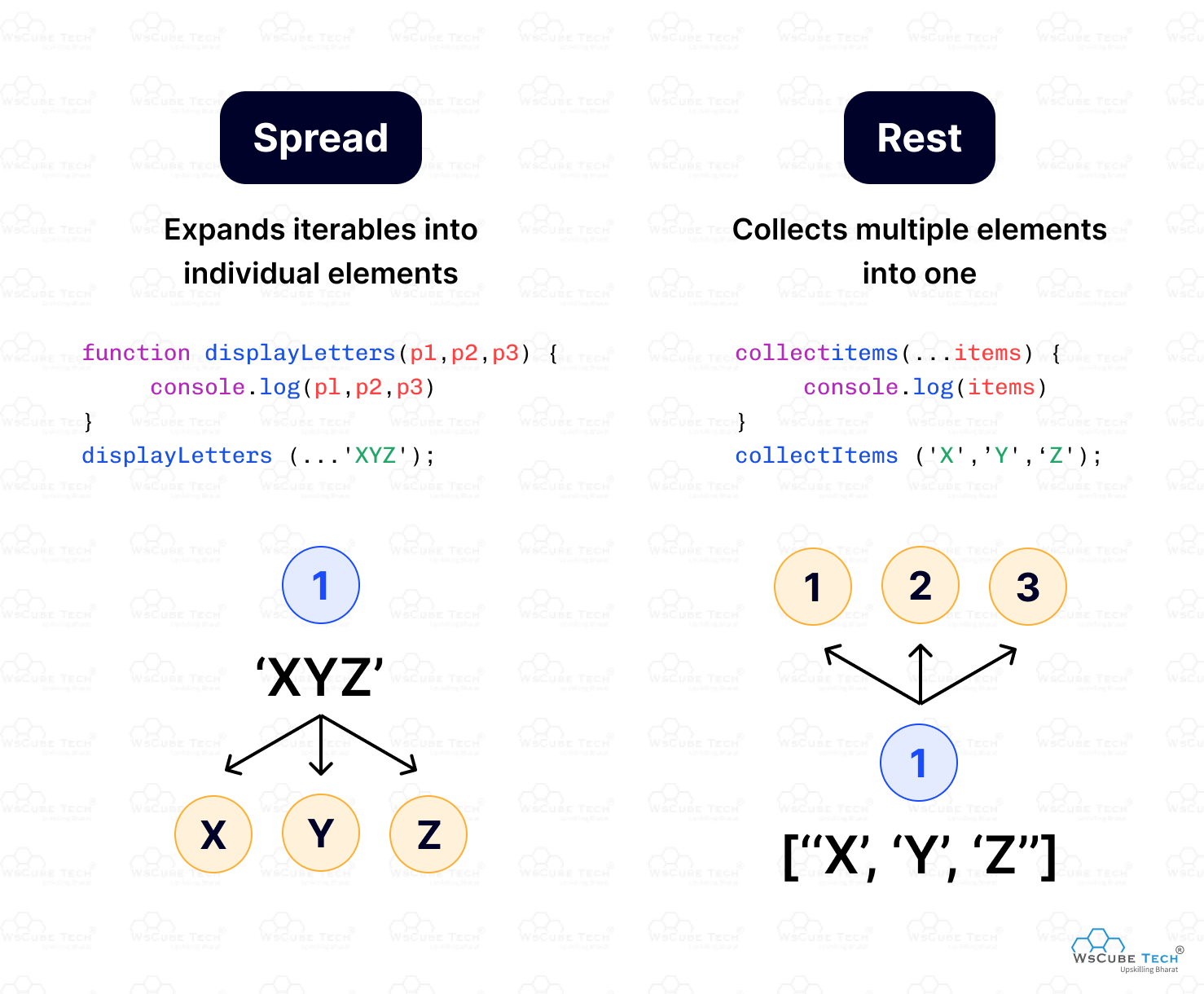
It's crucial to understand the difference between the rest and spread operators, as they look identical. The key is context:
- Rest (
...): Collects remaining items. It's used on the left side of an assignment, usually during destructuring.
const [first, ...restOfItems] = [10, 20, 30]; // restOfItems is [20, 30] - Spread (
...): Expands an iterable's items. It's used on the right side of an assignment or anywhere individual elements are expected (like in an array literal or function call).
const newArray = [...oldArray, 4]; // Expands oldArray into newArray
The image below provides a great visual summary of this distinction.
The "Why": Immutability and Avoiding Side Effects
Before we dive into the syntax, it’s important to understand why the spread operator is so fundamental. In JavaScript, primitive types like strings and numbers are passed by value, but objects and arrays are passed by reference. This means if you assign an array to a new variable and then modify that new variable, you're also modifying the original! This can lead to unexpected bugs, known as side effects.
The following article explains this problem perfectly with a fun Pokémon example. Understanding this concept is the key to appreciating the power of the spread operator.
Understanding the JavaScript Spread Operator
This article from DEV Community clearly illustrates the problem of data mutation in JavaScript.
Read the introduction and the section Why you should use the spread operator. Pay close attention to the Squirtle example and the explanation of what happens when you modify a variable that holds a reference to an object. Then, continue to the section How does it work? for a basic definition.
As you just read, to avoid accidentally changing our original data, we need to create a new array or object instead of just referencing the old one. This practice is called immutability, and it is a core principle in React. The spread operator is our primary tool for achieving this.
Using Spread with Arrays
The spread operator makes working with arrays incredibly clean and intuitive. You can copy, merge, and add elements to arrays without ever modifying the originals.
Copying and Merging Arrays
Let's see how to apply what you just read. Imagine you have two arrays and you want to combine them.
const frontendTech = ['React', 'HTML', 'CSS'];
const backendTech = ['Node.js', 'Express'];

// We create a *new* array, spread the elements of the first,
// then spread the elements of the second.
const fullStackTech = [...frontendTech, ...backendTech];

console.log(fullStackTech);
// Output: ['React', 'HTML', 'CSS', 'Node.js', 'Express']
The "Web Dev Simplified" video you've seen before has a concise segment on this.
Why Is Array/Object Destructuring So Useful And How To Use It
Let's see this in action.
Watch the short segment on combining two arrays. The instructor compares it to the older .concat() method to show how much more flexible the spread syntax is, especially when we move to objects.
Adding Elements to an Array
This is a pattern you will use constantly in React when updating state. To add an item to an array immutably, you create a new array that contains all the old items, plus the new one.
const tasks = ['Write report', 'Email team'];

// Add a new task to the end
const updatedTasks = [...tasks, 'Plan meeting'];
// updatedTasks is ['Write report', 'Email team', 'Plan meeting']
// 'tasks' remains unchanged!

// Add a new task to the beginning
const highPriorityTasks = ['URGENT: Fix bug', ...tasks];
// highPriorityTasks is ['URGENT: Fix bug', 'Write report', 'Email team']
Using Spread with Objects
The same principles apply to objects, which is where spread syntax becomes even more powerful for React development.
Copying and Merging Objects
You can easily merge two objects. If the objects have overlapping properties, the properties from the object that comes later in the sequence will overwrite the earlier ones.
const userProfile = {
  name: 'Sam',
  email: 'sam@example.com'
};

const userSettings = {
  theme: 'dark',
  email: 'sam.doe@work.com' // This will overwrite the original email
};

const mergedUser = { ...userProfile, ...userSettings };

console.log(mergedUser);
// Output: { name: 'Sam', email: 'sam.doe@work.com', theme: 'dark' }
Adding or Updating Properties
This is the standard way to update a piece of state in React. You create a copy of the existing object and then define the new or updated properties.
const book = {
  title: 'The Great Gatsby',
  author: 'F. Scott Fitzgerald',
  year: 1925
};

// Create a new object with an updated year and a new property
const updatedBook = { ...book, year: 1926, available: true };

console.log(updatedBook);
// Output: { title: 'The Great Gatsby', author: 'F. Scott Fitzgerald', year: 1926, available: true }
Let's return to the "Web Dev Simplified" video one last time to see a great explanation of merging objects.
Why Is Array/Object Destructuring So Useful And How To Use It
This is a critical pattern for React.
Watch this segment on combining two objects. The instructor clearly explains the overwriting behavior and notes how prevalent this pattern is in frameworks like React.
A Critical Caveat: Shallow Copies
There's one crucial detail you must be aware of: the spread operator performs a shallow copy.
This means that it only copies the top-level properties. If your array or object contains other arrays or objects (i.e., it's nested), the spread operator will copy the reference to the nested object, not the nested object itself. Modifying the nested object in your "copy" will still mutate the original.
This is a subtle but extremely important concept. The "Tech with Nader" video provides a fantastic, in-depth explanation with clear code examples that will help you avoid this common pitfall.
Array and Object Spread Syntax - Javascript In Depth
This video offers a very clear explanation of shallow copies, a concept that trips up many developers.
First, watch the segment that explains shallow copies with nested arrays. The presenter does an excellent job of showing how modifying the nested array in the original prices variable also affects the copy. Next, watch the same concept applied to nested objects. This example with countryPop directly mirrors how you'll often structure data in your applications.
Don't worry if this feels a bit complex right now. We'll revisit this idea when we start managing more complex state in React. For now, the key is to be aware that spread is not a magic "deep clone" function.
Key Takeaways
You've now learned about one of the most versatile and important pieces of modern JavaScript syntax, especially for your journey into React.
- The spread operator (
...) expands the elements of an iterable (like an array or object) into a new context. - It's the primary tool for achieving immutability by allowing you to create copies and merge data without modifying the original sources.
- When merging objects, properties from later objects in the sequence overwrite earlier ones with the same key.
- Crucially, the spread operator performs a shallow copy. Nested objects and arrays are not cloned, only their references are copied.
Next Steps
We're continuing to build your foundational JavaScript toolkit. In the next lesson, we will explore template literals, a modern and powerful way to work with strings and embed variables within them. This technique is incredibly useful for creating dynamic text and messages in your user interfaces.