Hello! Welcome to your first lesson in our deep dive into Docker.
Today, we're kicking off the "Production-Grade Dockerfiles" module. Our focus will be on a simple but powerful optimization technique: using a .dockerignore file. By the end of this lesson, you will be able to apply .dockerignore to exclude unnecessary files from your Docker build context.
As a DevOps Engineer, you know that efficiency is key. Smaller image sizes and faster build times are not just nice-to-haves; they translate directly into faster CI/CD pipelines, reduced storage costs on container registries, and a smaller attack surface. Mastering the .dockerignore file is the first fundamental step toward achieving these professional-grade results.
1. Understanding the Build Context
Before we can ignore files, we first need to understand what we're ignoring them from. When you run the docker build command, the first thing the Docker client does is package the files and directories specified in the command (e.g., the . in docker build .) into a tarball. This package is called the build context. The client then sends this entire context to the Docker daemon.
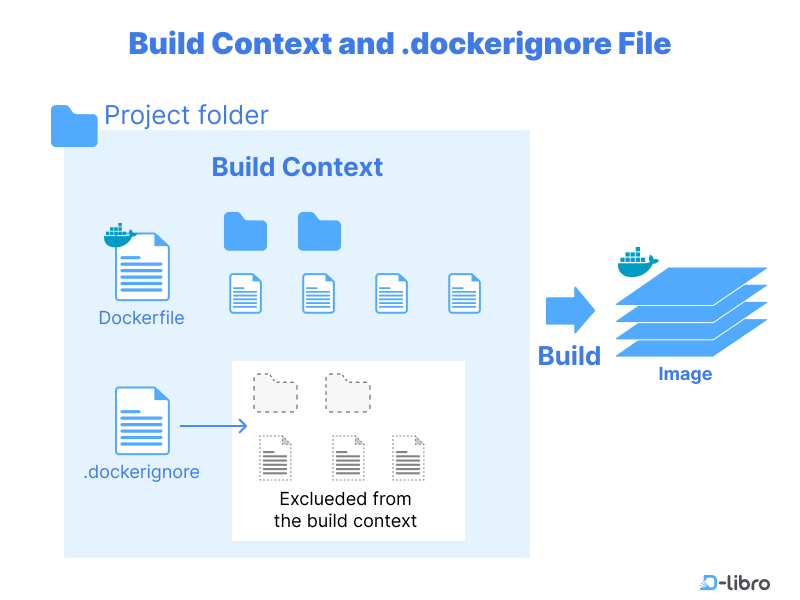
The problem is that without any filtering, this context includes everything in your project directory:
- Local dependencies like
node_modulesor Python'svenv. - Version control history in the
.gitdirectory. - Temporary files, logs, and local configuration like
.env. - IDE settings folders like
.vscodeor.idea.
Sending all of this to the daemon is inefficient and can lead to security risks if sensitive files are accidentally copied into your image.
To get a formal definition and see the different ways a build context can be provided, please read the introductory sections of the official Docker documentation.
This is the official Docker documentation on build contexts. It provides the foundational definition of what a build context is.
Please read the section titled 'What is a build context?'. Focus on understanding that the context is the set of files made available to the build process.
2. Introducing the .dockerignore File
The solution to the bloated build context problem is the .dockerignore file. It's a simple text file placed in the root of your build context (usually your project's root directory) that tells the Docker client which files and directories to exclude when creating the context tarball. Its syntax and behavior are intentionally similar to .gitignore, which you're likely already familiar with.
To see a practical demonstration of why this is necessary and how to create a basic .dockerignore file, let's watch a short video.
Docker Crash Course #6 - dockerignore
This video from Net Ninja provides a clear and concise explanation for why you need a .dockerignore file, using the common example of a Node.js project.
Watch from 01:27 to 03:08. The first part explains the problems caused by including node_modules in the build, and the second part shows how to solve it by adding node_modules to a .dockerignore file.
By excluding files, you gain several benefits:
- Faster Builds: A smaller context is sent to the daemon much more quickly.
- Smaller Images: Prevents accidental
COPY-ing of unnecessary files into your image layers. - Improved Security: Ensures that secrets, credentials, or local environment files are never included in the image.
- Avoiding Bugs: Prevents conflicts between local dependencies and dependencies installed within the container during the build.
3. .dockerignore Syntax and Patterns
While the basic concept is simple, the pattern-matching syntax offers a good deal of power and flexibility. Let's dive into the specifics.
A .dockerignore file is a list of patterns, with each line representing a pattern.
- Lines starting with
#are comments. - Wildcards like
*(matches any sequence of non-separator characters) and?(matches any single non-separator character) can be used. - Docker also supports a special
**wildcard that matches any number of directories. For example,**/*.logwill ignore any file with a.logextension in any subdirectory. - You can create exceptions to exclusion rules by prefixing a pattern with
!.
For a comprehensive guide to the syntax and some advanced examples, the official documentation is the best resource.
Let's return to the official Docker documentation to get a detailed understanding of the .dockerignore syntax, matching rules, and exception handling.
Read the entire section titled '.dockerignore files'. Pay close attention to the subsections on 'Syntax', 'Matching', and 'Negating matches'. This will give you a solid grasp of how to write effective rules.
Test your understanding!
You have the following .dockerignore file:
# Ignore all log files
*.log

# Ignore build artifacts
dist
target/

# Ignore documentation, but keep the main license
docs/
!docs/LICENSE

# Ignore all markdown files in the root
*.md
Which of the following files will be included in the build context?
app.logsrc/main.pydist/app.jsdocs/LICENSEdocs/guide.htmlREADME.md
Show answer
The files included in the build context are:
src/main.py: There is no rule to exclude.pyfiles or thesrcdirectory.docs/LICENSE: The!docs/LICENSErule creates an exception to thedocs/exclusion.
The files excluded are:
app.log: Matched by*.log.dist/app.js: Thedistrule excludes the entire directory.docs/guide.html: Thedocs/rule excludes this file, and it doesn't match the!docs/LICENSEexception.README.md: Matched by*.md.
4. Practical Patterns for DevOps
As a DevOps engineer working with various technology stacks, having a set of ready-to-use patterns is invaluable. The following resource provides excellent, well-commented .dockerignore templates for common project types.
How to Use .dockerignore to Speed Up Docker Builds
This article from OneUptime gives practical, real-world examples of .dockerignore files for different programming languages and provides a great summary of what to exclude and why.
First, review the section 'Essential .dockerignore Patterns' to see examples for Node.js, Python, and Go projects. Then, scroll down to the 'Summary' table at the end of the article. This table is a fantastic cheat sheet for the most common files and directories to exclude.
Here's a generic list of what you should almost always include in your .dockerignore file:
.git.vscode/.ideanode_modulesnpm-debug.logDockerfile.dockerignoreREADME.md.env
Excluding the Dockerfile and .dockerignore files themselves prevents them from being copied into the image with a broad COPY . . command, though they are still sent to the daemon so it can perform the build.
Conclusion
In this lesson, we took our first step towards creating production-grade Dockerfiles. You learned how to apply the .dockerignore file to optimize your build process.
Here are the key takeaways:
- The build context is the set of files sent to the Docker daemon to build an image.
- A
.dockerignorefile excludes specified files and directories from the build context, working much like.gitignore. - Properly using
.dockerignoreresults in faster builds, smaller images, and enhanced security by preventing secrets from being included in the image. - The syntax supports comments (
#), wildcards (*,?,**), and exceptions (!), allowing for fine-grained control over the build context.
By keeping your build context lean, you establish a critical foundation for efficient and secure containerization.
In our next lesson, we'll build on this foundation by exploring another crucial optimization technique: leveraging the build cache effectively by ordering Dockerfile instructions. Now that we've optimized what goes into the build, we'll learn how to optimize the build process itself.